Tom's Hardware > Forum > Graphic & Displays > Graphics Cards > Blue screen of death when loading Ntune

Blue screen of death when loading Ntune

Forum Graphic & Displays : Graphics Cards - Blue screen of death when loading Ntune

Tom's Hardware: Over 1.4 million members in 6 different countries available to answer all your high-tech questions. Sign up now! Its free!
Word :    Username :           
 

Hi. I recently bought myself a new computer with Vista x64. I am using a BFG 8800GTS 512.

When i install Ntune it seems to work fine for the first time the program is open, however after a reboot and loading up the program again i get the BSOD. After searching google i have seen it is an issue suffered by not just me, however i have seen no fixes as of yet. I have downloaded and installed the latest drivers for my video card.

Any tips or help that anyone can give me?

Thanks

Sponsored Links
Register or log in to remove.

Please give us more information about the hardware.
This should help you:

http://www.tomshardware.com/forum/ [...] uals-guide

Use RivaTuner for GPU overclocking.

Guide to Overclocking Video Cards

http://www.tomshardware.com/forum/ [...] ds-warning

http://www.tomshardware.com/forum/248173-33-video-card

------------------------------ Google is your friend and Bob's your uncle
Reply to evongugg

E8400
4GB 6400 OCZ Reaper
640GB WD HDD
BFG 8800GTS 512
Corsair 620W PSU
Antec P-182 case

Reply to sacoops

What kind of motherboard do you have?

------------------------------ Google is your friend and Bob's your uncle
Reply to evongugg

Also, did you change anything in Ntune after you installed it? Or did you just install it and restart?

------------------------------ http://www.custompcmax.com
Reply to basketcase

Sorry, Abit Ip35 Pro.

No i didn't change anything. I have uninstalled it and reinstalled and get it working fine the first time and crashes the second. I did mess around with GPU fan speed on one install as Auto makes it go at 100% so i turned it down to about 60%, but next load up i got the blue screen.

Reply to sacoops

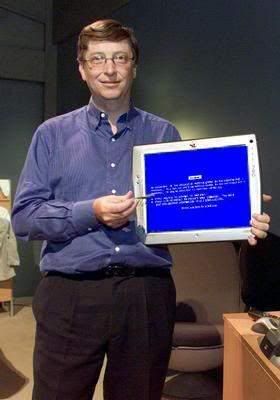
I had the same problem with the nvidia driver when I installed 8 gigs of ram.
I found this picture was helpful I was merely experiencing the full Windows Experience.

http://i149.photobucket.com/albums/s50/cisco680/th_gates.jpg

Actually I had to boot in safe mode uninstall my drivers and then reinstall different driver.

Reply to cisco

nTune is for Nvidia chipsets only.
Abit Ip35 Pro has an Intel chipset.
That is why you are getting BSOD.

------------------------------ Google is your friend and Bob's your uncle
Reply to evongugg

oh right ok! So is there anyway of controlling my graphics card fan speed. At the mo it is set on auto and is constantly changing speed, even as i type this with nothing else running on my pc. At least it isn't blasting out at 100% anymore. seemed to fix that problem by itself.

Reply to sacoops

Riva Tuner

------------------------------ http://www.custompcmax.com
Reply to basketcase

I too am experiencing this problem with the 5.05.54.00 version of nTune on my GF8800-GTS 640, on a P35-DQ6 motherboard. I rolled back to an earlier (last year) version of nTune, which works fine as far as being able to boot the system after installing it. I'm running the latest nVidia driver with last year's nTune version. No obvious problems, but I hope I don't run into any subtle problems.

BTW, that nTune version 5.05.54.00 is a disaster when it hits--good thing I had just made a Ghost image of the HD before installing it! I was unable to uninstall the driver in Safe Mode because Windows Installer doesn't run in Safe Mode. Lacking that, I used Norton Ghost to restore the system to usefulness (new build).

Reply to basspig
Tom's Hardware > Forum > Graphic & Displays > Graphics Cards > Blue screen of death when loading Ntune
Go to:

There are 1055 identified and unidentified users. To see the list of identified users, Click here.

Please mind

You are about to answer a thread that has been inactive for more than 6 months.
If you still wish to proceed, please ensure that your posting is original and does not duplicate or overlap any prior responses to this thread.

Add a reply Cancel
Sponsored links
  • Ask the community now
  • Publish
Ad
They won a badge
Join us in greeting them