Let's Go!

Options in the Sitecom menu: Users can choose between three resolutions.
After the installation has successfully completed, a new taskbar symbol appears from which the following modes of operation can be selected:
- USB-VGA (Primary): Mirrors the content of the primary display
- USB-VGA (Extended): Extends the primary display's desktop
- USB-VGA (Off): Turns the adapter off
The screen resolution and color depth of the USB-attached monitor can be chosen under the heading "Pixels". The available choices are 640x480, 800x600 and 1024x768. 32 bit color depth is only available on the lower two resolutions, though. When 1024x768 is selected, the adapter automatically reverts to 16 bit color depth; the interface wouldn't be able to cope with the amount of data needed for 32 bit operation at that resolution.
In our test scenario, we wanted to push the Sitecom adapter to its limits. Not only did we configure it to run at 1024x768, we also used it as our system's third display. We use two Eizo FlexScan F55S monitors to compare the image quality to that of the primary VGA display.

Three's company: The adapter shows up in the system; we can now use it as a third display.
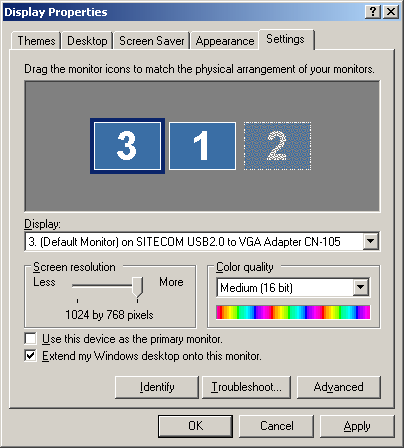
As you can see in the Control Panel, the adapter is working flawlessly. The system has recognized all three displays, and settings can be selected for each one independently (refresh rate, wallpaper, etc.).
When it first starts up, the monitor on the adapter is set to run at a flickering 60 Hz refresh rate - if you're working on a CRT monitor, you should select a more ergonomic refresh rate as soon as possible. However, the manual leaves users in the dark about how to achieve this.
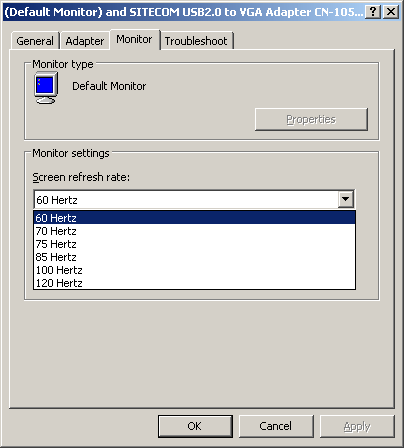
It Hertz us! Depending on the type of monitor you use, the refresh rate should be increased to a more ergonomic setting. Your eyes will thank you!


