The Miscellaneous Articles
- Creative Audigy 4 Pro: The Ultimate Consumer Sound Card?
- Altec Lansing GT 5051R: 5.1 Sound Without the Clutter?
- Creative I-Trigue 3600: Big Ambitions, Small Design
- Hercules 16/12 FW: Affordable, Professional-Quality Multichannel Audio
- Keep Your Stuff Safe with Inside Out Networks' USB Sensors and Cameras
- Does Hercules' Fortissimo 4 Deliver at 24 Bits?
- 5.1 Surround Sound on the Cheap
- Logitech Z-5500 Speakers: Much Muscle, More Options
- Logitech Z-2300 Speakers: More Than a Blast from the Past?
- Creative's E-MU 0404: Pro Sound Quality on the Cheap
From Vinyl To CD In One Click
1:04 PM - May 5, 2005 by
Driss Abdi
Source: Tom's Hardware US – Keywords: ads, tech, instant, music
Syndication:
Source: Tom's Hardware US – Keywords: ads, tech, instant, music
Syndication:
Table of Contents:
From Vinyl To CD In One Click
Nero SoundTrax is the application we'll use to acquire vinyl disks and cassettes on the computer.
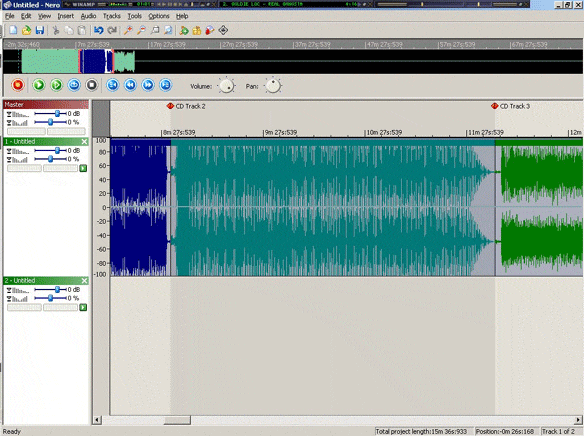
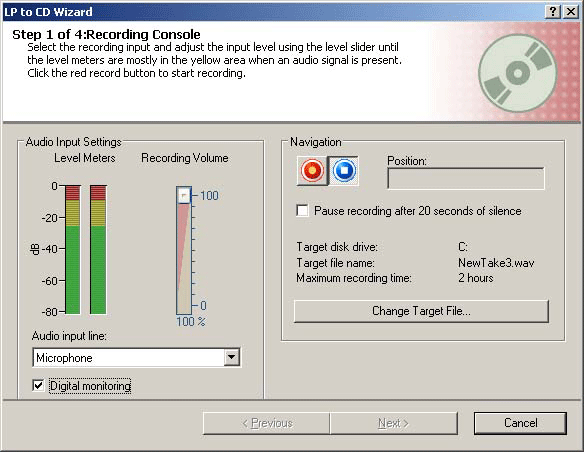
The application is very simple to use, providing highly practical wizards to help you perform the operation easily. The first stage involves adjusting the input level and launching the process of recording to the hard disk.
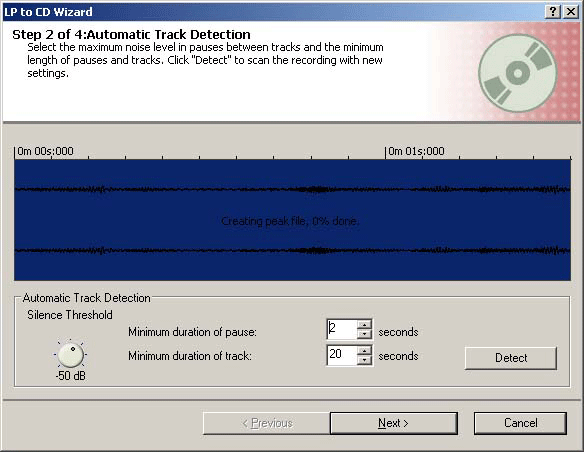
If you're digitizing an entire disk, during the second phase you can choose to detect pauses and set the length of pauses between tracks.
The second-last stage is often essential when you're recovering old, worn disks. Tools are provided for optimizing the audio quality - for example, removing the surface noise that's characteristic of vinyl, or reducing tape hiss.
- Previous page Quick, Easy Installation
- Next page From Vinyl To CD In One Click, Continued