RAID 0+1: Mirrored Stripe Set (Performance & Data Safety)
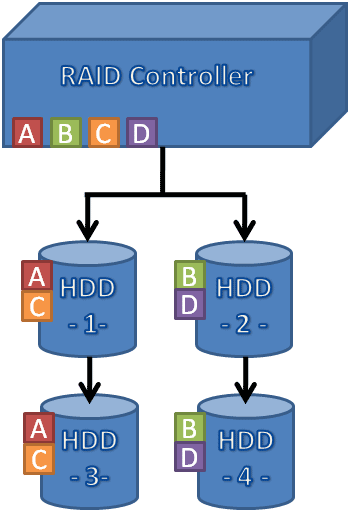
RAID 0+1 first creates a stripe set out of two or more drives, and then mirrors the whole structure onto the same number of additional hard drives. We call the result a mirrored stripe set. RAID 1+0 is the exact opposite: it creates a RAID 1 array and lines up multiple RAID 1 entities within a stripe set. This can be called a stripe set made of mirrored drives. From a performance standpoint there should be no difference between RAID 0+1 and RAID 1+0. Most controllers typically support RAID 0+1.
A mirrored stripe set offers the performance of a RAID 0 setup, but it pairs it with the data safety of a RAID 1. Obviously, you will need at least four hard drives to set up a RAID 0+1 array. We tried configurations with four, six and eight hard drives.
Performance Considerations

Putting several drives into a RAID 0 array ideally will add up the transfer rates of all individual drives. In real life, you will not be able to scale that linearly, but each added drive provides a clear performance boost, as you can see in the benchmark section of this article.

It is obvious that a larger number of hard drives will result in better transfer rates and better I/O performance, because you can combine the I/O performance and throughput of all hard drives. However, there are some limits, the first being the RAID controller: not all products are capable of moving around hundreds of megabytes of data constantly. Second, the controller’s interface requires attention. There are models for PCI-X at up to 533 MB/s or PCI Express x4 (1 GB/s upstream and downstream) and x1 (250 MB/s each way). Make sure your gross interface bandwidth is at least 50% higher than what you expect your RAID array to deliver, because net transfer rates can be significantly lower.
Finally, the number of hard drives typically affects access times in a negative way, as gathering a rather small piece of information off the file system may trigger access across multiple RAID member drives. If the heads of multiple hard drives all have to be repositioned, the average access time resembles the maximum access time of all the drives. Then there is the overhead of the RAID protocol itself, which moves access times from 12-14 ms into the upper 20 ms range.
As you add more I/O requests, the array will quickly outperform single drives, since features such as Native Command Queuing (NCQ) as well as controller caching will come into effect. For database applications, it makes sense to pick a controller with a rather large amount of cache memory (and a battery backup unit) to increase throughput and reduce access time to frequently accessed blocks.
