Deleting directories and files is one of the most basic, but important functions in any operating system. In Linux, if you have a windowed environment running, you can locate and delete files using a file manager application. Perhaps you’re logging in remotely via SSH, your Linux computer doesn’t have a GUI installed or you want to have more control over what you’re deleting. As with anything in Linux, there are many reasons why it might be necessary or preferable to delete directories or files via the command line.
In this how-to, we’ll look at the rm command which removes directories and files. We’ll look at the basics of the command and how it can be used to remove both files and directories and we’ll also look at a few other enhancements to get the most out of this command. If you want to change your file’s location instead, you should check out our article on how to move and rename files in Linux.
Of course, as this how-to is about deleting directories and files, you should take extra care to ensure you are carefully following the instructions, and whilst you become accustomed to these commands it’s good to work with example empty files and directories.
All the commands in this how-to will work on most Linux machines. We’ve used an Ubuntu LTS install but you could run this how-to on aRaspberry Pi. All of the how-to is performed via the Terminal. You can open a terminal window on most Linux machines by pressing ctrl, alt, and t or via the Applications menu.
How to Delete a File in Linux
(Image credit: Tom's Hardware)
Let’s start simply by removing a single file. The command syntax is structured as follows.
rm <name of object to delete>
1. Create a new file called test1.txt
touch test1.txt
2. List the contents of the directory to make sure if the file has been created. You should now see the file test1.txt.
Stay On the Cutting Edge: Get the Tom's Hardware Newsletter
Get Tom's Hardware's best news and in-depth reviews, straight to your inbox.
ls
3. Delete the test file. Deleting a file or folder is permanent. There is no recycle bin which can save us from an erroneous keystroke.
rm test1.txt
4. Re list the contents of the directory to check the file has been removed. You should see that test1.txt is no longer listed.
ls
How to Delete a Directory in Linux
(Image credit: Tom's Hardware)
Let’s run through a similar example to show that rm can be used to delete a directory containing files. For these examples, we will use two extra arguments -r and -i.
1. Create an empty directory. From your home directory create an empty directory.
mkdir test_directory
2. Move into the new directory.
cd test_directory
3. Create two test files within the directory
touch test1.txt test2.txt
4. List the directory contents to check the files are created. You should see the files test1.txt and test2.txt are now listed.
ls
5. Move back to the home directory
cd ~
6. Delete the directory. To delete this directory we need to use the -r argument. The -r argument acts recursively to enter the directory and check for and delete any files within. Once empty the command returns to delete the directory it has just cleared.
rm -r test_directory
7. Check the directory has been removed. You should see that test_directory has been removed from the list.
ls
8. Repeat the above steps 1 to 5 to create the test directory and files.
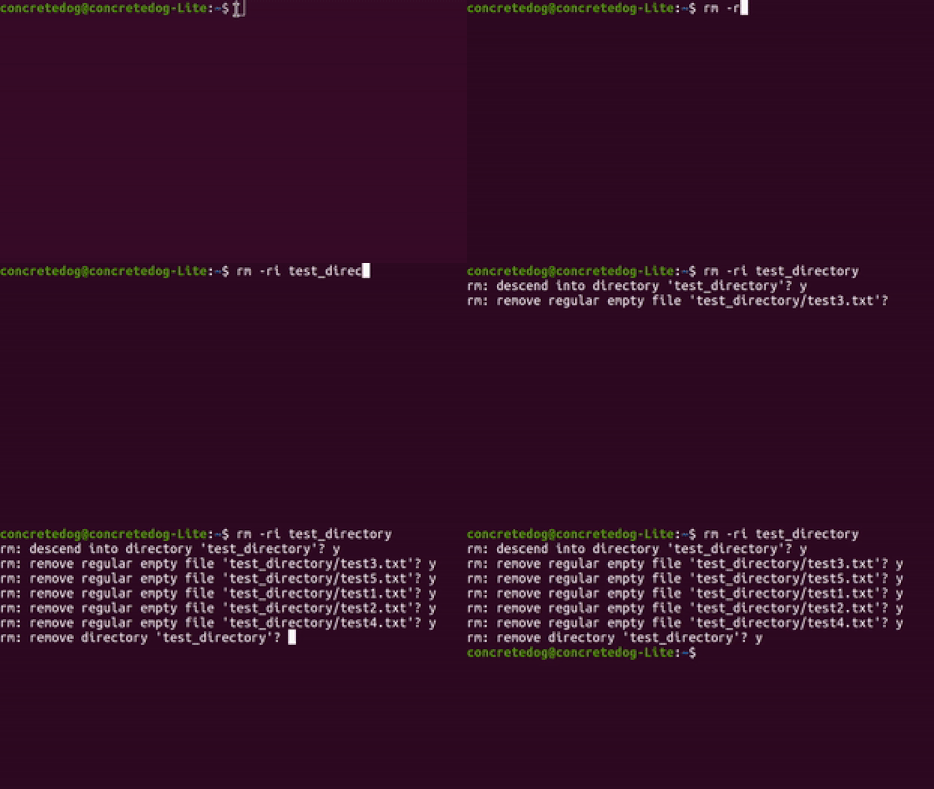
9. Repeat the -r argument but add -i argument to interactively delete the files and directory. It can be hard to imagine what the -r argument is doing. The -i argument forces the deletion process to ask for confirmation (interactive) of each deletion.Type “y” and click enter to confirm each step.
rm -ri test_directory
(Image credit: Tom's Hardware)
How to Delete a Write-Protected File in Linux
(Image credit: Tom's Hardware)
Occasionally you may need to delete files in Linux that are write protected. If you use the standard rm command it will ask you to confirm if you want to remove each protected file. For this we can use the -f force argument to help. This essentially forces the rm command to force-ably delete any directories and files so you need to be extra careful when using these commands as it won’t ask for any confirmation.
1. Create a test file called test1.txt
touch test1.txt
2. Change the file permissions so that only the user and the group they belong to can delete the file.
 chmod u-w test1.txt
 chmod g-w test1.txt
3. Try to delete the file using the standard rm command. When you use the standard rm command you should be prompted to confirm if you want to delete the test1.txt file. Click n for “no” this time. If you had a directory with hundreds of protected files you would have to confirm each one with a y which would be incredibly time wasting.
rm test1.txt
4. Delete the file using the -f argument. Running this command with -f argument forces the command to delete the file and does not ask for confirmation. Use with care!
rm -f test1.txt
These commands are incredibly powerful, simple to use and can make deletion tasks really straightforward to achieve. You may have seen jokes online about extremely dangerous versions of this command such as sudo rm -rf / and you may have new insight via this article of why that might be so dangerous.
You can spot that we are giving the command root privileges and using the force and recursive arguments to essentially send the command to remove all the files on a system!
Jo Hinchliffe is a UK-based freelance writer for Tom's Hardware US. His writing is focused on tutorials for the Linux command line. From PCBs to rowing boats to rockets, Jo tries wherever possible to integrate open source hardware and software into his projects. As such he is a keen Linux user, has authored a book on FreeCAD the open source 3D modeling software, and has published designs and tutorials across a wide range of makes.