Best offers
|
4GB PC3-10600 1333MHz DDR3 DIMM Dual... | $67.99 Crucial Technology More info |
|
2GB PC2-6400 800MHz DDR2 SODIMM Memory | $39.99 OfficeMax More info |
|
16GB Extreme III SDHC Card | $93.99 Newegg.com More info |
|
8GB Extreme III SDHC Memory Card | $79.99 Dell Home More info |
|
16GB Memory Stick PRO Duo Card | $89.99 OneCall.com More info |
- overclocking memory
- processor stress test
- overclocking memory test
- pentium d 950 overclocking
- pentium d 950 overclock
- memory test in bios
- overclocking stress test
- overclocking 950
- overclocking memory test
- overclocking memory tests
- presler core
- intel pentium d 955
- intel pentium extreme 965
- overclocking memory no start up
- system time stored in bios
Partners
The Games selection
violent :
More Mindless Violence
Basic shooting game, but still so powerful! Use the mouse to take aim and shoot at the little beasties before they get to you. Use Space to reload....
|
crazy :
Interactive Boogy
Pick one of the 3 songs, hit on the correct keys matching this boy's dance moves.
|
Sponsored links
Only Gigabyte was able to program a bug-free BIOS in the given timeframe. In our test, where the machines need to cope with a large range of clock speeds, extreme demands are made on the registry entries stored in the BIOS. For this reason, Gigabyte made a special BIOS just for this test, something not every company could achieve. More information is available in the compatibility test results for the Intel Pentium Extreme Edition 965.

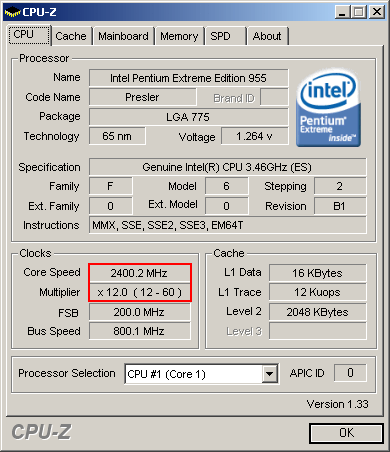
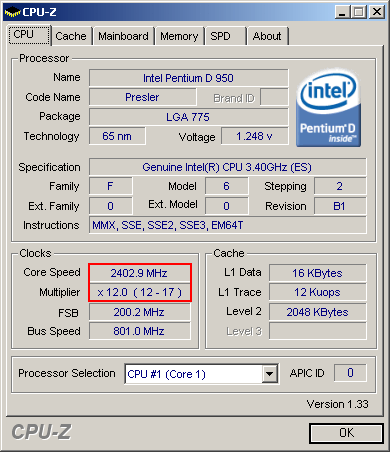
Both test systems use almost identical CPUs: Intel Pentium EE 955 and Intel Pentium D 950.
Both test platforms use almost identical processors: an Intel Pentium EE 955 and an Intel Pentium D 950. Since overclocking the memory requires the system front side bus to be increased, we lowered the processor core clock to the lowest possible level in order to prevent the CPU from becoming the factor responsible for any instability experienced when overclocking.

At the beginning of the live stress test, both processors start at a far lower clock speed than they usually would: 2.40 GHz instead of 3.46 GHz and 3.40 GHz. As we increase the FSB speed to raise the memory clock, the CPU clock speed rises synchronously along with it. Processors with a Presler core are manufactured using 65 nm technology, and we have known for a long time that they run solidly up to 4.26 GHz. As a result, a system crash can only be the result of memory failure at high memory speeds.

Sponsored links
Related forums topics
- 1:1 FSB : Ram ratio. Is it necessary for Q9550?
- 2.66GHz Nehalem to sell for $284???????
- Games keep freezing due to CPU?
- So... Do I stay with AMD or make the move to INTEL???
- Q6600 isn't real quad?
- What ddr1 ram to buy to make this p4 go ricky bobby fast!
- Extremely low 3DMark Vantage scores
- New Build, want to OC - need advice!
- OCing e6320 Questions
- Overclocking the GA-965G-DS3
- Asus P5Q broken motherboard?
- How come computer startup is slower than before when I remove ...
- PC Endlessly Rebooting All of a Sudden - Was Working Fine
- p5k and p5k deluxe "wont post" workaround


