Performance Analysis
The huge increase in storage capacity makes even more obvious the fact that hard drive performance hasn't increased by nearly as much.
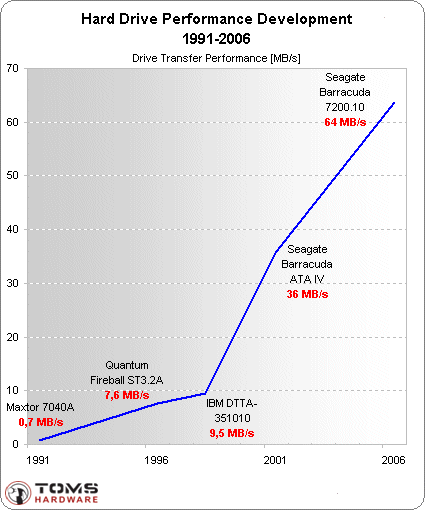
The actual performance increase between the 1991 Maxtor hard drive and the Barracuda 7200.10 750 GB is 0.7 MB/s to 64 MB/s, which represents a 91x increase. Comparing the 1991 drive to the 10,000 RPM WD Raptor's 85 MB/s, we get a 121x improvement.
While this already sounds disappointing, we should also take into account average file and program sizes. While an early Microsoft Word executable file did not occupy more than few megabytes on the hard drive and even less than that in main memory, today's application launch files can easily eat up several dozen megabytes, and they will even call in more code in the form of plugins and extensions. Adobe Photoshop CS2, for example, consumes over 60 MB of main memory, and most of it has to be pulled from the hard drive. Or think of opening a photo: years ago we were dealing with kilobyte-sized 640x480 JPEG files, while now we find that multi-megabyte images in resolutions like 3872x2592 are common.
Areal Density Vs. Performance
If you compare the areal density increase to the performance increase you will notice that there is a huge discrepancy: almost 6,000 times higher capacity versus not even a 100x increase in performance. In other words: capacity outran performance by 60 times! Is this something that our benchmark results will reflect?
