The Tweaking & Tuning Articles
- Double-Height Chic: Two Multifunction Panels From AeroCool
- The Matrix Orbital MX610 Ultra-Smart Character Display
- How To Best Spend $250 on Upgrading Your Rig
- mCubed's T-Balancer: Fan Controllers Go the Mod Way
- Drivers Improve WindowsXP Service Pack 2 FireWire
- Modding The Xbox Into The Ultimate Multimedia Center
- How to Speed up Your RAM
- All Ports To Front: The FrontX Solution
- How To Add Front - Mounted Ports To Your Case
- How To Get The Cool Connections Using DuoConnect
Forum
- More Deneb Leaks
- Need help building a Photo/Video editing system
- [CPU] Difference Qx9650 & Q9450
- IS IT WORTH WAITING FOR NEHALEM
- 2.66GHz Nehalem to sell for $284???????
- Overclocking 101 for the Gigabyte DS3
- Pump selection for MCT-5 and dual TMG2 radiator setup
- Which Opteron to buy?
- Which of these ram should i buy?
- e6600 & air cooling
Mighty Unwieldy Control Software
1:05 PM - September 23, 2005 by
Daniel Schuhmann
Source: Tom's Hardware US – Keywords: paying, price, high
Syndication:
Source: Tom's Hardware US – Keywords: paying, price, high
Syndication:
Table of Contents:
Mighty Unwieldy Control Software
Fans
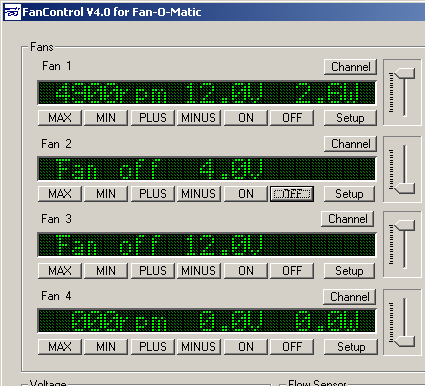
Fan adjustment and display
The speeds, voltages and power consumption of the connected fans are displayed under "Fans". The voltages are adjustable in 0.1 V intervals - which is accurate enough. The values are updated every second.
Control Buttons
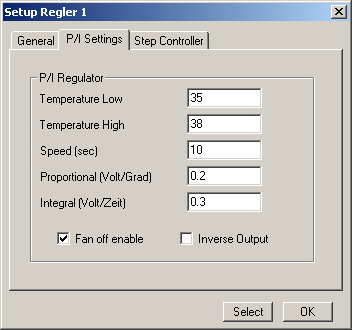
P/I fan speed control
The fans can be controlled manually, and complex control circuits are also possible. Thus, for example, a P/I circuit can be formed using two temperature values, whereby the proportional and integral parts can be adjusted individually.
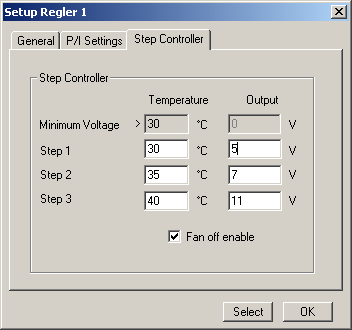
The Step Controller
Those who prefer simpler solutions should use the Step Controller. Here temperature values are assigned to different voltages, which represents a very simple but sufficient control method for most purposes.
- Previous page Windows Only
- Next page Temperatures