Test System & Benchmarks
| System Hardware | |
|---|---|
| Processor(s) | AMD Athlon 64 3400+ (Venice)2.2Ghz (overclocked to 2522 MHz), 512k L2 cache |
| Platform | ASrock 9393dual-SATA2 (socket 939)ULI 1695 chipset, BIOS v1.6 |
| RAM | PATRIOT EP1 x 1024 Mb PC3500 (CL2.0-3-2-5) |
| Hard Drive | Western Digital WD1200JB120 GB, 7,200 RPM, 8 MB cache, UltraATA/100 |
| Networking | On-board 100 Mb Ethernet |
| Graphics Card | ATI Radeon X1900 XTX (PCIe)512mb GDDR3 |
| Power Supply | Ultra X-Connect , ATX, 550 W |
| System Software & Drivers | |
| OS | Microsoft Windows XP Professional 5.10.2600, Service Pack 2 |
| DirectX Version | 9.0c (4.09.0000.0904) |
| Platform Driver | AMD Athlon 64 Processor Driver 1.2.2.0 |
| Graphics Driver | ATI Catalyst 7.2 |
We benchmarked the SHF1 cooler in Sytrin's Nextherm case. Although the Nextherm contains an air conditioning unit to lower internal temperatures, we turned this feature off for our tests to better demonstrate what SHF1 performance would be like in a typical ATX case. Running with normal fans, the ambient case temperature of the Nextherm case was 23 degrees Celsius throughout the duration of our tests.
Many cases have a door to cover the optical drive bays when not in use, so one interesting thing we investigated was the SHF1's performance behind a closed case door in addition to open operation. We applied a thermal sensor to both the top and bottom of the hard disk during all of our tests, which also offered some surprising results.
For the first test, we simply recorded the idle temperatures of the hard disk drive in its regular location, in the SHF1 without fan power, and in the SHF1 with fan power:
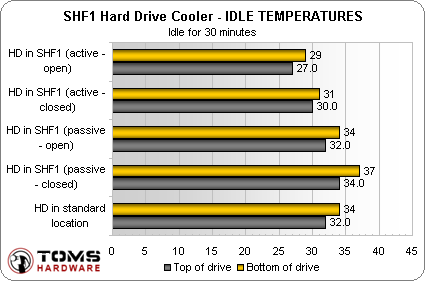
Firstly, we see that the hard drive is hotter on the bottom. This isn't what we expected at first because hot air rises, but perhaps it makes more sense when we realize that the bottom temperature sensor was applied directly to the drive's electronic board, which may be generating heat directly from its components. The top sensor is applied to the drive casing.
The most notable information here is that the SHF1 does not perform all that well when used passively with the cooling fans disengaged. Behind a closed case door, the temperature actually increased a couple degrees over the regular hard drive location. This is probably because the standard ATX hard drive location puts the hard disk in the path of airflow entering the bottom front of the case. In the drive bay and with the case door closed, there is no airflow past the hard disk.
Passively cooled but with the case door open, the temperature reads identically to the stock location because air is allowed to pass over the hard disk.
Actively cooled, with the fans enabled, the SHF1 begins to show its stuff. Even with the door closed, the temperature drops a few degrees over the stock location. With the case door opened allowing for airflow, the temperature is decreased a full five degrees Celsius at idle across the top and bottom of the drive.


