Join for quick access. Enter your email below and we'll send confirmation plus sign you up to our newsletter.
By submitting your information, you confirm you are aged 16 or over,
have read our
Privacy Policy
and agree to the
Terms & Conditions. Geographical rules apply.
You’re not going to find a better M.2 HAT for your Raspberry Pi. This is the standard to which other boards will now be measured.
Reasons to buy
+
Easy to build
+
GPIO and port access is excellent
+
Doesn’t impede cooling performance
Reasons to avoid
-
Not a massive fan of the M.2 retaining screw
Why you can trust Tom's Hardware
Our expert reviewers spend hours testing and comparing products and services so you can choose the best for you. Find out more about how we test.
Let's cut to the chase, for $10 (€9 / £9 for European and UK readers), the new Pineboards HatDrive! Nano is damn good value! Half the size of the former HatDrive! Top, the Nano is still packing the same M.2 interface used for 2230 and 2242 NVMe drives, or other PCIe boards.
All you need is a few minutes to assemble and you’ll see your Raspberry Pi 5 get a massive speed boost, without sacrificing access to the GPIO and the camera / display ports. We took the new Nano board for a spin, and compared it to its predecessor, the Pineboards HatDrive! Top, and here is what we found.
Many thanks to The PiHut for supplying us with this review unit and a Pinedrive 2242 NVMe SSD.
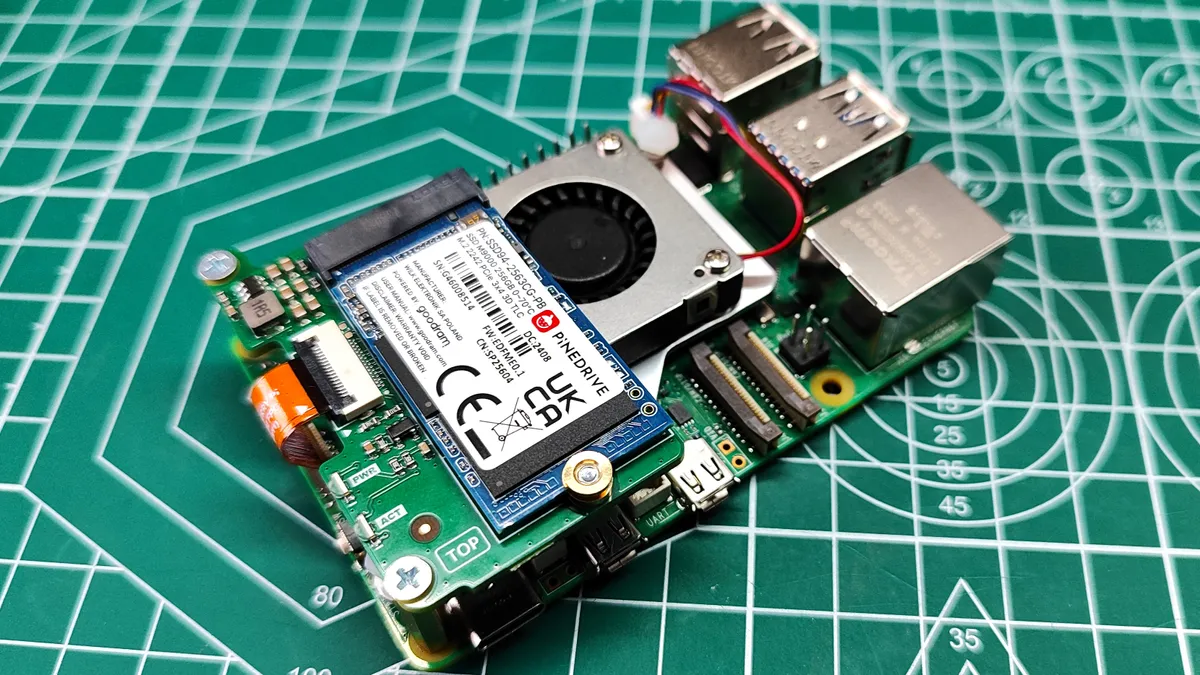
The Nano really does live up to its name. It is hard to believe that this tiny board provides the interface for super fast (by Raspberry Pi standard) storage that is smaller than a stick of gum. The best way to describe the design is “half a HAT drive”. The reason for this is that the board connects to the top and bottom left M2.5 mounting holes via brass standoffs (we’re so thankful for brass standoffs versus plastic). With just four screws the board is secured to the Pi, (two secure the standoff to the board, another two to the Pi 5) with approximately 1.3mm of clearance from the official Active Cooler. A short flexible printed circuit connector (FPC) connects the Raspberry Pi 5’s PCIe connection to the Nano. Put your drive in, and secure it down using the included brass retaining screw. This is the only thing we don’t like. You need to remove the Nano from the Pi to change the drive. But, we can change this to something else. With the drive in place, as long as you are running the latest firmware (which enables NVMe boot), you are off to the races.
The HatDrive! Nano’s design has to be the best I have seen for NVMe HATs that connect to the top of the Pi 5. Many impede access to the GPIO and the camera / display ports, something that Pineboard’s HatDrive! Top is guilty of. With the Nano we can access the GPIO and camera ports easily. The GPIO will need a riser / header to extend the GPIO pins over the Nano, but they only cost a couple of dollars.
With the HatDrive! Nano you will have no problem creating projects that use the GPIO and camera / display ports. If your projects extend to AI and machine learning, then you can use the Pineboards HatDrive! Nano with NPUs such as the Hailo-8L (which comes in the Raspberry Pi AI Kit) and the Google Coral. Obviously you will need to boot from micro SD.
Stay On the Cutting Edge: Get the Tom's Hardware Newsletter
Get Tom's Hardware's best news and in-depth reviews, straight to your inbox.
A quick reboot and our changes were confirmed and we got down to testing. We compared the HatDrive! Nano to the HatDrive! Top, running from the same 256GB Pinedrive M.2 2242 SSD. This is a PCIe 3x4 drive with 3D TLC. We’re not going to max out the PCIe 3 throughput, but we’ll certainly get the best speed possible from it.
Swipe to scroll horizontally
Header Cell - Column 0
Boot time in seconds
Header Cell - Column 2
HatDrive! Nano (Gen 3)
18.46
Row 0 - Cell 2
HatDrive! Top (Gen 3)
19.12
Row 1 - Cell 2
Micro SD (SDR104 / A1)
21.28
Row 2 - Cell 2
Our first test was a cold boot. From powering on to a usable desktop experience. The baseline is 21.28 seconds, using one of the best micro SD cards, an A1 rated Sandisk card. The Nano shaved 2.82 seconds from the boot time, coming in at 18.46 seconds. Not a great deal but every second helps. The Top came in at 19.12 seconds, 2.16 seconds faster than micro SD. The 0.66 time difference between the Nano and Top boot times is negligible enough to call it a dead heat.
(Image credit: Tom's Hardware)
How fast is the HatDrive! Nano? The short answer is, just as fast as the other NVMe HATs. We used the same Pinedrive between both boards and this leads us to the longer answer. PCIe Gen 3 speeds will not be maxed out, but reading from the drive we hit 893 MB/s (892 MB/s for the Top board).
This is approximately 10 times faster (9.85 times to be more exact) than the best micro SD cards! What about the write speeds? These are lower than the read speeds, but still impressive. At 735.6 MB/s, the Nano is faster than the Top (711.1 MB/s), even using the same drive and configuration. This is a remarkable 23.8 times faster than micro SD.
Swipe to scroll horizontally
Header Cell - Column 0
Speed in MB/s
HatDrive! Nano Read (Gen 3)
893
HatDrive! Nano Write (Gen 3)
735.6
HatDrive! Top (Gen 3) Read
892
HatDrive! Top (Gen 3) Write
711.1
Micro SD Read
90.5
Micro SD Write
30.8
All that raw data leads us to the conclusion that the Pineboards HatDrive! Nano is the board that you need for your Raspberry Pi 5.
Pineboards HatDrive! Nano and the official Raspberry Pi 5 Case
(Image credit: Tom's Hardware)
Pineboards claim that the Nano can be used inside the official Raspberry Pi 5 case. We dug into our box and found the case and then dropped the Raspberry Pi 5 and Nano board into it. First problem, we can’t use the official case’s fan. But we have the official Active Cooler installed, so we don’t need it. Removing the fan we dropped the kit into the case, and found that the ports wouldn’t line up. The problem? We need to remove the screws that hold the brass standoffs to the Raspberry Pi 5. Placing the kit into the case, we lined up the holes and replaced the screws through the case bottom. But, the screws were too short. Luckily, Pineboards included some longer screws which go through the case, Pi 5 and into the standoffs. Everything was tightened down and the case lid was placed on. Everything fit, just as Pineboards announced. So how does the case impact CPU temperatures?
We tested using our usual CPU stress test script. First we tested with the case completely off. This returned an idle CPU temperature of 37.3 degrees Celsius, and a CPU stress temperature of 60.4°C. With the case on, those temperatures increased. At idle, we recorded 41.1°C, and under stress we saw 66.4°C. Both the no case and case stress temperatures triggered the active cooler’s fan to kick in, and we can report that it was not noisy. A light “whoosh” is all we could hear from 2 feet away.
Who is the HatDrive! Nano for and what can they do with it?
For $10, the Pineboards HatDrive! Nano is a no-brainer purchase. We can see this being used across the entire gamut of Raspberry Pi projects. The unobstructed GPIO and camera / display access means that we can build robots, retro gaming rigs and AI projects with very little hassle.
Bottom Line
(Image credit: Tom's Hardware)
You’ve got $10 in your pocket, buy this and recycle a spare 2242 NVMe SSD (or find a good budget drive from our list of the best SSDs) into your new Raspberry Pi OS drive. The simplicity of the Nano is its best selling point. It’s simple to build and use, while keeping out of the way of the key features found on the Raspberry Pi 5.
Les Pounder is an associate editor at Tom's Hardware. He is a creative technologist and for seven years has created projects to educate and inspire minds both young and old. He has worked with the Raspberry Pi Foundation to write and deliver their teacher training program "Picademy".
First we tested with the case completely off. This returned an idle temperature of 37.3 degrees Celsius, and a stress temperature of 60.4°C. With the case on, those temperatures increased. At idle, we recorded 41.1°C, and under stress we saw 66.4°C.
Uh, these are CPU temperatures, right? If so, I'd love to see the SSD temperatures, also.
The article said:
We set the Raspberry Pi 5 to use PCIe Gen 3. This is easily configured via raspi-config.
I'd love an explanation of why this isn't the default. Are there risks or requirements (cooling?) associated with using PCIe 3.0? Is there anything about it that's not 100% stable?