Best offers
|
My Passport Essential 500GB Portable... | $99.99 Newegg.com More info |
|
Caviar Black 1TB Hard Drive (Serial... | $99.99 Dell Small Business More info |
|
My Book Essential Edition External... | $148.00 ServerSupply.com More info |
|
X25-M Gen2 160GB 2.5" Solid State... | $509.95 PC Connection More info |
|
My Passport Essential Portable 320GB... | $134.00 ServerSupply.com More info |
- using superfetch and readyboost
- usb flash memory not recognized
- hybrid hard drives
- reduce boot time vista
- hybrid hard drive
- what is cached memory in vista
- hybrid hard drives
- why non volatile memory is used for flash memory
- what are hybrid hard drives hdds
- windows vista cached memory
- windows vista used memory
- cache memory recommendations
- how to get memory speed in windows vista
- speed windows vista
- nonvolatile flash memory
Partners
The Games selection
crazy :
PC Breakdown
What is worst than a Fatal Error occuring during a game you did not save? Unleash your rage at your PC in this game. Blow it to pieces, it feels so...
|
kids :
Bob
Throw bubbles so as to make the ones that appear in the game disappear. For this, use the Right / Left arrow keys to duck or move about, and the...
|
Sponsored links
- Email |
- Print |
- Comment (1) |
- Share
Technically, it isn't Windows Vista that is required to support Hybrid Hard Drives, but rather a feature that only comes with Vista: ReadyDrive. You might already be familiar with the performance-accelerating features SuperFetch and ReadyBoost; these utilize available main memory to buffer application data (SuperFetch), and extend the entire caching process over a USB Flash memory device (ReadyBoost). The latter is particularly interesting for systems with less than 1 GB of RAM, although we do not recommend running Windows Vista with such small amounts of memory. ReadyDrive extends caching over a Hybrid Hard Drive's non-volatile Flash/cache memory, storing core Windows Vista files, frequently used application data (OEM pinning) and SuperFetch data on the Flash memory, to speed up Windows boot time and application launch time.
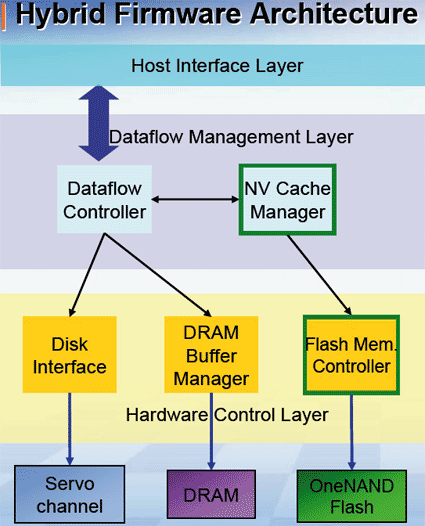
The hard drive ATA command set was adjusted to support NV cache. The ATA8-ACS specification includes commands that take care of two important functions: control of what data is pinned for retention in the NV cache at any given time, and control of whether the drive is put into the NV cache power mode. Windows Vista automatically recognizes H-HDDs and will assess the performance of the NV cache. Only one H-HDD is supported, and it has to be the system drive to benefit from the Flash memory.

You cannot distinguish a H-HDD from a regular hard drive by appearance.
- Windows XP vs. Vista: The Benchmark Rundown [Windows Vista]
- In a quandary about AMD versus Intel [Laptops & Notebooks]
- 4gb 150x SD card ! [Digital Camera]
- Flash memory in Hybrid hard drives *save* power [Home Cinema Equipment]
- Flash memory in Hybrid hard drives *save* power [Home Theatre]
Questions? Ask Tom's community!


> but I would not pay any premium today to get an H-HDD today.
Department of Redundancies Department, how can I help you?