Conclusion
Swipe to scroll horizontally
| Model | deskjet 5550 |
|---|---|
| Manufacturer | Hewlett Packard |
| Price (USA) | $150 |
| Price (Europe) | 199 € |
| Resolution | 2400 x 1200 dpi |
| Number of cartridges | 2 |
| Number of colors | 4 or 6 |
| Speed (B&W) | 17 ppm |
| Speed (Color) | 12 ppm |
| Interface | USB & parallel |
| Format | A4 |
| Nozzles | n.a. |
| Integrated memory | n.a. |

We really loved the Deskjet 5550. Its speed is adequate, prints are always very good to excellent, and, although this is a matter of taste, we find it very stylish. But we did find it had some faults (maybe growing pains?):
- Although the price of cartridges fell in August, we found the costs per page with this printer are still high. High enough to use it only for printing just a few pages a week.
- Twice during the tests it took two sheets of paper at a time. Let's hope that this was just a bit of bad luck on the model we had.
- It is noisy.
- When you have to keep on removing the black and white cartridges and putting them back, you are bound to blunder in the end. You could easily put one of them in the wrong way, for instance. Now, as we realized by accident, if there is a failsafe system, it is not infallible. You soon see your mistake. If the cartridge is installed the wrong way, the printer starts making such a ruckus that you'll think it's about to die. Removing the guilty cartridge is no easy matter but, after five minutes of testing, it finally started working again as though nothing had happened.
- Printing can take a long time to start. If you include the time it takes to analyze the paper, the printer often only really starts working after about ten seconds.
- Lastly, although it had worked fine for some 500 pages and a variety of photos, the printer suddenly started developing printing problems. Text pages still came out at the right speed, but the photos started to take a long time and the process was jumpy. All at once, after another twenty pages, the images didn't come through at all. We tried changing options, applications, formats, cartridges and weights, restarts and blanking, but it all made no difference. We had to uninstall and reinstall the printer completely before the situation returned to normal.
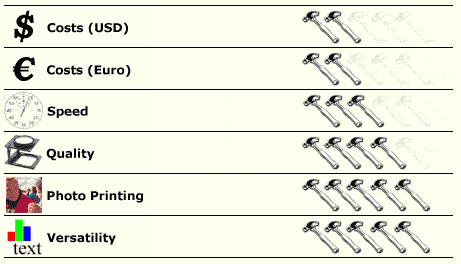
Marks for photo suitability and versatility are valid if you switch between the standard and photo cartridge sets. If you just use the first set, both scores should be four.
More about printers


