Join for quick access. Enter your email below and we'll send confirmation plus sign you up to our newsletter.
By submitting your information, you confirm you are aged 16 or over,
have read our
Privacy Policy
and agree to the
Terms & Conditions. Geographical rules apply.
Stay On the Cutting Edge: Get the Tom's Hardware Newsletter
Get Tom's Hardware's best news and in-depth reviews, straight to your inbox.
You are now subscribed
Your newsletter sign-up was successful
Join the club
Get full access to premium articles, exclusive features and a growing list of member rewards.
An account already exists for this email address, please log in.
One Open-E Flash Module + One IDE Interface Equals NAS Storage
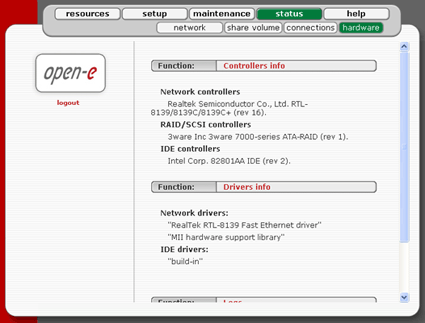
The status display shows which network and IDE controllers are available and can be used for the NAS server. In the case of the NAS 2.0 flash module, the connected RAID controllers are listed, too.
Under Status | devices, the NAS server displays the hardware with which it is equipped.