Our picks below will show you the best CPU for gaming. Even in 2026, gaming represents a demanding workload on your CPU, especially at lower resolutions, so it’s important to choose the best gaming processor that can deliver the full performance of your graphics card while avoiding a CPU bottleneck. As usual, we made our picks based on the latest data in our CPU benchmark hierarchy, where you can directly compare the performance of the processors listed below. If you’re struggling to choose, our CPU buying guide can give you some broad pointers, and our AMD vs. Intel article will give you the latest on where the never-ending battle of the CPU duopoly currently stands.

With some downtime in the year, we've gone back to look at some CPUs that fell through the cracks, including the Ryzen 5 7600X3D (which earned a spot on this list) and the Core Ultra 5 225. We don't expect to see next-gen Nova Lake or Zen 6 CPUs until at least the end of the year, but the rumor mill has been abuzz about refreshed CPUs coming before then, including the Ryzen 7 7700X3D and Ryzen 7 5800X3D 10th Anniversary Edition. Neither of those CPUs have been confirmed, however, so we're still waiting to see if AMD or Intel will make the next move.
AMD and Intel are winding down their current generations, so all eyes are on what the next generation holds. Intel has already released Arrow Lake Refresh, and it has Nova Lake is coming in 2026 as it focuses on “holes to fill on the desktop front.” AMD hasn’t revealed its next generation of CPUs, but it has teased its next-gen Zen 6 architecture in the data center, hopefully queuing up a consumer release for later this year. AMD just released the Ryzen 9 9950X3D2, keeping the consumer front going while Zen 6 is still in the oven.
Right now, AMD rules the roost with its 3D V-Cache processors, and for good reason. The Ryzen 7 9800X3D is the best gaming processor you can buy by a long shot. It beats everything; it’s 27% faster than the Core i9-14900K, 31% faster than the Ryzen 9 9950X, and a whopping 38% faster than the Core Ultra 9 285K. The newer Ryzen 7 9850X3D is slightly faster at $500, but the Ryzen 7 9800X3D remains our pick due to its lower price.
AMD's other 3D V-Cache CPUs are in a distant second place. The Ryzen 9 9900X3D is more expensive and offers worse gaming performance; skip it unless you find it on a deep sale. The Ryzen 9 9950X3D, on the other hand, offers chart-topping gaming and productivity performance, skirting the downside of 3D V-Cache with AMD’s second generation of the technology. It's a solid pick with recent price cuts, as well, though the Ryzen 9 9950X3D2 has taken its place in AMD's halo slot.
Intel was down for the count among the best gaming CPUs with its Arrow Lake chips, but it's made great strides with its new Arrow Lake Refresh offerings. Both the Core Ultra 7 270K Plus and Core Ultra 5 250K Plus have earned a spot on this list due to much better gaming and productivity performance, as well as competitive pricing that can stand against AMD's non-X3D chips.
It's difficult building a gaming rig right now regardless of if you go with AMD or Intel, however. RAM and SSD prices have shot through the roof, making an upgrade tough and an entirely new build almost impossible. We've included some options like the Ryzen 5 5600 that support DDR4 memory on this list if you're on an extreme budget. We also recently published a $100 CPU shootout, comparing the cheapest DDR4 processors on the market.
Here are the gaming CPUs we recommend buying. We have a shortlist of the top options and some alternatives below, but you can click the ‘More’ links to read our thoughts about a particular CPU and where it stands in the current market.
Best CPU for Gaming in 2026 at a glance (more info below):
CPU | Best CPU for Gaming | Alternate |
|---|---|---|
Overall Best CPU for Gaming: $300 to $400 | ||
Mid-Range Best CPU for Gaming: $200 to $300 | ||
Highest Performance Best CPU for Gaming: $400+ | ||
Budget Best CPU for Gaming: $100 to $150 | ||
Entry-Level Best CPU for Gaming: (iGPU) |
The list below is for the best CPUs for gaming, while the best budget CPUs can help you find a cheap chip. Processors benefit from the best thermal paste, so check out our guide if you're shopping for a new processor. But if you're after the best CPU for gaming, you're in the right place.
Best CPU for Gaming Benchmarks
Why you can trust Tom's Hardware Our expert reviewers spend hours testing and comparing products and services so you can choose the best for you. Find out more about how we test.
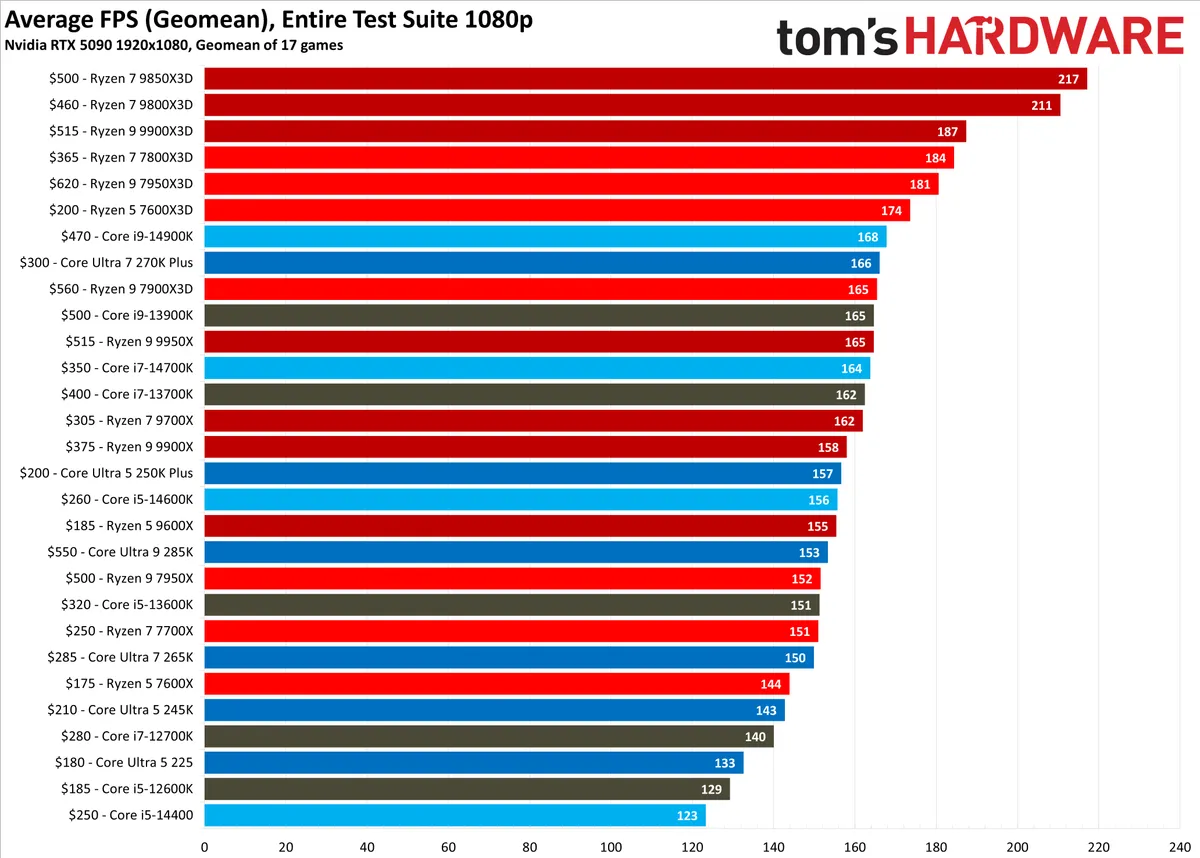
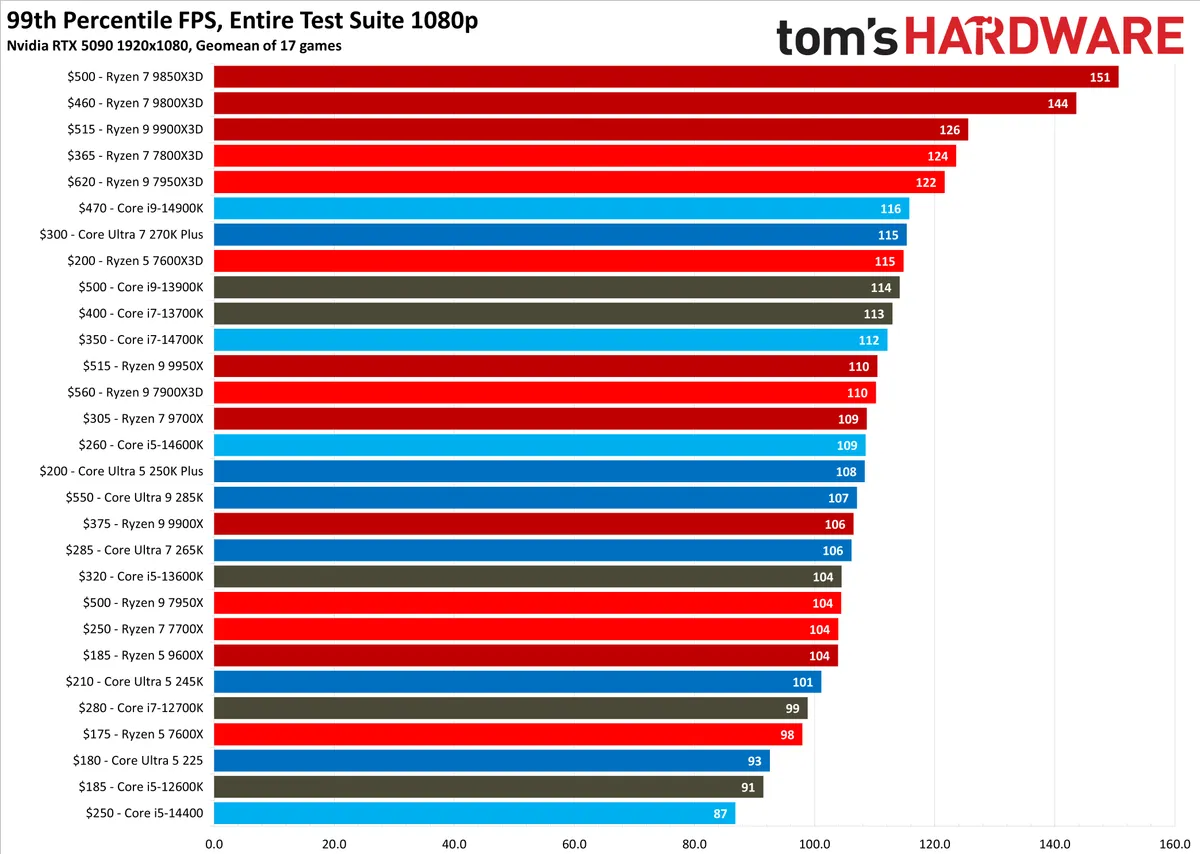
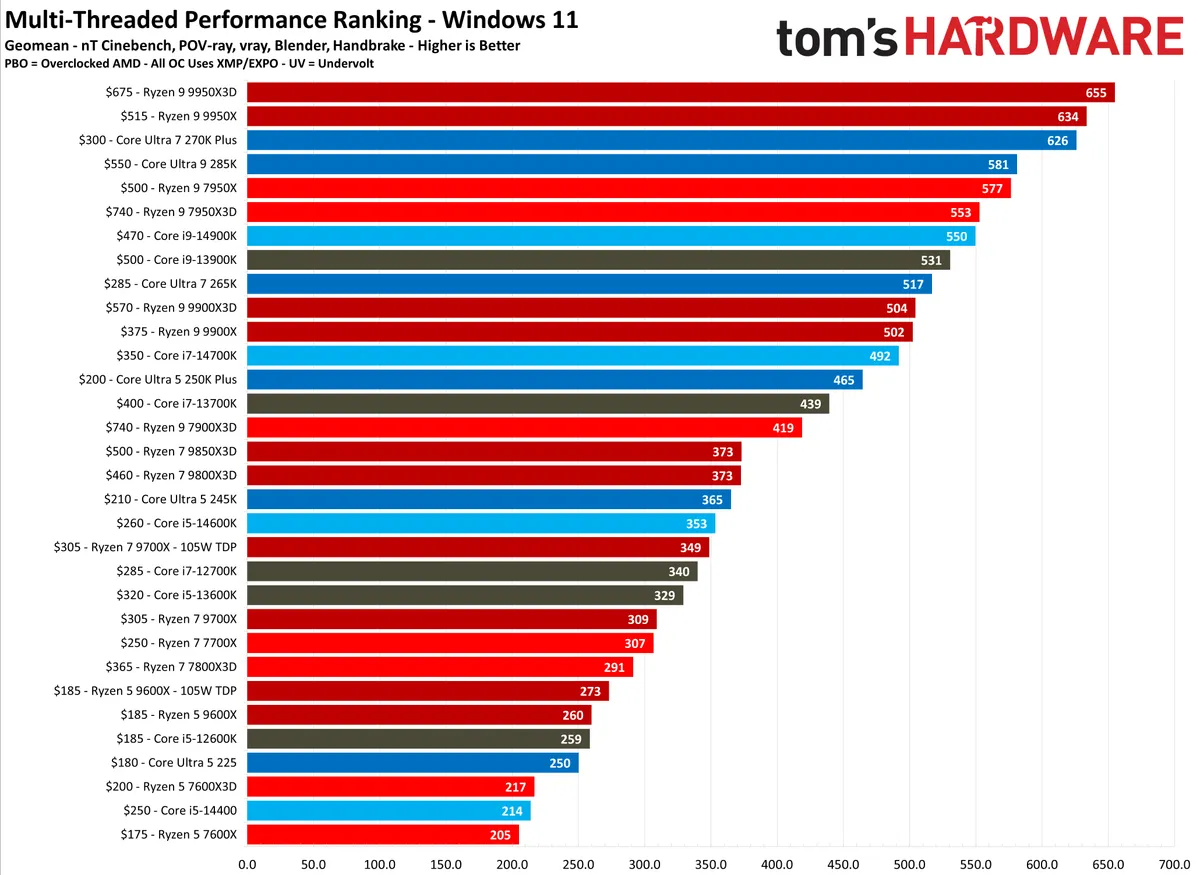
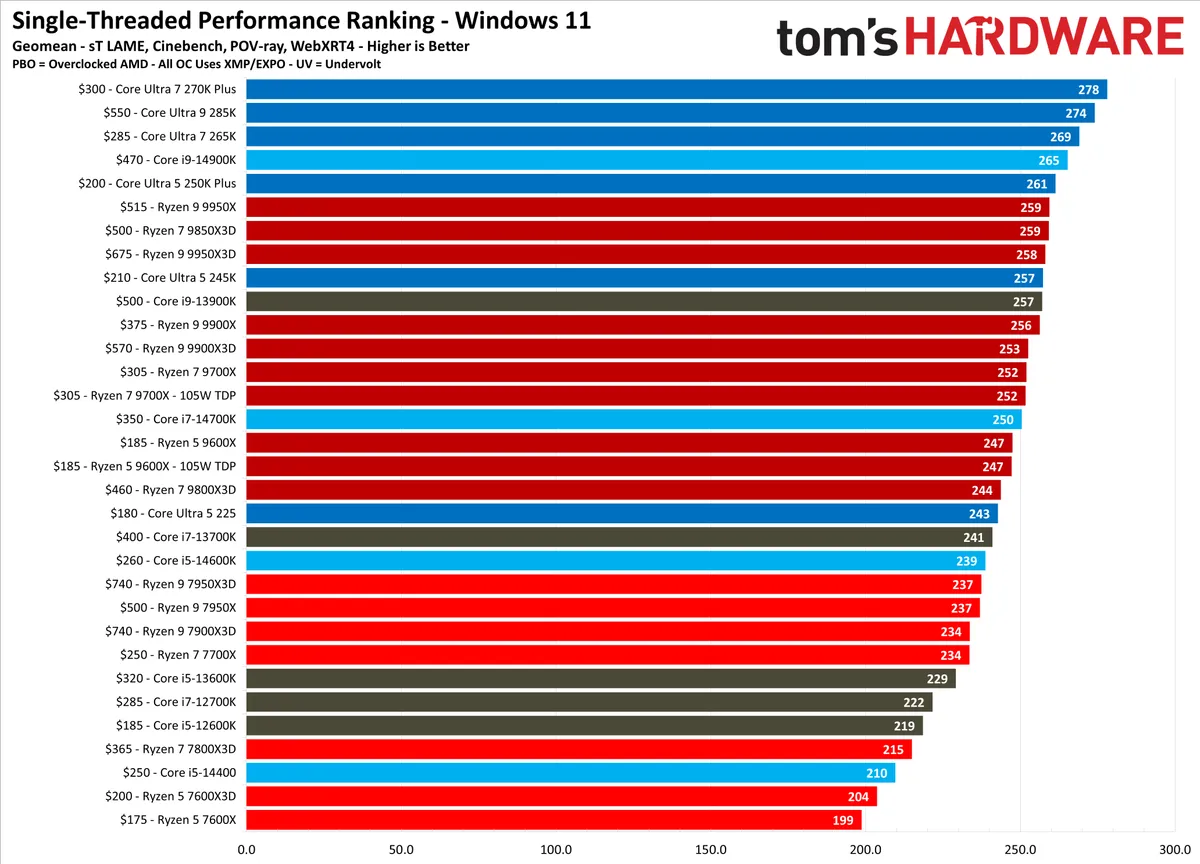
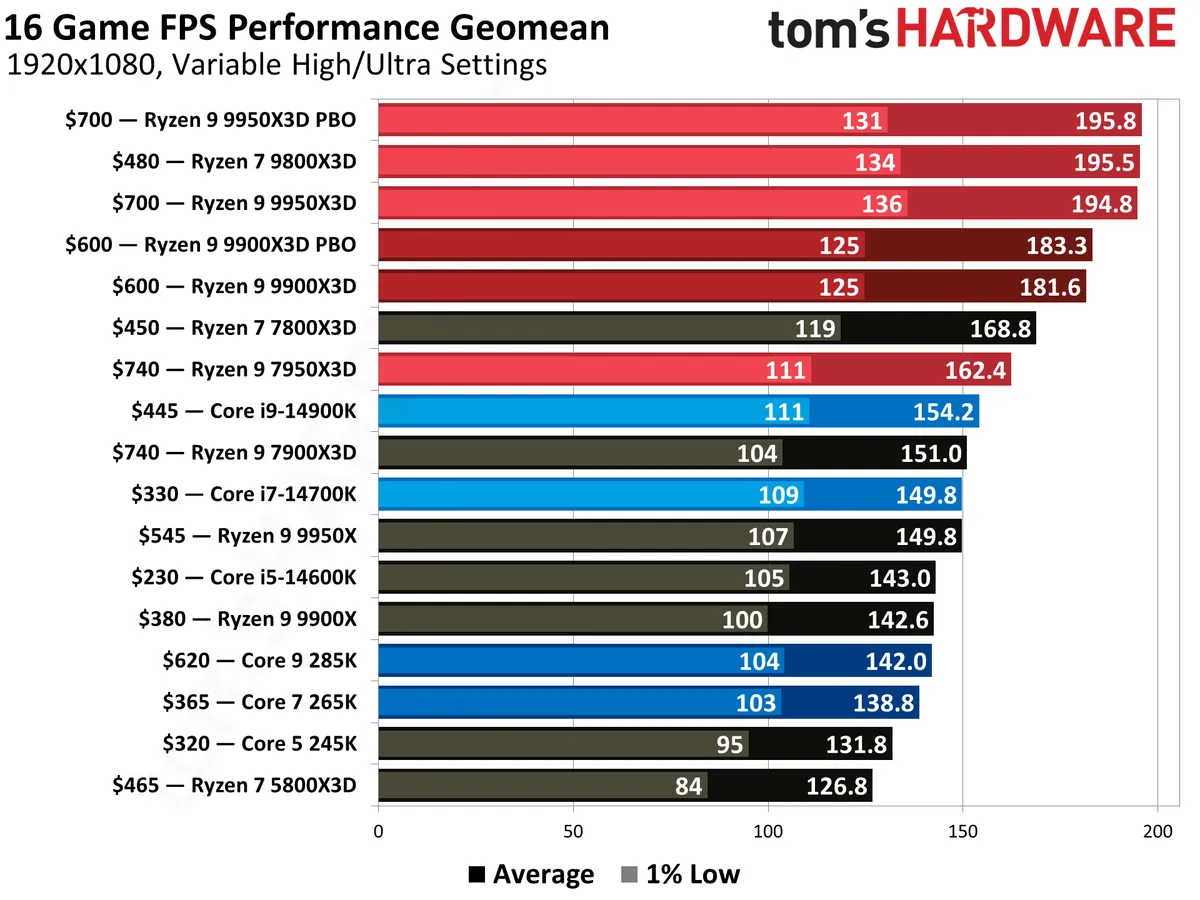
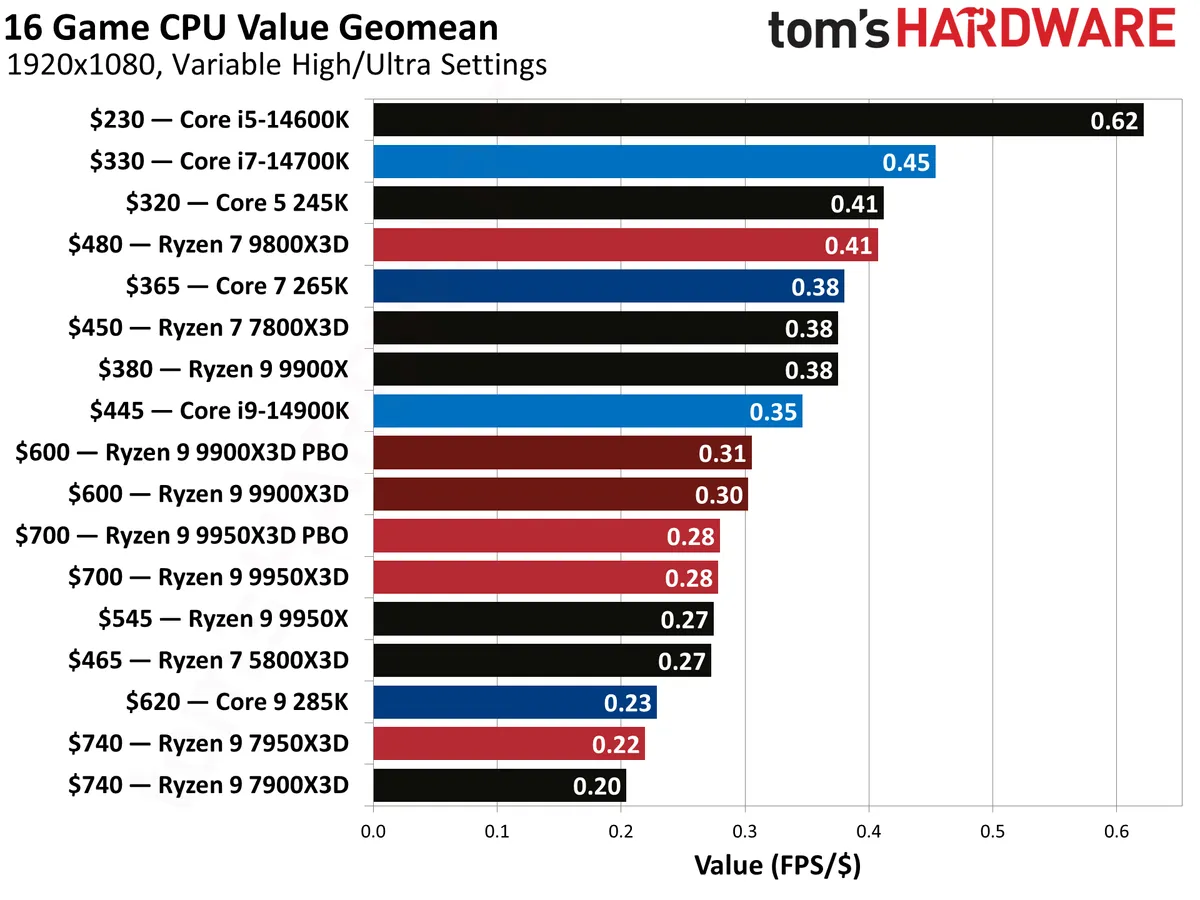
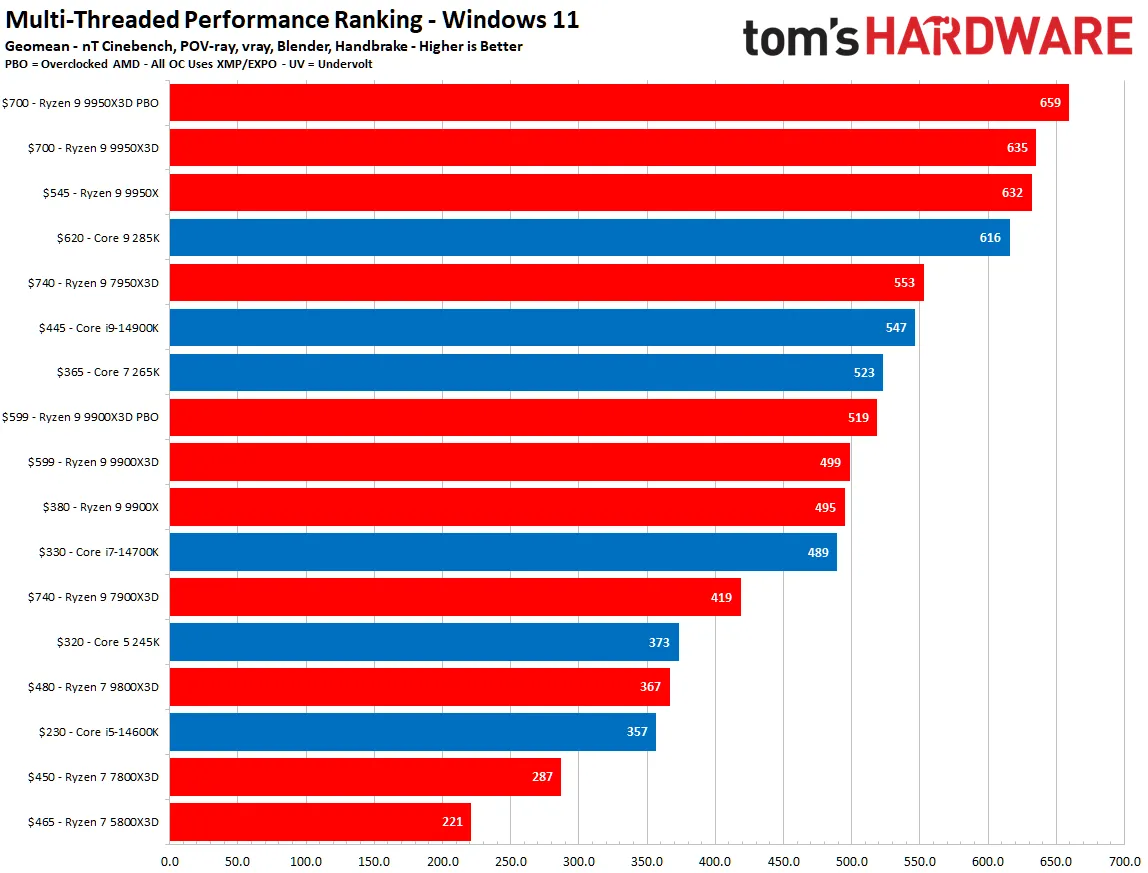
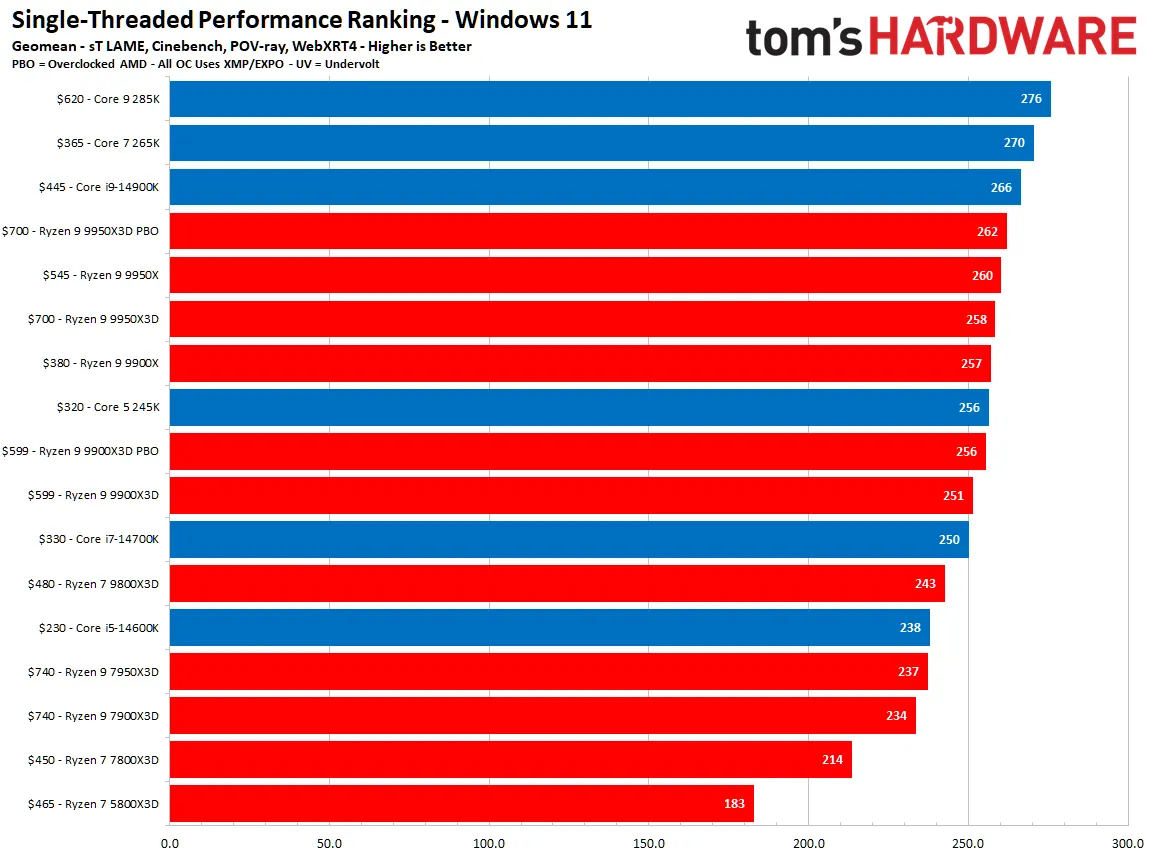
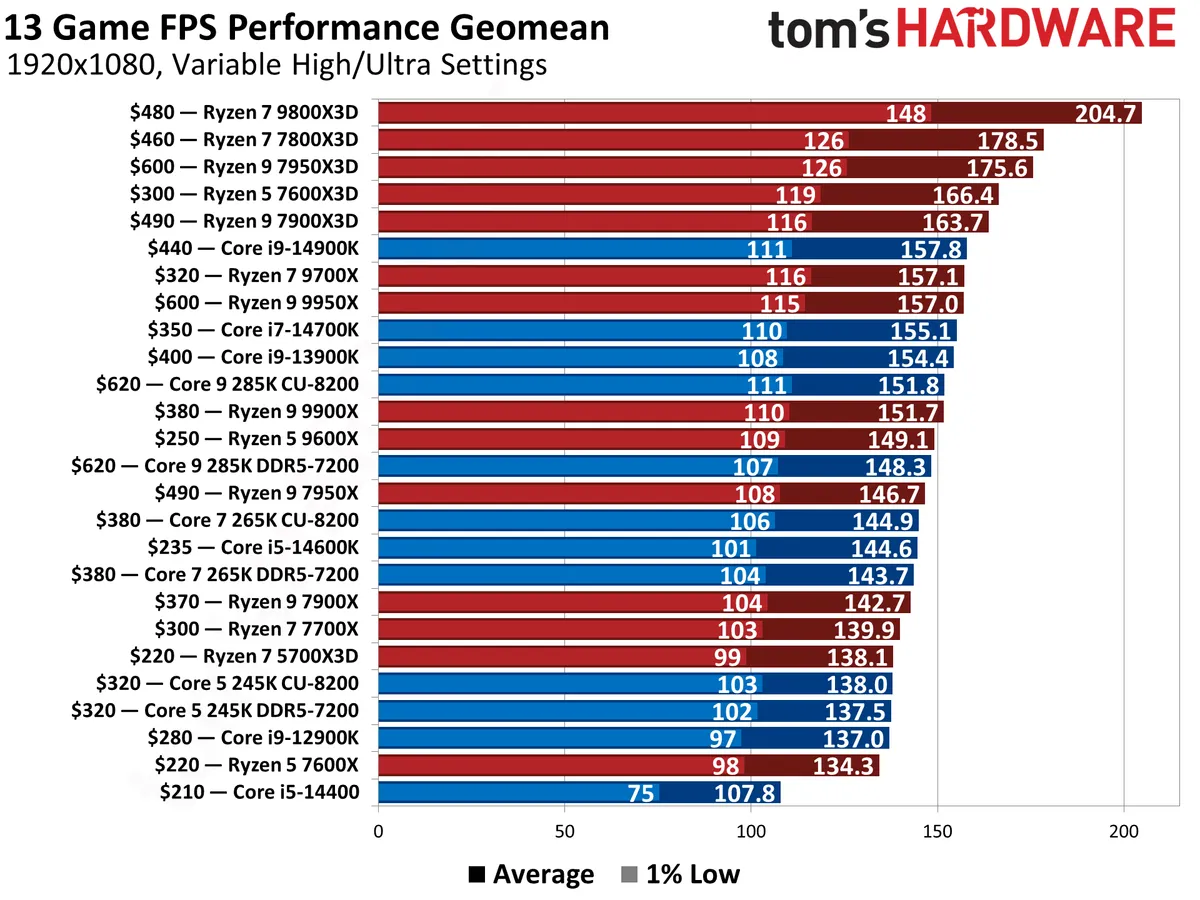
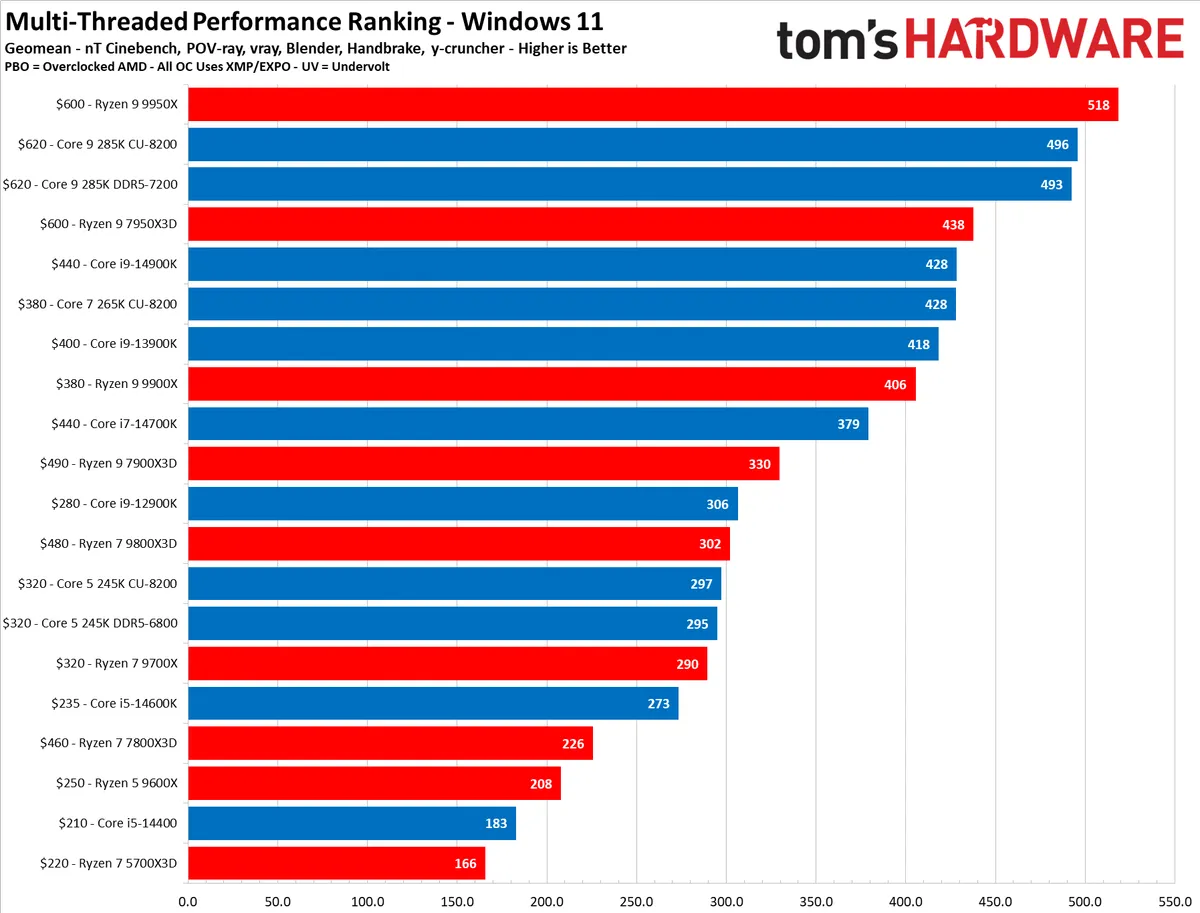
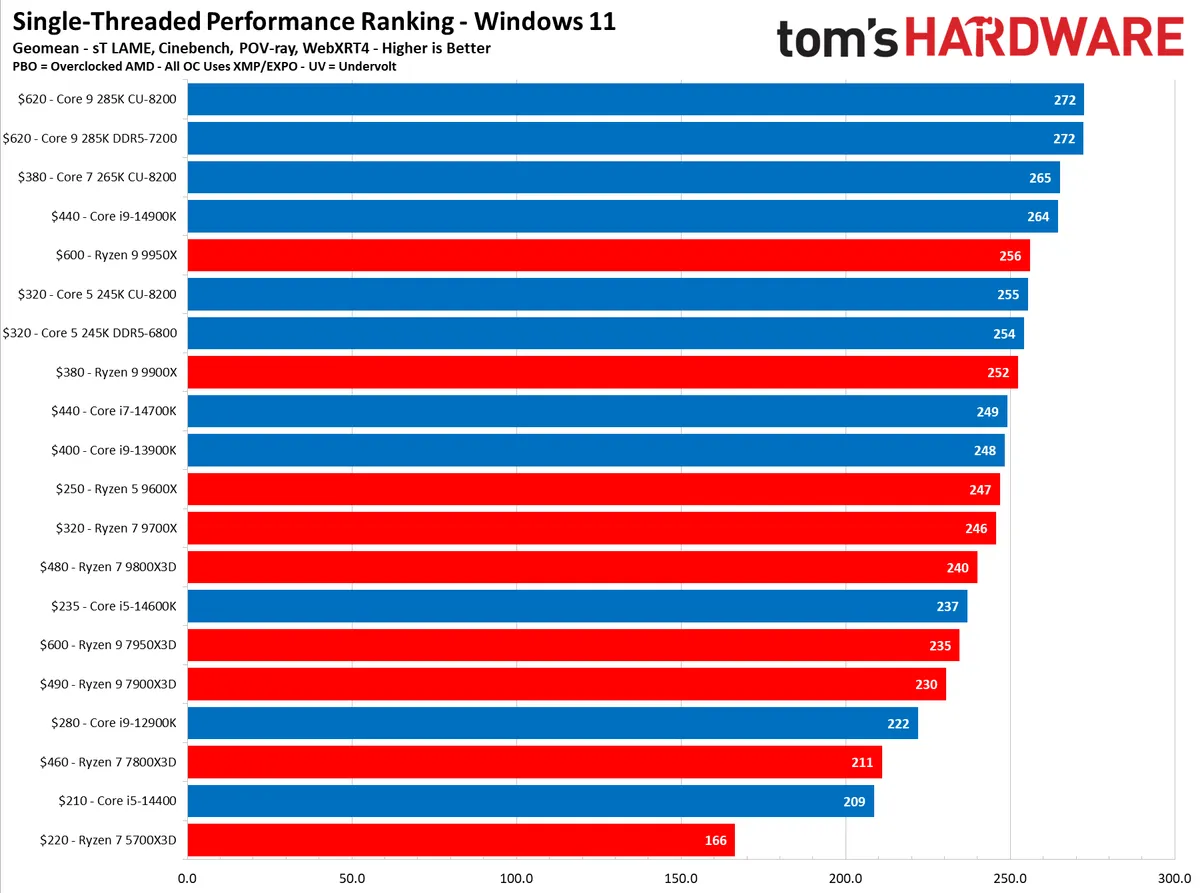
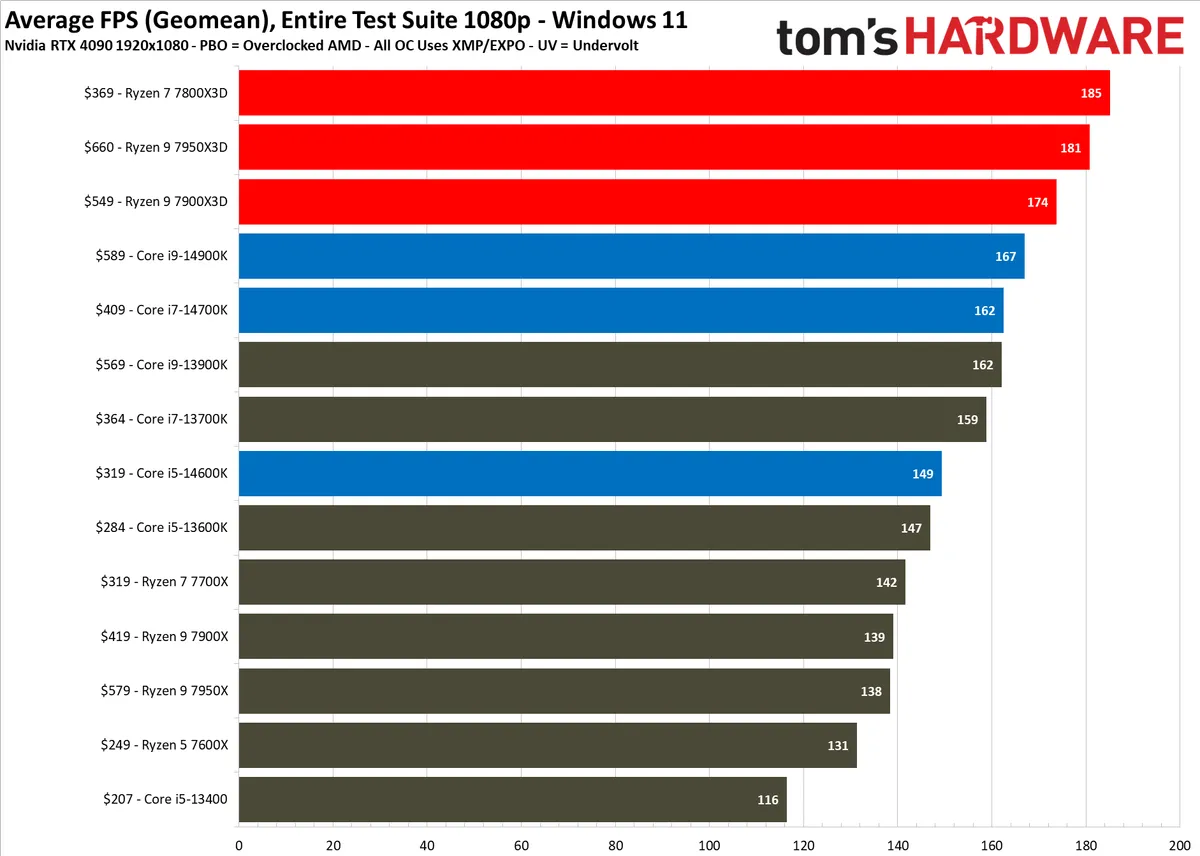
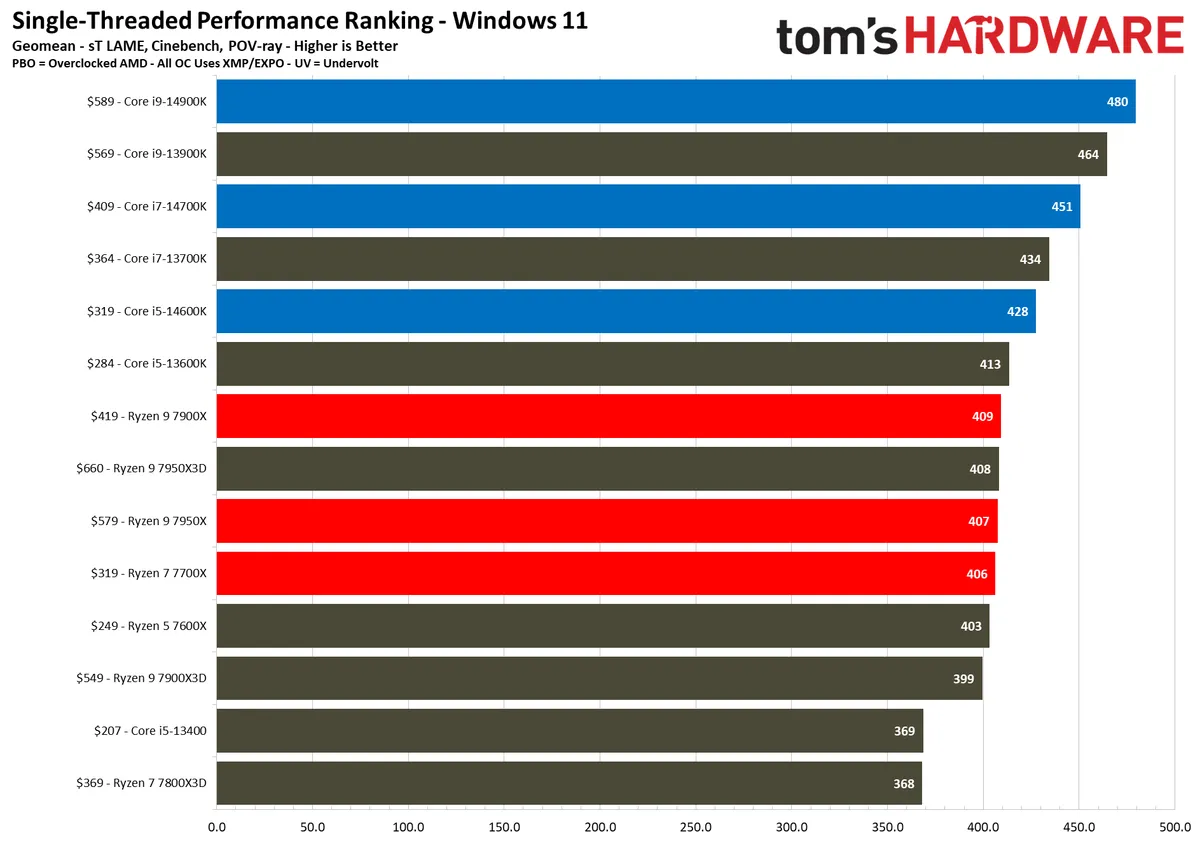
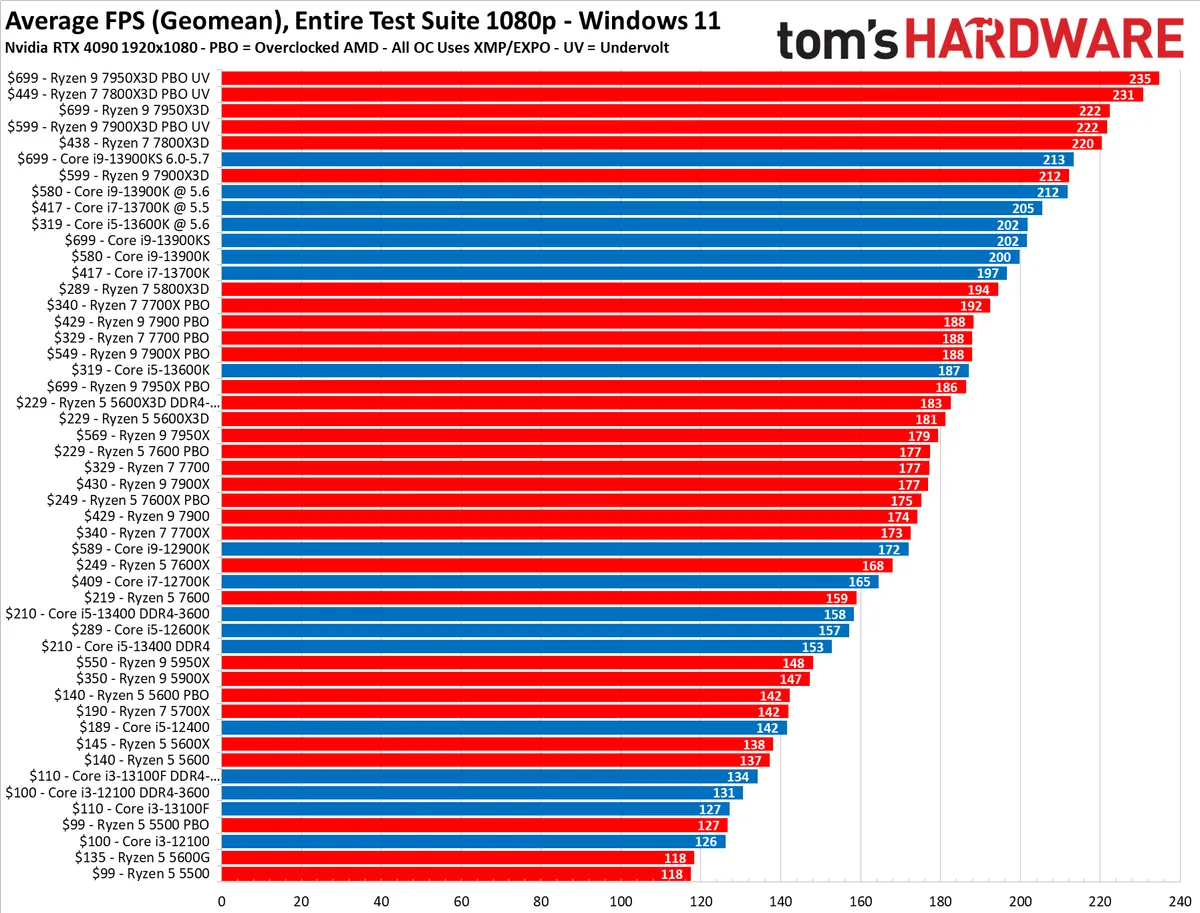
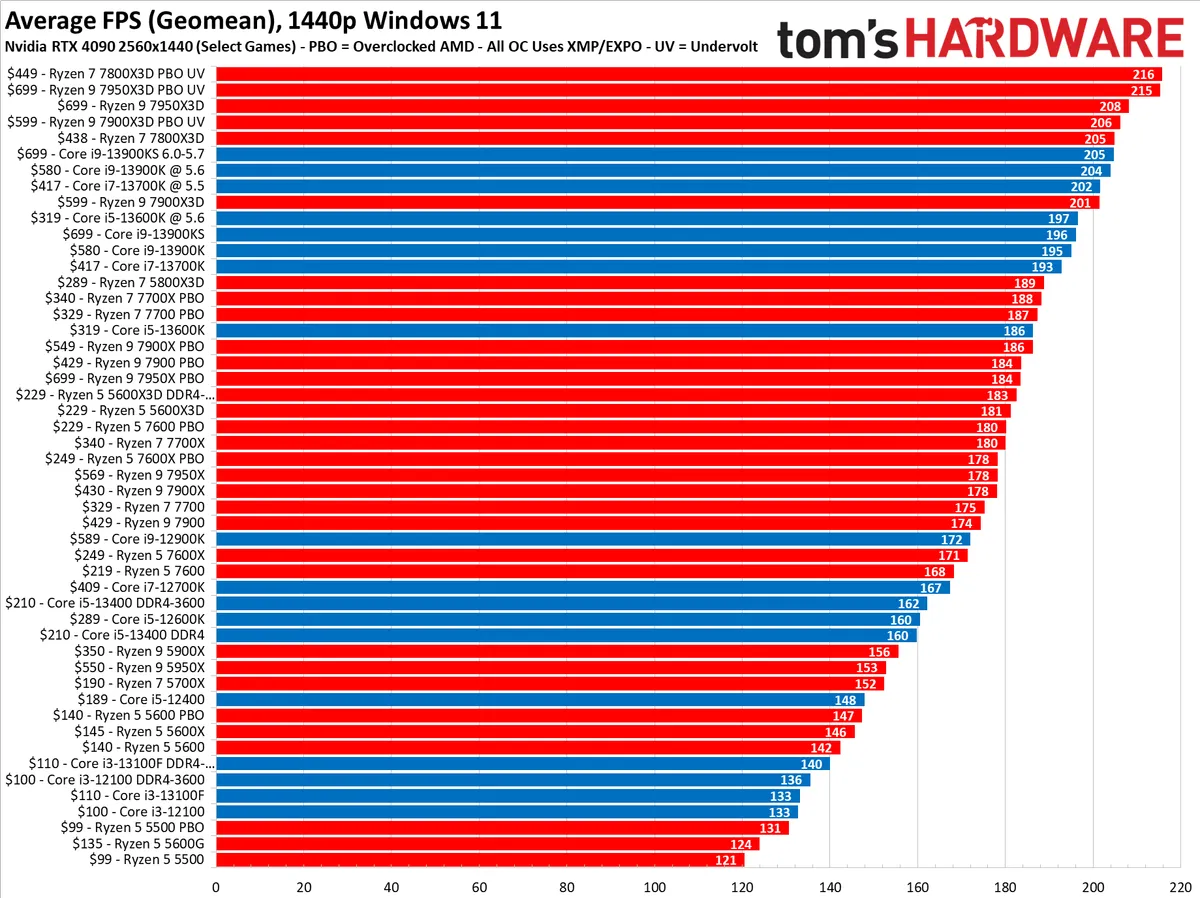
We rank all the Intel and AMD processors based on our in-depth CPU benchmarks hierarchy. You can see some of those numbers in the charts above, including CPU overclock performance results (marked as PBO for AMD processors). We're currently retesting all of these processors with the Nvidia RTX 5090, but only the first four slides have that testing. The remainder are historical testing results with the RTX 4090, which we'll remove once we have fully retested all of the gaming CPUs with the RTX 5090 for our benchmarks. This group of results comprises only the chips that have passed through our newest test suite. Additionally, the tables in our CPU benchmark hierarchy include rankings based on past CPU benchmarks and breakdowns of single- and multi-threaded performance in productivity applications across a broad spate of processors. Finally, be aware that the pricing in the charts above can fluctuate.
Quick Shopping Tips
When choosing the best CPU for gaming in 2026, consider the following:
- You can't lose with AMD or Intel: As noted in our AMD vs. Intel feature, AMD tends to make the best all-around CPU for gaming for mainstream PCs lately, but both offer compelling performance options at any given price point.
- Eight cores is sufficient for gaming: If you’re looking at a pricey flagship, you’re likely wasting some money if gaming is your primary focus. You can game on as little as a quad-core CPU, but performance scaling really falls off past eight cores.
- Budget platform costs: You never want to pair a strong CPU with a weak GPU, RAM, and storage. Right now, it’s especially important to consider platform costs, however. DDR5 prices are peaking, and you’ll need to factor in the cost of DDR5 and a new motherboard if you’re coming from an older socket like AM4.
- Overclocking isn’t for everyone, but if you follow our How to Overclock a CPU guide, you can scrape out extra performance gains.
Best CPU for Gaming 2026 - $300 to $400

The Ryzen 7 9800X3D technically isn’t the fastest gaming chip on the market any more. That title goes to the new Ryzen 7 9850X3D, though the victory is marginal. As you can read in our Ryzen 7 9850X3D review, AMD’s latest X3D offering pushes ahead by 3.3% on average. Despite a minor uplift, we’re still recommending the Ryzen 7 9800X3D. With prices as they currently are, the Ryzen 7 9850X3D is only 3.3% faster despite costing around 6% more than the Ryzen 7 9800X3D.
This chip really has no peer in the market outside of the Ryzen 7 9850X3D — the Ryzen 7 9800X3D delivers outstanding gaming performance, beating Intel's fastest gaming chip, the $469 Core i9-14900K, by 30% in our test suite. The 9800X3D is also almost unbelievably 35% faster than the current-gen Intel flagship, the $560 Core Ultra 9 285K. The stock Ryzen 7 9800X3D's 1% low frame rates (a good smoothness indicator) also deliver an exceptionally smooth gaming experience, benefiting gamers even in GPU-limited scenarios.
The Ryzen 7 9800X3D has eight cores and 16 threads that operate at a 4.7 GHz base and 5.2 GHz boost clock rate. The chip employs AMD's 3D V-Cache tech with a new spin, which places a 3D-stacked SRAM chiplet underneath the die to deliver an incredible 96MB of L3 cache to great effect. AMD moved the L3 cache chiplet from the top to the bottom of the compute die this generation. That gives the integrated heat spreader (IHS) direct access to the compute die, allowing for more thermal headroom, and in turn, higher clock speeds. The end result is a comparatively low-power chip that delivers incredible gaming performance and comparable productivity performance to other eight-core models on the market.
3D V-Cache previously came with trade-offs in the productivity department, but that’s not the case with the Ryzen 7 9800X3D. Still, 3D V-Cache doesn’t provide a performance benefit in every game, and the performance benefit is less pronounced as your display resolution climbs.
The Ryzen 7 9800X3D has much lower power consumption than the Intel competition, making it a far cooler processor that won't require as expensive accommodations, like a beefy cooler, motherboard, and power supply. It also takes particularly well to undervolting, which is easy to accomplish with AMD’s Curve Optimizer. That means the 9800X3D delivers top-notch gaming performance and a cooler, quieter, and less expensive system than you'll get with an Ultra 9 or Core i9.
Read: AMD Ryzen 7 9800X3D Review

The $305 Ryzen 7 9700X had a rough initial product launch, but AMD's targeted firmware and operating system improvements have changed the picture tremendously, allowing the chip to place much higher on our CPU benchmark hierarchy (head there for the most up-to-date gaming benchmarks). Combined with lower-than-launch pricing, the Ryzen 7 9700X is a strong contender, tying Intel's Core i9-14900K in gaming and beating the Core i7-14700K. That's not to mention that it beats Intel's entire lineup of Arrow Lake processors as well. Now, all of those processors offer faster performance in heavily-threaded productivity applications than the 9700X, but when it comes to a pure gaming experience, the 9700X either ties or beats all current Intel competitors.
The Ryzen 7 9700X has eight Zen 5 cores with 16 threads that operate at a 3.8 GHz base and 5.5 GHz boost clock. The chip has a 65W TDP, though AMD retroactively added a 105W TDP option you can select in the BIOS that helps boost performance in productivity applications. It's covered by the warranty, as well. With either setting, the 9700X has comparatively tame power consumption, so it is an easy chip to cool. You'll have to buy your own cooler for the processor, though.
The Ryzen 7 9700X drops into socket AM5 motherboards, and B-series motherboards make the most sense for this class of chip. B850 and B840 motherboards get AMD's latest chipset with features like mandatory PCIe 5.0 support on the top M.2 slot and better availability for features like Wi-Fi 7. However, the Ryzen 7 9700X will still work with the older B650 chipset if you can find a board on sale.
Read: Ryzen 5 9700X Review

The $350 Core Ultra 7 270K Plus performs like a flagship CPU, but it costs about half as much. In games, it narrowly outclasses the Core i7-14700K and offers a 2.4% boost over the competing Ryzen 7 9700X. AMD’s last-gen Ryzen 7 7800X3D still offers around a 10% boost over the Core Ultra 7 270K Plus, but it’s also around $50 to $80 more expensive depending on sales.
It’s a solid gaming CPU, and certainly a better recommendation than the Core i7-14700K given prices right now. Compared to the Ryzen 7 9700X, things are tighter. The Core Ultra 7 270K Plus gains an edge with productivity performance. Short of the 9950X, it’s at the top of our multithreaded performance rankings, more than doubling the performance of the Ryzen 7 9700X.
On the gaming front, it supports Intel’s new Binary Optimization Tool, which offers an average of an 8% improvement in gaming performance based on our testing. It’s only available in a limited number of games at the moment, but Intel says it plans to support the feature with updates in the future.
For specs, the Core Ultra 7 270K Plus is close to the 285K. It comes with 24 cores and threads, split across eight Lion Cove P-cores and 16 Darkmont E-cores. The P-cores boost up to 5.4 GHz and the E-cores can climb to 4.7 GHz. Across the CPU, you get a total of 76 MB of combined L2 and L3 cache. It comes with a 125W TDP and 250W MTP. Critically, the Core Ultra 270K Plus also comes with a 900 MHz boost in die-to-die frequency and 400 MHz boost in fabric frequency compared to stock Arrow Lake chips.
The Core Ultra 7 270K Plus slots into existing 800-series motherboards with the LGA 1851 socket. This is an unlocked chip, so if you want to get the full benefits of overclocking, you’ll need a Z890 board. However, it’ll still work with H- and B-series motherboards, just without CPU overclocking support.
Read: Core Ultra 7 270K Plus Review
Mid-Range Best CPU for Gaming - $200 to $300

Intel has returned to gaming prominence with its Arrow Lake Refresh CPUs, and nowhere is that clearer than with the $220 Core Ultra 5 250K Plus. It’s priced like a budget CPU at $220, but it can perform as well (and sometimes even better) than chips that cost twice as much. It doesn’t dominate the gaming charts in the same way as AMD’s X3D offerings, but at this price, it doesn’t need to. It offers marginally better performance than AMD’s competing six-core Ryzen 5 9600X in games while running the tables with application performance.
On average, the Core Ultra 5 250K Plus is 1% faster than the Ryzen 5 9600X at 1080p, and 9% faster than the 245K. It’s functionally identical, but Intel’s new iBOT feature allows the chip to hold some solid leads in certain titles. For instance, it’s 10% ahead of the 9600X in Cyberpunk 2077. Even in a non-iBOT title like Doom: The Dark Ages, the 250K Plus leads by 12%. There are still some games that struggle with the unique Arrow Lake architecture like F1 2024, but the losses are less pronounced with the souped-up Arrow Lake Refresh chips compared to the stock offerings.
The application performance is what really stands out with the 250K Plus, however. With 18 cores, it outpaces the Core i7-13700K, nearly matches the Core i7-14700K, and more than doubles the performance of the Ryzen 5 9600X in multithreaded applications. In single-threaded applications, it beats the Ryzen 5 9600X by 6%.
Although you get 18 cores, they’re split between six Lion Cove performance cores and 12 Darkmont efficient cores. The P-cores climb up to 5.3 GHz, while the E-cores top out at 4.6 GHz. The CPU comes with a combined 60 MB of L2 and L3 cache, along with a TDP of 125W and a MTP of 159W. Like all Arrow Lake chips, it doesn’t support Hyper-Threading, so you get 18 total threads.
The Core Ultra 5 250K Plus slots into existing motherboards with the LGA 1851 socket. It’s unlocked for overclocking, so a Z-series motherboard is an ideal pairing. However, Intel increased the die-to-die frequency and the fabric frequency out of the box, and you’ll see those improvements in action on B- and H-series motherboards, as well. It’s locked to DDR5 memory, unlike Raptor Lake and Alder Lake platforms, and it officially supports speeds up to 7200MT/s.
Read: Core Ultra 5 250K Plus Review

The $230 Ryzen 5 7600X3D is currently the best value gaming CPU you can get right now, though it trades performance in other areas to reach that status. It's just 4.5% slower than the Ryzen 7 7800X3D based on our testing, giving you most of the performance of AMD's coveted 3D V-Cache in games without the extra cost.
In games, it outclasses more expensive CPUs with ease, including the Ryzen 7 9700X, and averaged just 65W of power draw during our gaming tests. Outside of games, however, the Ryzen 5 7600 X3D struggles. The Core Ultra 5 250K Plus is more than twice as fast in multithreaded performance, and in single-threaded performance, even the base Ryzen 5 7600X is around 13% faster.
The lagging productivity performance makes sense. The Ryzen 5 7600X3D is a six-core / 12-thread chip, so it has limited multithreaded potential, and it only clocks up to 4.7 GHz. The limited specs give AMD room to cram 102 MB of combined L2/L3 cache on the die, however, which comes with a sizeable boost in gaming performance. Compared to the base Ryzen 5 7600X, the X3D version is 22% faster despite coming in at lower peak clocks and power draw.
You can slot the Ryzen 5 7600X3D into socket AM5, which is available on 600- and 800-series motherboards, though the latter may require a BIOS update. Memory and CPU overclocking is available on both B- and X-series chipsets; however, the Ryzen 5 7600X3D has a locked multiplier, so the only overclocking you can access is through AMD's Precision Boost Overdrive, or PBO.
Read: Ryzen 5 7600X3D review
Highest Performance Best CPU for Gaming - $400+

How do you improve upon a CPU that already claims a dominating position in gaming and productivity workloads? You add more cache, of course. The Ryzen 9 9950X3D2 is powerful, expensive, and hungry for wattage, but it’s the best of the best if you want top-shelf gaming and application performance. It throws value out the window, and it’s only marginally better than the Ryzen 9 9950X3D, but it is still better.
Based on our testing, it’s about 3.9% ahead of the Ryzen 9 9950X3D in multithreaded applications, and in lockstep in gaming at 1080p. Compared to Intel’s Core Ultra 7 270K Plus, the Ryzen 9 9950X3D2 is 9% ahead in multithreaded performance and 23% ahead in average gaming performance. The Ryzen 7 9800X3D delivers a better value on the gaming front, and the Core Ultra 7 270K Plus is a monster productivity chip at a third of the price of the 9950X3D2. But the magic trick of this chip is that it can do both without breaking a sweat.
Under the hood, the Ryzen 9 9950X3D2 is similar to the Ryzen 9 9950X3D. It’s a 16-core / 32-thread chip packing AMD’s Zen 5 architecture, and it tops out with a 5.6 GHz boost clock; just 100MHz behind the 9950X3D. As the name suggests, this processor is unique because it uses AMD’s 3D V-Cache on both CCDs. Both eight-core CCDs have 32 MB of onboard cache, plus an additional 64 MB chunk placed under the cores, giving you a total of 192 MB of L3 cache.
The extra cache slightly accelerates multithreaded performance overall, though only by around 4%. There are specific workloads where the advantage is more present, with some data science workloads showing performance gains in the realm of 26% over the Ryzen 9 9950X3D. Those specific workstation-class workloads are where the Ryzen 9 9950X3D2 earns its stripes.
Otherwise, it’s the chip to buy because you simply want the best, no matter what the cost or how marginal the improvements are. It slots into existing AM5 motherboards, and it’s best suited for newer 800-series chipsets. AMD officially supports memory speeds up to DDR5-5600, though we find that DDR5-6000 is the sweet spot for Zen 5 CPUs.
Prices have dropped since release, though the 9950X3D2 is still expensive. It launched at $1,000, but you can find the chip for around $900 now.
Read: AMD Ryzen 9 9950X3D2 Review

The prior-gen $469 Core i9-14900K is now selling for all-time low pricing, primarily because the newer $560 Core Ultra 9 285K has arrived to take its place. However, the Core Ultra 9 285K is actually slower than the 14900K in gaming, so it isn't a suitable replacement. The new Core Ultra 7 270K Plus is marginally slower based on our testing, as well. Even in the face of Intel’s 200S Boost update, which was meant improve gaming performance, the competitive landscape remains unchanged. In our testing, the Core Ultra 9 285K gained an average of 7% from the update, which means it’s still slower than the Core i9-14900K.
You should be aware that the much more economically-priced 14700K (listed above) is only 2% slower than the 14900K in gaming but costs over $100 less. The Ryzen 7 9700X, also listed above, is also less expensive and effectively ties the 14900K in gaming.
However, there are Intel fans willing to pay extra for the absolute most gaming performance they can get from an Intel platform. Also, the 14900K does offer more multi-threaded horsepower than the 14700K and 9700X, which could be useful if you game, stream, and record simultaneously or do other heavy multi-tasking while gaming. Just make sure that your use case justifies the extra cost.
The 14900K sports leading-edge connectivity, supporting DDR4-3200 or up to DDR5-5600 memory, along with 16 lanes of PCIe 5.0 and an additional four lanes of PCIe 4.0 from the chip for M.2 SSDs.
The chip comes with eight P-cores that support Hyper-Threading and 16 single-threaded E-cores for a total of 32 threads. The P-cores have a 3.2 GHz base, and peak frequencies reach an amazing 6.0 GHz with Turbo Boost Max 3.0 (this feature is only active on P-cores). Meanwhile, the E-cores have a 2.4 GHz base and stretch up to 4.4 GHz via the standard Turbo Boost 2.0 algorithms. The chip also has 36MB of L3 cache and 32MB of L2.
This 14900K has a 125W PBP (base) and 253W MTP (peak) power rating, but we recorded considerably lower power consumption than its prior-gen counterpart. You'll need to buy a capable cooler for the chip, and you'll also need either a 700-series or 600-series motherboard. Like other Raptor Lake Refresh chips, you can find DDR4 and DDR5 motherboards, though you’ll need to go with a DDR5 board for the highest performance.
The lower price of DDR4 might entice some gamers, but you'll lose anywhere from 5-8% of gaming performance with higher-end Intel chips. You can step up to the much more expensive DDR5 if you need access to more memory throughput and, thus, every bit of performance possible.
Beyond specs, the Core i9-14900K was at the center of a years-long controversy concerning instability. An error in the microcode (CPU firmware) meant the Core i9-14900K would degrade faster than expected, starting with instability in games. Intel has rectified the issue with microcode 0x12F, so make sure you update your BIOS immediately if you pick up Intel’s last-gen flagship
Read: Intel Core i9-14900K Review
Best Budget CPU Pick - $100 to $150

The $164 Ryzen 5 7600X is an attractive budget CPU at its new price, forced down by Intel's new Arrow Lake Refresh chips. It’s marginally slower than the Ryzen 5 9600X, but also marginally cheaper – the Ryzen 5 7600X offers about 90% of the performance of the Ryzen 5 9600X for 94% of the price. It’s a slightly worse value, but it’s still a good option to keep in mind, especially if you find it on sale. The Ryzen 5 7600, sans X, is available at around the same price. We’ve yet to see it drop below the Ryzen 5 7600X, however.
With the 7600X, you get six cores and 12 threads based on the Zen 4 architecture, clocked at 4.7GHz with boost speeds up to 5.3GHz. Unlike the Ryzen 5 9600X, the Zen 4-based version comes with a TDP of 105W. Cooling it shouldn’t be an issue, and you’re free to run in AMD’s 65W Eco mode through the Ryzen Master software.
The Ryzen 5 7600X slots into AM5 motherboards, including 600- and 800-series chipsets, and it supports PCIe 5.0. DDR5 is required, which is a tough pill to swallow at this bang-for-your-buck price point, but it’s hard to avoid soaring RAM prices.
Read: Ryzen 5 7600X review

The $135 AMD Ryzen 5 5600 delivers a solid blend of performance in both gaming and productivity applications, bringing a new level of value to the Zen 3 lineup. If you're fine sticking with a previous-gen AM4 motherboard, the Ryzen 5 5600 makes a great base for a budget build. The primary trade-off for the AM4 platform is that you're limited to DDR4, and you don't have access to PCIe 5.0. You also have a limited runway for upgrades, as the fastest gaming CPUs on AM4 – the Ryzen 7 5700X3D and Ryzen 7 5800X3D – have reached end of life.
The Ryzen 5 5600 also makes an absolutely unbeatable budget chip if you're updating a first-gen Ryzen system. The 5600 unseats the Ryzen 5 5600X, a long-time favorite. The 5600X is only a mostly imperceptible ~1% faster in gaming and multi-threaded PC work than the non-X model, but provides a 4% advantage in single-threaded work.
Our testing shows that the Ryzen 5 5600 generally matches the gaming performance of its more expensive sibling, the ~$230 Ryzen 7 5800X. That makes the 5600 an incredibly well-rounded chip that can handle gaming well, from competitive-class performance with high refresh rate monitors to multi-tasking gaming workloads like streaming, while also serving up more than enough performance for day-to-day productivity apps. As with all AMD CPUs for gaming, you can fully overclock the chip.
The Ryzen 5 5600 has a 3.7 GHz base and 4.6 GHz boost clock. The chip also has a 65W TDP rating, so it runs cool and quiet. Existing AMD owners with a 500-series motherboard will be happy, as the 5600X drops right into existing 500-, 400-, and 300-series motherboards. If you need a new motherboard to support the chip, AMD's AM4 motherboards are plentiful and relatively affordable, with the B-series lineup offering the best overall value for this class of chip.
Prices for the Ryzen 5 5600 have drifted upward as stock depletes, but that’s offset by platform costs. In addition to low prices on AM4 motherboards, the Ryzen 5 5600 is limited to DDR4. High DDR5 prices are a significant roadblock to opting for a newer chip, as prices continue to surge. So it’s hard to recommend a newer budget CPU, even if it’ll net you higher performance. In the event you already have a kit of DDR5, the $189 Ryzen 5 7600 is a compelling option, and it includes AMD’s Wraith Stealth cooler.
Read: AMD Ryzen 5 5600 Review
Entry-Level Best CPU for Gaming - For gaming on integrated GPUs

The $268 Ryzen 7 8700G, AMD's flagship desktop APU, delivers the fastest socketed performance on the market from integrated graphics, bringing passable 1080p gaming to the desktop PC without a discrete graphics card, but its high price point relegates it to a niche audience.
In contrast, the $191 Ryzen 5 8600G delivers 90% of the 8700G's performance but for ~$80 less, making it a solid alternative for gaming systems that don't use a discrete GPU.
Naturally, you'll have to accept lower fidelity settings and be realistic about which titles can play at 1080p resolution. Still, AMD's Hyper-RX suite of features, which includes in-driver Radeon Super Resolution upscaling tech, frame generation with AMD Fluid Motion Frames (AFMF), Anti-Lag+, and Radeon Boost, helps boost performance at a slight cost to image quality. This new feature set, a first for AMD's iGPUs, is a boon for budget gamers.
The Ryzen 5 8600G has six Zen 4 CPU cores and the RDNA 3 GPU engine with eight CUs. The Ryzen 5 8600G drops into the AM5 platform, with value-focused B650 and A620 motherboards being the obvious best combination. These systems offer a new level of connectivity for AMD's APU processors, which were previously on the aging AM4 platform but require DDR5 memory. That adds some cost, so do a value analysis before selecting this processor. If you're looking for the lowest entry price possible with an APU, the Ryzen 5 5600G listed below slots in as the value alternative.
The Ryzen 7 8600G only supports 16 usable lanes of PCIe 4.0 connectivity, while other processors on the AM5 platform support PCIe 5.0. However, we don't feel this will impact this class of system.
More: AMD Ryzen 7 8700G and Ryzen 5 8600G Review

The Ryzen 5 5600G steps into the arena as the value champ for APUs, which are chips with strong enough integrated graphics that they don't require a discrete GPU for light gaming—just be sure you're willing to accept lowered quality settings.
The Ryzen 5 5600G gives you 96% of the gaming performance on integrated graphics than its more expensive sibling, the Ryzen 7 5700G, but for 25% less cash. Our testing shows that its level of performance makes it the best value APU on the market. As long as you're willing to sacrifice fidelity and resolution and keep your expectations in check, the Ryzen 5 5600G's Vega graphics have surprisingly good performance in gaming.
The 5600G's Vega graphics served up comparatively great 1280x720 gaming across numerous titles in our tests, but options become more restricted at 1080p. Of course, you can get away with 1080p gaming, but you'll need to severely limit the fidelity settings with most titles.
With eight cores and 16 threads that operate at a 3.9 GHz base and boost up to 4.4 GHz, the Ryzen 5 5600G also offers solid performance for its price point in standard desktop PC applications. The chip also comes with a bundled Wraith Stealth cooler, sweetening the value prop, and drops into existing 500-series and some 400-series motherboards, though support on the latter will vary by vendor.
The Ryzen 5 5600G is nearly five years old, and as a result, it’s hard to find it in stock at a reasonable price. AMD updated this model with the Ryzen 5 5600GT in early 2024, which features identical silicon and a slight boost to clock speed, and you’ll generally find it for less at around $150.
If your budget is tight and you're looking to build a system for modest gaming, you should check out our Best Cheap CPU feature. Some of those chips can deliver passable gaming performance without a graphics card, and their prices start at just $55 (£40).
Read: AMD Ryzen 5 5600G Review
- MORE: CPU Benchmark Hierarchy
- MORE: AMD vs Intel
- MORE: Best Cheap CPUs
- MORE: Best CPUs for Workstations