Backups To Disk: Four Tape Alternatives Put To The Test
Get Tom's Hardware's best news and in-depth reviews, straight to your inbox.
You are now subscribed
Your newsletter sign-up was successful
Test System
| Hardware | |
|---|---|
| Processor | Intel Pentium 4, 2.0 GHz256 kB L2 Cache (Willamette) |
| Motherboard | Intel 845EBTIntel 845E ChipsetBIOS BT84520A.86A.0024.P10 |
| Memory | 256 MB DDR/PC2100, CL2.0Micron/Crucial |
| Controller | i845E UltraDMA/100-Controller (ICH4)On-Board USB 2.0 (ICH4)On-Board FireWire |
| Graphics card | ATI Radeon SDRAM, 32 MB |
| Network | 3COM 905TX PCI 100 MBit |
| OS | Windows XP Professional 5.10.2600Service Pack 1 |
| Drivers & Settings | |
| Graphics driver | 5.1.2001.0 (Windows XP Standard) |
| DIE driver | Intel INF Drivers 5.02.1003 |
| DirectX version | 9.0c |
| Resolution | 1024x768, 16 Bit, 85 Hz refresh |
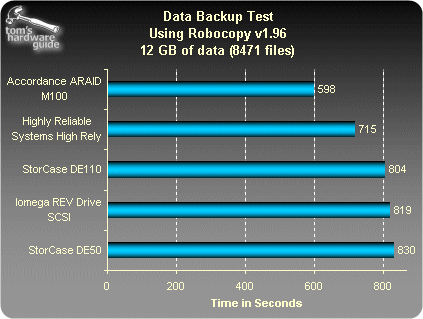
To get a picture of the performance of these storage products, we resorted to a copy tool instead a relying on a classic backup program. As a rule, backup programs are used with data compression. This does not always make sense when using hard drives, as one of their benefits should after all be direct access to the saved data. Running compression algorithms also places a high load on the system, so the storage device interface is no longer the bottleneck.
Test Results
Get Tom's Hardware's best news and in-depth reviews, straight to your inbox.

Patrick Schmid was the editor-in-chief for Tom's Hardware from 2005 to 2006. He wrote numerous articles on a wide range of hardware topics, including storage, CPUs, and system builds.