









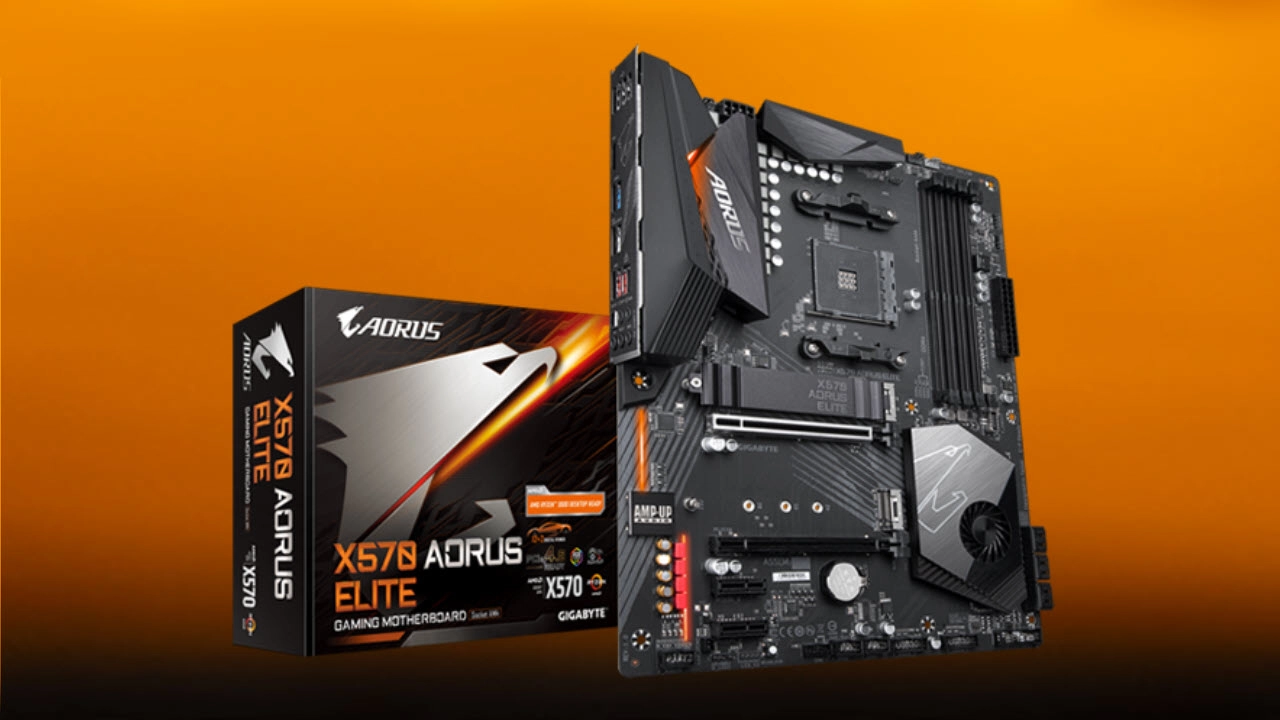
Tom's Hardware Verdict
The sub-$200 X570 Aorus Elite offers a wallet-friendly inroad to AMD’s latest platform. It forgoes some of the extras like USB Type-C, Wi-Fi and lots of RGB. But it handled overclocking our Ryzen 7 3700X without a complaint and performed well in our testing.
Reasons to buy
- +
Low price
- +
Integrated I/O plate
- +
Heatsink on primary M.2 slot
Reasons to avoid
- -
No debug LEDs
- -
No Type-C port on the rear IO
Why you can trust Tom's Hardware Our expert reviewers spend hours testing and comparing products and services so you can choose the best for you. Find out more about how we test.
Features and Layout
Gigabyte’s X570 Aorus Elite mainboard comes in on the budget end of the X570 platform (which is generally more expensive than previous-generation X470 boards), priced under $200. It comes with all of the basics, including PCIe 4.0 support, dual PCIe 4.0 M.2 slots, an integrated I/O shield, large heatsinks covering the VRM and front panel USB Type-C support, among other features.
Supporting both Ryzen 2000 and Ryzen 3000 series processors, the X570 Aorus Elite
is the second board in Gigabyte's X570 product stack, above the non-Aorus-branded X570 Gaming X. The Elite aims to give users a well-balanced platform to build on, offering up-to-date connectivity and a robust power delivery area capable of driving all Ryzen 3000 processors.
The full complement of six SATA ports, two M.2 slots, an Intel I211 Gigabit NIC and Realtek ALC1200 audio codec which supports 7.1 surround are included, and the four DIMM slots are capable of supporting up to 128GB of RAM and/or speeds up to DDR4-4000 (when overclocked). Below is a complete list of specifications from Gigabyte.
Gigabyte X570 Aorus Elite Specifications
| Socket | AM4 |
| Chipset | AMD X570 |
| Form Factor | ATX |
| Voltage Regulator | 12+2 phase (doubled - 7 phase, actual) |
| Video Ports | HDMI |
| USB Ports | USB 3.1 Gen 2 (10 Gbps): 2x Type-A USB 3.1 Gen 1 (5 Gbps): 4x Type-A USB 2.0: 4x Type-A |
| Network Jacks | (1) Gigabit Ethernet |
| Audio Jacks | (5) Analog + SPDIF |
| Legacy Ports/Jacks | ✗ |
| Other Ports/Jack | ✗ |
| PCIe x16 | (1) v4.0 |
| PCIe x8 | ✗ |
| PCIe x4 | (1) v4.0 |
| PCIe x1 | (2) v4.0 |
| CrossFire/SLI | AMD Quad-GPU Crossfire and 2-Way AMD Crossfire |
| DIMM slots | (4) DDR4 |
| M.2 slots | (1) PCIe 4.0 x4 / SATA + PCIe (1) PCIe 4.0 x4 / SATA + PCIe |
| U.2 Ports | ✗ |
| SATA Ports | (6) 6Gb/s |
| USB Headers | (1) v3.x Gen2, (2) v3.x Gen1, (2) v2.0 |
| Fan Headers | (4) 4-Pin |
| Legacy Interfaces | ✗ |
| Other Interfaces | FP-Audio, RGB-LED, TPM |
| Diagnostics Panel | ✗ |
| Internal Button/Switch | ✗ / ✗ |
| SATA Controllers | Integrated (0/1/10) |
| Ethernet Controllers | Intel GbE LAN |
| Wi-Fi / Bluetooth | ✗ |
| USB Controllers | ✗ |
| HD Audio Codec | ALC1220 |
| DDL/DTS Connect | ✗ / ✗ |
| Warranty | 3 Years |
As we’d expect with a budget-priced board, included accessories are minimal, but the basics are covered. Here’s a list of what ships in the box with the board.
- User’s manual
- Support CD
- Installation guide
- 4x SATA cables
- Screw for M.2 slot
- Aorus sticker
- G connector


The Gigabyte X570 Aorus Elite’s appearance is fairly indistinct, with an all-black PCB and some stenciling around the chipset heatsink and audio area. Outside of that, we can see the Aorus branding on the left VRM heatsink along with a shroud covering the integrated rear IO plate. All heatsinks on the board have a brushed-aluminum finish with the chipset heatsink sporting a small fan, along with the Aorus falcon sitting proudly on top.
The DIMM and PCIe slots are also black, matching the board with the primary, metal-clad PCIe slot, which Gigabyte calls Ultra Durable PCIe armor. All other connectors, including the 8-pin EPS, 24-pin ATX and the SATA ports are all black as well.
RGB LEDs do make an appearance on the board. They’re found under the IO shroud by the VRM heatsink, as well as a line on the bottom-left side used to separate the audio bits from the rest of the board. The latter provides a nice glow underneath, while the RGB around the VRM makes for a nice accent on top.
Get Tom's Hardware's best news and in-depth reviews, straight to your inbox.
Overall, the Gigabyte X570 Aorus Elite should fit into most build themes, with its basic-black styling and reserved use of integrated RGB LED lighting.

Starting off at the top half of the motherboard, we get a closer view of the heatsinks and shroud covering the VRMs and back of the IO area. Between the shroud and left heatsink with the Aorus branding on it is where we find that first RGB LED strip. Just above that is a single 8-pin EPS connector.
The VRM for the Elite is listed as a 12+2 phase system on the website. Digging a bit deeper we see the board uses an Infineon IR35201 controller in a 6+1 configuration and uses phase doublers (Infineon IR3599) to run in the 12+2 Gigabyte states. The VRM’s should be able to handle any of the Zen 2 CPUs at stock and with some overclocking.
The top half of the board also houses all four fan headers. Three are located across the top while the 4th is just above the M.2 slot next to the rear IO shroud. All fan headers are hybrids that support both PWM- and DC-controlled fans. Gigabyte’s Smart Fan 5 software manages all the fan headers and allows control over them through six temperature sensors on the board which you can base your fan off of. For example, if your PCH gets hot, the case fan header can spin faster. It also supports “Fan Stop” capabilities which, as the name implies, shuts off the fans below a certain threshold.
Toward the right side of the board, we see the four DIMM slots which skip any armor (not that it’s needed), but use a double-sided locking mechanism to secure the modules. Last, we can see two of the four RGB headers in the upper right-hand corner (the others are located across the bottom). In each area, one header supports your basic RGB strips with a 4-pin setup (2A max) while the other supports addressable RGBs (5A max, 1000 LED max) with a 3-pin header.

Moving down to the bottom portion of the board, on the left side is the audio section. The Realtek ALC1200’s 7.1-channel chip is hidden underneath the EMI shield, with Amp-Up Audio stenciled on top. Below that are two rows of audio caps with the yellow Chemicons on the left and red WIMA FKP2 capacitors on the right. Separating the audio section from the rest of the board is a “noise guard,” which also includes the 2nd area with RGB illumination. Both sets of LEDs can be controlled via the included RGB Fusion 2.0 software, along with the headers.
The PCIe area consists of two full-length slots and two x1 size slots. The top PCIe connector uses Gigabyte’s armor around the slot to prevent shearing with heavy video cards. The top slot runs at a full PCIe 4.0 x16 sourced from the CPU while the bottom slot is limited to PCIe 4.0 x4 bandwidth from the chipset. The two x1 size slots are also PCIe 4.0.
Also found around the PCIe slots are the two M.2 connectors. The first is located above the primary PCIe slot and has a heatsink on it while the second is above the other full-length slot, sans heatsink. Both connectors support SATA and PCIe 4.0 x4/x2 SSDs up to 110mm in length. The nice bit (thanks to the extra bandwidth addorded by PCIe 4.0) is that there’s no port sharing when using both slots.
The chipset heatsink covers a lot of area on the board and has a small fan inside to help keep the 11W chip cool. We only heard the fan on boot when it ramps up to full speed and then winds down. Outside of that, the fan remained inaudible, even under heavy loads including stress testing. Sliding more to the right are the six SATA3 (6 Gbps) ports.
Finally, across the bottom are several headers which include the 2nd set of RGB headers, the Q-Flash button, and front-panel USB headers. There is nothing out of the ordinary to report on this front, so here’s a bulleted list of the other headers:
- Front Panel Audio
- aRGB and RGB headers
- Q-Flash button
- TPM header
- 2x USB 2.0 headers
- 2x USB 3.0 headers
- Front panel header

Last but far from least is the rear I/O. Surprisingly, the X570 Aorus Elite has an integrated rear I/O plate, which gives the board a more expensive feel and a cleaner look. Gigabyte used the same design cues with an Aorus falcon on the I/O plate as well as the same lined pattern stenciled on the board.
But it isn’t just about looks. There are a total of 10 USB ports available: Four USB 2.0 (black), four USB 3.0 (blue and white - the latter for bios flashback/Q-Flash) and two USB 3.1 Gen2 ports. One thing you won’t find is a USB Type-C port of any kind, but such as life when buying an entry-level board. You’ll also find the Intel I211 LAN port here, as well as the audio stack (5 analogs, one SPDIF). If you happen to be using an APU on this motherboard, the video comes from a single HDMI 2.0 port.

MORE: Best Motherboards
MORE: How To Choose A Motherboard
MORE: All Motherboard Content

Joe Shields is a staff writer at Tom’s Hardware. He reviews motherboards and PC components.
-
alan.campbell99 I ended up going for this motherboard shortly after the Ryzen 3000 CPUs dropped. It's working well for me so far. My considerations were cost, PCIe16 slots and m.2 heatsink scheme. I wanted two PCIe16s so I could add in my SAS card, I wanted separate m.2 heatsinks that didn't require messing with the chipset heatsink, I also didn't need lots of SATA as I use two NVME drives and a bunch of SAS SSDs I acquired. No optical drive in this build either so presently not using any SATA ports.Reply -
atombombe Recently upgraded to a Ryzen 3700X cpu and needed a motherboard. After searching a lot I finally chose to Gigabyte Aorus Elite X570. First Gigabyte product I own. Not afraid of buying more from the Gigabyte brand in the future.Reply
What made me buy this board over other products was the Intel lan, Realtek ALC1200 audio codec and also every review states that the board had good VRMs. Not that I'm a huge overclocker, but I chose good VRMs because of future expand-ability. I might get some better CPU with more cores and then need the extra power on the board.
It has been very easy to build the computer. Everything just worked. Put in DDR4 3200 CL14 ram, chose XMP in bios and it has been running without any hickups! -
robert40 it is funnyReply
"Elite was able to push our Ryzen 7 3700X to 4.16 GHz at 1.32V. Anything beyond this point yielded a near-instant stoppage of AIDA64’s stress test "
this cpu is 3.6gh -4.4 gh without overlocking:) -
SovereignKnight Replyrobert40 said:it is funny
"Elite was able to push our Ryzen 7 3700X to 4.16 GHz at 1.32V. Anything beyond this point yielded a near-instant stoppage of AIDA64’s stress test "
this cpu is 3.6gh -4.4 gh without overlocking:)
That is 4.4 GHz on ONE or TWO cores. The rest of the cores are running @ ~ 3.6-3.8 GHz.
The overclock in this review is 4.16 GHz on ALL cores.
It takes a hell of allot of power to push all cores to 4.16 GHz, vs. just 1 or 2 cores at 4.4 GHz.
That also takes more voltage, in turn creating more heat.
The benefit in this case for overclocking all cores to 4.16 GHz is, you get one hell of a multi threaded boost for any application that will use more than one or two cores. -
raposa ReplySovereignKnight said:That is 4.4 GHz on ONE or TWO cores. The rest of the cores are running @ ~ 3.6-3.8 GHz.
The overclock in this review is 4.16 GHz on ALL cores.
It takes a hell of allot of power to push all cores to 4.16 GHz, vs. just 1 or 2 cores at 4.4 GHz.
That also takes more voltage, in turn creating more heat.
The benefit in this case for overclocking all cores to 4.16 GHz is, you get one hell of a multi threaded boost for any application that will use more than one or two cores.
Do you mean a higher Tier motherboard, would provide more power, thus providing better mult-thread perfomance? Thus maximizing potential of multicore processores, like 3900x/3950x? -
robert40 Reply
You are right! Sorry.I am new on amd (ryzen 5 3600) from intel I5 3570k (z77) and from 3400mhz to 4200 all core (4 core) without + voltage or anything else.......just change the multiper.On 4300 just work 3 core and 4th core must put just 4200mhx.But i am sure + little voltage will fine.and more....SovereignKnight said:That is 4.4 GHz on ONE or TWO cores. The rest of the cores are running @ ~ 3.6-3.8 GHz.
The overclock in this review is 4.16 GHz on ALL cores.
It takes a hell of allot of power to push all cores to 4.16 GHz, vs. just 1 or 2 cores at 4.4 GHz.
That also takes more voltage, in turn creating more heat.
The benefit in this case for overclocking all cores to 4.16 GHz is, you get one hell of a multi threaded boost for any application that will use more than one or two cores.
so amd is different(:
but still the best value.... -
kadir8804 Reply
check your configuration I have that board and that micro at 4.25 1.25v without problemsrobert40 said:it is funny
"Elite was able to push our Ryzen 7 3700X to 4.16 GHz at 1.32V. Anything beyond this point yielded a near-instant stoppage of AIDA64’s stress test "
this cpu is 3.6gh -4.4 gh without overlocking:) -
Ancient Alien Wow, I must have bad luck. I have been building my own systems since 1996. Purchased the X570 Aorus Elite in Dec 2019. BIOS erased the partitions on 5 HHDs totaling 16TB. Returned for a replacement and new board wouldn't recognize any drives but one. Came with f4 BIOS, so I downloaded the f20 BIOS to flash. BIOS recognized the USB drive, but I couldn't save or load from it. Sometimes, while booting, the BIOS screen would come up without pressing the delete key and would do this several times before I finally got the OS to load. Had random system freeze ups that became more frequent. Ended up calling it a $200 loss and replaced it with a MSI MEG X570 Tomahawk WiFi and the system behaves well now. No more Gigabyte products for me.Reply