Terratec DMX 6Fire 24/96: Drivers
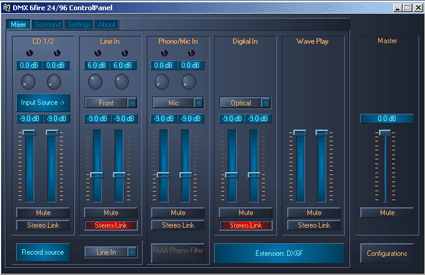
The DMX 6Fire control panel is divided into 4 main tabs. The first contains the mixing desk and related settings. This includes the volume controls and potentiometers to adjust the gain for each input/ output. There are the settings for CD 1 and 2 inputs, front and back Line Ins, pre-amplified phono and mike inputs, digital inputs and the overall volume and Wave sound control. The potentiometers for gain act directly on the AK4524 converters, and range from 0 to 18 dB, in 0.5 dB increments. Recording options are all grouped into this tab. Note especially the "Input Source" and "Record Source" buttons, which are used to switch easily from one input to another, to decide exactly which input is to be recorded, and from which source. Below the phono and mike mixer is a button to activate or deactivate the RIAA phono filter on the pre-amplifier. Remember that a phono input has the specific feature of integrating a single special filter for sound improvement.
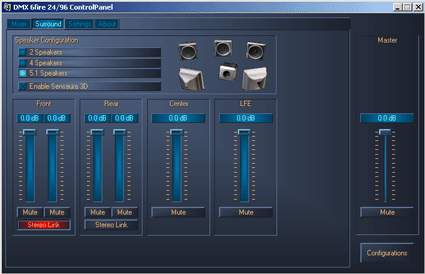
The second tab, called "Surround," contains management of the speakers connected to the card, as its name implies. There is a choice of 2 satellites, 4 satellites and 5.1 speakers, but not a specific headphone mode, which could definitely be a drawback for night-time players. An HRTF filter dedicated to headphones would be much better than using the default 2 satellite mode. The Surround tab can also be used to deactivate the Sensaura 3D, which is advisable if you want to play a DVD video with a Dolby Digital track.
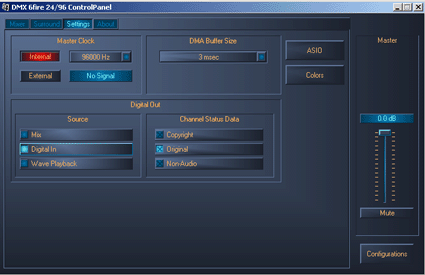
The third tab has a number of options. You can adjust the frequency of the card's internal workings, from 8000 to 96000 Hz, and specify the frequency of input digital signals. There is a menu to adjust the size of the DMA buffer, from 1 to 15 milliseconds. The ASIO button is used to set the number of samples per buffer to find the best latency time in Cubase. This setting depends on the sample rate chosen for sound processing. So, with 336 samples per buffer, you get excellent results of 3 milliseconds in 96 kHz or 8 milliseconds in 44.1 kHz. This tab features the options for digital outputs, as well. Also note that you can save several series of settings, which can be useful if you use the card regularly for repetitive tasks.


