









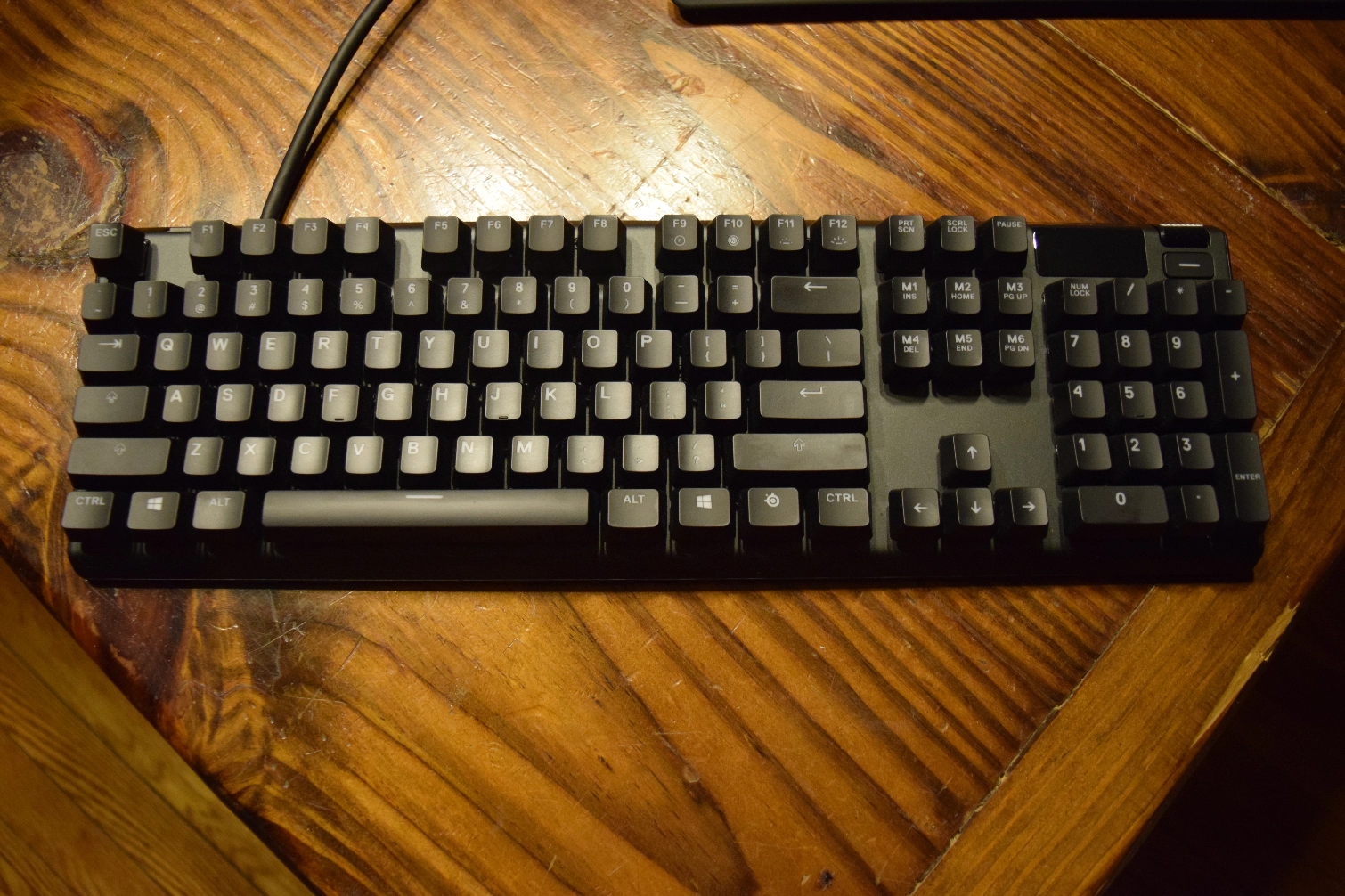
Tom's Hardware Verdict
The SteelSeries Apex 7 is a solid keyboard that lacks the per-key customization that made its counterpart, the Apex Pro, worth considering. It doesn’t quite justify its price because of the limited utility of its integrated OLED Smart Display and ubiquity of RGB-backlit keyboards.
Pros
- +
Attractive RGB lighting
- +
Included magnetic wrist rest
- +
Sturdy aluminum frame
Cons
- -
OLED Smart Display doesn’t add much to the experience
- -
missed inputs
- -
expensive
Why you can trust Tom's Hardware Our expert reviewers spend hours testing and comparing products and services so you can choose the best for you. Find out more about how we test.
Keyboard manufacturers seem convinced that people want more information at their fingertips -- literally. Das Keyboard made notifications via RGB lighting a central aspect of its Q devices (like the Das Keyboard Q5), and SteelSeries decided to do Das one better with the Apex 7, which features an OLED Smart Display in the top-right corner. This monochromatic panel is supposed to represent the future of keyboards. The problem is that the feature isn’t compelling enough to make up for the Apex 7’s shortcomings.
SteelSeries Apex 7 Specs
| Type | Full |
| Switch | SteelSeries QX2 Mechanical RGB Switch in linear Red, tactile Brown, and clicky Blue |
| Lighting | Dynamic Per-Key RGB Backlighting |
| Onboard Storage | Yes |
| Media Keys | Yes |
| Game Mode | No |
| Microcontroller | Unknown |
| Key Rollover | NKRO |
| Polling Rate | 1,000Hz / 1ms |
| Interface | USB 2.0 Type-A to USB 2.0 Type-A |
| Cable | USB 2.0 Type-A (with an additional head for USB passthrough) via unbraided cable |
| Additional Ports | 1 x USB 2.0 Type-A for passthrough |
| Keycaps | Plastic |
| Construction | Aircraft grade aluminum |
| Accessories | Magnetic wrist rest |
| Software | SteelSeries Engine 3.0 |
| Dimensions (W x D x H) | 15.9 x 5.5 x 0.7 inches (403 x 139 x 17mm) |
| Weight | 2.1 pounds (952.5g) |
| Warranty | 1 year |
| Price | $160 |
OLED Smart Display Disappoints
SteelSeries released the Apex 7 alongside the Apex Pro (as well as tenkeyless versions of both keyboards) earlier in 2019. Much of the company’s attention went to the Apex Pro, which features new OmniPoint switches that offer customizable actuation points, with the Apex 7 offering a similar design with traditional switches for people willing to sacrifice customizability for affordability. But without those OmniPoint switches, the Apex 7 relies on the OLED Smart Display to stand out.
The display is a monochrome rectangle that displays a SteelSeries logo by default. It can be customized to display a 120 x 48 pixel image, too, for anyone who’d like to add a little bit of personal flair to the device. Otherwise, it’s primarily used to navigate menus involving the board’s RGB lighting, macro keys, and other settings, which makes it easier to customize the Apex 7 without having to install the companion software offered by SteelSeries.
SteelSeries offers several apps for the OLED Smart Display. Most use it to display additional information: One previews messages received via Discord, another displays in-game details about ongoing Counter-Strike: Global Offensive matches, and SteelSeries said one showing the currently playing Spotify song is “coming soon.” Those details could prove useful, but might not be enough to convince someone to Alt-Tab out of a game so they can view them on their monitor.

But the OLED Smart Display simply hasn’t made a difference in my day-to-day usage of the Apex 7 in the weeks I’ve spent with the keyboard. Its positioning means it’s unobtrusive, but it also makes the display hard to notice while the keyboard’s in a comfortable position. The number pad’s keys block at least half of the display even when the built-in legs underneath the Apex 7 are set to their lowest position. Steeper angles fare slightly -- but not significantly -- better.

I’ve had similar problems with other keyboards that were supposed to offer at-a-glance information. It’s an interesting concept, but it’s never managed to become core to my computer usage, despite repeated attempts to understand what the hype is about. I learned to touch-type specifically so I wouldn’t have to stare at my keyboard while I’m using my PC. Why break that habit--and ruin my posture--to look at the keyboard when there’s a monitor right in front of me?
Design
At 403 x 139 x 17mm (15.9 x 5.5 x 0.7 inches), the Apex 7 isn't a small keyboard. It's not a behemoth, either, but it takes up considerably more space on my desk than I would like. That's especially true when the wrist rest is attached--suddenly the number pad, thick USB cable, and wrist rest have become more than the sum of their parts. This led to some uncomfortable moments, which I'll discuss later, but it generally meant that once I put the Apex 7 down I was determined not to move it again. But the sizing issue is really a matter of preference--and price, since the Apex 7 TKL (sans the number pad) costs $30 less than its full-sized counterpart--in the end.
Get Tom's Hardware's best news and in-depth reviews, straight to your inbox.
SteelSeries constructed the Apex 7’s case with an “aircraft grade aluminum alloy” that gives it a satisfying heft. I like the brushed metal--it’s a nice change of pace from the plastic cases I’ve encountered on most keyboards. Combined with the keycaps, which don’t rely on typographic monstrosities to convey the Apex 7’s status as a gaming keyboard, the frame makes it clear that the Apex 7 is supposed to be a premium device that wouldn’t look out of place in the office.
Like I mentioned earlier, the Apex 7 features two built-in legs that allow the back of the keyboard to be angled for more comfortable typing. There are only two settings--the legs are either tucked in or pulled out--which might disappoint anyone looking for more precise angling options, but plenty of keyboards employ a similarly limited setup. The included wrist rest can help make up for the limited adjustability, though, and its magnetic attachment makes it easy to type on the Apex 7 without worrying about it sliding around.
The Apex 7 connects to your PC through a USB cable that occupies two USB slots if you use the USB passthrough. I’m not particularly fond of this setup, largely because it can be hard to integrate into the hodgepodge of peripherals I already have connected to my system, but to each their own. A cable management tray helps keep things relatively neat, though, so long as you can ignore the thick cable protruding from the back of the keyboard.
Gaming Experience
SteelSeries offers three switch types for the Apex 7: linear Red switches, tactile Brown switches, and clicky Blue switches. All three feature 2mm actuation points and have been rated to withstand 50 million keypresses. My review unit featured the Red switches, which are often marketed to gamers because they’re supposed to be a bit easier to press than their counterparts, and quieter, too, so as not to annoy everyone in voice chat with a bunch of clacking sounds.
I didn’t mind the switches themselves, even though I usually prefer tactile switches. The switches were a bit louder than the Romer-G switches found on my Logitech G Pro, but not as loud as other keyboards I’ve used. Unfortunately there did appear to be some problems with key presses not registering during particularly hectic moments in games like Overwatch when I had to quickly switch between keys.
The Apex 7 offers N-key rollover, so those moments should not have posed any problems. But I noticed that inputs were regularly ignored during frantic moments--which is exactly when gamers expect their keyboards to perform flawlessly. A quick example of a common scenario: grappling into the air as Wrecking Ball, using the WASD keys to reposition, pressing Q to drop a bunch of mines, pressing Ctrl to slam into the opposing team, and then pressing E to activate shields.
That paragraph might read like a bunch of gobbledygook to people who don’t play Overwatch, but the gist is that I’m doing a bunch of things at once to make sure my mech-piloting hamster doesn’t turn into so much roadkill. Yet I would regularly find that my bombs didn’t drop (so the Q didn’t register) or shields didn’t activate (which means the E didn’t) while using the Apex 7. I didn’t have any problems performing similar maneuvers on the Logitech G Pro after multiple attempts.
Some errors are to be expected when playing an online game. But with everything else about my setup being stable--the Apex 7 is literally the only thing I changed--the problem is most likely the keyboard’s fault. If the OLED Smart Display’s relative uselessness makes it hard to justify the Apex 7’s price, missing inputs makes it hard to justify using the keyboard while playing competitive games, period. That makes it hard to recommend to most gamers these days.
Typing Experience
That said, these problems didn’t affect the Apex 7 during everyday use. I wrote most of this review on the Apex 7 and didn’t have any more typos than I usually do. That might have resulted from me being particularly cautious, though, or actively gauging how the keys felt while I was writing just to make sure my initial impressions weren’t clouding my final judgment. Sometimes it takes a little while to get used to a keyboard. So I turned to the Aesop’s Fable test at TypingTest.com.
The results confirmed what I'd already suspected about the Apex 7, which was that I was typing faster but also making more mistakes. TypingTest scored me at 101 words per minute (wpm) after taking 10 typing errors into account. I usually score around 103 wpm on the Logitech G Pro and Microsoft Sculpt Keyboard, with fewer errors on each, so I'm clearly hitting keys faster on the Apex 7. I just also happen to be hitting more keys by accident in the process.
Having the included wrist rest made typing on the Apex 7 more comfortable as well--at least until I had to reach for my mouse. Having to accommodate the number pad after getting used to using tenkeyless keyboards meant I was putting more stress on my shoulders by spreading them further apart. I mostly noticed this while I was gaming, so on the whole the typing experience was fine, but anyone who doesn't need the number pad should consider the TKL model of the Apex 7 rather than the full-sized keyboard.
RGB Lighting and Controls

The Apex 7’s RGB lighting is controlled with the same SteelSeries Engine 3 software as the Apex Pro. I’m not as keen on RGB lighting as some of our other writers and editors--I’m content to let all the pretty lights cycle through colors of the rainbow in the default “Coast” setting. I could use SteelSeries Engine 3 to keep the RGB lighting in sync for my headset and mouse, both of which are also from SteelSeries, but I can’t see the lights on my ears or under my palm so I left ‘em alone. (Yes, I’m aware that this makes me the outlier in an age when RGB lighting is finding its way into almost everything, but that’s just fine by me.)
For anyone who’s more interested in customizing their setup than I: SteelSeries Engine 3 makes it easy to create individual profiles that automatically start in certain programs and games. There isn’t as much customizability with the Apex 7 as there is the Apex Pro, thanks to the missing OmniPoint switches, but different lighting profiles can help set the mood based on what’s on-screen. The software also simplifies the assignment and function of macro keys. Built-in color profiles also make it easy to choose a new lighting scheme with as little fiddling as possible.

My relative disinterest in advanced RGB lighting controls somewhat ironically helps me justify the OLED Smart Display. The built-in display can be used to cycle through five built-in lighting schemes (Vapors, Coast, Haze, Prism and Orange) or navigate a Custom setting. Is this as convenient as using SteelSeries Engine 3? No. The options are limited and the menus aren’t easy to navigate. For anyone who only has a passing interest in RGB lighting, though, not having to install additional software could be the best justification for the OLED Smart Display. Gamers who frequently move their keyboards between multiple PC will also appreciate this.
Bottom Line
It’s not hard to see why SteelSeries made the Apex 7. We liked the Apex Pro, but most people aren’t willing to spend $200 on a keyboard, regardless of what kind of switch it uses. Relying on its existing switch options gives SteelSeries an easy way to take advantage of all the design work that went into the Apex Pro--including the OLED Smart Display--but with a lower price meant to help those design elements reach more people. Other companies have done similar things.
But we concluded our Apex Pro review by saying that the OmniPoint switches and their per-key customization options helped make up for the keyboard costing more than competitive products that were actually more comfortable to use. Without the advantage of those OmniPoint switches, the only thing the Apex 7 really had going for it was the OLED Smart Display, and that simply isn’t a compelling enough gimmick to make up for the product’s other shortcomings.
There’s no denying that the Apex 7 is an attractive keyboard--it’s certainly easier on the eyes than most “gaming keyboards” on the market--but I don’t think that’s worth the $160 asking price. And if the problem I had with missed inputs affects more than just our review unit, then this keyboard is even more problematic.
In short, the Apex 7 is a middle-of-the-line keyboard with a relatively high price that only seems low because its higher-end sibling costs even more. Most people would be better served by competing products that either have more substantive features, or ditch them in pursuit of a lower price.
Image Credits: Tom's Hardware
MORE: How We Test Mechanical Keyboards
MORE: Mechanical Keyboard Switch Testing Explained
MORE: All Keyboard Content

Nathaniel Mott is a freelance news and features writer for Tom's Hardware US, covering breaking news, security, and the silliest aspects of the tech industry.
-
BaRoMeTrIc I really hope this fad of adding oled screens to peripherals subsides, it's totally useless except for maybe a few notifications during sessions. if i'm going to pay $160 I might as well just build my own or go with a huntsman.Reply -
Celt1 I was sick of the Corsair crap that drove me nuts with bad firmware and iCUE glitches. The last problem pushed me to replace a Strafe with a Steelseries Apex 7 TKL. Best move I have made in a long time. Red switches are perfect for my preferences, the TKL size is great, and having the media scroll on such a compact form is a nice change.Reply
The Steel Engine 3 software is far more intuitive and easy to use, but does everything I want to do in terms of profiles and customizing. Since I already had replaced a Corsair mouse that failed with a Steelseries Rival 310, I only need one utility for both. The Apex 7 TKL is no more than I paid for the Strafe - bit less in fact, and I am happy with the change.
Just for the heck of it I replaced the "letter" keys with HyperX - Double Shot PBT Keycaps while I was at it. I wanted to give it a bit different look and so I left the rest of the keys as original. -
Colif Logitech must have a patent on the location of their screen as why have it way over on right of KB when it could be squarely in the middle. Screens on keyboards, not a new thing. At least they didn't go mad and use them like DAS did on the keycaps.Reply
Steelseries have a history of putting screens in random spots. My last mouse from them had one on its base, under the mouse... i never used it but it was there.
They make good mice or I wouldn't be onto my second one (last one lasted 9 years)