Obstacles For Overclockers
Today, an overclocker will usually try to increase the FSB speed to deliver maximum, yet-stable performance. Memory timings apply here as well, which we will not address.
When buying a processor for overclocking, you can first opt for a low-end model, e.g. a Pentium 4 Processor 520 at 2.8 GHz. However, the lower speed grades can become unstable at comparable clock speeds of faster versions, such as the Pentium 4 Processor 560 at 3.6 GHz. It is likely, for example, that a 520 will fail running at 3.6 GHz. In addition, this always requires a decent motherboard that is capable of running at up to a 260 MHz FSB speed (our P4 520 would require a 257 MHz FSB speed to reach 3.6 GHz), and memory that supports the increased clock settings, too.
The second option is to get an upper mid-level or high-end processor, with a sophisticated cooling solution included, in order to see what the processor is really made of. Here, you might be able to overclock even a top- model processor, but as these already run on high multipliers, you won't be able to speed up the FSB very much.

Finally, the best approach to take depends on the application.
Smaller Multipliers Needed
Unlocked processors would certainly be every overclocker's dream, but currently only AMD offers this feature with its Athlon64 family, while the Pentium 4 remains locked. Changing the processor's clock speed on the fly requires several multipliers that can be configured, which is why the BIOS and thus the user gets multiplier access.
Performance Requirement Bit Enables X14 Multiplier
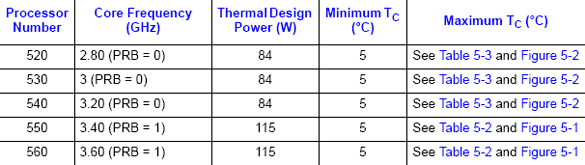
Intel's P4 processor data sheet contains lots of information about its performance requirements. The most important is the thermal design power.
However, Intel is now becoming a victim of its decision to differentiate between low- and mid-end Pentium 4 Prescott's on the one hand and the more demanding versions at maximum clock speeds on the other. The so-called performance requirement bit or PRB (MSR_PLATFORM_BRV bit 18) is responsible for approving the usage of the processor's designated multiplier or a factory default one (which is x14). The latter was implemented for security reasons, as the requirements as well as thermal specifications of the two fastest P4s are much higher than for the mainstream models.
