Measurements: Energy Consumption For Onboard Components
We also wondered if disabling various components would affect the motherboard's overall energy consumption. To that end, we measured what happened when we disabled all the on-board components, such as Firewire, network, sound and COM ports, and learned that overall energy use dropped by 2 Watts.
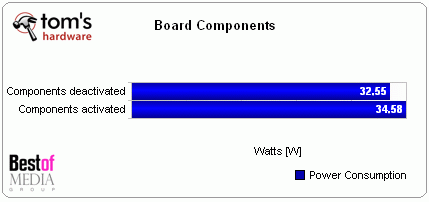
Differences in energy consumption with components enabled and disabled
We left disabled all the components we didn't need, which meant everything except the network controller.

Choosing RAM: A-Data Is The Most Efficient
Memory is seldom sufficiently considered when it comes to managing energy consumption. For our solar-powered PC we measured memory modules from various vendors to see how much energy they required.
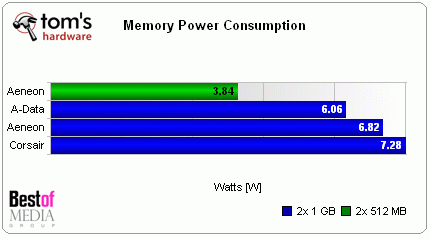
Comparing various RAM configurations
Those who want to equip their systems with 1 GB of RAM should know that this consumes about 3.8 W of power. We decided to install Windows Vista on our solar-powered PC, so we went with 2 GB instead.
When it comes to energy consumption, memory technology plays an important role. Thus, for example, you can find DDR2 modules built using from 90 nm to 110 nm technologies, which results in measurable differences in energy uptake. According to our measurements, the latest A-Data RAM modules (Vitesta Extreme Edition, DDR2-1066+) proved to be the most energy efficient. That's why we chose them for our solar-powered PC.

A-Data Vitesta Extreme Edition DDR2-1066+
| 12 Volt Solar-PC-System | ||
|---|---|---|
| Component | Idle | Max load |
| PSU | 5.00 W | 14.20 W |
| CPU | 8.49 W | 38.66 W |
| Cooler | 1.00 W | 1.00W |
| Motherboard | 7.78 W | 19.71 W |
| RAM | 6.06 W | 6.23 W |
| Total: | 61.23 W | 115.60 W |
| max. 160 Watt Custom PSU |
