All about Build Your Own
 Latest Build Your Own articles
All Build Your Own articles

Newsletters


  • Ask your question about IT issues
  • Post

Partners

The Games selection

violent : More Mindless Violence Basic shooting game, but still so powerful! Use the mouse to take aim and shoot at the little beasties before they get to you. Use Space to reload....
action : Yoyo the Star Yoyo is a young girl who recently graduated and dreams to become a movie star (don't we all). You'll have to guide her on the path to stardom,...
Ads

Sponsored links

1 Watt Active Cooling Takes Very Little Power

Previous Next
10:37 AM - 09/13/2007 by The editorial team

When it comes to cooling our solar-powered PC, we could have taken either of two basic approaches: either cool the processor actively with a cooler, or construct some kind of passive cooling system. To help decide which way to go, we measured the processor's energy consumption at various temperatures.

We have measured the energy consumption of the processor under different temperatures.
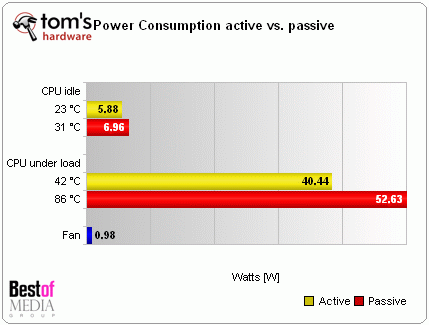
Energy consumption for a passively and actively cooled processor

The stock cooler included with the processor consumed about 1 W at maximum fan rotation. If we used a passive cooler instead, the energy consumption of the Athlon 64 X2 BE-2350 increased by about 1.1 W in "Cool and Quiet" mode, and by a hefty 12 W at full load.

CPU and cooler on the test system motherboard

CPU and cooler on the test system motherboard

Although the CPU cooler fan consumes a steady stream of energy, the use of processor power decreases when it's active. Because our Gigabyte motherboard includes a fan controller, the fan is also very quiet. Thus, we decided to employ active cooling, due to the better energy budget it gave us to work with.

12 Volt Solar-PC-System
Component Idle Max load
PSU 5.00 W 14.20 W
CPU 8.49 W 38.66 W
Cooler 1.00 W 1.00W
Total: 61.23 W 115.60 W
max. 160 Watt Custom PSU
Talkback
Raigedas 07/20/2009 10:30 AM
Hide
-0+

i bought this M2-ATX PSU (actually to of them). but i was unable to start it.

1. first quick question: is it possible to start (for testing purposes) the PSU without connecting it to the computer? is it enough to short circuit J8 only to start?

2. docummentation is unclear about 10 (J6). it looks like J6 is purely for controlling stereo amplifier. but other place of the manual says "if J6 is cnnected to the motherboard". where to motherboard?

3. how should PSU be connected?
for testing i have taken 12V 7Ah lead acid battery fully charged.
connected battery "-" to J4.
battery "+" to J1.
J3: tried to leave not connected and tried to connect battery "+".
disconnected power switch cable from motherboard and connected it to J9.
connected J8 with motheboard (using little cable included in the package) where power switch was originally connected.
left J6 not connected.
J10 not connected (P0 mode). also tried P1 mode.
connected ATX and P4 (J2).
pressed power on my pc but nothing happened and no voltage on MOLEX cable.

could authors of the article (or maybe other owner of the PSU) describe how did they start the PSU?

Comments are closed on this page.

Sponsored links
