







Best Power Supplies 2026
These PSUs offer the best reliability, performance and protection for your system and its components.

When you are building a PC, the Power Supply Unit (PSU) is not usually the component you daydream about. It is not as sexy as a top-tier GPU or as flashy as RGB parts. But think of the PSU as the heart of your system. Just as a weak heart limits the body, a subpar PSU limits (and endangers) your rig. Its job is deceptively simple: convert the volatile High-Voltage Alternating Current (AC) from your wall outlet into stable Direct Current (DC) for your components. However, doing this reliably is what separates a long-lasting PC from a fire hazard.
Choosing the right unit involves a mix of hard math and personal preference.
Strictly speaking, wattage matters, but the Efficiency Curve is paramount. We recommend aiming for a unit that operates near 50% load for optimal thermal performance and longevity. It is also vital to look beyond basic efficiency ratings and examine our power quality measurements, which reveal how stable and 'clean' the voltage output truly is. On the subjective side, design plays a major role. For a streamlined chassis, look for fully modular units that eliminate cable clutter and improve airflow. Remember that units with similar price-to-performance ratios can feature vastly different industrial designs, so pick one that matches your build’s theme.
If you take away only one thing, let it be this: Never cheap out on protection.
A high-quality PSU does more than just push power; it acts as a firewall between the grid and your expensive hardware. If a PSU lacks a comprehensive protection suite, it is not just a bad purchase – it is a liability.
The Best Power Supplies You Can Buy Today
Best Cheap PSU ($60 or less)

Specifications
Reasons to buy
Reasons to avoid
The Be Quiet! Pure Power 13 M 650W is an impressive power supply unit built on FSP's mature and reliable platform. It delivers exceptional performance with efficiency that reaches Platinum levels despite Gold certification, achieving 93.3% average efficiency at 230 VAC. Featuring fully modular cables and ATX 3.1 compliance with a 450W-rated 12V-2x6 connector, this PSU ensures compatibility with current and future hardware. The semi-passive cooling mode keeps the unit silent during light loads, while outstanding voltage regulation and ripple suppression provide clean, stable power. Essential protections including OVP, OCP, OPP, and SCP safeguard connected components. The primary concern involves Elite capacitors on the secondary side, though the comprehensive 10-year warranty demonstrates FSP's confidence. Priced at $100, it targets enthusiasts and professionals who value balanced performance, reliability, and forward compatibility over initial cost savings.
MORE: Be quiet! Pure Power 13 M 650W PSU Review
Up to 750 Watts

Specifications
Reasons to buy
Reasons to avoid
The Montech Titan PLA 750W is the product of a collaboration with Seasonic, and Montech is proud enough of that to print the OEM name on the box. The bench results justify the pride. Voltage regulation is 0.5% on the 12V rail and 0.2% on the minor rails, while ripple never exceeds 26mV on any rail, figures we rarely see even from flagship units.
Seasonic went with a full-bridge LLC primary inversion topology, an arrangement usually reserved for units well above 1000W, and the secondary side is populated almost entirely with Nippon Chemi-Con capacitors, with a few Rubycon parts. Efficiency averages 91.1% at 115 VAC and 92.6% at 230 VAC, comfortably clearing the Platinum thresholds, and it barely drops inside our hotbox, where the fan hardly spins faster than it does at room temperature. The single 12V-2x6 connector is rated for the full 600W, although there are only two 6+2 pin PCIe connectors. At its $160 MSRP it is expensive for a 750W unit, but at the $120 to $130 it frequently sells for, nothing else in this class matches its overall quality, and the 10-year warranty seals the deal.
MORE: Montech Titan PLA 750W PSU Review
Up to 850 Watts

Specifications
Reasons to buy
Reasons to avoid
The Cooler Master MWE Gold 850 V3 is a reliable, competitively priced 850 watts PSU that is ATX 3.1 / PCIe 5.1 compliant and comes with a 10-year manufacturer’s warranty. Its efficiency is thrice-certified (80Plus Gold, PPLP.info Gold, and Cybenetics Platinum), with the Cooler Master MWE Gold 850 V3 displaying outstanding low-to-mid range efficiency under typical operating conditions. It is built by LITEON, one of the most experienced OEMs, and is a great solution for users who want a great all-around performer at a reasonable price without breaking the bank.
Read: Cooler Master MWE Gold 850 V3 review
Up to 1000 Watts

Specifications
Reasons to buy
Reasons to avoid
Gigabyte markets the Gaming 1000GM PG5 with 80Plus Gold logos, yet both CLEAResult and Cybenetics certify it as Platinum, and our results confirm it, with efficiency averaging 90.6% at 115 VAC and 92.6% at 230 VAC. Even more impressive, the efficiency drops by just 0.8% when the ambient temperature rises to 45°C. The platform is built by HEC and the capacitors are all from Japanese manufacturer Toshin Kogyo, a welcome sight at this price point.
The headline feature is T-Guard, a set of thermistors monitoring the 12V-2x6 connector that cuts power to the graphics card if it starts overheating, while keeping the rest of the system running. The fan remains off up to about 300W and is barely audible up to 500W, although it gets loud when the unit is heavily loaded in a hot environment. Electrical performance is good rather than exceptional, with 1.3% regulation on the 12V rail and ripple peaking at 48mV. With a price of around $160 and a 10-year warranty, it is a very sensible 1000W choice for any high-end single GPU system.
MORE: Gigabyte 1000GM PG5 1000W Review
Up to 1200 Watts

Specifications
Reasons to buy
Reasons to avoid
The ASRock Steel Legend SL-1200P proves that HEC is capable of much more than the mid-tier designs it has historically been known for. Every capacitor on the secondary side is supplied by Nippon Chemi-Con, the APFC stage relies on Rubycon bulk capacitors and Infineon CoolMOS transistors, and the result is excellent ripple suppression, peaking at just 36mV on the 12V rail. Efficiency averages 90.6% at 115 VAC and 92.9% at 230 VAC, easily meeting the Platinum requirements. Both 12V-2x6 cables carry embedded temperature sensors that are wired back to the PSU, which shuts down if a cable overheats, a sensible defense against the connector failures that have plagued high-end graphics cards.
The fan stays off up to about 550W, keeping the unit silent under most real-world loads. Voltage regulation on the 12V rail is a little soft at 1.3%, and the OPP triggers at 116%, which is tight for a 1200W ATX 3.1 unit and worth noting for users running two power-hungry GPUs. With its distinctive grey aesthetic, a $180 price tag and a 10-year warranty, it is the best-equipped 1200W unit available today.
MORE: ASRock Steel Legend SL-1200P power supply review
1250-1500 Watts
Specifications
Reasons to buy
Reasons to avoid
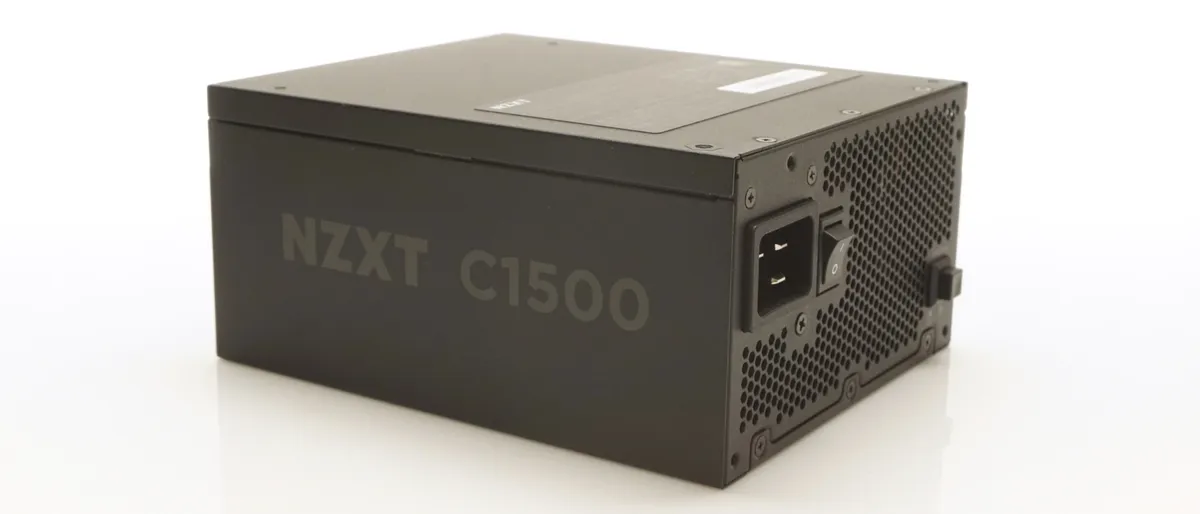
The NZXT C1500 Platinum is a powerhouse designed for serious PC enthusiasts building ultra-high-performance systems. With 1500W of capacity and dual 12VHPWR connectors, it is ideal for setups running multiple GPUs. This PSU hits the sweet spot for efficiency, with 80Plus Platinum certification, delivering an impressive 92.6% efficiency at 115V and up to 93.7% at 230V. Its "Zero-Fan" mode keeps the fan completely off at up to 50% load, making it virtually silent under typical gaming conditions. When tested under heavy load, the C1500 remains reliable, handling heat with ease, making it perfect for gamers pushing their systems to the max. Priced at $370, this PSU is a viable top-tier option for enthusiasts running high-end gaming rigs with dual GPUs, offering great performance without an unreasonably high price tag.
Read: NZXT C1500 Platinum Review
>1600 Watts

Specifications
Reasons to buy
Reasons to avoid
The Seasonic Prime TX-1600 Noctua Edition is a flagship 1600-watt power supply unit designed for extreme performance and reliability. A collaboration between Seasonic and Noctua, this power supply unit (PSU) combines cutting-edge power delivery with advanced cooling technology. It complies with ATX 3.1 and PCIe 5.1 standards, ensuring compatibility with the latest high-demand systems and hardware. The Seasonic Prime TX-1600 Noctua Edition excels in efficiency, meeting the requirements for both 80Plus Titanium and Cybenetics Titanium certifications, while offering overall performance that sets the industry benchmarks. Priced at $570, it targets professional users and enthusiasts who prioritize top-tier performance and quality.
MORE: Seasonic Prime TX-1600 Noctua Edition Review
SFX PSU <800 Watts
Specifications
Reasons to buy
Reasons to avoid
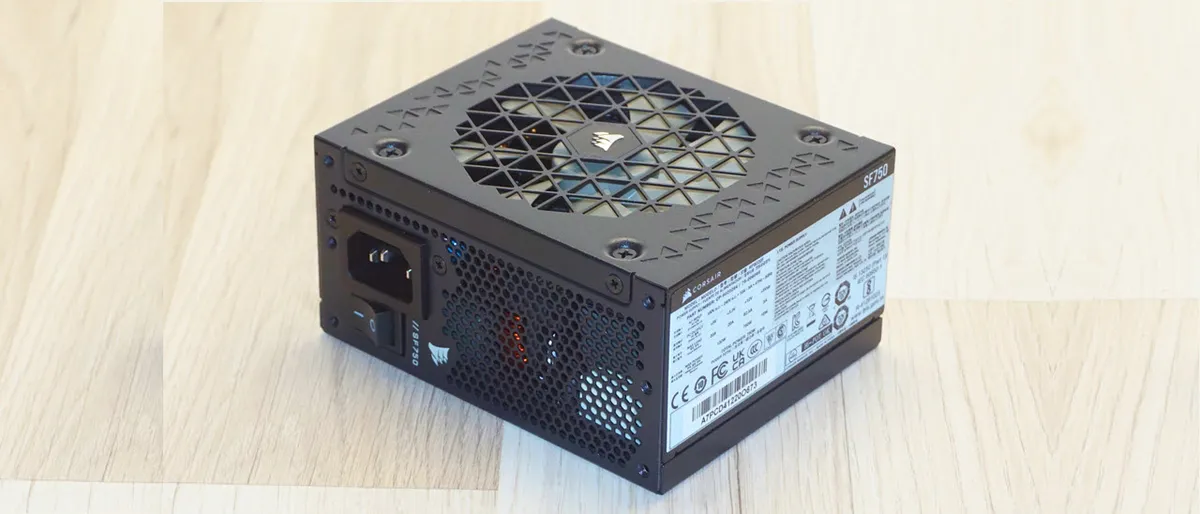
The Corsair SF750 Platinum (2024) is a high-performance SFX power supply, designed for compact builds that demand high performance. It is based on a refined version of the Great Wall platform that its predecessor used, now updated to meet the ATX 3.1 standard. It delivers cutting-edge power efficiency and reliability in its class. Corsair uses premium components, including all-Japanese capacitors, ensuring durability and performance. Certified by both Cybenetics and CLEAResult with Platinum efficiency, the SF750 delivers outstanding electrical performance. Despite its small form factor, it also maintains an excellent thermal-to-acoustic balance, running quietly under typical loads. At $170, it is a steep investment, but a necessary one for gamers seeking a high-performance, ATX 3.1-compliant SFX PSU. Perfect for compact gaming builds.
MORE: Corsair SF750 Platinum (2024) Review
SFX PSU >800 Watts

Specifications
Reasons to buy
Reasons to avoid
The Lian Li SP1000P squeezes 1000 watts into a standard 100mm SFX chassis, a power density that few competitors can match without stepping up to the larger SFX-L form factor. A flat copper strip transformer helps make that possible, and the electrical results are remarkable for any form factor, let alone one this compact. Ripple peaks at just 24mV on the 12V rail and 16mV on the minor rails, while the 12V rail holds within 0.8% across the load range. Efficiency averages 90.9% at 115 VAC and 92.3% at 230 VAC. The secondary capacitors are from Nippon Chemi-Con and Nichicon, with Rubycon parts in the APFC stage, which supports the generous 10-year warranty.
The 92mm fan stays off up to about 370W, but beyond 60% to 70% load it becomes loud, and in a hot environment it reaches its maximum speed before the unit reaches its rated output. The connector selection is conservative too, with a single 12V-2x6 connector. Still, at about $185, it is the SFX unit to buy for a compact system that needs to feed a high-end graphics card.
MORE: Lian Li SP1000P SFX PSU Review
Quick Power Supply Shopping Tips
Quick Power Supply Shopping Tips
Key Factor: Correct sizing. First and foremost, it is crucial to understand a system's power consumption, especially if future upgrades are planned. Modern PSUs operate most efficiently at around half their rated capacity, and contrary to popular belief, purchasing a higher-wattage PSU does not guarantee better performance. Efficiency drops significantly at low loads, particularly below 15%, with only the 80Plus Titanium certification requiring 90% efficiency at 10% load. Therefore, an oversized PSU may result in poorer performance than a properly sized unit, often at a higher cost.
Avoiding Overestimation. The most common mistake in PSU selection is overestimating power needs. Builders often recommend 1000W PSUs for systems with mid-range GPUs, though most systems with a mainstream CPU and a single GPU rarely exceed 550W. For example, a modern system with a Ryzen 7 or Core Ultra 7 processor and an RTX 5070 (rated at 250W) or an RX 9070 (rated at 220W) typically consumes well under 500W under gaming load. Even a flagship system with an RTX 5090, rated at 575W, and a high-end desktop CPU usually peaks at around 900W, which is why a quality 1000W unit is enough for such builds.
Several reputable manufacturers and e-tailers offer PSU calculators to help estimate power needs, including:
- Cooler Master Power Calculator
- Seasonic Wattage Calculator
- MSI PSU Calculator
- be quiet! PSU Calculator
- Newegg PSU Calculator
While PSU calculators are useful, but they rely on thermal design power (TDP) figures that often overestimate real-world consumption. Considering that the unit should operate at roughly half capacity, following their recommendations is not wrong; however, many users mistakenly opt for much higher wattages, leading to oversized, expensive units that cannot perform optimally.
The 12V-2x6 rating is not always 600W. ATX 3.1 compliance does not require a 600W 12V-2x6 output, and many lower-wattage units limit it. In our testing, the be quiet! System Power 11 550W is limited to 300W, while the be quiet! Pure Power 13 M 650W and the Phanteks AMP GH 750W are limited to 450W. The limit is printed on the unit's label and usually on the connector itself. A graphics card rated above that figure, such as the 575W RTX 5090, needs a PSU with a full 600W output. Users need to check the rating of the connector before buying, not just its presence. It is also worth noting that ATX 3.0/3.1 compliance does not necessitate the presence of a 12V-2x6 connector at all, and there are several products on the market that do not have one.
Connector protection features. After several years of melted 12V-2x6 connectors, most manufacturers now ship some form of safeguard, but these differ in what they measure and in how they react. Cooler Master's GPU Shield monitors the current on each pin of the 12V-2x6 connector and intervenes when it detects an anomaly. Corsair's ThermalProtect places a temperature sensor inside the cable, 30mm from the GPU end, and signals the graphics card to shut down if the cable exceeds 65°C, while the rest of the system keeps running. Gigabyte's T-Guard uses thermistors to monitor the temperature of the connector and cuts power to the graphics card if it starts overheating. MSI's GPU Safeguard+ monitors the current of each wire; on the MPG series, the PSU communicates with the system over USB-C and throttles the GPU instead of shutting it down. ASRock embeds temperature sensors in each 12V-2x6 cable of its Steel Legend P series, with the PSU shutting down if a cable overheats. Current sensing reacts fastest to a poorly seated pin, while temperature sensing detects the condition that actually melts the connector. Any of these is better than none, but none of them replaces properly seated and healthy connectors.
Reading the efficiency badges. The badge on the box and the actual certification of a unit no longer always match. CLEAResult's 80Plus program tests efficiency at fixed points of 20%, 50% and 100% load, so a dip at full load can hold a unit back to Gold. Cybenetics averages efficiency between 10% and 100% load, so the same unit can earn a Platinum certification. That is why units such as the Montech Century II Gold and the Corsair RM850x SHIFT carry a Gold badge but hold a Cybenetics Platinum certification. Some manufacturers even undersell their products, with Gigabyte printing Gold logos on the Gaming 1000GM PG5, which holds Platinum certifications from both CLEAResult and Cybenetics, while Corsair now relies solely on Cybenetics for its certifications. When in doubt, users should search for the model number in the CLEAResult and Cybenetics databases.
ATX v3.0 / ATX v3.1 Compliance. ATX v3.1 replaced the 12VHPWR connector with the 12V-2x6, which has shorter sense pins that only allow full power delivery when the connector is properly seated, and it is the current revision of the standard. ATX v3.1 is actually less stringent than its predecessor for PSU manufacturers, so an ATX v3.0 unit is not inferior by default, but it should ship with a 12V-2x6 cable.
Physical Considerations. Ensure that the PSU's physical dimensions are compatible with your case. Standard ATX cases will typically accommodate ATX-compliant PSUs, but some units may exceed the typical length of 5.5 inches. If you have a compact case, such as one that supports SFX power supplies, ensure that your chosen PSU fits accordingly. For more on this subject, see our A Basic Guide To Motherboard, Case, and Power Supply Form Factors feature.
For more on this subject, see our A Basic Guide To Motherboard, Case, and Power Supply Form Factors feature.
How we test Power Supplies
How we test Power Supplies
Effective power supply testing demands specialized equipment and precise methodology. It's not enough to connect a PSU to a PC and measure voltage with a basic multimeter. Professional testing requires programmable electronic loads, high-spec oscilloscopes, and detailed technical knowledge. Moreover, knowledge of the correct loading and testing protocols is essential, as these processes are governed by well-documented procedures detailed in technical papers and guides.
Programmable DC loads are essential for accurate testing. We use two Maynuo M9714 and two M9711 loads, capable of drawing 2400 Watts from 12 V line and 150 Watts from 3.3 V and 5 V lines respectively.
When assessing power supply performance, even the best multimeters are inadequate. An oscilloscope is indispensable, but not just any oscilloscope. The Intel ATX design guide specifies a minimum bandwidth of 20 MHz but, practically, digital oscilloscopes must be able to sample data at a rate at least ten times higher than the frequency being measured, meaning a 20 MHz oscilloscope should have a sampling rate of at least 200 MSa/s. Low-end oscilloscopes, particularly those that are USB-connected, simply cannot meet this requirement. In our testing setup, we employ a Rigol DS5042M oscilloscope with a bandwidth of 40 MHz and a real-time sampling rate of 500 MSa/s. While these specifications may seem impressive, even this instrument has limitations, such as automatically resolving the noise out of the ripple of a signal.
Efficiency testing, while simpler, still requires precision. Our programmable loads provide real-time power draw data, and we use an Extech 380803 power analyzer to measure true RMS values from the AC outlet. Testing is conducted at both 230V/50Hz and 115V/50Hz, with input voltage managed by a 3000VA Variac. It is crucial to use an analyzer capable of displaying true RMS values, as power supplies generate significant harmonic distortion.
Thermal and noise testing are more complex. Thermal testing is relatively simple, requiring only two high-precision UNI-T UT-325 digital thermometers with four probes to monitor ambient, exhaust, and heatsink temperatures. Noise testing, however, cannot be conducted during PSU operation due to the interference from testing equipment. Instead, we isolate the fan’s noise using a laser tachometer and test it separately with an adjustable DC power supply. Noise levels are recorded with an Extech HD600, in a quiet environment with a baseline noise of 30.4 dB(A).
We also developed a custom test fixture and hot box for more controlled testing. The hot box is a simple enclosure with an air-heating device that simulates real-world conditions by heating the air, not the box, allowing for testing at room temperature (25°C) and elevated temperatures (45°C). It is worth noting that efficiency certifications, such as 80Plus, are performed at room temperature, and a PSU may fail to meet its certification standards under elevated temperatures.
Efficiency certifications themselves follow different protocols. The CLEAResult 80Plus certification tests efficiency at specific load intervals (20%, 50%, and 100%), while the Cybenetics certification takes into account the average efficiency from 10% to 100% load. Our testing provides efficiency data from 5% to 100% load, as well as the average efficiency of a unit between 20% and 100% load. We chose to include 5% load testing as modern systems have their energy demands dropping dramatically while idling, which typically land at 5% to 10% capacity of a properly sized PSU. The conversion efficiency of switching power supplies drops significantly at very low loads, with drops exceeding 10% being common in many designs.
In conclusion, effective power supply testing requires precision instruments, a comprehensive understanding of testing methodologies, and carefully controlled conditions. Only by adhering to these standards can we obtain accurate data on PSU performance, efficiency, thermal behavior, and noise characteristics.
Finding Discounts on the Best Power Supplies
Whether you're shopping for one of the best power supplies or just looking for an affordable alternative, you may find savings by checking out our lists of the latest Corsair coupon codes, Newegg promo codes and Micro Center coupons.
Get Tom's Hardware's best news and in-depth reviews, straight to your inbox.

Dr. E. Fylladitakis has been passionate about PCs since the 8088 era, beginning his PC gaming journey with classics like Metal Mutant and Battle Chess. Not long after, he built his first PC, a 486, and has been an enthusiast ever since. In the early 2000’s, he delved deeply into overclocking Duron and Pentium 4 processors, liquid cooling, and phase-change cooling technologies. While he has an extensive and broad engineering education, Dr. Fylladitakis specializes in electrical and energy engineering, with numerous articles published in scientific journals, some contributing to novel cooling technologies and power electronics. He has been a hardware reviewer at AnandTech for nearly a decade. Outside of his professional pursuits, he enjoys immersing himself in a good philosophy book and unwinding through PC games.
- Aris Mpitziopoulos Contributing Editor
-
abryant Archived comments are found here: http://www.tomshardware.com/forum/id-3694061/psus.htmlReply -
DVJ Rick Kraft Now many motherboards require 8pin+4pin CPU power, and some even require 8pin+8pin. Since this guide is made for DIY builders, this is the most important information when buying PSUs. In your guide there should be some differentiation between limited power supplies (1x CPU 8Pin) and PSUs that are more versatile, especially since 2x CPU 8pin is required for mid-tier or higher-end motherboards.Reply -
davidm.maya Reply21490758 said:Now many motherboards require 8pin+4pin CPU power, and some even require 8pin+8pin. Since this guide is made for DIY builders, this is the most important information when buying PSUs. In your guide there should be some differentiation between limited power supplies (1x CPU 8Pin) and PSUs that are more versatile, especially since 2x CPU 8pin is required for mid-tier or higher-end motherboards.
Yes, That's true. But I had read that the 4pin connector isn't needed if you don't do 'extreme' overclocking, I don't know how much is considered 'extreme' but at least it should be safe to connect only the 8pin for runing the CPU at stock speed. -
jdcranke07 If you are running a non-k SKU of Intel processors, you probably can run with DavidM.Maya's advice. I would error on the side of caution otherwise. I also agree that the number of CPU cables with pin counts & number of SATA & Molex power cables should be in there as well. The reason you might go for a high wattage PSU like a 1600W might be for a rig that has multiple purposes, i.e. gaming rig & workstation and/or server. Peripherals such as HDDs & SSDs can determine which PSU better fits you based on cables provided.Reply
I have an EVGA SuperNova 1600 T2 that came with 4way SATA power cables (x2) & one cable that was 2 SATA power & 2 Molex power as an example.