









Stable Diffusion Benchmarks: 45 Nvidia, AMD, and Intel GPUs Compared
Which graphics card offers the fastest AI performance?

Stable Diffusion Introduction
Stable Diffusion and other AI-based image generation tools like Dall-E and Midjourney are some of the most popular uses of deep learning right now. Using trained networks to create images, videos, and text has become not just a theoretical possibility but is now a reality. While more advanced tools like ChatGPT can require large server installations with lots of hardware for training, running an already-trained network for inference can be done on your PC, using its graphics card. How fast are consumer GPUs for doing AI inference using Stable Diffusion? That's what we're here to investigate.
We've benchmarked Stable Diffusion, a popular AI image generator, on the 45 of the latest Nvidia, AMD, and Intel GPUs to see how they stack up. We've been poking at Stable Diffusion for over a year now, and while earlier iterations were more difficult to get running — never mind running well — things have improved substantially. Not all AI projects have received the same level of effort as Stable Diffusion, but this should at least provide a fairly insightful look at what the various GPU architectures can manage with AI workloads given proper tuning and effort.
The easiest way to get Stable Diffusion running is via the Automatic1111 webui project. Except, that's not the full story. Getting things to run on Nvidia GPUs is as simple as downloading, extracting, and running the contents of a single Zip file. But there are still additional steps required to extract improved performance, using the latest TensorRT extensions. Instructions are at that link, and we've previous tested Stable Diffusion TensorRT performance against the base model without tuning if you want to see how things have improved over time. Now we're adding results from all the RTX GPUs, from the RTX 2060 all the way up to the RTX 4090, using the TensorRT optimizations.
For AMD and Intel GPUs, there are forks of the A1111 webui available that focus on DirectML and OpenVINO, respectively. We used these webui OpenVINO instructions to get Arc GPUs running, and these webui DirectML instructions for AMD GPUs. Our understanding, incidentally, is that all three companies have worked with the community in order to tune and improve performance and features.
Whether you're using an AMD, Intel, or Nvidia GPU, there will be a few hurdles to jump in order to get things running optimally. If you have issues with the instructions in any of the linked repositories, drop us a note in the comments and we'll do our best to help out. Once you have the basic steps down, however, it's not too difficult to fire up the webui and start generating images. Note that extra functionality (i.e. upscaling) is separate from the base text to image code and would require additional modifications and tuning to extract better performance, so that wasn't part of our testing.
Additional details are lower down the page, for those that want them. But if you're just here for the benchmarks, let's get started.
Stable Diffusion 512x512 Performance
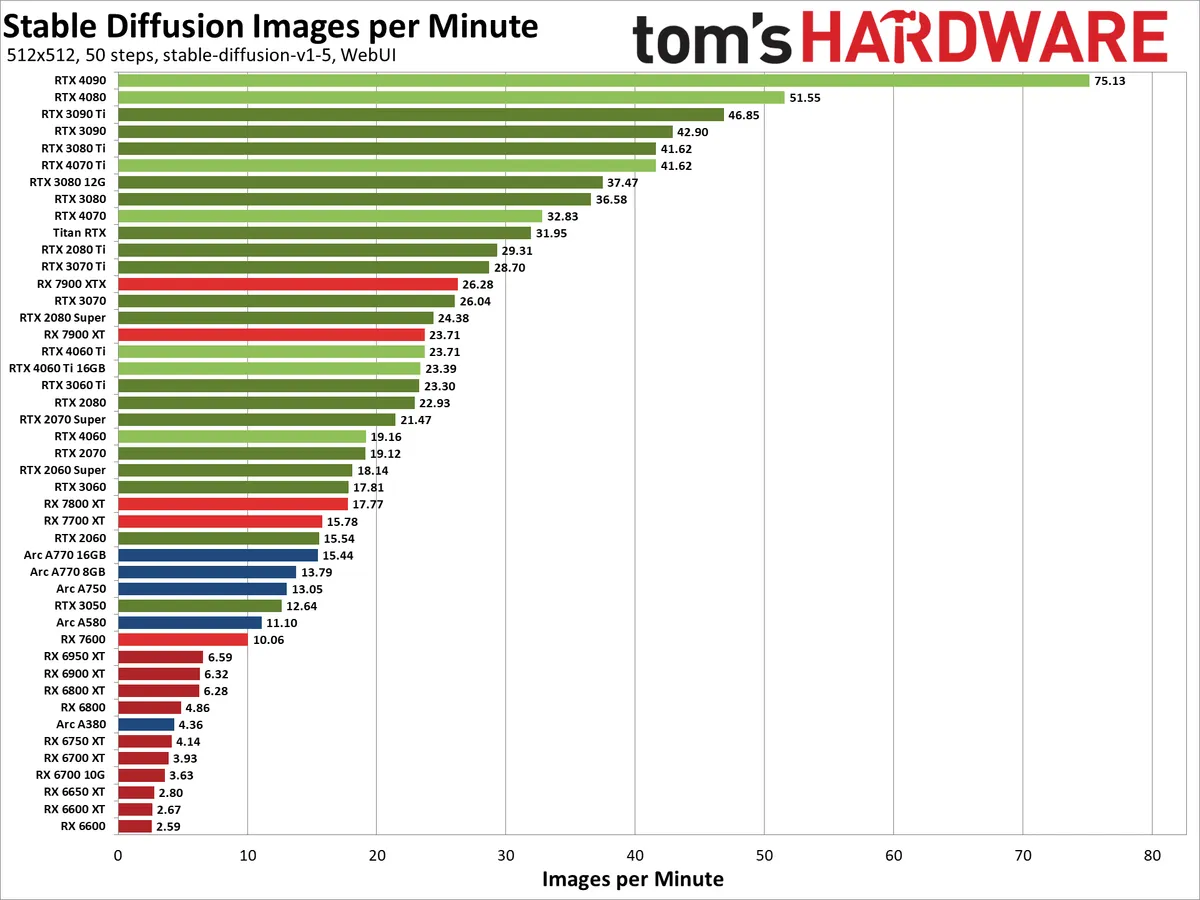
This shouldn't be a particularly shocking result. Nvidia has been pushing AI technology via Tensor cores since the Volta V100 back in late 2017. The RTX series added the feature in 2018, with refinements and performance improvements each generation (see below for more details on the theoretical performance). With the latest tuning in place, the RTX 4090 ripped through 512x512 Stable Diffusion image generation at a rate of more than one image per second — 75 per minute.
AMD's fastest GPU, the RX 7900 XTX, only managed about a third of that performance level with 26 images per minute. Even more alarming, perhaps, is how poorly the RX 6000-series GPUs performed. The RX 6950 XT output 6.6 images per minute, well behind even the RX 7600. Clearly, AMD's AI Matrix accelerators in RDNA 3 have helped improve throughput in this particular workload.
Intel's current fastest GPU, the Arc A770 16GB, managed 15.4 images per minute. Keep in mind that the hardware has theoretical performance that's quite a bit higher than the RTX 2080 Ti (if we're looking at XMX FP16 throughput compared to Tensor FP16 throughput): 157.3 TFLOPS versus 107.6 TFLOPS. It looks like the Arc GPUs are thus only managing less than half of their theoretical performance, which is why benchmarks are the most important gauge of real-world performance.
While there are differences between the various GPUs and architecture, performance largely scales proportionally with theoretical compute. The RTX 4090 was 46% faster than the RTX 4080 in our testing, while in theory it offers 69% more compute performance. Likewise, the 4080 beat the 4070 Ti by 24%, and it has 22% more compute.
The newer architectures aren't necessarily performing substantially faster. The 4080 beat the 3090 Ti by 10%, while offering potentially 20% more compute. But the 3090 Ti also has more raw memory bandwidth (1008 GB/s compared to the 4080's 717 GB/s), and that's certainly a factor. The old Turing generation held up as well, with the newer RTX 4070 beating the RTX 2080 Ti by just 12%, with theoretically 8% more compute.
Stable Diffusion 768x768 Performance
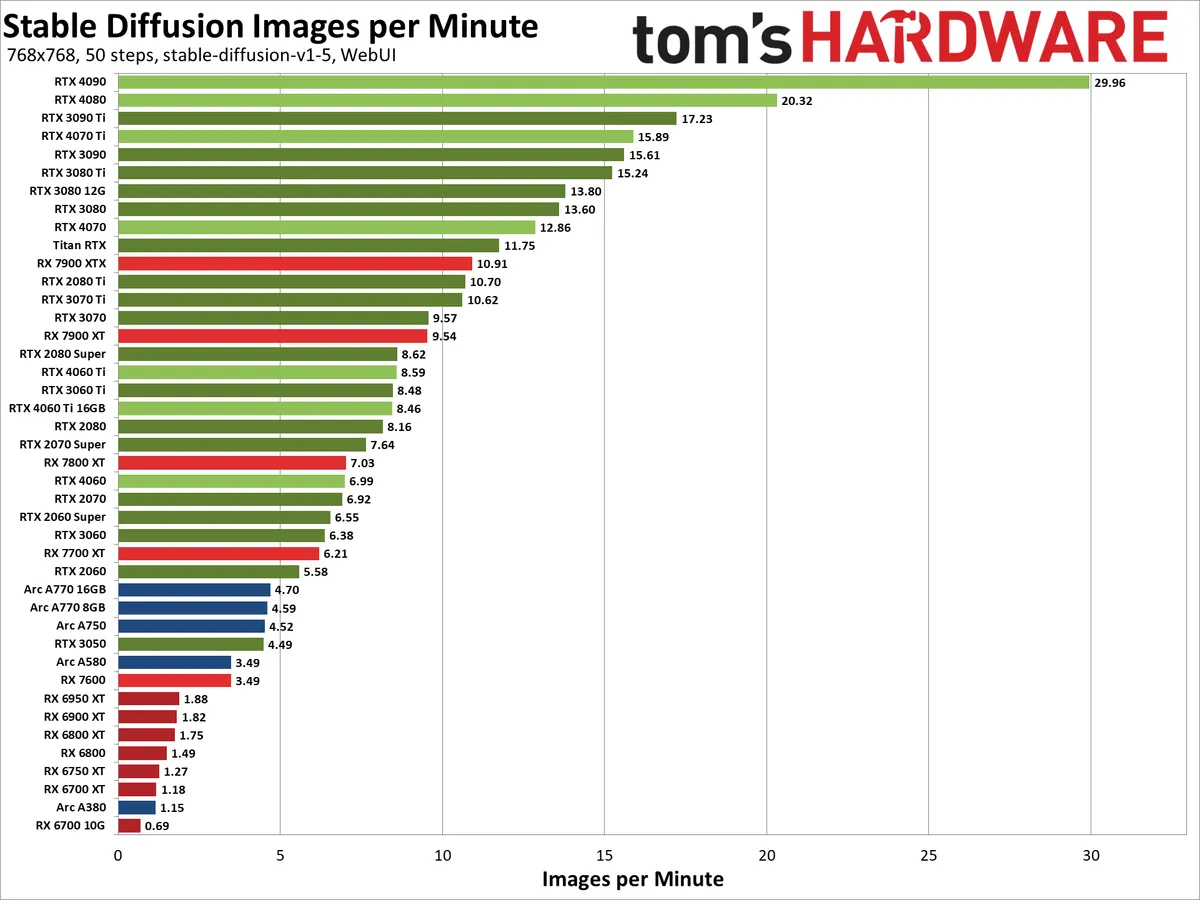
Kicking the resolution up to 768x768, Stable Diffusion likes to have quite a bit more VRAM in order to run well. Memory bandwidth also becomes more important, at least at the lower end of the spectrum.
The relative positioning of the various Nvidia GPUs doesn't shift too much, and AMD's RX 7000-series gains some ground with the RX 7800 XT and above, while the RX 7600 dropped a bit. The 7600 was 36% slower than the 7700 XT at 512x512, but dropped to being 44% slower at 768x768.
The previous generation AMD GPUs had an even tougher time. The RX 6950 XT didn't even manage two images per minute, and the 8GB RX 6650 XT, 6600 XT, and 6600 all failed to render even a single image. That's a bit odd, as the RX 7600 still worked okay with only 8GB of memory, but some other architectural difference was at play.
Intel's Arc GPUs also lost ground at the higher resolution, or if you prefer, the Nvidia GPUs — particularly the fastest models — put some additional distance between themselves and the competition. The 4090 for example was 4.9X faster than the Arc A770 16GB at 512x512 images, and that increased to a 6.4X lead with 768x768 images.
We haven't tested SDXL, yet, mostly because the memory demands and getting it running properly tend to be even higher than 768x768 image generation. TensorRT support is also missing for Nvidia GPUs, and most likely we'd see quite a few GPUs struggle with SDXL. It's something we plan to investigate in the future, however, as the results are generally preferable to SD1.5 and SD2.1 for higher resolution outputs.
For now, we know that performance will be lower than our 768x768 results. As an example of what to expect, the RTX 4090 doing 1024x1024 images (still using SD1.5), managed just 13.4 images per minute. That's less than half the speed of 768x768 image generation, which makes sense as the 1024x1024 images have 78% more pixels and the time required seems to scale somewhat faster than the resolution increase.
Picking a Stable Diffusion Model


Deciding which version of Stable Generation to run is a factor in testing. Currently, you can find v1.4, v1.5, v2.0, and v2.1 models from Hugging Face, along with the newer SDXL. The earlier 1.x versions were mostly trained on 512x512 images, while 2.x included more training data for up to 768x768 images. SDXL targets 768x768 to 1024x1024 images. As noted above, higher resolutions also require more VRAM. Different versions of Stable Diffusion can also generate radically different results from the same prompt, due to differences in the training data.
If you try to generate a higher resolution image than the training data, you can end up with "fun" results like the multi-headed, multi-limbed, multi-eyed, or multi-whatever examples shown above. You can try to work around these via various upscaling tools, but if you're thinking about just generating a bunch of 4K images to use as your Windows desktop wallpaper, be aware that it's not as straightforward as you'd probably want it to be. (Our prompt for the above was "Keanu Reeves portrait photo of old warrior chief, tribal panther make up, blue on red, side profile, looking away, serious eyes, 50mm portrait photography, hard rim lighting photography" — taken from this page if you're wondering.)
It's also important to note that not every GPU has received equal treatment from the various projects, but the core architectures are also a big factor. Nvidia has had Tensor cores in all of its RTX GPUs, and our understanding is that the current TensorRT code only uses FP16 calculations, without sparsity. That explains why the scaling from 20-series to 30-series to 40-series GPUs (Turing, Ampere, and Ada Lovelace architectures) mostly correlates with the baseline Tensor FP16 rates.
As shown above, performance on AMD GPUs using the latest webui software has improved throughput quite a bit on RX 7000-series GPUs, while for RX 6000-series GPUs you may have better luck with using Nod.ai's Shark version — and note that AMD has recently acquired Nod.ai. Throughput with SD2.1 in particular was faster with the RDNA 2 GPUs, but then the results were also different from SD1.5 and thus can't be directly compared. Nod.ai doesn't have "sharkify" tuning if you use SD1.5 models either, which resulted in lower performance with our apples to apples testing.
Test Setup: Batch Sizes



View Original
View Original

View Original

View Original

View Original

View Original

View Original

View Original

View Original

View Original

View Original

View Original

View Original

View Original

The above gallery shows some additional Stable Diffusion sample images, after generating them at a resolution of 768x768 and then using SwinIR_4X upscaling (under the "Extras" tab), followed by cropping and resizing. Hopefully we can all agree that these results look a lot better than the mangled Keanu Reeves attempts from above.
For testing, we followed the same procedures for all GPUs. We generated a total of 24 distinct 512x512 and 24 distinct 768x768 images, using the same prompt of "messy room" — short, sweet, and to the point. Doing 24 images per run gave us plenty of flexibility, since we could do batches of 3x8 (three batches of eight concurrent images), 4x6, 6x4, 8x3, 12x2, or 24x1, depending on the GPU.
We did our best to optimize for throughput, which means running batch sizes larger than one in many cases. Sometimes, the limiting factor in how many images should be generated concurrently is VRAM capacity, but compute (and cache) also appear to factor in. As an example, the RTX 4060 Ti 16GB did best with 6x4 batches, just like the 8GB model, while the 4070 did best with 4x6 batches.
For 512x512 image generation, many of Nvidia's GPUs did best generating three batches of eight images each (the maximum batch size is eight), though we did find that 4x6 or 6x4 worked slightly better on some of the GPUs. AMD's RX 7000-series GPUs all liked 3x8 batches, while the RX 6000-series did best with 6x4 on Navi 21, 8x3 on Navi 22, and 12x2 on Navi 23. Intel's Arc GPUs all worked well doing 6x4, except the A380 which used 12x2.
For 768x768 images, memory and compute requirements are much higher. Most of the Nvidia RTX GPUs worked best with 6x4 batches, or 8x3 in a few instances. (Note that even the RTX 2060 with 6GB of VRAM was still best with 6x4 batches.) AMD's RX 7000-series again liked 3x8 for most of the GPUs, though the RX 7600 needed to drop the batch size and ran 6x4. The RX 6000-series only worked at 24x1, doing single images at a time (otherwise we'd get garbled output), and the 8GB RX 66xx cards all failed to render anything at the higher target output — you'd need to opt for Nod.ai and a different model on those GPUs.
Test Setup


Our test PC for Stable Diffusion consisted of a Core i9-12900K, 32GB of DDR4-3600 memory, and a 2TB SSD. We tested 45 different GPUs in total — everything that has ray tracing hardware, basically, which also tended to imply sufficient performance to handle Stable Diffusion. It's possible to use even older GPUs, though performance can drop quite a bit if the GPU doesn't have native FP16 support. Nvidia's GTX class cards were very slow in our limited testing.
In order to eliminate the initial compilation time, we first generated a single batch for each GPU with the desired settings. Actually, we'd use this step to determine the optimal configuration for batch size. Once we settled on the batch size, we ran four iterations generating 24 images each, discarded the slowest result, and averaged the time taken from the other three runs. We then used this to calculate the number of images per minute that each GPU could generate.
Our chosen prompt was, again, "messy room." We used the Euler Ancestral sampling method, 50 steps (iterations), with a CFG scale of 7. Because all of the GPUs were running the same version 1.5 model from Stable Diffusion, the resulting images were generally comparable in content. We noticed previously that SD2.1 tended to often generate "messy rooms" that weren't actually messy, and were sometimes cartoony. SD1.5 also seems to be preferred by many Stable Diffusion users as the later 2.1 models removed many desirable traits from the training data.
The above gallery shows an example output at 768x768 for AMD, Intel, and Nvidia. Rest assured, all of the images appeared to be relatively similar in complexity and content — though I won't say I looked carefully at every one of the thousands of images that were generated! For reference, the AMD GPUs resulted in around 2,500 total images, Nvidia GPUs added another 4,000+ images, with Intel only needing about 1,000 images. All of the same style messy room.
Comparing Theoretical GPU Performance
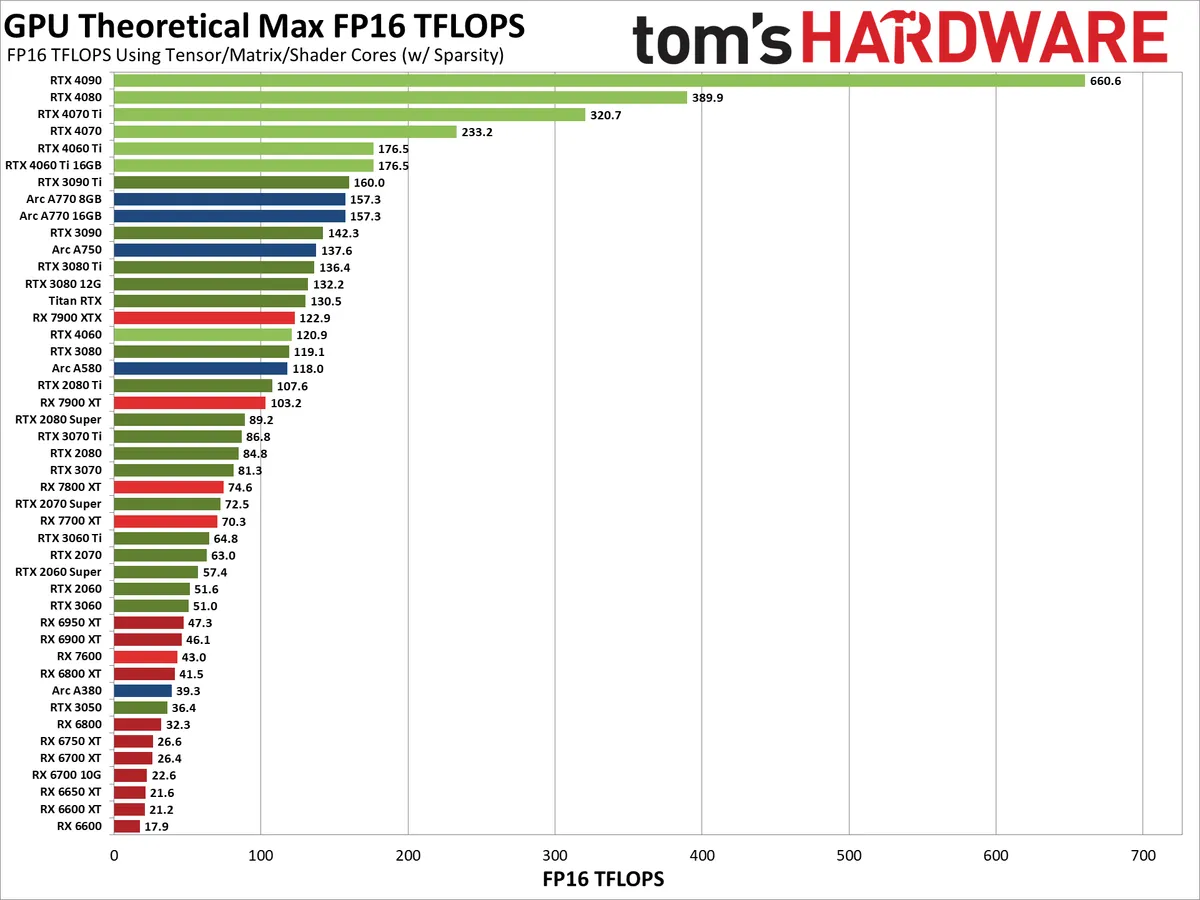
While the above testing looks at actual performance using Stable Diffusion, we feel it's also worth a quick look at the theoretical GPU performance. There are two aspects to consider: First is the GPU shader compute, and second is the potential compute using hardware designed to accelerate AI workloads — Nvidia Tensor cores, AMD AI Accelerators, and Intel XMX cores, as appropriate. Not all GPUs have additional hardware, which means they will use GPU shaders. Let's start there.
Get Tom's Hardware's best news and in-depth reviews, straight to your inbox.

For FP16 compute using GPU shaders, Nvidia's Ampere and Ada Lovelace architectures run FP16 at the same speed as FP32 — the assumption is that FP16 can and should be coded to use the Tensor cores. AMD and Intel GPUs in contrast have double performance on half-precision FP16 shader calculations compared to FP32, and that applies to Turing GPUs as well.
This leads to some potentially interesting behavior. The RTX 2080 Ti for example has 26.9 TFLOPS of FP16 GPU shader compute, which nearly matches the RTX 3080's 29.8 TFLOPS and would clearly put it ahead of the RTX 3070 Ti's 21.8 TFLOPS. AMD's RX 7000-series GPUs would also end up being much more competitive if everything were restricted to GPU shaders.
Clearly, this look at FP16 compute doesn't match our actual performance much at all. That's because optimized Stable Diffusion implementations will opt for the highest throughput possible, which doesn't come from GPU shaders on modern architectures. That brings us to the Tensor, Matrix, and AI cores on the various GPUs.

View Original

View Original

Nvidia's Tensor cores clearly pack a punch, except as noted before, Stable Diffusion doesn't appear to leverage sparsity with the TensorRT code. (It doesn't use FP8 either, which could potentially double compute rates as well.) That means, for the most applicable look at how the GPUs stack up, you should pay attention to the first chart for Nvidia GPUs, which omits sparsity, rather than the second chart that includes sparsity — also note that the non-TensorRT code does appear to leverage sparsity.
It's interesting to see how the above chart showing theoretical compute lines up with the Stable Diffusion charts. The short summary is that a lot of the Nvidia GPUs land about where you'd expect, as do the AMD 7000-series parts. But the Intel Arc GPUs all seem to get about half the expected performance — note that my numbers use the boost clock of 2.4 GHz rather than the lower 2.0GHz "Game Clock" (which is a worst-case scenario that rarely comes into play, in my experience).
The RX 6000-series GPUs likewise underperform, likely because doing FP16 calculations via shaders is less efficient than doing the same calculations via RDNA 3's WMMA instructions. Otherwise, the RX 6950 XT and RX 6900 XT should at least manage to surpass the RX 7600, and that didn't happen in our testing. (Again, performance on the RDNA 2 GPUs tends to be better using Nod.ai's project, if you're using one of those GPUs and want to improve your image throughput.)
What's not clear is just how much room remains for further optimizations with Stable Diffusion. Looking just at the raw compute, we'd think that Intel can further improve the throughput of its GPUs, and we also have to wonder if there's a reason Nvidia's 30- and 40-series GPUs aren't leveraging their sparsity feature with TensorRT. Or maybe they are and it just doesn't help that much? (I did ask Nvidia engineers about this at one point and was told it's not currently used, but these things are still a bit murky.)
Stable Diffusion, and other text to image generators, are currently one of the most developed and researched areas of AI that are still readily accessible to consumer level hardware. We've looked at some other areas of AI as well, like speech recognition using Whisper and chatbot text generation, but so far neither of those seem to be as optimized or used as Stable Diffusion. If you have any suggestions for other AI workloads we should test, particularly workloads that will work on AMD and Intel as well as Nvidia GPUs, let us know in the comments.

Jarred Walton is a senior editor at Tom's Hardware focusing on everything GPU. He has been working as a tech journalist since 2004, writing for AnandTech, Maximum PC, and PC Gamer. From the first S3 Virge '3D decelerators' to today's GPUs, Jarred keeps up with all the latest graphics trends and is the one to ask about game performance.
-
Bikki Thanks so much for this, truly generative model is consumer gpu next big thing besides gaming.Reply
Meta LLama 2 should be next in the pipe
https://huggingface.co/models?other=llama-2 -
-Fran- I've learned a lot today, Jarred. Thanks a lot for your review and efforts into explaining everything related to gauging performance for the GPUs for these tasks. Fantastic job.Reply
Regards. -
JarredWaltonGPU Reply
I've poked at LLaMa stuff previously with text generation, but what I need is a good UI and method of benchmarking that can run on AMD, Intel, and Nvidia GPUs and leverage the appropriate hardware. Last I looked, most (all) of the related projects were focused on Nvidia, but there are probably some alternatives I haven't seen.Bikki said:Thanks so much for this, truly generative model is consumer gpu next big thing besides gaming.
Meta LLama 2 should be next in the pipe
https://huggingface.co/models?other=llama-2
What I really need is the equivalent across GPU vendor projects that will use LLaMa, not the model itself. Running under Windows 11 would be ideal. If you have any suggestions there, let me know. -
dramallamadingdong Reply
thank you. Very informative.Admin said:We've tested all the modern graphics cards in Stable Diffusion, using the latest updates and optimizations, to show which GPUs are the fastest at AI and machine learning inference.
Stable Diffusion Benchmarks: 45 Nvidia, AMD, and Intel GPUs Compared : Read more -
kfcpri ReplyAdmin said:We've tested all the modern graphics cards in Stable Diffusion, using the latest updates and optimizations, to show which GPUs are the fastest at AI and machine learning inference.
Stable Diffusion Benchmarks: 45 Nvidia, AMD, and Intel GPUs Compared : Read more
As a SD user stuck with a AMD 6-series hoping to switch to Nv cards, I think:
1. It is Nov 23 already if people buy a new card with SD in mind now, they absolutely should consider SDXL and even somewhat plan for "the version after SDXL" and so omitting it in a benchmark report is like wasting your own time and effort. Like, making a detailed benchmarking on Counterstrike but not Cyberpunk in 2023,
Of course the old cards can't run it so I think maybe a separate SDXL report on just the >=12GB latest gens cards? The tests should be a basic 1024x1024 one, plus another larger dimension one that kind of simulate a potential future SD version. Some other such test elsewhere shows that the 4060 ti 16GB will be faster than the 4070 in such vram heavy operation, and I have been hoping to see more tests like that to confirm.
2. I can understand not mentioning AMD with Olive, which is a quick optimizations but with many limitations and required extra preps on the models. However AMD on Linux with ROCm support most of the stuff now with few limitations and it runs way faster than AMD on Win DirectML, so it should worth a mention. (I prefer to switch to Nv soon though) -
JarredWaltonGPU Reply
Too many things are "broken" with SDXL right now to reliably test it on all of the different GPUs, as noted in the text. TensorRT isn't yet available, and the DirectML and OpenVINO forks may also be iffy. I do plan on testing it, but it's easy enough to use regular SD plus a better upscaler (SwinIR_4x is a good example) if all you want is higher resolutions. But SDXL will hopefully produce better results as well. Anyway, just because some people have switched to SDXL doesn't make it irrelevant, as part of the reason for all these benchmarks is to give a reasonable look at general AI inference performance. SD has been around long enough that it has been heavily tuned on all architectures; SDXL is relatively new by comparison.kfcpri said:As a SD user stuck with a AMD 6-series hoping to switch to Nv cards, I think:
1. It is Nov 23 already if people buy a new card with SD in mind now, they absolutely should consider SDXL and even somewhat plan for "the version after SDXL" and so omitting it in a benchmark report is like wasting your own time and effort. Like, making a detailed benchmarking on Counterstrike but not Cyberpunk in 2023,
Of course the old cards can't run it so I think maybe a separate SDXL report on just the >=12GB latest gens cards? The tests should be a basic 1024x1024 one, plus another larger dimension one that kind of simulate a potential future SD version. Some other such test elsewhere shows that the 4060 ti 16GB will be faster than the 4070 in such vram heavy operation, and I have been hoping to see more tests like that to confirm.
2. I can understand not mentioning AMD with Olive, which is a quick optimizations but with many limitations and required extra preps on the models. However AMD on Linux with ROCm support most of the stuff now with few limitations and it runs way faster than AMD on Win DirectML, so it should worth a mention. (I prefer to switch to Nv soon though)
Regarding AMD with Olive, you do realize that this is precisely what the linked DirectML instructions use, right? I didn't explicitly explain that, as interested parties following the link will have the necessary details. AMD's latest instructions are to use the DirectML fork, and I'd be surprised if ROCm is actually much faster at this point. If you look at the theoretical FP16 performance, I'm reasonably confident the DirectML version gets most of what is available. ROCm also has limitations in which GPUs are supported, at least last I checked (which has been a while). -
JarredWaltonGPU Reply
Maybe read the article?forrmorr134567 said:how did you get to 24 images per minute on 2080 super?
"Getting things to run on Nvidia GPUs is as simple as downloading, extracting, and running the contents of a single Zip file. But there are still additional steps required to extract improved performance, using the latest TensorRT extensions. Instructions are at that link, and we've previous tested Stable Diffusion TensorRT performance against the base model without tuning if you want to see how things have improved over time."
So you have to do the extra steps to get the TensorRT extension installed and configured in the UI, then pre-compile static sizes, normally a batch size of 8 with 512x512 resolution. -
Elegant spy Hello i want to ask so Intel Arc gpus works well using the automatic1111 openVINO version right ? does Intel Arc gpus still able to run SD using directml like amd gpus does ? thank youReply