3D Mode Not Without Its Glitches
We've found that double-images in 3D (Stereo) mode can be painful, but it's possible to get rid of them using the stereo options available in the Nvidia control panel. In our experience, adjusting stereo resolution seemed the most helpful in eliminating display problems, and keeping desktop/game/stereo mode set to identical resolutions rendered better overall results.
It's important to note that the 3D feature is not universally supported by all games, and requires driver support. Doom 3 had some difficulties in 3D mode when viewing bright objects and lights. We couldn't get FEAR to display correctly at all; it just seemed to "white out" the screen.
Black & White 2 will play, but adjusting the 3D depth creates a grey line down the right side of the screen. Auto-positioning doesn't fix it, and since the monitor is an LCD there are no manual screen positioning controls. Neurok has set up an elementary wiki dedicated to individual games, and will be adding configuration advice for custom settings as time goes on.

Conclusion
Neurok Optics is onto something with this offering. We'd like to see some of the little bugs worked out, a longer list of properly supported games, and an enhanced online reference for tech support. The wiki is a great starting point that can allow front-line users to share and offer solutions about what works for them. It can also take users a little time to adapt and properly focus while using the display in stereo mode, but it's easy enough to pick up.
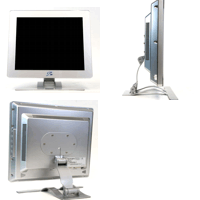
Once the 3D (Stereo) is set up properly the effect is pretty wild. You get a real sense that the game might actually be 3D. I've played home tournaments in big screen LCD projection environments, which surround you "IMAX style", but the 3D effect you get from the monitor is much more pronounced. The monitor also has a cool physical appearance, and feels like it could integrate nicely onto the desk of any gamer.
The display was sharp and clear in 2D mode and once you find the appropriate 3D focus/depth settings, the effects can be stunning. Enemies, bullets and scenery appear to almost literally pop off the screen, leading one into a reality-suspending experience of sensory immersion.
Author's Opinion
I'm not as big of a gamer as some Tom's Hardware Guide readers, but I do a fair amount of 3D modeling and look forward to this technology's further application, especially to the real-time sculpting of organic forms, and proofing scenes. For architectural applications you could have your client slap on the glasses and take a "walk-through" that they could almost reach out and touch. Showcasing your demos by using a neat technique like this adds tangible excitement to your presentation, and its "whiz-bang" effect might make a difference in landing your next gig.