Shop for All
|
8GB Extreme III CompactFlash Card |
Compare the top 5 lowest prices by hovering your mouse over the product names on the left |
$89.99 $11.99 $9.99 $119.99 $39.99 $89.99 |
|
2GB USB 2.0 Portable Drive |
jaytoo
Compare the top 5 lowest prices by hovering your mouse over the product names on the left |
$61.72 $14.99 $7.00 $41.49 $59.99 $11.99 |
|
2GB microSD Card |
not just memory
MemorySuppliers
Compare the top 5 lowest prices by hovering your mouse over the product names on the left |
$118.99 $14.99 $8.40 $49.00 $44.99 $9.99 |
|
8GB Memory Stick PRO Duo |
NextWarehouse.com
USA Outlet
Compare the top 5 lowest prices by hovering your mouse over the product names on the left |
$61.99 $8.53 $59.99 $36.99 $119.99 |
|
8GB Cruzer Micro USB U3 Flash Drive |
Perfect Deal Outlet
BzBoyz.com
WorldWide Distributors
Compare the top 5 lowest prices by hovering your mouse over the product names on the left |
$49.95 $8.68 $61.95 $24.99 $39.99 |
The Memory Articles
- How Much RAM Do You Really Need?
- The GeIL CL 1.5 DDR600 RAM Promise
- Pushing Your DDR2 RAM To The Max
- Separating The Wheat from the Chaff: The Latest DDR2 Modules Tested
- Corsair Reveals Xpert Memory Line: Speed with Sizzle
- Corsair In The Fast Lane: DDR2-667 and DDR400 With Extreme Timing
- THG Puts 13 Bleeding-Edge Memory Modules, 14 Mobos To the Match-Up...
- Samsung PC3700
- Ups and Downs: Memory Timings Put to the Test
- OCZ Attempts to Step Up the Clock Pace with DDR400 Module
8:29 AM - February 27, 2006 by
Bert Töpelt
Source: Tom's Hardware US – Keywords: search, true, ddr2, bleeding, edge, memory
Topics: Build Your Own
Syndication:
Source: Tom's Hardware US – Keywords: search, true, ddr2, bleeding, edge, memory
Topics: Build Your Own
Syndication:
Table of Contents:
12 –
Default Settings Test: DDR2-66...
- 1 – Optimal DRAM For Overclocking
- 2 – DDR2 Parts Details
- 3 – Two DRAM Sides Are Better Than One
- 4 – BIOS Settings To Boost Performance
- 5 – CL4 Or CL3: Boosts Performance By Up To 5%
- 6 – More Speed By Tightening Latency Timings
- 7 – Boosting Memory Clock Speed: 23% Performance Gains
- 8 – Here's How We Tested At THG's Munich Labs
- 9 – Wstream And Everest Benchmarks
- 10 – Overclocking Tests And Motherboards Used
- 11 – Default Settings Test: DDR2-667
- 12 – Default Settings Test: DDR2-667, Continued
- 13 – Overclocking By Tightening Timings
- 14 – Overclocking By Tightening Timings, Continued
- 15 – Overclocking To The Max
- 16 – Overclocking To The Max, Continued
- 17 – Only Asus Boards Convince
- 18 – An Overview Of The 16 Test Candidates
- 19 – Aeneon DDR2-533: Unbeatable Price/Performance
- 20 – Buffalo's DDR2-667 Is Unspectacular, But Solid
- 21 – Corsair DDR2-1000: Absolutely The Fastest
- 22 – Crucial/Micron DDR2-667 (Ballistix) Is Geared For Overclocking
- 23 – GeIL's DDR2-533 Fails To Impress
- 24 – G.Skill's DDR2-675 Confusing Label
- 25 – Kingmax DDR2-667: Choose The Chip's Color
- 26 – Kingston DDR2-900 Offers Minimal Overclocking
- 27 – Mushkin DDR2-667's Double-Sided Module With A Need For Speed
- 28 – OCZ DDR2-800: The Third-Fastest Test Candidate
- 29 – Patriot Memory DDR2-1000 Offers Top Performance Reads At 8.6 GB/sec
- 30 – PQI's DDR2-667 Is Fast, With No Overclocking Headroom
- 31 – Samsung DDR2-667: Conservative RAM Sans Overclocking
- 32 – Twinmos' DDR2-667 Is Slow, But Overclocks Well
- 33 – Wintec's (AMP) DDR2-667: 475 MHz When Overclocked
- 34 – Conclusion
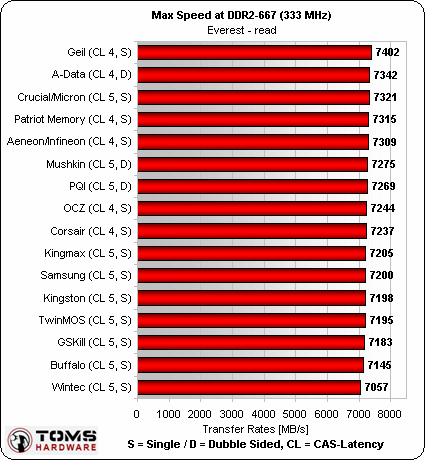
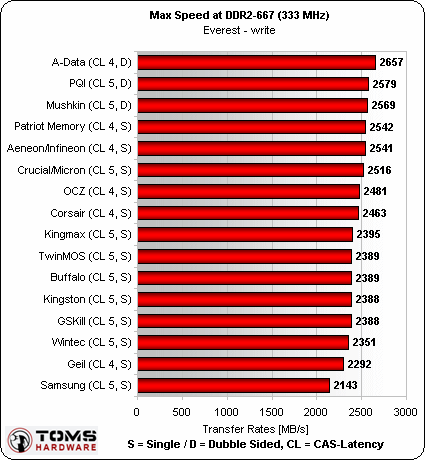
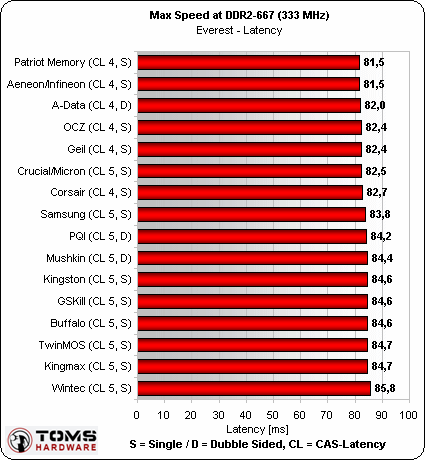
Default Settings Test: DDR2-667, Continued
Everest


-
12 – Default Settings Test: DDR2-66...
- 1 – Optimal DRAM For Overclocking
- 2 – DDR2 Parts Details
- 3 – Two DRAM Sides Are Better Than One
- 4 – BIOS Settings To Boost Performance
- 5 – CL4 Or CL3: Boosts Performance By Up To 5%
- 6 – More Speed By Tightening Latency Timings
- 7 – Boosting Memory Clock Speed: 23% Performance Gains
- 8 – Here's How We Tested At THG's Munich Labs
- 9 – Wstream And Everest Benchmarks
- 10 – Overclocking Tests And Motherboards Used
- 11 – Default Settings Test: DDR2-667
- 12 – Default Settings Test: DDR2-667, Continued
- 13 – Overclocking By Tightening Timings
- 14 – Overclocking By Tightening Timings, Continued
- 15 – Overclocking To The Max
- 16 – Overclocking To The Max, Continued
- 17 – Only Asus Boards Convince
- 18 – An Overview Of The 16 Test Candidates
- 19 – Aeneon DDR2-533: Unbeatable Price/Performance
- 20 – Buffalo's DDR2-667 Is Unspectacular, But Solid
- 21 – Corsair DDR2-1000: Absolutely The Fastest
- 22 – Crucial/Micron DDR2-667 (Ballistix) Is Geared For Overclocking
- 23 – GeIL's DDR2-533 Fails To Impress
- 24 – G.Skill's DDR2-675 Confusing Label
- 25 – Kingmax DDR2-667: Choose The Chip's Color
- 26 – Kingston DDR2-900 Offers Minimal Overclocking
- 27 – Mushkin DDR2-667's Double-Sided Module With A Need For Speed
- 28 – OCZ DDR2-800: The Third-Fastest Test Candidate
- 29 – Patriot Memory DDR2-1000 Offers Top Performance Reads At 8.6 GB/sec
- 30 – PQI's DDR2-667 Is Fast, With No Overclocking Headroom
- 31 – Samsung DDR2-667: Conservative RAM Sans Overclocking
- 32 – Twinmos' DDR2-667 Is Slow, But Overclocks Well
- 33 – Wintec's (AMP) DDR2-667: 475 MHz When Overclocked
- 34 – Conclusion
- Previous page Default Settings Test: DDR2-667
- Next page Overclocking By Tightening Timings