HP’s TouchPad comes with webOS 3.0, a version exclusive to the TouchPad. Version 2.0 is restricted to HP’s latest smartphones, but the differences are few. Overall, webOS 3.0 is similar to webOS 2.0, and more specifically optimized for the TouchPad’s larger screen. Considering that most of us don’t use HP smartphones though, webOS 3.0 is probably still foreign to most folks.
Unlocking
If the TouchPad is sitting idle, you need to unlock the screen by moving the yellow lock button outside the half-circle.

Navigation
The touch gestures on the TouchPad are the same as every other tablet. There are taps, scrolls, pinches, and swipes. The home screen contains a task bar with shortcuts to the browser, email, calendar, messaging, photo, and video apps. The arrow icon functions as the home button; it takes you back to the Launcher menu. Up top, you see a "Just type..." search bar that you can set to your favorite search engine. But it also allows you to search for a particular program.
Once you’re in a program, pressing the home button takes you to the main screen. This is where all of the currently-open programs are displayed. You can switch between multiple programs by swiping horizontally to find the window you want, and resuming a program is as simple as tapping on its window.
The keyboards in iOS and Android feature four rows of keys. But in both operating systems, they're basically all letters. Entering mixed input (like numbers) requires that you hit some sort of function key.
That's not an issue for the TouchPad because of its business focus. The keyboard in webOS features five rows, with the fifth dedicated to displaying numbers. This is a welcome relief when you're editing spreadsheets. But it also serves to make the layout more familiar to folks accustomed to desktop keyboards (another big positive for anyone finding the tablet transition difficult).
Notifications
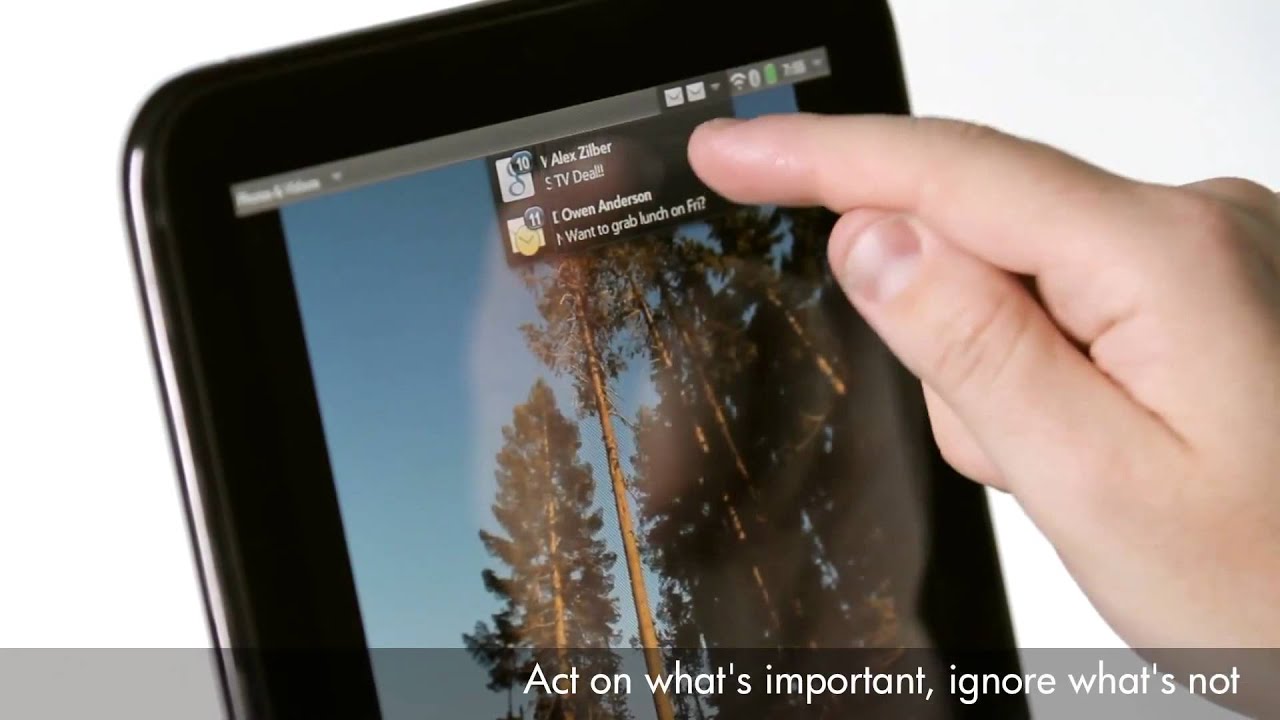
Notifications are managed beautifully in webOS. The latest alerts appear on the lock screen. Once the TouchPad is unlocked, a prompt appears with options for snoozing or dismissing.
Home Screen: Notification Prompt
Notifications on a Locked Screen
Stacked Notifications
Swipe to Dismiss
If you’ve ignored your notifications, they start to stack up in the status bar. In order to dismiss those alerts, you simply swipe through them like a deck of cards.
- HP's TouchPad Battles It Out With WebOS
- Meet HP's TouchPad
- webOS 3.0: Navigation And Notifications
- webOS 3.0: Email And Multitasking
- webOS 3.0: Media And Documents
- webOS 3.0: Screenshots And File Transfers
- webOS 3.0: Adobe Flash
- webOS 3.0: Synergy
- HP's App Catalog
- The Developer's Dilemma
- Third-Generation Snapdragon: The Dual-Core Scorpion
- The Adreno GPU: An AMD Bloodline
- Gamer Spotlight: HP TouchPad
- Display Quality: Color Gamut
- Display Quality: White And Black Uniformity
- Battery Life And Real-World Benchmarks
- Is The TouchPad An iPad Or Xoom Competitor?


The one thing lacking in this review, which is also lacking in everything being written about webos, is the mention of what I consider one of the standout features of webos: The openness of the platform. With preware installed (free), you have access to thousands of patches and homebrewed apps as well as linux applications. It is possible, for example, to run a full Debian Linux in a chrooted environment (without any cracking or jailbreaking), giving access to OpenOffice, and all other x-server Linux software out there. HP/Palm is the only tablet OS developer that actively encourages the homebrew/open source community in its efforts. As a developer, it is not only the ease of development that is compelling but the huge amount of expressive and creative freedom you get. With the Apple appstore, the walled garden may protect consumers well, but also creates a completely controlled and often repressive and capricious environment for a developer. This openness is the secret sauce behind much of the loyalty of webos users. The os is a joy to use, a joy to explore, and a joy to create new code in. And unfortunately, most reviewers can't or won't take the time to understand this extremely compelling aspect of the OS.
Thank you again for the best review of the touchpad I've seen yet.
Thanks again, Andrew!
HP just announced the $100 off sale from this last weekend is now permanent.
"Effective immediately, the HP TouchPad 16GB Wi-Fi will now be available for $399.99 and the HP TouchPad 32GB Wi-Fi will now be available for $499.99"
http://vdccnz2prof.houston.hp.com/view_email.asp?eid=10048010&mid=055f0aa5-75fa-414f-9913-9aa980bb0ef7
With preware and some patches... 1.5ghz or even 1.7ghz... amazing!
as the first WebOS tablet, i think its a home run.
http://www.youtube.com/watch?v=OpCJzdWxEbQ
Intel in under the impression that with die shrinks of 22nm and less that x86 will fit in the same power envelope as ARM but be able to run full applications, so they are not playing with ARM. But you have to believe that they are sitting on some ARM tech that will come out if their die shrinks are not as effective as they hope.
"Effective immediately, the HP TouchPad 16GB Wi-Fi will now be available for $399.99 and the HP TouchPad 32GB Wi-Fi will now be available for $499.99"
That's $100 cheaper than the initial price, and -$50 cheaper than what the article states.
So what do you do in-order to get software ?