









Best Wireless Mouse 2026: Our Tested Picks for Productivity, Portability, and Comfort
Clear cable clutter, starting with your mouse.

A great wireless productivity mouse is more than just a standard five-button pointer that helps you keep your Slack status active. The right wireless mouse can improve your workflow in ways you never imagined — and, hopefully, help stave off any repetitive stress injuries.
Productivity mice are very different from gaming mice. While gaming mice tend to prioritize speed, ultra-low latency, and pinpoint accuracy, productivity mice are about comfort and convenience. That's not to say you want a wireless mouse with noticeable lag or a low-quality sensor, of course — but you probably don't need to be concerned with a millisecond or two of latency. Instead, you should look for something ergonomic and sized for your hand and grip style, with the convenience features you're most likely to use — whether that's a side-scroll wheel or multi-device control, or even just something sized for travel (with built-in Bluetooth).
(Of course, if you're looking to improve your game, check out our list of best gaming mice.)
The quick list

Best Wireless Mouse for Most
This large, ergonomically-contoured mouse features a dual-mode scroll wheel, a side scroll wheel, and six configurable buttons. It can connect to three devices simultaneously, and the Logi Flow feature lets you move — both the mouse and some simple data — seamlessly across them.

Best Wireless Ergonomic Mouse
This vertical mouse is designed for smaller hands and it comes in multiple colors and in both left- and right-handed configurations.

Best Budget Vertical Mouse
This vertical mouse is comfortable and well-made, and can usually be found for between $30 - $50.

Best Premium Productivity
This small, productivity-focused Razer mouse has a dual-mode tilt wheel.

Best Budget Mouse
This basic, battery-powered mouse features an ambidextrous shape and can usually be found for under $20.

Best Small Mouse
This ultra-thin 78g Bluetooth mouse has a minimalist design — just two buttons and a scroll wheel.

Best Travel-sized Ergonomic Mouse
This is a less-flat, ergonomic (ish) take on the modern mobile mouse, with a similarly minimalistic design that's curved instead of flat.

Best Trackball Mouse
This large, ergonomically-curved mouse features a trackball for moving the cursor (of course, this is also the only way to move the cursor).

Best Mouse for Multiple Devices
This multi-device mouse has an easy-to-reach profile switch button for seamlessly swapping between devices.
The Best Wireless Mouse You Can Buy Today
Best Wireless Mouse for Most

Specifications
Reasons to buy
Reasons to avoid
The Logitech MX Master 3S is worth every penny if you make use of all its features. The MX Master 3S combines a comfortable, sculpted design with useful productivity features such as an electromagnetic scroll wheel, a separate, side-scrolling thumb wheel, and a ton of customization options. It can also use Logi Flow through the Logi Options+ software, which lets you switch connections seamlessly between three different devices by simply moving your cursor to the edge of a screen — and it can even carry clipboard contents to the next device.
The MX Master 3S's electromagnetic scroll wheel is one of its most impressive features: It lets you toggle between a smooth, free-scrolling feel or a notched scrolling feel with the press of a button — or automatically, based on how fast you spin it. It's perfect for quickly scrolling through long documents and then switching over to more precise tasks where you need that ratcheted precision. The mouse also has a second thumb wheel on the left side that lets you perform tasks such as zooming in and out of documents, scrolling horizontally in spreadsheets, and raising and lowering your system volume.


The mouse has six configurable buttons (seven, if you include the clickable scroll wheel), which you can set up to perform different tasks based on the app you're using, through the Logi Options+ software. Logi Options+ tracks what app you're currently using and automatically switches the mouse's profile to match. For example, you can set up the mouse's side buttons to perform the forward/back functions when you're using a web browser, but set them to act as PgUp/PgDn buttons when you're in a word processor.
The MX Master 3S has two noticeable improvements over its predecessor, the MX Master 3: an upgraded sensor that goes up to 8,000 DPI (twice the MX Master 3's 4,000 DPI), and quieter switches in the main left/right click buttons.
Read: Logitech MX Master 3S Review
Best Wireless Ergonomic Mouse

Specifications
Reasons to buy
Reasons to avoid
The Logitech Lift is an ergonomic wireless mouse designed for users with small- to medium-sized hands — it’s not for everyone, but it’s nice to see an option for users who might not find the larger Logitech MX Vertical comfortable to use. The Lift also comes in both right-handed and left-handed versions, making it one of the only ergonomic mouse options for left-handed users (though while the right-handed version comes in pink, white, and graphite, the left-handed version only comes in the latter).
The Lift has a vertical design, which puts your hand at an “optimal” 57-degree angle — also known as the “handshake angle.” This angle is more natural than the typical horizontal angle mice normally have, but this design does lift your hand away from your desk. If you’re used to a regular mouse, it may take you some time to get used to this new position (and you may never get used to it, especially if you work with very precise movements — it’s harder to be precise when your hand is further from the desk).

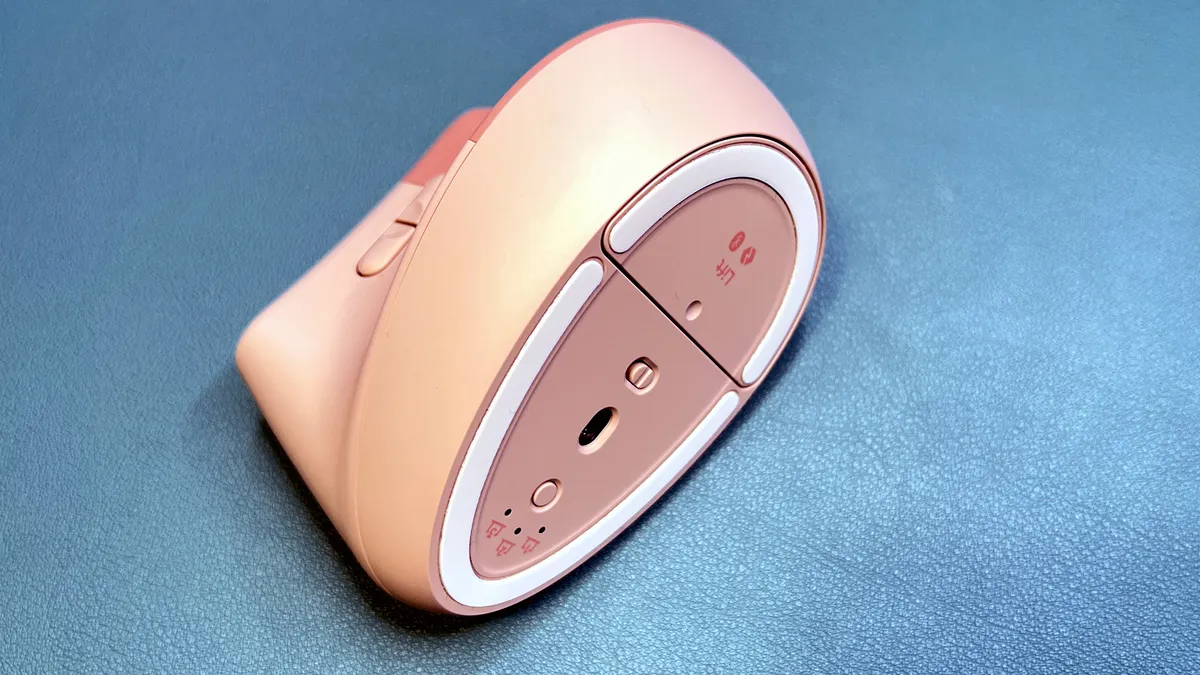
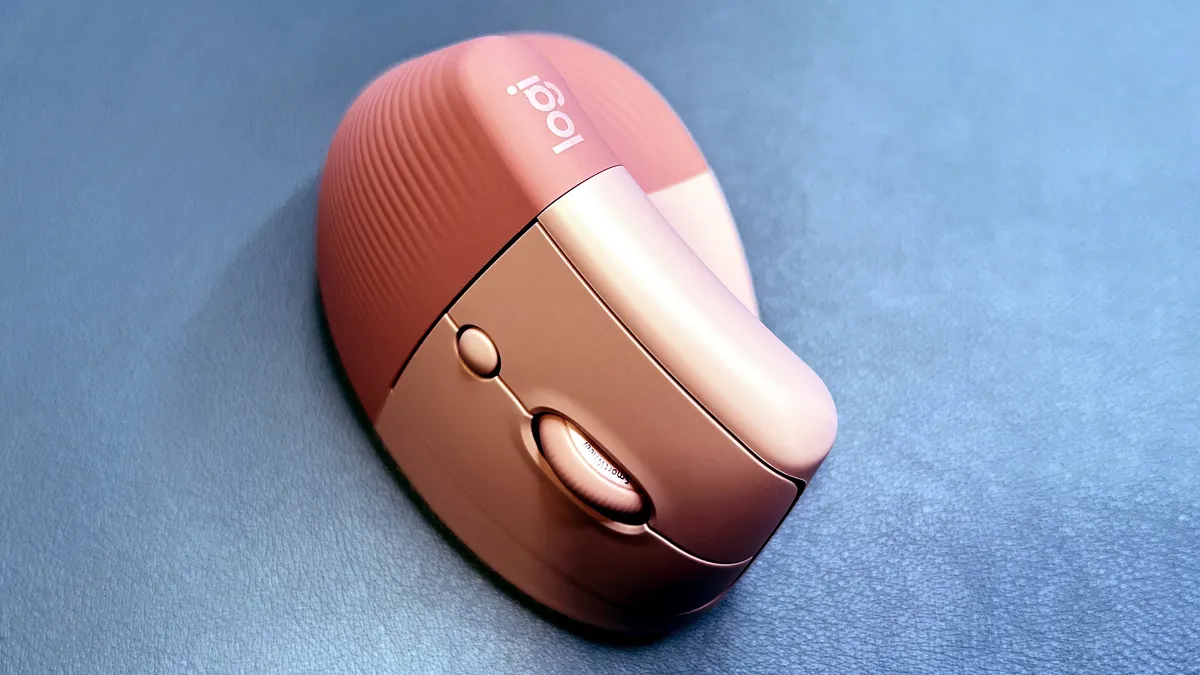


The Lift is a productivity mouse; it works with Logitech’s Logi Options+ software and includes Logitech’s productivity features, such as Logi Flow, which lets you switch between three different PCs. Logi Flow isn’t perfect — there’s a small delay between devices, but it’s an excellent feature for people who switch between a laptop and a desktop, or a laptop and a tablet.
The Lift's vertical design makes it less-than-ideal for precision tasks, such as gaming — gamers who want an ergonomic mouse should check out the incredibly comfortable Razer DeathAdder V4 Pro.
Read: Logitech Lift Review
Best Budget Vertical Mouse

3. Lenovo Go Wireless Vertical Mouse
Our expert review:
Specifications
Reasons to buy
Reasons to avoid
The Lenovo Go Wireless Mouse is a cheaper take on the vertical mouse layout than the Logitech Lift and the Logitech MX Vertical, with a price that ranges from $30 - $50 depending on sales (which Lenovo frequently has). Despite this, it’s got a strong luxury feel thanks to the comfortable, stylish cork side finish, and it also has many of the Lift's and MX Vertical's strengths.
These include the natural, 57-degree "handshake position" angle and the six programmable buttons (one less than you'll find on the MX Vertical). The Go Wireless mouse also features three programmable DPI steps (800 - 2,400), which you can cycle through using the DPI switch button. The Lenovo Go Wireless mouse has a battery life of up to 18 months via one AA battery.
The main drawback is the Go Wireless' side button placement. Instead of being in the divot where your thumb rests — like it is on the MX Vertical — the side buttons are instead located on the mouse's top edge. You'll have to strain your thumb to reach them, which throws a wrench in the mouse's otherwise strong ergonomics.
Best Premium Productivity

Specifications
Reasons to buy
Reasons to avoid
Often, gaming gear is a cheap way to get your hands on a mouse with professional-level features. Razer is known mainly for its gaming peripherals, but it's also been dabbling in the productivity sphere by taking some of those gaming features and translating them into a line specifically for productivity.
The Razer Pro Click Mini is the second productivity-focused pointer from Razer, and it features quieter switches and a smaller footprint than its predecessor. Unlike other productivity-focused mice, it’s also got a decently high max DPI (12,000) and polling rate (1,000 Hz), seven programmable buttons, and low-latency 2.4GHz wireless connectivity. It also has five onboard memory profiles and fully remappable buttons — including the 4-way tilt wheel, which has both infinite and ratcheted scrolling modes.
That makes this an especially powerful contender for the office — it's versatile, highly responsive, and totally customizable. Plus, its sleek gray and white chassis keep it from looking too much like a gaming mouse.
It’s a bit of a shame that it uses AA batteries instead of just being rechargeable, especially since those batteries do make it a touch heavier. But with a purported 465 hours of battery life over 2.4GHz wireless and 725 hours over Bluetooth, it’s easy to just stuff this in your bag and forget about it for months on end.
Read: Razer Pro Click Mini review
Best Budget Mouse

5. Logitech M510
Specifications
Reasons to buy
Reasons to avoid
What is a 'best mouse,' anyway? Don’t you just need a way to point your cursor without too much delay and without hurting your hands? If this sounds like you, the Logitech M510 will be your new best friend. Its no-frills design makes it one of the most inexpensive mice on this list at just $20, while its low-latency 2.4GHz wireless connectivity means it has virtually zero lag. It sports a comfortable, ambidextrous body that should fit nicely into most hands, and its two side buttons are accessible across palm, claw, and fingertip grip styles.
The M510 works with Logi Options+, where you can set the DPI (up to 1,000), swap the left and right mouse buttons, and otherwise remap the mouse's five buttons. Remap assignment options include keystrokes, functions, and even a "gesture" toggle that works with mouse movement to open up even more mappable actions. Logi Options+ also lets you set application-specific mouse profiles, so the mouse's buttons can function differently depending on which app you're using at the moment. Logi Options+ isn't unique to the M510, but it's good to know that Logitech's productivity features are still accessible, even for the brand's most basic mice.
This mouse glides well with its four rubber feet and is powered by two AA batteries (up to 24 months of battery life). It weighs 4.48 ounces (127g), making it relatively easy to lift and travel with. All around, it's a great starter mouse — though its ambidextrous design leaves it with a somewhat underdeveloped thumb rest (and it doesn't have some of the fancier features, such as an infinite scroll wheel).
Best Small Mouse

6. Microsoft Modern Mobile Mouse
Specifications
Reasons to buy
Reasons to avoid
The Microsoft Modern Mobile Mouse is a thin little credit card of a pointer that presumes that the most comfortable form factor for a mouse is to have as little mouse in your hand as possible. This makes it great for travel and style, especially with its 8 available colors and Bluetooth connectivity. At 2.75 ounces (78g) with batteries installed, it’s easy to carry around with you. At the same time, its sleek rectangular exterior makes it difficult for certain grip types to handle it, and it doesn’t come with extra buttons or too much configurability.
With just a left button, a right button, and a clickable scroll wheel (non-tilt), this mouse isn’t meant for more than basic work. The scroll wheel’s push-in button can be remapped to input a key combination, open the screen snipping tool, or even input a macro, but that’s the most advanced usability you’ll get out of this mouse. Otherwise, all its software will let you do is swap the left and right clicks, change how fast the wheel scrolls (and in which direction), and adjust your DPI.
There’s no doubt that the mouse’s lightweight nature lends it a certain level of comfort, as it doesn’t take much force to use, but it can feel bulky in the hands thanks to its rectangular shape. This is a bit odd given how small the mouse is, and it doesn’t help that palm grip users don’t have much of a body to rest their palms on.
This is a good mouse for Bluetooth devices, casual use, and travel, and will appeal to anyone who prefers lightweight, small accessories that stay out of the way. It also looks good. But its functions are limited, and it’s not the most comfortable for all types of users.
Best Travel-sized Ergonomic Mouse

7. Microsoft Arc Mouse
Specifications
Reasons to buy
Reasons to avoid
The Microsoft Arc Mouse is a more ergonomic take on the Microsoft Modern Mobile Mouse that nonetheless loses some functionality in the pursuit of greater comfort. It feels great in the hands, so much so that it might convince you to abandon a claw grip for a palm grip instead. However, its hair-trigger button (which doesn't physically distinguish between left/right click zones) and its lack of a scroll wheel mean it's not for everyone.
At $80, the Arc Mouse is more than three times the cost of the Modern Mobile Mouse, but it is still affordable compared to other ergonomic mice on this list. It also carries over some of the benefits of the Modern Mobile Mouse — an uncomplicated, lightweight body, multiple color options, and easy portability (it can bend flat to fit into bags with no issue).
It's also got the same weaknesses as the Modern Mobile Mouse — and then some. Most noticeable and egregious is the lack of a scroll wheel or separate left and right click buttons. Taking the Modern Mobile Mouse’s lack of buttons a little further, the Arc Mouse opts to have one clickable touchpad for its input. Clicking the left side works as a left click, and clicking the right side works like a right click (although you can swap these), while an optional three-finger-click option can serve as either a middle click or a keyboard combination of your choice. This can take some getting used to at first, as you find where the boundaries between the different options are, but it generally works.
Instead of a scroll wheel, the mouse wants you to flick your finger to scroll. This results in stilted scrolling that requires a lot of extraneous flicks, even on the highest sensitivity setting. Not only do you lose precision with this, but you also lose comfort, which goes against the point of the mouse.
Also, a little disappointing is that bending the mouse flat also turns it off, so you can’t use it in this shape if you prefer. Further, the mouse is not built for fingertip or claw grippers.
Some people will love this mouse, either as a main pointer or as a backup while traveling. It's a niche pick, but so are most ergonomic mice.
Best Trackball Mouse

8. Logitech Ergo M575 Mouse
Specifications
Reasons to buy
Reasons to avoid
The Logitech Ergo M575 Mouse is the hero your strained wrists have been waiting for. With it, you won’t need to move them at all. Just lay your hand on your mouse once, and you’re all set for eight hours straight without needing to move it again (aside from getting up to go to the bathroom). Of course, your thumb will be getting a workout the whole time.
That’s because this mouse uses a trackball to move the cursor. It’s not a new approach, but at $50 and with 2.4GHz and Bluetooth support, the Ergo M575 is more advanced than what you would have gotten in the ‘90s.
Using it will take some practice, of course, but it feels like a dream in your hand. It completely eliminates strain from repetitive motions, and the wide body perfectly contorts to my hand shape. Again, it does require my thumb to do a lot of movement, but if there’s anything decades of gaming have taught me, it’s that my thumbs are pretty resilient when it comes to carpal tunnel syndrome. The rest of my hand, not so much.
Of course, speaking of gaming, not being able to move the mouse itself does come with some struggles. For instance, while this isn’t our best gaming mouse list, let’s not kid ourselves. You’re probably not constantly swapping between a gaming and work mouse with your home setup. If you were hoping to use this mouse to moonlight in games, think again. While its trackball can reach a DPI of up to 2000, it’s harder to do controlled flicks or steady tracking with it. Not common use cases on the job, but very common in games.
Clicking and dragging also takes some rewiring at first, as I’m not used to using both my thumb and my index finger when doing so. It took a bit of thought to remember to let go of my index finger when I was done dragging, but not my thumb. Similarly, it can be hard to precisely highlight text with a trackball.
Most of these issues, aside from the mouse not being well-suited to games, are easy enough to fix with practice. And once you do, your wrists will thank you. Your desk might thank you too. While the M575 is a bulky mouse, it also paradoxically has a small footprint because you don’t need to move it when using it. It doesn’t even need a mousepad, making it great for people with small desks or keyboard trays.
Like the Logitech M510, the M575 is compatible with the Logitech Options software, which lets you remap its three extra buttons, check battery level, swap the left/right click, and adjust DPI. The customization on offer here is fairly robust and allows you to set a button to open programs, control media, enter certain key combinations, and the like. Plus, you can set the mouse to use different settings depending on which program you have open.
If you like trackball mice, this is one of the best modern options available.
Best Mouse for Multiple Devices

9. Logitech Triathlon M720 Mouse
Specifications
Reasons to buy
Reasons to avoid
At first glance, the Logitech Triathlon M720 mouse doesn’t appear to offer much for its $40 price, which the more basic, $20 Logitech M510 mouse already has. It’s got one extra button hidden away in its left thumb rest, which itself is more prominent than the thumb rest on the M510, plus a switch hidden under the scroll wheel that swaps it between ratcheted and smooth scrolling. But it’s also got one other additional, non-remappable button on its side with a “123” printed next to it. This button is where you’ll find the Triathlon’s unique use case, which is its ability to pair with up to 3 computers at once and swap between them on the fly, either with that button or through Logitech Flow.
Logitech Flow is a unique piece of software that allows the Triathlon to easily treat multiple computers like one desktop simply by moving the cursor between their displays. This lets you copy and paste images and files easily, or even just use a laptop as a secondary or tertiary monitor without hassle. Think of it like a software solution for a KVM. All you have to do is pair the Triathlon to each of the PCs you want to use and make sure Logitech Options is installed on each.
In practice, it works almost flawlessly, plus you can add a Logitech keyboard into the mix if you have one. The only major issue is with connectivity standard limitations. To connect to a device, the M720 needs either Bluetooth or a Logitech Unifying Receiver. Since it only comes with a single unifying receiver, you can’t have all of your devices using 2.4 GHz unless you buy individual receivers separately. There’s no issue with connecting multiple Bluetooth devices, however, nor did I have a problem connecting one device via 2.4 GHz and one via Bluetooth.
Less of an issue is that a device’s mouse cursor does not disappear when you move your mouse off of it, which can be mildly annoying if you’re using a laptop as a secondary display.
If you need to quickly move files across devices or simply do not own a secondary monitor but do have a laptop, Logitech Flow can be a boon to your productivity. But if all you need to do is connect a single mouse to multiple devices and swap between them on the fly, other Logitech mice can also do that.
Take the Ergo M575, which has both 2.4 GHz and Bluetooth compatibility. I easily connected the M575 to one device via 2.4 GHz and one device via Bluetooth, then swapped between them on the fly via the button on the bottom of the mouse that changes the M575’s connectivity standard. It’s a more hack-y solution, and requires you to turn the mouse over every time you want to swap devices rather than using an easy side button, but it does take away one of the Triathlon’s unique strengths.
Nonetheless, the Triathlon is still inexpensive compared to mice like the Ergo M575, and is a good choice if you’re just getting a Logitech productivity mouse and need to use it across multiple devices. It’s comfortable in the hand across all grip styles, easily remappable via the robust Logitech Options software, and has access to an always-satisfying smooth scroll wheel.
How We Test Wireless Mice
Wireless productivity mice are as much about convenience, comfort, and usability as they are about performance. First, we inspect the build quality of each mouse, as well as its size, weight, and attention to ergonomics. For comfort, we also consider button placement and scroll wheel style/stiffness, and take note of productivity-oriented features such as side scroll wheels and smooth scrolling.
We then spent a couple of weeks with each mouse, using it for both productivity and gaming tasks if possible. We test each mouse on a variety of typical surfaces (wood, laminate, metal, glass), as well as on unusual surfaces (carpet, upholstery... pets...) to see how adaptable it is. We test how well the mouse connects to multiple devices and how well it switches between those devices on the fly.
We take a look at any included software and test each mouse's productivity features (such as Logitech's Logi Options), but we also test each mouse with no software installed to see how well it performs as a plug-and-play device. We look at how customizable the mouse is via its software, including how granular the DPI settings are and whether there are any gaming-related features, such as a higher polling rate. We test battery life on both 2.4GHz (if applicable) and Bluetooth, and inspect any accessories it comes with (e.g. battery, charging cable). If it comes with a 2.4GHz wireless dongle, we look for dongle storage for easy travel.
Tips for Picking the Best Wireless Mouse
Shape and comfort
An excellent wireless mouse will feel like a natural extension of your arm — not like a clunky, cheap-feeling hunk of plastic that hinders productivity — but comfort is very subjective. Consider how you hold your mouse to determine where you'll want more (or less) height or width.
How many buttons do you need?
While productivity mice tend to focus more on convenience and connecting to multiple devices instead of having tons of customizable buttons, a few extra buttons or scroll wheels can definitely help your workflow. Most mice have at least two programmable side buttons, and some mice have extra features such as the MX Master 3S's side scroll wheel. If you need more than a couple of extra buttons, however, you may want to look at the best gaming mice instead.
How does it connect?
Some wireless mice connect via Bluetooth, while others connect via 2.4GHz wireless using a USB-A (or USB-C) dongle — and some mice offer both. If you're only going to use your mouse with one PC, consider one that connects via 2.4GHz wireless, especially if you're going to game on the side — you'll get a reliable, lag-free connection this way. If you have more than one device to connect to, a Bluetooth connection will let you connect to multiple devices and switch between them — some even let you switch without manually pressing a profile-switch button.
Does it need batteries?
Wireless mice running on AA or AAA batteries are usually cheaper than their rechargeable rivals, and one battery can last a long time — months, or even years, depending on how often you use it. But they're heavier and larger, which can make them less convenient to travel with.
Finding Discounts on the Best Wireless Mice
Whether you're shopping for one of the best wireless mice or a model that isn't on our list above, you may find some savings by checking out our lists of the latest Best Buy promo codes, Corsair coupon codes, Logitech promo codes, Micro Center coupons, Newegg promo codes, Staples coupons and Razer promo codes.
Get Tom's Hardware's best news and in-depth reviews, straight to your inbox.

Sarah Jacobsson Purewal is a senior editor at Tom's Hardware covering peripherals, software, and custom builds. You can find more of her work in PCWorld, Macworld, TechHive, CNET, Gizmodo, Tom's Guide, PC Gamer, Men's Health, Men's Fitness, SHAPE, Cosmopolitan, and just about everywhere else.
-
Findecanor I'm browsing the UK version of Tom's Hardware. Why can't weights and measurements be in international units?Reply -
imsurgical Let me preface my surprise at this list by stating I own and have religiously used a G Pro Wireless, G903 (original non-lightspeed) and Razer DeathAdder V2 Pro, and am currently using a G305 as my everyday work horse mouse, so I have some semblance of expectations when it comes to wireless gaming mice.Reply
How does the G305 not make this list? I'm a little confused by that :unsure:. Weight wise, it's in line with most of these expensive mice or better, and if you sub out the battery for a lithium or even AAA converted lithium you're coming in at an 84-85g mouse that has such a long charge time compared to any of these mice listed. I can understand most of the picks, but the Redragon M686 taking a spot as an "affordable wireless gaming" mouse compared to the G305?
Anyways, interesting quick read, thank you! -
scharhar ReplyFindecanor said:I'm browsing the UK version of Tom's Hardware. Why can't weights and measurements be in international units?
Your wish is my command :) -
Stave Dan I though razer basilisk ultimate should be at first position, i am using this mouse more than a year , it never disappoint me .... however like other sites , great content on best gaming mouse I really appreciate it !Reply -
deesider Interesting that Bluetooth gives such a large battery life improvement. I wonder if there is a latency disadvantage, otherwise why bother with using a proprietary dongle?Reply -
Nestea_Zen I'll never understand why all these blog websites/articles paste the picture first, above the title. it's called a title for a reason.Reply
it ALWAYS confuses. especially since the images usually never carry text.
so much for college educated people. -
Logitech G502 LightspeedReply
Reasons to avoid:
- Must RMA every 6 months because at least 1 button will develop double-clicking issues.
A flaw it shares with the G903, G900, G700, and the G602 (and possibly every other G mouse released in the past decade or so). -
Dankhola Doesn't the G-Pro wireless now have the 25K sensor? Or is it the same pixart sensor with a firmware update?Reply -
Old Molases Please correct me if i am wrong. Do people using wireless mice for gaming experience delays while gaming?Reply -
Prizm4 Doesn't Razer software still require you to create a Razer account to use it?Reply
I bought a Razer mouse years ago and returned it as soon as I saw the software required me to log in just to change the mouse settings 👎