









How to Install a Waterblock on a GPU: Liquid Cooling Your Graphics Card
It's really not as scary as it seems.

If you're contemplating building a liquid-cooled PC with a full custom loop, you'll have to decide at some point whether to buy a graphics card with a waterblock pre-installed, or opt for a normal card and install the waterblock yourself.
There are pros and cons to taking each route. For example, a GPU with a pre-installed waterblock is guaranteed to keep its warranty. But there's more satisfaction in doing it yourself, and you'll have the chance to pick a waterblock that matches the rest of your system.
Today, we're showing you the basics of how to install a waterblock on a graphics card. While the disassembly of expensive components can be intimidating, it's not as complicated or scary as it may seem.
The graphics card we're using is the EVGA RTX 2080 Super Gaming Black. This card features a reference design PCB (as designed by Nvidia), but comes with a less-expensive cooler than the Nvidia Founders Edition card, making it a great contender for installing a waterblock, as we're ditching the included cooler anyway.
For this process, you'll want to be ready to spend an hour to 90 minutes. As long as you're patient and take your time, chances are nothing will go wrong.
1. Test Your Graphics Card
We can't stress this enough: When you're installing a waterblock on a graphics card, you're going to want to make sure the card is working before you start the process. Technically in most countries, a manufacturer isn't allowed to void your warranty if you remove the stock cooler and replace it with a waterblock, but we all know that having a right doesn't mean you'll get warranty coverage without a protracted fight. Do yourself a favor and make sure your GPU works before you tear it apart.
Better still: Run some GPU benchmarks to see how your graphics card is performing. In this case, you'll want to use a tool like MSI Afterburner or GPU-Z to log details on your GPU clocks and temperatures, along with capturing actual performance via some other utility like OCAT. You should see a substantial drop in temperatures with liquid cooling.
Get Tom's Hardware's best news and in-depth reviews, straight to your inbox.
2. Disassembling Your Graphics Card


Disassembling the graphics card is fairly easy, but you'll want to be patient. Some things will differ from one manufacturer to another, and from one cooling design to another, but in general, the process is the same.
Around the rear of our EVGA card, there are a significant number of tiny screws to remove, and it can be helpful to remove the front I/O bracket too — for our card, a lip at the top was blocking the cooler from removal, so we detached it.
With the required screens removed, the cooler should pop right off, though it might need a small nudge. If it requires too much force, look to see if there are any screws you might have missed. Note that some graphics cards use a form of thermal glue that may require a bit of heat to loosen up. Twist the cooler gently to the side rather than trying to pull it straight off.
Make sure you keep all the screws in a safe place, preferably a small plastic bag, so that you can keep them with the cooler in case you ever decide to put it back on later. When you eventually upgrade to a newer graphics card, you may want to take your waterblock along for the ride, and your old GPU won't work without cooling of some form.
3. Cleaning the GPU

With the cooler detached, you'll likely find a mess of thermal paste. To clean the GPU, grab a lint-free cloth, 99% isopropyl alcohol, q-tips, and a toothbrush. Use the cloth and alcohol to remove most of the thermal paste from the GPU, and the Q-tips and toothbrush for the finer work.
Take note of the electronics around the GPU; chances are yours won't come out as clean as ours as most manufacturers apply far too much thermal paste, spreading it past the GPU. Don't worry if you can't clean everything off the bits surrounding the GPU — the thermal paste is non-conductive and won't do any harm, so there's no need to get aggressive with cleaning. Just make sure the GPU itself is immaculately clean.
If the graphics card has a cooling plate that sat between the GPU and its cooler, now is the time to remove it. You can also re-install the IO shield now if you previously removed it.
4. Take a Breather, Admire Your Graphics Card, and Tidy Up

It's not every day that you get to witness a graphics card taken apart to this level. And now that you've cleaned it, it's a great time to take a breather and tidy up your workspace. Get rid of the cloth and q-tips, box up the cooler and its screws, and get your liquid-cooling components ready for installation.
If you're not sure whether you bought the right waterblock, you can quickly test-place it before the next step to see if it fits correctly.
It's also a good moment to get the manual for your waterblock ready. It should all be quite straightforward, but the manual will show some key details for your particular GPU model.
5. Cut and Apply Thermal Pads and Thermal Paste

Your waterblock will come with thermal pads to cool the memory and VRM circuitry. The memory pads will likely be pre-cut, so grab some tweezers and carefully place them on the memory modules around the GPU, making sure to remove the protective plastic off each piece.
Then, cut the thermal pad for the mosfets and coils according to the manual of your waterblock, and place them as instructed.
Your waterblock will also come with a tube of thermal paste. It's likely to be of the non-conductive type (though it's worth double-checking), so go ahead and put a small amount, roughly the size of a small pea, on the center of the GPU. Don't worry about spreading it out -- the waterblock will spread the paste out when you tighten it on.
Tip: If it turns out your paste is conductive, only use it if you are confident you will not apply too much. If you're new to PC building and don't have that intuition yet, see if you have some non-conductive thermal paste you can use instead, as this will ensure no damage is done from over-application.
6. Place the Waterblock

Now, you're ready to place the waterblock onto the graphics card. Simply lower it into place, making sure to get it as close to its intended position as you can so that you don't end up smearing the thermal paste underneath around.
Once in place, grab the assembly, and place it with the IO shield over the edge of your desk, so that the graphics card is resting on the waterblock.
Now it's time to reinstall the four screws around the GPU, in a crisscross pattern. We generally start by lightly installing each screw, and then tightening them down in an X-pattern after they're in place. Don't overdo the tightening of the screws, however, as you risk cracking your GPU. Don't be too shy either, as inadequate mounting pressure will lead to disappointing temperatures.
In case of doubt: The small screws and small-handled screwdriver you're using (we told you to use a small screwdriver, right?) will make it difficult to over-tighten the screws unless you really try.
Now do up the remaining screws to secure the waterblock onto the graphics card.
You're All Done!
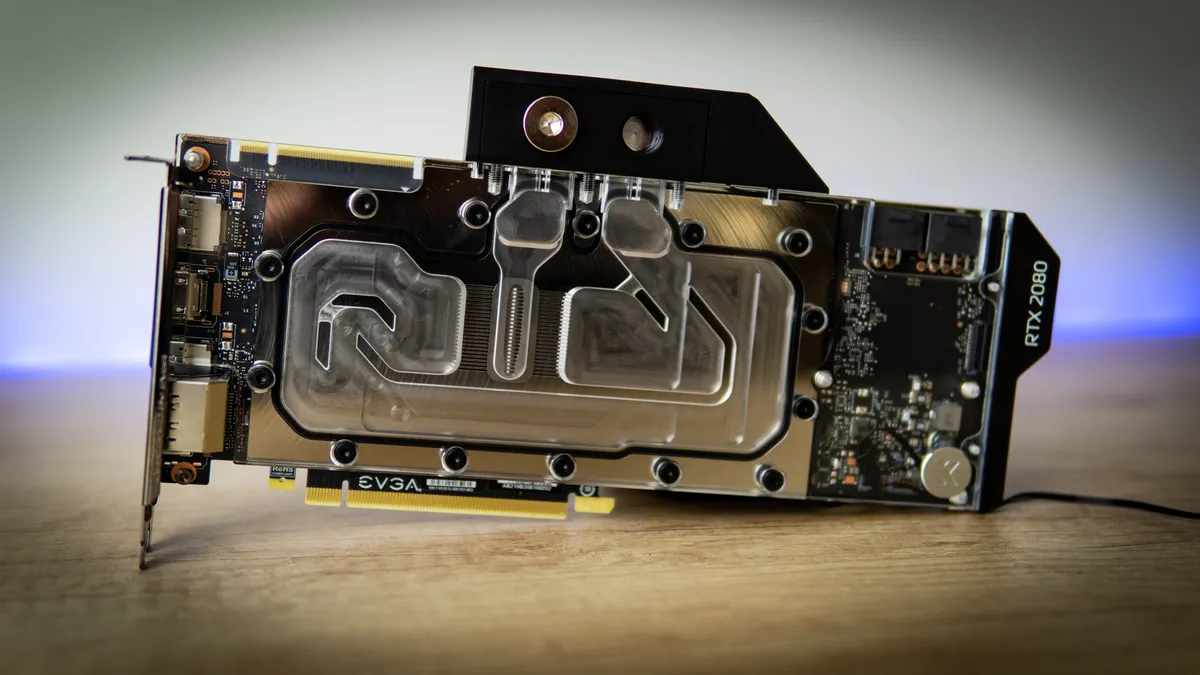
You have now successfully prepared your graphics card for installation into a custom cooling loop. Do be sure to do up the plugs on the inlet and outlet terminals though — you wouldn't want fluid to come spouting out of your card when filling the system.
With that easy bit out of the way, you're ready for the much harder task of planning and setting up the rest of your custom loop. If that bit is intimidating to you or this is your first venture into custom cooling, you may want to consider Corsair's Hydro X watercooling kit and its handy configurator page. Similarly, EKWB has its own custom liquid cooling kits that can be a lot less expensive than buying individual parts piecemeal.
Once everything is complete, go and run the same tests as before and see how performance and temperatures have changed. You can also look into overclocking your graphics card, since it will surely be running a lot cooler than before.

Niels Broekhuijsen is a Contributing Writer for Tom's Hardware US. He reviews cases, water cooling and pc builds.
-
Makaveli Great article for me the scary part about water is the regular maintenance, leak checking and if you go hard tubing making sure its cut correctly. Installing cpu and gpu water blocks isn't difficult.Reply
And the scariest thing is owning a PC with custom water that is a multi user pc with novice users that is #1 for me lol. -
CXK novice users = spouse and kids? :DReply
I am not particularly worried about that, as they do not meddle with the parts inside the PC case.
I am more worried about leaks and pump problems.