Best offers
|
P7P55D Motherboard (Intel Socket H... | $149.99 Newegg.com More info |
|
M4A785TD-V EVO AMD 785G/SB710 Socket... | $84.99 Newegg.com More info |
|
GA-P55-UD4P Motherboard (Intel Socket... | $169.99 Newegg.com More info |
|
GA-P55-UD3R Motherboard (Intel Socket... | $139.99 Newegg.com More info |
|
M4A78T-E Motherboard (AMD, AM3, AMD... | $129.99 Newegg.com More info |
- dynamic overclocking technology
- reference memory
- ras to ras delay
- msi dynamic overclocking technology
- dynamic overclocking
- trfc timings
- pcie clock 100 or 200
- x48 motherboard comparison
- is there a fsb limit
- memory setting trfc
- cpu fsb comparison
- southbridge core voltage
- southbridge ich9r
- does dynamic overclocking technology work
- trfc setting
Partners
The Games selection
adventure :
Ray
Adventure game, South Park style. Pick the way the story goes by picking an answer among those offered.
|
crazy :
Interactive Boogy
Pick one of the 3 songs, hit on the correct keys matching this boy's dance moves.
|
Sponsored links
- Email |
- Print |
- Comments (7) |
- Share
| BIOS Frequency and Voltage settings (for overclocking) | |
|---|---|
| FSB Frequency | 200 - 800 MHz (1 MHz) |
| Clock Multiplier Adjustment | Yes |
| DRAM Frequency | FSB clock x 1.0, 1.2, 1.33, 1.5, 1.60, 1.66, 2.0 |
| PCIe Clock | 100 - 200 MHz (1 MHz) |
| CPU Vcore | 1.3000 - 2.0750 Volts (0.0125 Volts) |
| CPU FSB Voltage | 1.20 - 1.44 Volts (Eight Steps) |
| Northbridge (MCH) | 1.25 - 1.83 Volts (Eleven Steps) |
| Southbridge (ICH) | 1.50 - 1.80 Volts (Eight Steps) |
| DRAM Voltage | 1.50 - 2.75 Volts (26 Steps) |
| CAS Latency Range | |
| tCAS: 5-11; tRCD: 3-15; tRP: 3-15; tRAS: 9-30 | |
MSI provides a wide range of frequency adjustments, and just about every other setting the X48 Platinum might need to reach its full overclocking potential. This begins with a CPU FSB clock setting that goes up to 800 MHz (FSB-3200), which is at least 150 MHz higher than even the world's greatest overclockers could hope to reach. Less enthusiastic overclockers might instead choose one of the company's Dynamic Overclocking Technology (D.O.T.) settings of 1%, 3%, or 5%, which changes the FSB dynamically (as the name implies) under high CPU workload.
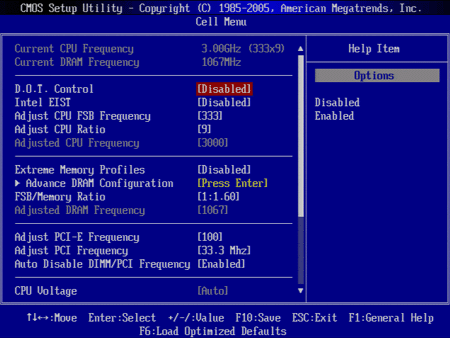
The full range of DRAM multipliers is available regardless of FSB clock, but the BIOS doesn't show any indication of which bootstrap is being applied.
Scrolling down the menu reveals CPU core, memory, FSB, MCH (X48 Express Northbridge), ICH (ICH9R Southbridge), CPU reference, and memory reference voltage settings.
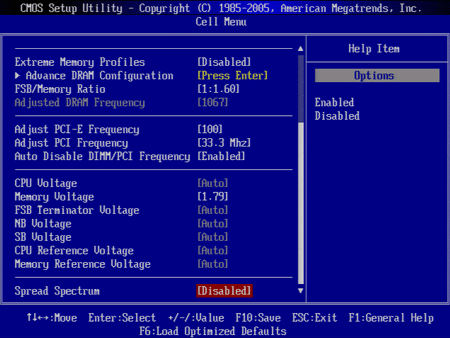
The CPU core voltage limit of 2.075 volts is somewhat lower than those of some competitors, but still high enough to take most Core 2 series processors to their Liquid Nitrogen-cooled limits. The only relatively restrictive voltage range is the FSB limit of 1.44 V.
Adjusting DRAM timings requires opening a separate menu.
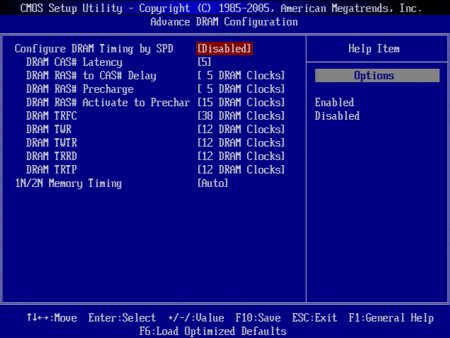
The X48 Platinum's latency values are fairly comprehensive, and each selection is broad enough for most types of memory. Unlike models from Asus and Gigabyte, though, the MSI X48 Platinum BIOS makes it impossible to manually set some values while leaving others in "automatic" configuration. To reach high memory speeds at moderate CAS, RAS to CAS delay, RAS Precharge, and RAS Activate to Precharge settings, we had to manually set tRFC to a higher value. The problem with not having an "automatic" setting for individual timings is that most builders don't know which tRFC values are appropriate.
The X48 Platinum supported the highest FSB of today's comparison: 542 MHz (FSB-2168) with our Core 2 Duo E6850 at 1.60 V core, 1.44 V FSB, and 1.52 V northbridge. Using the CPU's stock 9x multiplier we also reached a 4019 MHz clock speed.
- Help choosing a new motherboard [Motherboards & Memory]
- Which is better? [Motherboards & Memory]
- Which card(s) would be best??? [Graphic & Displays]
- Q8400 stronger than the Phenom II quads when OC'ed over 3 Ghz? [CPU & Components]
- 260 and 4870 are the same price. Help! [Graphic & Displays]
Questions? Ask Tom's community!
Sponsored links
Related forums topics
- AMD: Core i7 as being out of touch with the marketplace
- The Ultimate Hardware Guide [Last Update: 4-14-06]
- MSI Eclipse SLI with Core i7 965 Extreme OC Review
- Help me choose components to OC E8400?
- Intel p45, p35 or x48 ??
- Formula or DQ6 pls help URGENT
- X48 Motherboard Comparison: Meet the new boss
- Q9550 vs i7 920
- Expert advice needed on new home build!
- New to the forums and need opinions/suggestions on my first build.
- New Gamer/BluRay Rig
- My First System Build -- Hoping for Your Expert Advice!
- GTX 260 SLI reviews?
- Is a 4870 X2 worth it over these other options?


Help please.Can this board be configured with the first two (SATA) HDs mirrored and the other drives JBOD? Thank you in advance.
Great review, very detailed and informative. But I must say that either you were lucky that your X38 P5E3 Deluxe came with a better-than-average chipset or that I wasn't so lucky and got a malfunctioning one.
I have an Asus Maximus Formula which is, as you know, the Republic of Gamer's solution for the X38 and recently bought a Patriot Extreme Performance 1150mhz PC2-9600. Whenever I try anything above 1020mhz for the RAM my PC reboots; the higher it is the less time it takes to do it. At 1020mhz it'll only reboot if I run something more demanding like 3dMark06 or any new game, at 1100mhz it'll barely show the Windows loading screen then reboot, above 1120mhz it'll not even load windows and freeze. But in every case it boots up fine.
The Asus forums are full of users who can't get stability in any way with >=1066mhz ram on X38 boards. A selected few have come to accomplish it however, which leads me to think those were the lucky ones who got the good shipment, like you. The Patriot forums are the same, X38 users can't get their system stable with RAMS over 1066 or not even that.
Maybe that X48 "official" support is something to consider, it might be the fix to the X38 we users are looking for. Even if it's only to make sure it'll run RAMs at >=1066mhz, it's good enough already.
oblivionspell - Have you tried manually setting your RAM voltage to the correct value for the performance setting(s)?
I had to do this on my Asus Crosshair, even though EPP is supposed to take care of it for you. Without manually setting the voltage, I had memory corruption and crashes, but could use the non-EPP mode. With the voltage bumped to the correct 2.1V,
the EPP modes work perfectly.
Great review, very detailed and informative. But I must say that either you were lucky that your X38 P5E3 Deluxe came with a better-than-average chipset or that I wasn't so lucky and got a malfunctioning one.I have an Asus Maximus Formula which is, as you know, the Republic of Gamer's solution for the X38 and recently bought a Patriot Extreme Performance 1150mhz PC2-9600. Whenever I try anything above 1020mhz for the RAM my PC reboots; the higher it is the less time it takes to do it. At 1020mhz it'll only reboot if I run something more demanding like 3dMark06 or any new game, at 1100mhz it'll barely show the Windows loading screen then reboot, above 1120mhz it'll not even load windows and freeze. But in every case it boots up fine.The Asus forums are full of users who can't get stability in any way with >=1066mhz ram on X38 boards. A selected few have come to accomplish it however, which leads me to think those were the lucky ones who got the good shipment, like you. The Patriot forums are the same, X38 users can't get their system stable with RAMS over 1066 or not even that.Maybe that X48 "official" support is something to consider, it might be the fix to the X38 we users are looking for. Even if it's only to make sure it'll run RAMs at >=1066mhz, it's good enough already.
It's just a matter of having the right RAM and using the correct timings and voltage. All X38 and X48 motherboards that support DDR2 memory can run DDR2-1066 speeds with stability, so long as the RAM is set up right in BIOS.
"Inside, users will find a GUI based on the Smart Common Input Method (SCIM) platform."
This is not accurate. SCIM is an "input method" -- a scheme for entering internationalized text. Not sure what the GUI is really based on. GTK2, maybe?
"Inside, users will find a GUI based on the Smart Common Input Method (SCIM) platform."
This is not accurate. SCIM is an "input method" -- a scheme for entering internationalized text. Not sure what the GUI is really based on. GTK2, maybe?
I see your point, but that's the same arguement as "Windows 98SE is a GUI based on DOS". Which is innacurate only in wording. It would be better to say "Windows 98SE is a GUI for DOS".
So, you'd be happier to read "Users will find a GUI for the Smart Common Input Method (SCIM) platform" correct?
It's not only the wording. SCIM is not an operating system, so even your example is not analogous (won't even mention that DOS and Windows are separate operating systems with distinct kernels, etc).
This statement is as correct as saying Vista has a GUI based on a 105-key keyboard.
SCIM is an input method platform independent on the GUI. GTK GUI is an widget toolkit, independent on SCIM (although they *may* used each other). Neither is "based" on the other.
If you want to emphasize that the Express Gate supports users of many different languages and nationalities you can mention that the GUI USES SCIM.