Game Control: SteelSeries Free and GestureWorks Gameplay
The SteelSeries Free Bluetooth Gamepad
As I was researching for this story, I discovered that there just aren't many Bluetooth-capable game controllers for the PC. Thankfully, SteelSeries has a well-designed option: its Free.

The gamepad is small, yet surprisingly comfortable. It doesn't feel restrictive or limiting in any way. There are eight buttons, two analog sticks, and an eight-way directional pad. The Free shares the same form factor as SteelSeries' Stratus controller, designed exclusively for iOS-based devices.
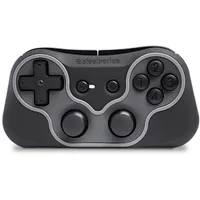
In addition to extending PC compatibility, the Free works with iOS- and Android-based devices, too. It gives you the option to remap key functionality on all three platforms. However, I found the PC version's profile editor (called the SteelSeries Engine) perfectly-suited to what I needed, even though the interface took me a little while to get accustomed to. I'd also like to see the company facilitate a way for users to share their custom game profiles. The software can't do that right now.


You can map custom keys to each button, or run the controller in mouse and keyboard mode. This allows the analog stick to emulate mouse movement, which is perfect for first-person shooters. Moreover, the controller can simply be used as a Windows gamepad in titles that support it.
With an advertised 10+ hours of battery life, I was able to complete my testing without recharging the gamepad once. Of course, the Free is still operable while it charges, so you're never left hanging if it runs out of juice as you're playing.
Really, my only criticism of the Free is its $50 price tag on Amazon. Given a lack of competition out there, though, SteelSeries likely isn't under any pressure to make the controller more affordable. On the bright side, wide platform support means you can use the same piece of hardware under several different operating environments.
GestureWorks Gameplay
While the Free is certainly nice, it'd be even more ideal, in my opinion, to have controls built into the gaming device itself. Nintendo, Sony, and Nvidia give you the ability to hold their consoles in your hands. The Wikipad Gamevice promises to deliver this kind of functionality, but we still haven't heard much since its announcement. What is today's tablet gamer to do?
Enter GestureWorks. The company's Gameplay software creates a controller that overlays on top of Windows-based games not already optimized for touch support.

The utility is highly configurable. Simply place the joystick, directional pad, button, switch, or scroll wheel on the screen, wherever you want, and assign the corresponding control. Multi-touch gestures and accelerometers are even supported. I wouldn't call functionality particularly intuitive, and the configuration software runs slowly on Dell's Venue 8 Pro.

When Gameplay works, it's wonderful. Unfortunately, the overlay has some practical limitations that get in the way. For instance, it can be a bit finicky when Steam or Origin is involved. In some cases, it simply doesn't work (Need for Speed World is an example). I also encountered occasional glitches. But overall, the software seems to do what it advertises, and the developers at Ideum do pay attention to the issues that users report.

Best of all is the low $15 buy-in for Gestureworks Gameplay. That's a relatively insignificant expense for software enabling desktop-oriented gaming without the encumbrance of physical keyboards, mice, and gamepads. Version 2.0 is on the horizon as well, and from what we hear, upcoming improvements include the ability to use smartphones as game controllers. If you're seriously into tablet gaming and willing to spend some time configuring this application, it'd be hard to go wrong for the price.