









Tom's Hardware Verdict
An impressive list of capabilities and a reasonable price make Sapphire’s GearBox Thunderbolt 3 enclosure appealing to gamers without room in their systems for discrete graphics, whether that’s in a thin-and-light notebook or small form factor desktop PC. Just be aware that the GearBox incurs a substantial performance hit.
Pros
- +
Discrete graphics, gigabit Ethernet, and USB 3.0 from one enclosure
- +
Reasonable price compared to the competition
- +
Supports full-size, dual-slot graphics cards
- +
500W PSU accommodates 300W graphics cards
Cons
- -
Significant performance loss compared to a native 16-lane PCIe interface
- -
Always-on blue light bar up front.
Why you can trust Tom's Hardware Our expert reviewers spend hours testing and comparing products and services so you can choose the best for you. Find out more about how we test.
Sapphire GearBox Thunderbolt 3 Review
Sapphire’s Gearbox promises to keep high-end graphics, USB 3.0, and gigabit Ethernet connectivity readily available, even if your Ultrabook or small form factor PC doesn’t have room for a discrete GPU or RJ-45 jack. It leverages a dual-port Intel Thunderbolt 3 controller to deliver transfer rates of up to 40 Gb/s, compatibility with the DisplayPort 1.2 standard, and Power Delivery Charging for laptops needing up to 60W.
That’s a lot of convenience in a compact, attractive enclosure. But is the performance hit you take after dropping a modern graphics card onto a x4 PCIe 3.0 link acceptable to gamers who know what their hardware should be capable of? We ran plenty of benchmarks to help answer that question.
Meet the Gearbox Thunderbolt 3 External Graphics Enclosure
The design of Sapphire’s GearBox is simple enough, yet still elegant. Up front, a black, aluminum panel is broken up by a horizontal bar that lights up blue when you press the large power button underneath. It’d be nice to have some control over this behavior, as the bar remains illuminated as long as the enclosure has power, whether you want to see it or not. The top and sides are a single sheet of aluminum that swings up to reveal the internals. Eight hex screws bolt the sides into place, though you only need to remove the two bottom-back screws to free the hinge.

You’ll also need to remove two hex screws on the back panel, which keep the top from swinging open. The black, aluminum rear has holes cut in it for ventilation, an opening for the power supply, two slots for display outputs, a pair of USB 3.0 ports, an RJ-45 jack, and one Thunderbolt 3 port.

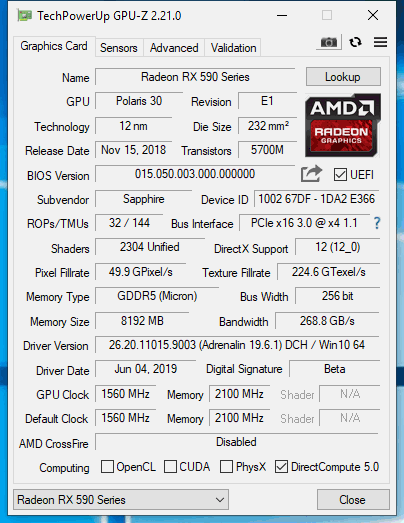
Measuring 11.8” long, 5.43” wide, and 8.03” tall, the GearBox’s dimensions aren’t obtrusive sitting on a desk. Still, the enclosure is large enough to accommodate a wide range of dual-slot cards based on AMD and Nvidia GPUs. We ran our benchmarks with the company’s own Nitro+ Radeon RX 590. However, we also installed a variety of alternatives right up to a GeForce RTX 2080 Ti Founders Edition, just to see how they’d fit.

While we certainly wouldn’t recommend spending $1,200 on a 2080 Ti and then bottlenecking it over a Thunderbolt 3 port, the TU102-based card is technically compatible. Not only does it fit physically, but Nvidia’s 260W power rating dips in under the GearBox’s 300W limit. And that’s a conservative ceiling, we’d say, given the 500W Enhance PSU found inside.

An open cover makes it easy to see how Sapphire keeps this enclosure cool. Rigid mesh across the left side facilitates intake for axial or centrifugal fans. Warm air that accumulates inside is exhausted out the top by two 120mm fans. Flow is directed out the front and back by openings under the aluminum panel. Fan, power, and lighting cables are routed somewhat haphazardly; it’d be nice to see those handled more stealthily.
Get Tom's Hardware's best news and in-depth reviews, straight to your inbox.
Much of the inside is monopolized by the 500W PSU, which plugs in to the motherboard through a 24-pin ATX and 8-pin EPS connector. What space remains next to the power supply is reserved for your graphics card of choice. Very little room is left between them. This may become problematic if you need to pop the card out of its PCIe interface. We were able to reach under to release the latch, but only after bending our Nitro+ Radeon RX 590 away from us in its slot.

The motherboard on which that slot resides is a relatively straightforward affair. Thunderbolt 3 connectivity is provided by an Intel JHL6540 dual-port controller. It’s an Alpine Ridge model, launched back in 2016 and limited to DisplayPort 1.2 compatibility. Newer Titan Ridge controllers add DisplayPort 1.4 support.
A Texas Instruments TPS65983 USB-C controller sits between Intel’s chip and the Thunderbolt 3 connector, enabling the GearBox’s Power Delivery Charging capability. There’s also an ASMedia ASM1074 hub, which provides up to four USB 3.0 downstream ports, though only two are exposed on the GearBox’s rear panel. Realtek’s RTL8153 delivers gigabit Ethernet networking through USB to the controller. This could be useful on a laptop that’s too thin for an Ethernet jack.
How We Tested Sapphire’s GearBox
The most common use case for an external graphics enclosure like the GearBox is going to be enabling high-end graphics on a device with an integrated or low-end GPU. That means you’ll probably keep it at home, on a desk, and hook up to it with your laptop when you return from work. Or, it’ll be a permanent installation next to your small form factor HTPC. But in a standalone environment like that, meaningful comparison data is difficult to generate.
So, we started by taking Sapphire’s Nitro+ Radeon RX 590 8G and testing it on a full-sized workstation. Then, we dropped it into the GearBox, connected to the same desktop over Thunderbolt 3, and tested again. Along the way, we rolled in some data from a GeForce GTX 1060-equipped laptop, cut our test system’s link speed to Gen 1 transfer rates to measure the effect of PCIe bandwidth, and even tested a second firmware version to try pulling more performance from the Thunderbolt interface.
Since the MSI Z170 Gaming M7 we usually use doesn’t offer Thunderbolt connectivity, we switched over to an Aorus Z270X-Gaming 7 with our Core i7-7700K installed. The processor is complemented by G.Skill’s F4-3000C15Q-16GRR memory kit. Crucial’s MX200 SSD is included, joined by a 1.6TB Intel DC P3700 loaded down with games.
The focus of today’s review is Sapphire’s GearBox, along with Sapphire’s Nitro+ Radeon RX 590 running natively in our Z270-based motherboard. To those data points, we add Nvidia’s GeForce GTX 1660 Ti, GeForce GTX 1070 Ti, GeForce GTX 1070, GeForce GTX 1660, GeForce GTX 1650, GeForce GTX 1060 6GB, and GeForce GTX 1050 Ti. AMD is represented by the reference Radeon RX Vega 64 and 56 cards, plus the PowerColor Radeon RX 590 and Asus Radeon RX 570.
Our benchmark selection includes Ashes of the Singularity: Escalation, Battlefield V, Destiny 2, Far Cry 5, Grand Theft Auto V, Metro: Last Light Redux, Shadow of the Tomb Raider, Tom Clancy’s The Division 2, Tom Clancy’s Ghost Recon Wildlands, The Witcher 3 and Wolfenstein II: The New Colossus.
The testing methodology we're using comes from PresentMon: Performance In DirectX, OpenGL, And Vulkan. In short, these games are evaluated using a combination of OCAT and our own in-house GUI for PresentMon, with logging via GPU-Z.
We’re using Adrenalin 2019 Edition 19.6.1 drivers to test Sapphire’s Nitro+ Radeon RX 590 8G and Crimson Adrenalin 2019 Edition 18.12.3 for the other AMD cards. We use driver version 430.39 to test Gigabyte’s GeForce GTX cards and build 417.54 for everything else.
MORE: Best Graphics Cards
MORE: Desktop GPU Performance Hierarchy Table
MORE: All Graphics Content
Current page: Sapphire GearBox Thunderbolt 3 Review
Next Page Performance Results: 1920 x 1080
-
LordConrad "Discrete graphics, gigabit Ethernet, and USB 3.0 from one enclosure"Reply
This is not a Pro, because all devices connected to the enclosure will share the bandwidth of that single Thunderbolt 3 connection. Any use of the Ethernet and/or USB ports will steal bandwidth from your graphics card, which is already bandwidth starved from being on Thunderbolt. -
cangelini Reply
If it's on your desk, and you're always looking at it, an always-on light becomes a con. When it comes time to watch a movie or play a game, you'll want the ability to disable it.abhipw said:How can an always on blue light bar be a con?