









How to Buy the Right SSD: A Guide for 2024
Find the right SSD to speed up your rig
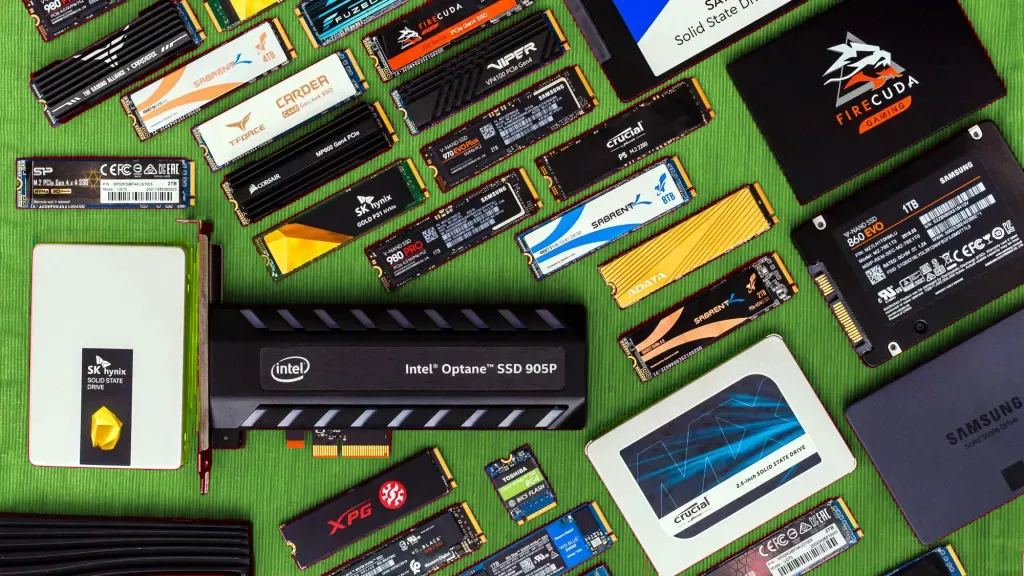
Getting one of the best SSDs for your system is key because the easiest way to slow down a PC with one of the best CPUs for Gaming is to pair it with slow storage. Your processor can handle billions of cycles a second, but it often spends a lot of time waiting for your drive to feed it data. Even the best hard drive can be particularly sluggish because it has platters that have to spin up and a read / right arm that has to find its way physically to the data sectors you're currently seeking. To get optimal performance, you need a good solid-state drive (SSD).
You can check out our feature for much more on the differences between hard drives and SSDs. While SSDs are almost always faster, there are still instances (like bulk storage) where hard drives are definitely worth considering. Because 10TB hard drives can be had for under $200 and a 4TB SSD will set you back over $400.
If you already know about drive types and want specific recommendations, check out our Best SSDs page. And if you're after an external drive or SSD for portable storage or back up, be sure to check our Best External Drives page. But if you don't have a PhD in SSD, here are a few things you need to consider when shopping.
As drives like Intel's 660p and its successor the Intel 665p start to undercut mainstream drives on the old SATA interface while delivering more speed, this could be the beginning of the end of our old friend, Serial ATA. That said, Samsung recently released the 870 EVO, so SATA isn't dead yet. And existing SATA drives will have to continue falling in price as well, in order to at least compete on price, since they can't hope to keep up with NVMe drives on performance.
But NVMe PCIe 3.0 drives, once the fastest storage around, have been outclassed by PCIe 4.0 M.2 SSDs from the likes of Gigabyte, Corsair, Patriot and Samsung. These drives indeed up sequential speeds dramatically (thanks to a doubling of the PCIe bus bandwidth). But you'll need an AMD X570 or B550 motherboard to run one of these drives at their top speed, or an Intel Z590 motherboard paired with one of Intel's upcoming Rocket Lake-S processors. And in many ways, beyond the obvious bump in sequential performance, users might not see much in the way of real-world benefits from these drives. But there's no doubt that the next generation of PCIe 4.0 drives, like WD Black's SN850, are impressively agile.
TLDR
Here are four quick tips, followed by our detailed answers to many FAQs:
- Know your computer: Find out if you have slots for M.2 drives on your motherboard. If not, you may need a 2.5-inch drive instead.
- 500GB to 1TB capacity: Don't even consider buying a drive that has less than 256GB of storage. 500GB offers a good balance between price and capacity. And as 1TB drives slide below the $100/£100 price point, they're great, roomy options as well.
- SATA is cheaper but slower: If your computer supports NVMe/PCIe or Optane drives, consider buying a drive with one of these technologies. However, SATA drives are more common, usually cost less and still offer excellent performance for common applications.
- Any SSD is better than a hard drive: Even the worst SSD is at least three times as fast as a hard drive in most common use scenarios. Depending on the workload, the performance delta between good and a great SSDs can be subtle.
How much can you spend?
Most consumer drives range from 120GB to 2TB. While 120GB drives are the cheapest, they aren't roomy enough to hold a lot of software and are usually slower than their higher-capacity counterparts. Many companies have begun phasing out those low capacity. It costs as little as $15 extra to step up from 120 to 250GB size, and that's money well spent. The delta between 250GB and 500GB drives can be small as well. The sweet spot between price, performance and capacity for most users used to be 500GB, but increasingly 1TB is becoming the better choice --particularly when 1TB drives slip to $100 or less.
There are also an increasing number of drives (primarily from Samsung) with capacities above 2TB. But they’re typically extremely expensive in the extreme (over $400/£400), so they’re really only worthwhile for professional users who need space and speed and aren’t averse to paying for it.
What kind of SSD does your computer support?
Solid-state drives these days come in several different form factors and operate across several possible hardware and software connections. What kind of drive you need depends on what device you have (or are intending on buying). If you own one of the best gaming PCs or are building a PC with a recent mid-to-high-end motherboard, your system may be able to incorporate most (or all) modern drive types.
Also, modern slim laptops and convertibles have mostly shifted solely to the gum-stick-shaped M.2 form factor, with no space for a traditional 2.5-inch laptop-style drive. And in an increasing number of cases, laptop makers are soldering the storage directly to the board, so you can’t upgrade at all (it would be difficult to desolder the storage, even using one of the best soldering irons). So you’ll definitely want to consult your device manual or check Crucial's Advisor Tool to sort out what your options are before buying.
Which form factor do you need?
SSDs come in three main form factors, plus one uncommon outlier.

- 2.5-inch Serial ATA (SATA): The most common type, these drives mimic the shape of traditional laptop hard drives and connect over the same SATA cables and interface that any moderately experienced upgrader should be familiar with. If your laptop or desktop has a 2.5-inch hard drive bay and a spare SATA connector, these drives should be drop-in-compatible (though you may need a bay adapter if installing in a desktop with only larger, 3.5-inch hard drive bays free).
- SSD Add-in Card (AIC): These drives have the potential to be much faster than most other drives, as they operate over the PCI Express bus, rather than SATA, which was designed well over a decade ago to handle spinning hard drives. They can also access more PCIe lanes than most M.2 drives. AIC drives plug into the slots on a motherboard that are more commonly used for the best graphics cards or RAID controllers. Of course, that means they’re only an option for desktops, and you’ll need an empty PCIe x4 or x16 slot to install them.
If your desktop is compact and you already have a graphics card installed, you may be out of luck. But if you do have room in your modern desktop and a spare slot, these drives can be among the fastest available (take the Intel Optane 900p, for example), due in large part to their extra surface area, allowing for better cooling. Moving data at extreme speeds generates a fair bit of heat.
- M.2 SSDs: About the shape of a stick of RAM but much smaller, M.2 drives have become the standard for slim laptops, but you'll also find them on most desktop motherboards. Many high-end boards even have two or more M.2 slots, so you can run the drives in RAID.
While most M.2 drives are 22mm wide and 80mm long, there are some that are shorter or longer. You can tell by the four or five-digit number in their names, with the first two digits representing width and the others showing length. The most common size is labeled M.2 Type-2280. Though laptops will usually only work with one size, many desktop motherboards have anchor points for longer and shorter drives.
The largest M.2 drives are 2, 4, or even 8TB. So, if you have a generous budget and need a ton of storage space, there's an M.2 for you.
- U.2 SSDs: At first glance, these 2.5-inch components look like traditional SATA hard drives. However, they use a different connector and send data via the speedy PCIe interface, and they're typically thicker than 2.5-inch hard drives and SSDs. U.2 drives tend to be more expensive and higher-capacity than regular M.2 drives. Servers that have lots of open drive bays can benefit from this form factor, though it's extremely uncommon in consumer desktops.

Do you want a drive with a SATA or PCIe interface?
Strap in, because this bit is more complicated than it should be. As noted earlier, 2.5-inch SSDs run on the Serial ATA (SATA) interface, which was designed for hard drives (and launched way back in 2000), while add-in-card drives work over the faster PCI Express bus, which has more bandwidth for things like graphics cards.
M.2 drives can work either over SATA or PCI Express, depending on the drive. And the fastest M.2 drives also support NVMe, a protocol that was designed specifically for fast modern storage. The tricky bit (OK, another tricky bit) is that an M.2 drive could be SATA-based, PCIe-based without NVMe support, or PCIe-based with NVMe support. That said, most high-end M.2 SSDs launched in recent years support NVMe.
Both M.2 drives and the corresponding M.2 connectors on motherboards look very similar, regardless of what they support. So be sure to double-check the manual for your motherboard, laptop, or convertible, as well as what a given drive supports, before buying.
If your daily tasks consist of web browsing, office applications, or even gaming, most NVMe SSDs aren’t going to be noticeably faster than less-expensive SATA models. If your daily tasks consist of heavier work, like large file transfers, videos or high-end photo editing, transcoding, or compression/decompression, then you would be better served stepping up to an NVMe SSD. These SSDs provide up to five times more bandwidth than SATA models (and double that if you opt for a PCIe 4.0 NVMe drive), which boosts performance in heavier productivity applications.
Also, some NVMe drives (like Intel's SSD 660p) are edging below the price of many SATA drives. So if your device supports NVMe and you find a good deal on a drive, you may want to consider NVMe as an option even if you don't have a strong need for the extra speed.
What capacity do you need?
- 128GB Class: Stay away. These low-capacity drives tend to have slower performance, because of their minimal number of memory modules. Also, after you put Windows and a couple of games on it, you'll be running out of space. Plus, you can step up to the next level for as little as $10 more.
- 250GB Class: These drives are cheaper than their larger siblings, but they're still quite cramped, particularly if you use your PC to house your operating system, PC games, and possibly a large media library. If there’s wiggle room in your budget, stepping up at least one capacity tier to a 500GB-class drive is advisable.
- 500GB Class: Drives at this capacity level offer a reasonable amount of room at decent prices, although 1TB drives are becoming increasingly appealing.
- 1TB Class: Unless you have massive media or game libraries, a 1TB drive should give you enough space for your operating system and primary programs, with plenty of room for future software and files.
- 2TB Class: If you work with large media files, or just have a large game library that you want to be able to access without lots of install shuffling, a 2TB drive is often worth the price premium.
- 4TB Class (and above): You have to really need this much space on an SSD to splurge on one of these. A 4TB SSD will be quite expensive -- usually over $400/£500 -- and you won’t have many options. Samsung has been selling 4TB consumer drives for years now, but many other companies have stuck to the 2TB limit unless you step up to pricier enterprise storage.
If you’re a desktop user, or you have a gaming laptop with multiple drives and you want lots of capacity, you’re better off opting for a pair of smaller SSDs, which will often save you hundreds of dollars while still offering up roughly the same storage space and speed. Until pricing drops and we see more competition, 4TB and larger drives will be relegated to professionals and enthusiasts with very deep pockets.
What about power consumption?
If you’re a desktop user after the best possible performance, then you probably don't care how much juice you're using. But for laptop and convertible tablet owners, drive efficiency is more important than speed—especially if you want all-day battery life.
Choosing an extremely efficient drive like Samsung’s 860 EVO over a faster-but-power-hungry NVMe drive (like, say, the Samsung 960 EVO) can gain you significantly more unplugged run time. And higher-capacity models can draw more power than less-spacious drives, simply because there are more NAND packages on bigger drives to write your data to.
While the above advice is true in a general sense, some drives can buck trends, and technology is always advancing and changing the landscape. If battery life is key to your drive-buying considerations, be sure to consult the power consumption testing we do on every SSD we test.
What controller should your SSD have?
Think of the controller as the processor of your drive. It routes your reads and writes and performs other key drive performance and maintenance tasks. It can be interesting to dive deep into specific controller types and specs. But for most people, it’s enough to know that, much like PCs, more cores are better for higher-performing, higher-capacity drives.
While the controller obviously plays a big role in performance, unless you like to get into the minute details of how specific drives compare against each other, it’s better to check out our reviews to see how a drive performs overall, rather than focusing too much on the controller.
Which type of storage memory (NAND flash) do you need?
When shopping for an SSD for general computing use in a desktop or laptop, you don't expressly need to pay attention to the type of storage that’s inside the drive. In fact, with most options on the market these days, you don’t have much a choice, anyway. But if you’re curious about what’s in those flash packages inside your drive, we’ll walk you through various types below. Some of them are far less common than they used to be, and some are becoming the de facto standard.
- Single-Level Cell (SLC) flash memory came first and was the primary form of flash storage for several years. Because (as its name implies) it only stores a single bit of data per cell, it’s extremely fast and lasts a long time. But, as storage tech goes these days, it’s not very dense in terms of how much data it can store, which makes it very expensive. At this point, beyond extremely pricey enterprise drives and use as small amounts of fast cache, SLC has been replaced by newer, denser types of flash storage tech.
- Multi-Layer Cell (MLC) came after SLC and for years was the storage type of choice for its ability to store more data at a lower price, despite being slower. To get around the speed issue, many of these drives have a small amount of faster SLC cache that acts as a write buffer. Today, apart from a few high-end consumer drives, MLC has been replaced by the next steps in NAND storage tech, TLC and QLX.
- Triple-Level Cell (TLC) flash is slower still than MLC, as its name implies. It’s also more data-dense, which brought about more spacious, affordable drives. Most TLC drives (except some of the least-expensive models) also employ some sort of caching tech, because TLC on its own without a buffer often is not significantly faster than a hard drive.
For mainstream users running consumer apps and operating systems, this isn’t a problem because the drive isn’t typically written to in a sustained enough way to saturate the faster cache. For years, TLC was the technology of choice for mainstream and budget drives, but it too has been supplanted by QLC.
- Quad-Level Cell (QLC) tech has become the de facto standard for the next stage of the solid-state storage revolution. And as the name implies, it should lead to less-expensive and more-spacious drives thanks to an increase in density. But this often comes with a lower endurance rating (see below) as well as slower sustained write speeds once the drive's cache fills up.
What about endurance?
These are two other areas where, for the most part, buyers looking for a drive for general-purpose computing don’t need to dive too deep, unless they want to. All flash memory has a limited life span, meaning after any given storage cell is written to a certain number of times, it will stop holding data. And drive makers often list a drive’s rated endurance in total terabytes written (TBW), or drive writes per day (DWPD).

But most drives feature “over provisioning,” which portions off part of the drive’s capacity as a kind of backup. As the years pass and cells start to die, the drive will move your data off the worn-out cells to these fresh new ones, thereby greatly extending the usable lifespan of the drive. Generally, unless you’re putting your SSD into a server or some other scenario where it’s getting written to nearly constantly (24/7), all of today’s drives are rated with enough endurance to function for at least 3-5 years, if not more.
If you plan on using your drive for much longer than that, or you know that you’ll be writing to the drive far more than the average computer user, you'll probably want to avoid QLC drives in particular, and invest in a model with higher-than-average endurance ratings, and/or a longer warranty. Samsung’s Pro drives, for instance, typically have high endurance ratings and long warranties. But again, the vast majority of computer users should not have to worry about a drive’s endurance.
Do you need a drive with 3D flash? And what about layers?
Here again is a question that you don’t have to worry about unless you're curious. The flash in SSDs used to be arranged in a single layer (planar). But starting with Samsung’s 850 Pro in 2012, drive makers began stacking storage cells on top of each other in layers. Samsung calls its implementation of this tech “V-NAND” (vertical NAND), Toshiba/Kioxia calls it “BiCS FLASH.” Most other companies just call it what it is: 3D NAND. As time progresses, drive makers are stacking more and more layers on top of each other, leading to denser, more spacious, and less-expensive drives.
At this point, the vast majority of current-generation consumer SSDs are made using some type of 3D storage. These days, many drives use 96-layer or 128-layer NAND, and technologies to add more layers are always in the works. But apart from looking at small letters on a spec sheet or box, the only reason you’re likely to notice that your drive has 3D NAND is when you see the price. 3D-based drives tend to cost significantly less than their predecessors at the same capacity because they’re cheaper to make and require fewer flash packages inside the drive for the same amount of storage.
What about 3D XPoint/Optane?
3D XPoint, (pronounced “cross point”), created in a partnership between Intel and Micron (maker of Crucial-branded SSDs), is a storage technology that can be much faster than any existing traditional flash-based SSD (think performance similar to DRAM), while also increasing endurance for longer-lasting storage.

While Micron was heavily involved in the development of 3D Xpoint, and intends to eventually bring it to market, as of this writing, Intel is the only company currently selling the technology to consumers, under its Optane brand. Optane Memory is designed to be used as a caching drive in tandem with a hard drive or a slower SATA-based SSD, while the Optane 900p (an add-in card) / 905P are standalone drives, and the Intel 800p can be used as either a caching drive or a standalone drive (though cramped capacities make it more ideal for the former).
Optane drives have much potential, both on the ultra-fast performance front and as a caching option for those who want the speed of an SSD for frequently used programs but the capacity of a spinning hard drive for media and game storage.
But Intel announced in early 2021 that it was discontinuing standalone Optane drives. So unless and until Micron sees fit to bring Xpoint to consumers, the technology seems to be at a dead-end for enthusiasts looking for extreme storage. Perhaps Samsung's Z-NAND tech will step up to take Optane's place.
Bottom Line
Now that you understand all the important details that separate SSDs and SSD types, your choices should be clear. Remember that high-end drives, while technically faster, won’t often feel speedier than less-spendy options in common tasks.
So unless you’re chasing extreme speed for professional or enthusiast reasons, it’s often best to choose an affordable mainstream drive that has the capacity you need at a price you can afford. Stepping up to any modern SSD over an old-school spinning hard drive is a huge difference that you’ll instantly notice. But as with most PC hardware, there are diminishing returns for mainstream users as you climb up toward the top of the product stack.
MORE: Best SSDs
MORE: Best External Hard Drives and Portable SSDs
MORE: How to Sell Your Used PC Components
Get Tom's Hardware's best news and in-depth reviews, straight to your inbox.

After a rough start with the Mattel Aquarius as a child, Matt built his first PC in the late 1990s and ventured into mild PC modding in the early 2000s. He’s spent the last 15 years covering emerging technology for Smithsonian, Popular Science, and Consumer Reports, while testing components and PCs for Computer Shopper, PCMag and Digital Trends.
-
WyomingKnott What about having onboard DRAM cache, at least for lookup tables? Or is that a controller detail that will be clearly expressed in performance graphs?Reply -
1800Allen M.2 connectors have different keys. The common ones for SSDs are B and M. B is 2x PCI and a lot of OEM drives are B+M keyed. M is 4x PCI and what you'll find on NVMe drives. Very important for laptop upgraders as cheaper machines may only have a B+M key.Reply
Good rundown from TomITPro http://www.tomsitpro.com/articles/datacenter-m.2-ssd-pcie-specification,2-950.html -
I concur. Very good article for average computer user. I learned a thing or two as well.Reply
You should add that Optane works with Intel processors only, so AMD buyers don't need to bother with it. -
bentremblay I bought a PCIE unit (Corsair MP500; 240Gig) for my new build and kinda dread the "new connector" stuff. I'm sure it will work fine but ... I still dread it.Reply -
bentremblay Can't edit to add p.s.2? awww c'mon ... it's 2018 ...Reply
Anyhow: I think that PCIE unit will work wonders as boot drive, with a selection of high-performance software (ArmA3 rocks!) -
ITFT "2.5-inch SSDs run on the Serial ATA interface, which was designed for hard drives (and launched way back in 2000)"Reply
I remember that in 2004/2005 I could still buy a new laptop with an IDE hard drive, and SATA drives were pretty new at the time and had a higher price tag than IDE. But either way, you forgot to mention that there are 3 types of SATA and that the Sata 3 is what an average user would need to unleash a full potential of a modern SSD. -
CRamseyer Optane is not limited to just Intel processors. Optane Memory is a speciality product that is part of a system. You can use it with AMD's cache software, or use it just as a regular SSD.Reply