- PC Memory: Just the Facts
- The New Arms Race: DDR3-1800 RAM
- Hardcore DDR2 RAM by Corsair, G.Skill, OCZ and Patriot
- Overclocking 9 Value-Priced DDR2-800 Kits
- Corsair's PC10000 Super-Ober-Uber-RAM Sets Sails
- Corsair's XMS2 Dominator: The World's Fastest DDR2?
- Live Memory Test: Overclock 'Em Till They Crash
- Tight Timings vs High Clock Frequencies
- Navigating the Memory Upgrade Jungle
- In Search of True DDR2 Bleeding Edge Memory
Source: Tom's Hardware US – Keywords: ddr3, 1333, speed, latency, shootout
Topics: Buyer's Guides
Syndication:
Mushkin Enhanced EM3-10666
Over the years, Mushkin has shifted marketing focus dramatically from "extreme performance" to "ultimate reliability," yet the company continues to put most of its engineering efforts into high-speed parts. And what more could an enthusiast want besides speed and reliability?

Unlike many of Mushkin's previous efforts, its part number 996583 2 x1 GB dual-channel kit is rated at rather mundane DDR3-1333 timings of 9-9-9-24, using a motherboard's DDR3 default voltage of 1.50V. This is also the memory's DDR3-1333 SPD value, so builders will find the memory's rated performance simply by installing it into an FSB-1333 processor system.
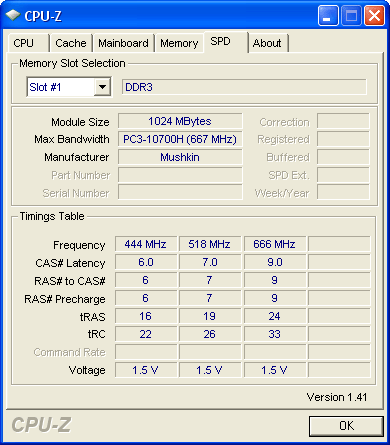
Other SPD values include 444 MHz and 518 MHz, which are interpreted in BIOS to DDR3-800 and DDR3-1000 values. Again, a wider range of users would probably find a DDR3-1066 value more beneficial than the oddball DDR3-1036, as systems that default to DDR3-1066 will instead use the slower DDR3-1333 SPD timings.
- Previous page Kingston HyperX PC3-11000
- Next page OCZ PC3-10666 Platinum Edition
"Because cycle time is the inverse of clock speed (1/2 of DDR data rates), the DDR-333 reference clock cycled every six nanoseconds, DDR2-667 every three nanoseconds and DDR3-1333 every 1.5 nanoseconds. Latency is measured in clock cycles, and two 6ns cycles occur in the same time as four 3ns cycles or eight 1.5ns cycles. If you still have your doubts, do the math!"
Based off of the cycle-based latencies of the DDR-333 (CAS 2), DDR2-667 (CAS 4), and DDR3-1333 (CAS8), and their frequences, you come to the conclusion that each of the memory types will retrieve memory in the same amount of time. The higher CAS's are offset by the frequences of the higher technologies so that even though the DDR2 and DDR3 take more cycles, they also go through more cycles per unit time than DDR. How is it then, that DDR2 and DDR3 technologies are "better" and provide more bandwidth if they provide data in the same amount of time? I do not know much about the technical details of how RAM works, and I have always had this question in mind.
Thanks
Bandwidth = Rate at which you can get the "goodies"
7-7-6-24-2t at 1333Mhz or
9-9-9-24-2t at 1600Mhz
This is FSB at 1600Mhz unlinked. Is there a method to calculate the best setting without running hours of benchmarks?