
Flight Simulator 2024 introduction
Microsoft Flight Simulator 2024 was released on November 20, 2024, and it had some serious issues at takeoff. But things have calmed down enough that we've now managed to test it on a wide selection of graphics cards and processors to see what sort of hardware the game requires for an optimal experience. We've tested 23 of the best graphics cards from the past eight years, including nearly all of the latest generation offerings. We also tested a handful of different CPUs to check how those impact performance. Due to the game's requirement for a constant internet connection for data streaming, we also took a deeper look at just how much data the game streams per hour.
We also recently had the launch of Stalker 2: Heart of Chornobyl, another game that can be extremely demanding of your PC hardware. Give that a read if you haven't already. Microsoft's Flight Simulator 2020 already had hefty requirements for max settings, and the new 2024 release ups the ante. It also ditches DirectX 11 support and leverages DirectX 12 for all systems.
The minimum requirements list an AMD Ryzen 5 2600X or Intel Core i7-6800K processor. Basically, you want a 6-core/12-thread CPU. On the GPU front, the minimum specs list a Radeon RX 5700 or GeForce GTX 970, but those are wildly different levels of performance — according to our GPU benchmarks, the 5700 is about 2.4 times as fast as the 970. This is clearly an error and should list the RX 570 4GB, which has about the same performance as the 970. You also need 50GB of storage, and a 10 Mbps broadband internet connection is required at all times.
The recommended hardware consists of a Ryzen 7 2700X or Intel Core i7-10700K, Radeon RX 5700 XT or GeForce RTX 2080, and a 50 Mbps broadband connection. Based on that, we can show why the minimum spec GPU is supposed to be the RX 570 4GB, not the completely different RX 5700.
The 5700 XT is only about 15% faster than the vanilla RX 5700, while the RTX 2080 ends up being over three times as fast as the GTX 970. If we were looking for equivalent AMD and Nvidia picks, a better selection would be an RTX 2070 Super for the recommended GPU (about 5% ahead of the 5700 XT) and RX 570 4GB for the minimum GPU (about 6% faster than the 970). And for Intel, the Arc A380 basically matches the RX 570, while the Arc A750 comes in 3% behind the 5700 XT.
It's important to note that while Flight Simulator 2024 can be very CPU-limited on higher-spec GPUs, that's also mostly with maximum quality settings. 1080p ultra won't get much above 90 fps in our testing, but 1080p medium nearly doubles that limit — or cuts the CPU demands in half, if you prefer. And 1080p low settings can still hit reasonable framerates even on relatively slow processors.
But system requirements are only the start. There are quite a few settings you can tweak, and the initial install size for Flight Simulator 2024 ends up being much smaller than with the 2020 release... and then it streams in a bunch of map data as you play, which is where that broadband connection requirement comes into play. Let's briefly discuss our test setup and then hit the benchmarks to see how modern PC hardware fares with MSFS24.
Flight Simulator 2024 Test Setup
AMD Ryzen 7 9800X3D
Asus ROG Crosshair X870E Hero
2x16GB G.Skill Trident Z5 Neo DDR5-6000 CL28
Crucial T700 4TB
Corsair HX1500i
Cooler Master ML280 Mirror
Windows 11 Pro 64-bit (24H2)
GRAPHICS CARDS
Nvidia RTX 4090
Nvidia RTX 4080 Super
Nvidia RTX 4070 Ti Super
Nvidia RTX 4070 Super
Nvidia RTX 4070
Nvidia RTX 4060 Ti 16GB
Nvidia RTX 4060 Ti
Nvidia RTX 4060
AMD RX 7900 XTX
AMD RX 7900 XT
AMD RX 7900 GRE
AMD RX 7800 XT
AMD RX 7700 XT
AMD RX 7600 XT
AMD RX 7600
Intel Arc A770 16GB
Intel Arc A750
Flight Simulator 2024 is one of those games that only supports a limited selection of upscaling and frame generation technologies. Specifically, it supports DLSS 3 with upscaling and frame generation on Nvidia GPUs (RTX 40-series required for framegen, obviously). On everything else, you can use AMD's FSR2 upscaling — there's no FSR3 framegen support or XeSS upscaling, sadly.
You'll be happy to hear that we've updated our main test PC to AMD's latest Ryzen 7 9800X3D, the current champion of CPU gaming performance. We've also run tests on some other CPUs, including a Ryzen 7 7800X3D, Core i9-13900K, and Core i9-12900K.
We've tested most of the modern assortment of GPUs, plus some previous-generation cards. We can't realistically test every GPU under the sun, as that's too time-consuming. To that end, we've skipped the Nvidia RTX 4080 and RTX 4070 Ti, as well as the Arc A770 8GB and A380. However, there are a few previous-generation cards included for good measure.
GPU drivers for our testing are Nvidia 566.14, Intel 6299, and AMD 24.10.1. While this isn't an Nvidia-promoted game, the lack of FSR3 and XeSS support does imply that it could be more favorable to Nvidia. However, we'll see where things stand in a moment.
We test with medium settings at 1080p, then 1080p, 1440p, and 4K with ultra settings. We'll do all the baseline testing with TAA and 100% scaling and then run some additional tests at 4K with upscaling and — on the Nvidia GPUs — frame generation. CPU bottlenecks can limit how much additional performance upscaling will bring, particularly at lower resolutions. The RTX 4090 and RX 7900 XTX, for example, won't see much, if any, improvement at 1080p ultra from upscaling alone.
Our benchmark sequence uses the Ísafjörður landing challenge under the "Epic" options. But we're not even trying to land — we're just flying over the water in the same path each time. It's a 'manual' run with minimal input after the first few seconds, so we end up with the same path each time. We used the same test for Microsoft Flight Simulator 2020 previously, though there are slight differences due to the way each game handles the start and engine speeds.
We run each GPU at each setting at least twice, using the higher score, with a third and possibly fourth run if there's a big difference between the two. We also do three test runs after launching the game and discard the first run as a "warming up" test, and we do an unmeasured run for several minutes before starting benchmarking to help with any necessary downloading of map data.
We'll add screenshots and a discussion of image fidelity at the various settings further down the page after the benchmarks. But probably not until later, as we've got other fish (i.e., GPUs) to fry right now...
Flight Simulator 2024 1080p Medium GPU performance
1080p medium represents our baseline performance metric. There are higher and lower settings and resolutions available, which will scale framerates more or less as expected, but this is our starting point. We run with TAA at 100% scaling (native) for these tests, so that the GPU performance results are directly comparable. Upscaling introduces a lot of fuzziness, as you don't inherently get the same image quality with the various options, so even if you play games with upscaling enabled, it's best to start by looking at native rendering performance.


As expected, there are CPU bottlenecks at play with our baseline 1080p medium testing. That doesn't necessarily mean all the fastest GPUs end up tied, but the top two Nvidia GPUs deliver almost identical results, while AMD GPUs seem to have a bit more legroom remaining.
This isn't all that unusual. We've seen plenty of games where, if you're CPU limited at lower resolutions, AMD's drivers and GPUs still hit higher levels of performance. This is reputedly thanks to better threading optimizations, and of course, we're also looking at somewhat silly test settings — $700 to $2,000 GPUs running on a top-tier gaming PC at 1080p medium isn't normally the intended workload.
Leaving the extreme GPUs behind, nearly every GPU we tested breaks 60 fps. The sole exception is the RTX 3050 8GB, and obviously, there are a lot of older and slower GPUs that we haven't tested that would likewise fall below the 60 fps mark. Nvidia's eight-year-old GTX 1080 Ti barely manages to clear 60, as an example, which means the GTX 1080 and lower will come up short.
In general, AMD's modern GPUs clearly outperform their Nvidia counterparts. That goes for every pricing tier, with even the lowly RX 7600 8GB card coming out ahead of Nvidia's RTX 4060 8GB — that's typically not the case in our experience. But again, these are relatively tame settings for most of the GPUs, so let's go ahead and move up to the ultra preset.
Flight Simulator 2024 1080p Ultra GPU performance

Running Flight Simulator 2024 at 1080p ultra with TAA and 100% scaling, the GPU rankings more or less line up with what we're used to seeing. The CPU can still be a factor — and in ways you might not expect, as we'll see below — but there's at least a moderate gap between the various GPU tiers.
As with the previous MSFS 2020, we're definitely hitting CPU limits on some of the GPUs. For our test sequence, we're capping out at right around 100 fps — but this time, Nvidia's 4090 hits 105 fps while AMD's top 7900 XTX GPU only reaches 96 fps. The XTX is also just 7% faster than the 7900 XT, a clear indication that at least some level of CPU bottlenecking is going on. It's a bit surprising that the AMD GPUs on an AMD CPU end up hitting a seemingly lower maximum level of performance here.
To reach 60 FPS or more at 1080p ultra, you'll need at least an RTX 4070 or RX 7800 XT (or equivalent). You'll also need a reasonably potent CPU, so don't plan on reaching these levels of performance at the ultra preset if you're running a processor from 2020 or earlier.
The AMD vs. Nvidia GPU matchups this time are slightly less in AMD's favor. It still wins at every level, but the gap between GPUs has shrunk. For example, the RX 7900 GRE beats the similarly priced RTX 4070 by 18%, compared to 31% at 1080p medium. Similarly, the $400 (give or take — check our GPU prices for up-to-date information) RTX 4060 Ti loses quite badly to the RX 7700 XT. AMD's mid-tier card leads by 15% at 1080p ultra, compared to a 30% lead at 1080p medium.
Yes, those are still very much AMD wins. We're not trying to downplay that, but things are closer at the higher settings, so we'll have to see how that plays out at higher resolutions below.
Note also that, at least for 1080p medium and ultra, the amount of VRAM beyond 8GB doesn't appear to be a factor. The RTX 4060 Ti 8GB and 16GB cards are basically tied, with the 8GB taking a slight lead — it tends to clock a bit higher, thanks to power limits and having half the VRAM. AMD's RX 7600 XT does beat the vanilla RX 7600, but only by 2–3 percent.
Flight Simulator 2024 1440p Ultra GPU performance

Moving up to 1440p ultra, do the margins between AMD and Nvidia GPUs change at all? Yes, they do, and it's generally in AMD's favor. The 7900 GRE leads the 4070 by 22% now, and the 7700 XT beats the 4060 Ti by 21%. Nvidia's RTX 4090 does increase its lead over the 7900 XTX just slightly — it's now 12% faster compared to 9% faster at 1080p — but the XTX beats the more expensive 4080 Super by 8%, another slight increase from the 6% lead at 1080p.
If you're aiming for 60 fps or more, the requirements are pretty high. The RTX 4070 and above (including the previous generation RTX 3080) will suffice, while AMD's 7700 XT comes up just a hair short of that mark. A few minor tweaks to the settings would push it above 60, obviously, as would any amount of upscaling.
Finally, you can check the chart for other comparisons, but it's interesting to look at the various 8GB and 16GB cards. There are the two 4060 Ti cards from Nvidia, still at roughly the same level of performance — the 16GB card still has slightly lower average performance but now with a slightly higher minimum FPS. AMD's RX 7600 XT and RX, however, show a relatively large gap, with the 16GB card delivering nearly 20% higher performance. Intel's Arc A770 16GB also beats the A750 by 32%, though there are differences in core counts there.
Basically, the move from 1080p ultra to 1440p ultra was the tipping point for most of the GPU vendors in terms of VRAM requirements. 10GB looks to be enough, based on the RTX 3080, but 8GB cards take a performance hit. And that trend will become far more obvious with the move to 4K.
Flight Simulator 2024 4K Ultra GPU performance

If you want 60 FPS at 4K ultra with 100% scaling, only one GPU can manage that right now: the RTX 4090. And even that GPU only barely clears the mark with 61 FPS. AMD still takes second place with the 7900 XTX, now back to 6% ahead of the 4080 Super, and the 4080 Super pulls a bit further ahead of the 7900 XT. But further down the stack, Nvidia's reduced memory capacity and interface width (and thereby memory bandwidth) starts to create problems.
The RX 7900 GRE still ranks ahead of the more expensive RTX 4070 Super, never mind the RTX 4070 — it's 31% faster than the 4070. The RX 7800 XT even matches the 4070 Super, basically. RX 7700 XT also has a commanding 28% lead over the RTX 4060 Ti 16GB card, while the 8GB variant falls off the pace. The 16GB isn't massively faster, but 19% definitely isn't a small figure, and there are other ramifications that we'll see in a moment.
Even reaching 30 FPS at 4K ultra proves challenging. You basically need a $500 graphics card. And if you're higher up in the sky, on a clear day, performance can be higher than what we're showing. But if you're planning to run Flight Simulator 2024 a lot in the coming months, you'll definitely see areas where performance drops below the levels shown here.
Flight Simulator 2024 with upscaling
Since the CPU can limit performance, especially at lower resolutions, we opted to skip upscaling tests at 1080p and 1440p. As mentioned already, Flight Simulator 2024 only supports DLSS and FSR2 upscaling. Results with upscaling will be very much apples and oranges, as it's effectively impossible to get "identical" rendering results from the two algorithms. DLSS does look better in general, though there are visible artifacts at times with both upscaling solutions. We set both to "Quality" mode (67% rendering or 2.25X upscaling) for these tests.

As you would expect, performance at 4K with quality mode upscaling — so render at 1440p and then upscale — ends up being lower than native 1440p performance. There's overhead with upscaling, in other words. The relative margins are mostly the same, however.
RTX 4090 ends up as the fastest GPU, outpacing the RX 7900 XTX by 12%, just like at 1440p native. The XTX beats the 4080 Super by 7%, slightly less than the 8% lead at 1440p native. And if you want to average 60 FPS or more, you'll still need at least an RX 7900 XT — which means AMD's $623 graphics card beats Nvidia's $777 GPU. But elsewhere, there are some issues for certain GPUs.
The RTX 4060 Ti and RTX 4060, both 8GB cards, basically tanked on performance with 4K and upscaling. VRAM requirements were higher, and the resulting performance ended up being extremely volatile — so much so that picking one of the several results didn't feel justifiable. You'd get over 30 FPS at times, and then drop into a stuttering single-digit mess for a few seconds, then back to 30 FPS, and back again to stuttering. The same thing happened with AMD's RX 7600.
Curiously, Intel's Arc A750 did okay, at least in terms of delivering a consistent result. It's only running at 20 FPS, but it wasn't constantly dropping into single-digit territory. Whether that's due to drivers or some other architectural difference between the various 8GB GPUs isn't entirely clear, and we could see improvements in the coming months.
Flight Simulator 2024 with upscaling and frame generation
As we've said on many occasions, frame generation is neither a panacea nor is it entirely fair to use as a comparison point. It's really frame smoothing, taking two previously generated frames and interpolating a middle frame. It can look better, and even feel smoother — our brains are complex and so a smoother visual presentation can effectively trick us into perceiving something as being more responsive even if objective measurements prove that's not the case — but there are problems.
And one of the biggest problems is perfectly illustrated by Flight Simulator 2024: GPU vendor favoritism. Game developers have to integrate frame generation support for the various APIs for it to work properly. Yes, you can try AMD's AFMF (AMD Fluid Motion Frames), a driver-side implementation of framegen, but the end result isn't quite the same. Also, there are no utilities I'm aware of that properly capture frametimes with AFMF enabled.
The bottom line is that the lack of FSR3 support in Flight Simulator 2024 means Nvidia RTX 40-series GPUs can offer a substantial "fake frames" boost via frame smoothing. Will there be an official update to add FSR3.1 — and XeSS 2 — framegen support in the future? Possibly, but considering the game isn't officially (as far as I'm aware) promoted by Nvidia, that seems like it already should have happened.
A game years in development couldn't spare the week or two that it might have required to test and validate FSR3 and XeSS support? That seems ludicrous, but that's the way of game development at times. Anyway, it results in an all-Nvidia RTX 40-series chart for now.

If you're looking at that and wondering what happened to the RTX 4060 Ti and RTX 4060, the above discussion about running out of VRAM applies here as well. Probably, framegen would work fine at 1440p and 1080p, but at 4K ultra, the 8GB cards run short of memory, and you get a choppy mess. Wasn't it a great decision by Nvidia to not go with a 192-bit interface and 12GB of VRAM as the baseline, like it did with the (original) RTX 3060? Now, anyone who bought a 4060 or 4060 Ti gets to pay the price.
The combination of framegen and upscaling does wonders for framerates, or at least the number of unique frames sent to your display. Remember, as always, that the actual user experience will take input at half the rate shown in the charts. And of course, Flight Simulator 2024 isn't a high-speed shooter where a few milliseconds of latency can make the difference, so it's generally fine. (Maybe the fighter jet might feel a bit sluggish, though? I fly about as good as a pig, so I can't really say.)
RTX 4070 Super and above will break 60 FPS with framegen and quality upscaling. And everything that we tested breaks 30 FPS (with just ~19 FPS input rate on the 4060 Ti 16GB). Nvidia will naturally want you to look at performance mode upscaling, where the game renders at just 1080p, and that will make the GPUs look even better. But the 4090 at the top already hits CPU limits, even with framegen, so don't expect much more than around 120 FPS on average with a 9800X3D.

Flight Simulator 2024 CPU Benchmarks
With the clear CPU bottlenecks, particularly at 1080p, we also wanted to do some CPU benchmarks. We may add to this section with additional testing, but for now, we have four CPUs that we tested: Core i9-13900K, Core i9-12900K, Ryzen 7 9800X3D, and Ryzen 7 7800X3D. These are basically the fastest CPUs I have access to, because I'm the GPU reviewer and not the CPU reviewer.
The previous Flight Simulator 2020 showed a clear preference for AMD's X3D chips, so we have the old and new kings of gaming performance, with the 9800X3D being our primary chip for all of the benchmarks shown above. I don't have Intel's new Core Ultra 9 285K, or even a 14900K, but the 13900K is basically the same chip as the 14900K except with slightly lower clocks.
The 12900K has eight P-cores and eight E-cores but with slightly lower clocks than the newer 13th and 14th Gen chips, which means it ends up performing about the same as the Core i5-14600K — or perhaps falling somewhere between that and the faster i7-14700K. Anyway, we have four CPUs that I've tested.
To make up for the lack of CPUs, I've also tested with both the RTX 4090 and the RX 7900 XTX. It could provide for some interesting comparisons because we'll have Nvidia on Intel and AMD, versus AMD on AMD and Intel. Are there any platform harmonies to be had from using an AMD GPU with an AMD CPU? Let's find out...


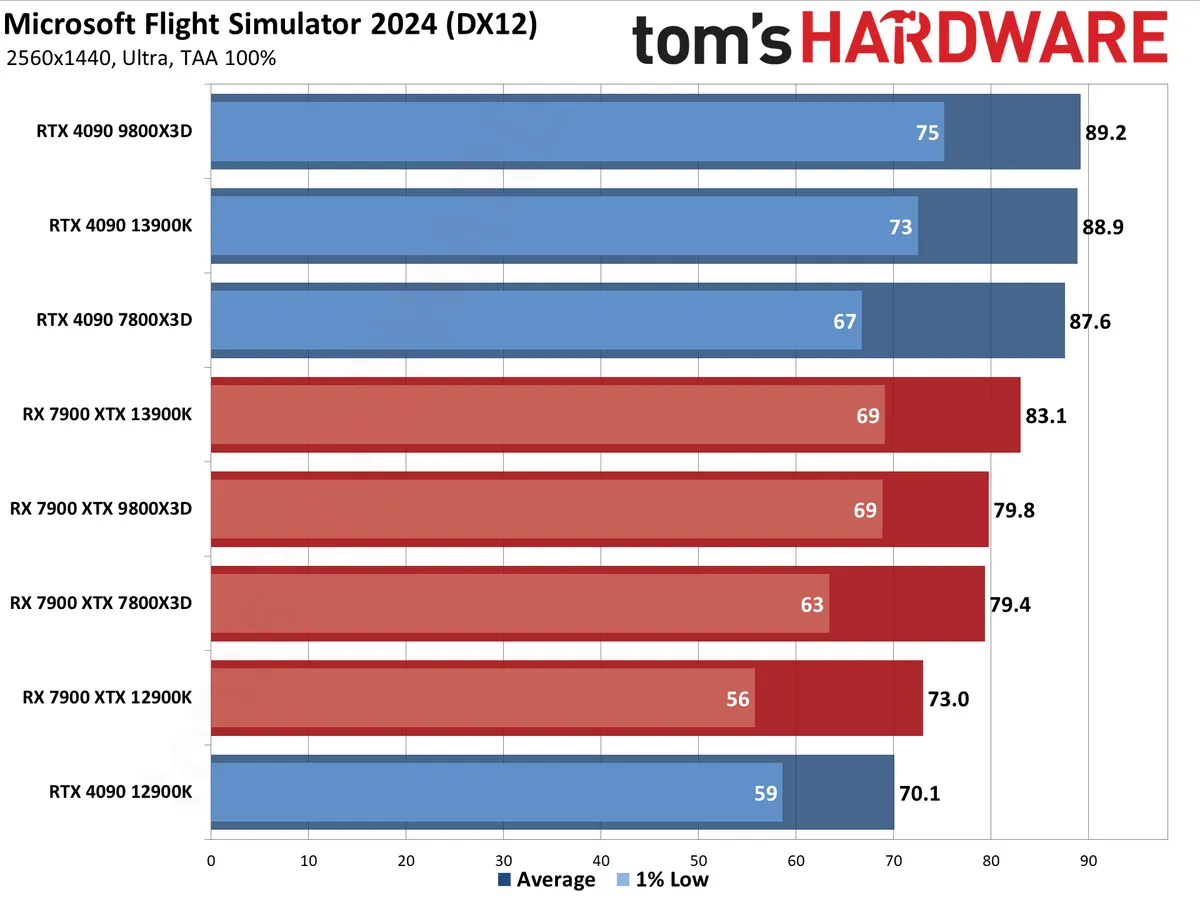
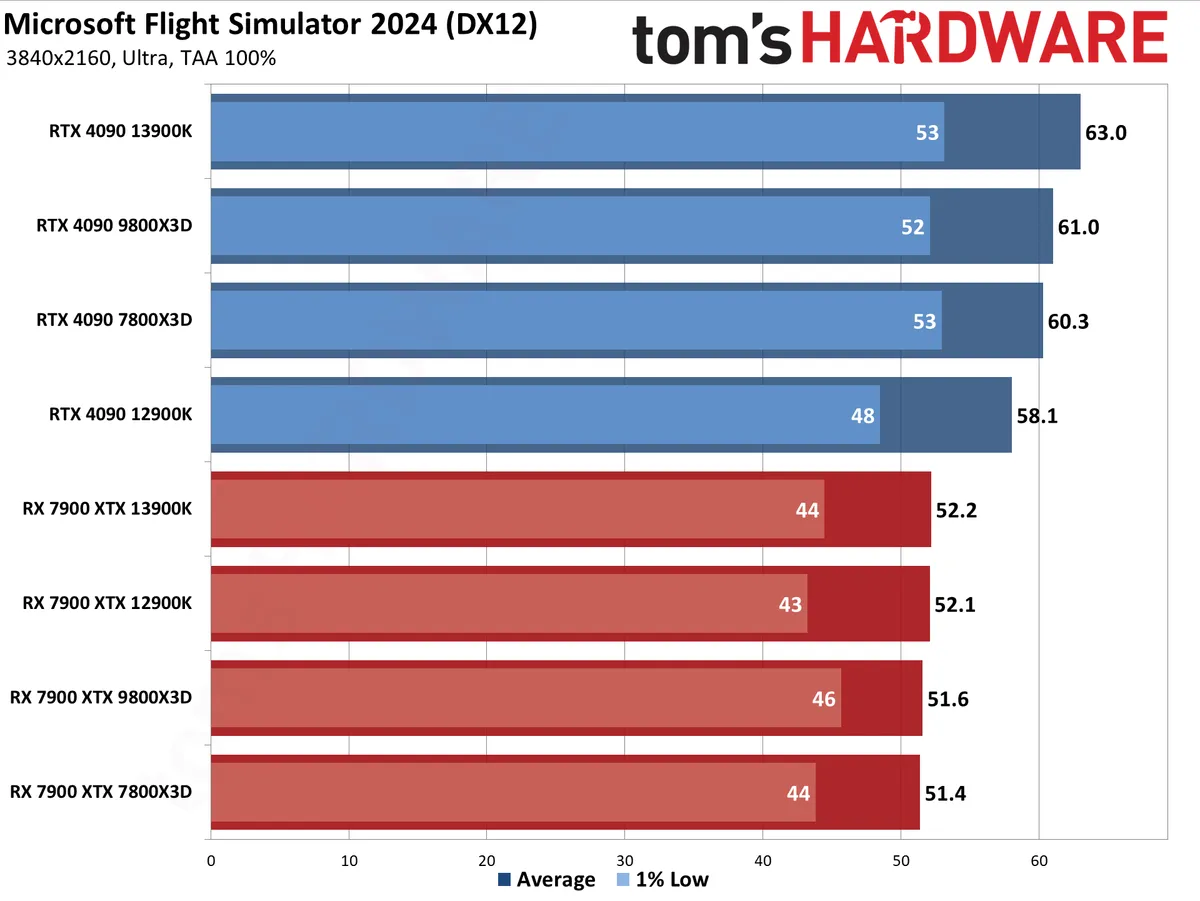


We have all six resolution/setting charts combined into one gallery above, so be sure to swipe through to see the various results. The 1080p charts are going to be the most interesting, but if anyone wants to know why we don't usually bother with 1440p and 4K gaming tests.
Let's just go ahead and start there to get it out of the way. The Core i9-12900K definitely falls behind at 1440p ultra, with the RTX 4090 performance dropping 20% compared to the 7800X3D. The 9800X3D and 13900K end up basically tied with the 4090. On the AMD side of things, the 13900K yielded better results than the other CPUs, beating the 9800X3D by 4%, which is interesting. The 9800X3D and 7800X3D are close to tied, though minimum FPS is better on the newer chip, while the 12900K lags behind by 8%.
Go up to 4K ultra and there's almost no difference in performance between the various CPUs on AMD's 7900 XTX. The 0.8 FPS gap between the fastest and slowest chip amounts to just a 1.5% spread, which is within the margin of error for this sort of test. Minimum FPS does slightly favor the 9800X3D, but not enough to make a major difference. For the RTX 4090, there's still an 8% spread, which is something but definitely not a huge deal. The 13900K again comes out on top by a few percent, the 9800X3D and 7800X3D are tied, and the 12900K falls behind by 4%.
The 4K quality upscaling chart mostly echoes the native 1440p chart, but with slightly reduced margins — upscaling does require a bit more GPU work. And there's not much to say about the Nvidia framegen results other than pointing out how close everything is.
Probably the most useful of the CPU scaling charts is 1080p ultra, where having a high-end GPU means there's potential for differentiation among the CPUs, but where the combination of settings isn't abnormal (unlike 1080p medium). And the results, again, are pretty interesting.
AMD's 9800X3D comes out with a clear lead when paired with the RTX 4090. But with the 7900 XTX? The 13900K actually came out just slightly ahead of the AMD CPU. The 7800X3D ends up tied with the 13900K on the 4090 testing, but behind the 9800X3D (as expected). In either case, the 12900K brings up the rear, by a pretty wide margin.
And we'll wrap up with the 1080p medium results. There's a big difference in maximum performance between AMD and Nvidia here, due to GPU driver overhead or something similar. Whatever the cause, the 9800X3D rises to the top with both CPUs. It's 59% faster than the 12900K when paired with the 7900 XTX, and 49% faster than the 12900K when using the 4090.
As always, the CPU requirements will vary by how much GPU performance you have. With a slower graphics card like the RX 7700 XT or RTX 4070, even at 1080p there would likely only be relatively minor differences between the CPUs.

Flight Simulator 2024 network bandwidth utilization
Flight Simulator 2024 makes some significant changes to the underlying code in terms of storage requirements. The previous version had a default install size of over 100GB — and easily over 150GB with all the various free updates. (My current "AppData\Roaming\Microsoft Flight Simulator" folder sits at 158GB, not counting the rolling cache file.) Beyond that, it would still download additional real-time weather and traffic data along with enhanced map details and cache that. The default cache size was 16GB, but it could be set higher if desired.
With MSFS24, the default installation size ends up being a very tame for this day and age 13GB, with a 16GB rolling cache. Most of that data, in my case, resides in the Steamapps\Common\Limitless folder (11GB), with another 2GB in "AppData\Roaming\Microsoft Flight Simulator 2024" — not counting the cache file. But MSFS20 could run offline if desired, without real-time weather and traffic data, obviously. MSFS24 requires an internet connection and recommends having at least a 50 Mbps connection. That's not particularly fast these days, but it could still download a lot of data over time.
How much data? We did some testing to find out, using several tests. First, we checked the amount of data downloaded just to launch the game. Then, we did another test checking data uploads and downloads with the Iceland landing challenge we used for our above benchmarks. Finally, we started at one airport (ORD) and set the autopilot to head toward another airport (ICT), logging network data use by the game — first for about 30 minutes, and then again logging data over five hours.
Each test was run two or three times to see how things changed with subsequent launches of the game. Here are the results.


Just launching Flight Simulator 2024 the first time downloaded about 730 MB of data — not horrible for a fast connection but also not something everyone could just ignore. The second launch only downloaded about 70 MB (and was also faster). Uploads were 18 MB for the first launch and about 3 MB on the second launch. It's not clear what data is being uploaded, but it's a small fraction of the total network use. As expected, data use over time should decrease.
Loading into the Iceland landing challenge, the first time we launched the game downloaded just over 700 MB of data, presumably maps and textures and such. The second time it only used about 92 MB, and the third launch only needed 50 MB. Data uploads were again a small fraction of the network traffic: 12 MB for the first run, 4 MB on the second, and 2 MB on the third.
Finally, we have the long-term data use. The first run we stopped after 25 minutes, and that pulled down the majority of the data in the first couple of minutes. During that time, MSFS24 used a bit more than 1GB of data. The second run lasted over five hours, and the initial part didn't need much more in the way of new information. However, after a while, you can see the data spikes that start to appear, and those are likely as the engine loads new sections of the map in bursts.
It's a somewhat consistent increase in data downloaded, pulling anywhere from around 250 to 575 MB per hour. The average over the last four hours was around 365 MB per hour. Note that a 50 Mbps network connection could download up to 22,500 MB per hour, so really, the higher speed recommended by Microsoft is to help get the desired data in a faster burst rather than because it's consistently using that much bandwidth.
Flight Simulator 2024 settings and image quality
We haven't had time to do a full image quality analysis, so check back and we'll update this section.





Flight Simulator 2024 closing thoughts
Flight Simulator 2024 ends up being somewhat like its predecessor in terms of graphics but with higher demands on the hardware. We checked performance on a few GPUs and CPUs with the old version (using the same test sequence, which isn't what was used in our CPU reviews), and Flight Simulator 2020 typically runs about 30~40 percent faster than Flight Simulator 2024. The exact amount will vary quite a bit, however, based on your CPU, GPU, and test settings.
If you were hoping Flight Simulator 2024 would run better than its predecessor, that might be disappointing, but I'm not sure anyone would be naive enough to think that after four years, the system requirements wouldn't increase. And you can still run at lower settings with upscaling to get higher performance if that's what you prefer.
We do hope the game adds support for FSR3.1 frame generation and upscaling. The previous game didn't have upscaling support at launch but later added DLSS 3 and FSR2 — it was one of the big names when Nvidia first released DLSS 3 frame generation, as it was so CPU-limited on a lot of hardware. But it never got XeSS upscaling, nor did it see support for FSR 3 frame generation.
Our best advice for Flight Simulator 2024 is to ensure you have a fairly capable CPU, but also be willing to turn down the graphics settings a notch or two. The medium preset runs roughly twice as fast as the ultra preset and still looks good, or you can opt for the middle ground of the high preset. And if you have lower-tier hardware or want to play on a laptop with integrated graphics, you'll almost certainly need to drop to the low preset, with upscaling if possible.
