









Best PC builds for gaming 2026: From $950 budget rigs to $4,000+ dream machines
We recommend the best PC builds across multiple price points.

If you want a computer that meets your exact needs and budget, you need to put it together yourself. When you build a gaming PC, you get total control over the parts, choosing the exact make and model of the motherboard, the case with the look you like, and even the layout of RGB (or non-RGB) fans. You could save time by purchasing one of the best pre-built gaming PCs, but you'll give up control (and sometimes spend more). To help you assemble the best PC build for gaming or productivity that you can get, we've created recommended parts lists for every budget: from an inexpensive sub $1,000 system ($500 just won’t cut it at today’s prices and we’ve dropped that price tier) to an affordable and more powerful $1,100 build, up to a $4,000+ (which ended up at $4,700+) machine for those with deep pockets.
Prices for RAM, graphics cards, and storage have risen significantly over the past several months, so we are forced to raise prices across our tiers to compensate or risk performance degradation. It’s pretty impossible these days to create a competent 1080p gaming machine for our typical $500 entry point. To that end, we've bumped up our brackets to $950, $1,200, $1,700, $2,100 and $4,000+ in these expensive times for PC hardware.
That said, with pricing for RAM, storage, and most GPUs remaining prohibitively high, the best way to build it yourself right now is to check out our Best RAM combo deals page, which offers heavy discounts when bundled with other items (like CPUs, motherboards), and then build around that. Because this is, sadly, now the way, we’ve left out RAM pricing in the total as with some bundles, you can get the RAM for pre-apocalypse pricing or even better. The problem with adding those to these builds is that they tend to sell out quickly.
Picking and Pricing the Best PC Builds
Note that our best PC build recommendations are based on our component expertise, market research, and testing of the key components in each build — namely, the CPU, GPU, and SSD. You can find performance details for each of those in our CPU benchmarks, GPU benchmarks, and SSD benchmarks. Because we are trying to hit price points and frequently changing these lists to accommodate price changes, we have not tested all of the parts in each build. Some of the less performance-centric parts, such as the case, motherboard, and PSU, may not have been reviewed.
Intel recently launched its Core Ultra "Arrow Lake" refresh chips, and we found they offer as much, if not more, performance than the original Core Ultra series, especially in gaming. However, the new chips won’t find their way into these builds because this page is for gaming, and AMD still rules there, too. Some X3D chips aren't on discount, but we managed to include them where we could.
On the GPU front, we have some good news and bad news: The good news is that you can now purchase the latest Nvidia cards from reputable retailers like Newegg or Amazon. Now you can get these cards, including budget models (typically 8GB cards), close to their MSRP. The bad news is that most other cards are still much more expensive than the SEP, particularly those with more than 8GB of vRAM. It’s tough sledding out there and is only getting worse. Prices have gone up since August of 2026 forcing our hand to raise the cost of some of the less expensive builds.
While we have expansive options for building your own PC mapped out below, it's no secret that component pricing has skyrocketed. As such, some might take a now often-cheaper route and purchase a prebuilt PC instead and one example of a PC that generally costs less than the sum of its parts. For those of you interested in building a PC, our guide and recommendations continue below.
Also note that we don't include the cost of an operating system, because you can get Windows 11 for free or cheap. Nor do we include the price of peripherals such as the best gaming monitors, best gaming keyboards, best gaming mouse, or gaming chair. And if you've never built a computer before, you should start with our guide on how to build a PC. In addition to the PC builds listed below, we also have example build logs you can peruse, like our recent Rising Phoenix build.
Black Friday Exceptional prebuilt gaming PC deal
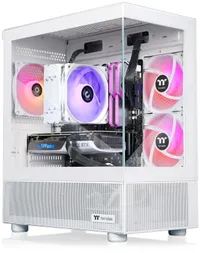
If you're just not in the mood to build your own, this prebuilt gaming PC from Thermaltake is a great way to buy a complete, and competent gaming PC. It comes with everything you need for 1080p and 1440p gaming. You get a last-gen Intel Core i7-14700F (8p/8e 28 threads), 32GB of DDR5-6000 RAM, a Zotac brand Nvidia RTX 5070 12GB video card, 1 TB M.2 SSD, 80 Plus Gold 850W power supply, Thermaltake air cooler, and four 120mm ARGB fans. Just take it out of the box and start gaming.
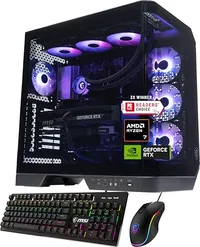
The AMD Ryzen 7 9800X3D, coupled with the Nvidia GeForce RTX 5070, make this powerful MSI PC a great option for gaming at 1440p and 4K. This liquid-cooled machine ships with 32GB DDR5 and 2TB of SSD storage.
Above is a current standout deals from the Black Friday event, which is currently taking place. For a more extensive list of Black Friday deals, head to our Black Friday tech and PC Hardware deals 2026 article. Our standard list of the best overall picks continues below.
Best ~$950 PC Build for Gaming

Component Type |
Model |
Price (at Pub Time in USD) |
CPU |
$219 |
|
Motherboard |
$139 |
|
GPU |
$389 |
|
RAM |
$262 (volatile, not factored) |
|
Storage |
$80 |
|
Case |
$60 |
|
PSU |
$60 |
|
Cooler |
$24 |
|
Total: |
Row 9 - Cell 1 | $971 |
To keep this build close to $950, we updated the processor to the Intel Core Ultra 250K Plus (6P-cores, 12E-cores) instead of the i5-14400. To go with this Intel processor, we're using the budget ASRock B860 Rock Wifi7 motherboard. It uses DDR5 memory, and with prices the way they are, we chose to stick with 16GB to keep the prices under $1,000 while keeping focus on a solid graphics card (which also jumped in price and pushed this tier up higher for the same performance). Please note that in this, and all builds, we are not factoring in RAM prices as you can get incredible combo deals from Newegg.
With our lowest-tier custom-built machine, you can still get solid 1080p gaming performance, even with a last-gen budget graphics card. Your lowest glass ceiling will be the 16GB of RAM, so you may need to close unnecessary applications when playing resource (RAM) intensive games. The new Intel processor isn't an AMD X3D chip, but it's better than the previous generation Intel processor we used before and didn't cost much more to make the leap.

Our graphics card at this price point is the AMD Radeon RX 7600, which is now around $389 (up from $339 when we built this rig in early October). The 7600 has solid performance at 1080p ultra settings, averaging well over that magic 60 FPS we’re after. It ranks just above the RX 6650 XT and below the RTX 4060 on our GPU benchmarks hierarchy.

For storage, we're going with the 512GB Patriot P300. This budget-oriented PCIe 3.0 SSD can't beat top-of-the-line drives like the Samsung 990 Pro or WD Black SN850X, but it delivers better performance than any SATA-based storage options, with sequential read and write speeds of 1,700 and 1,200 MBps, respectively. Here again, we’re hit with ridiculous prices forcing us to a smaller drive to fit within the budget.


View Original
View Original
Power use with this system shouldn’t peak over 400-450W at worst so we’ve picked MSI's A650BN PCIE5 III. As the name implies, it’s a 650W Bronze-level power supply. Even though it’s a budget unit, it will easily handle the build's output, with some headroom, and is ATX 3.1 and PCIe 5.1-ready.
Our case for the ~$950 build is the DIYPC ARGB-N5-BK ATX mid-tower chassis with wrap-around tempered glass panels. It also includes three ARGB fans, including two reverse fans for the side. The chassis supports up to 330mm video cards, easily housing the ASRock graphics card and motherboard we chose, and 170mm cooling height (the Jonsbo CPU cooler is below that).
We have decided not to include RAM prices in our builds because there are so many combo deals at Newegg that could cut the cost in half or more, taking the sting out of these horrendous prices. The problem with entering them here is that the deals tend to not last long, so by the time you read this, it could have expired.
Best ~$1,200 PC Build for Gaming

CPU |
$242 |
|
Motherboard |
$139 |
|
GPU |
$529 |
|
RAM |
$251 (volatile, not factored) |
|
Storage |
$149 |
|
Case |
$69 |
|
PSU |
$60 |
|
Cooler |
$80 |
|
Total: |
Row 8 - Cell 1 | $1,268 |
If you can bump your budget a bit over the $1,250 mark, you can build a PC with the ability to play games really well at 1080p and competently at 1440p. We dropped in an RTX 5060 Ti 8GB for the build which goes for as little as $529 today (it was $499 in October). As shown in our RTX 5060 16GB vs RTX 5060 8GB faceoff, there is a compromise with going with less VRAM, so take that into consideration if you're wanting 1440p with higher in-game settings.
Our recommended CPU for this build is the AMD Ryzen 7 7600X3D. The 7600X3D is a 6-core, 12-thread CPU with 96MB of L3 cache, making it great for 1080p gaming. Although we went down in core count, the generational upgrades are well worth the change from AM4 and the 5000 series. It also gives you an upgrade path to the 9000 series processors and moves into DDR5. We didn’t personally test this CPU, but it’s well known that it beats out non-X3D CPUs and all Intel offerings in gaming.
To support our Ryzen 5 7600X3D, we're now using an Asus TUF Gaming B650E-E Gaming Wifi. It is a budget-class board, but it still fully supports the suggested processor and offers BIOS Flashback capability, which lets you update the BIOS before you install a CPU. This is helpful for the 9000 series and future-compatible processors that weren’t native to the chipset. There are enough USB ports, a basic audio solution, and capable VRMs to handle our processor. The Ryzen 7 7600X3D doesn't come with a stock cooler, so we're adding an inexpensive, mid-range 360mm AIO cooler to the mix.
With this ~$1,250 build, we're stepping up to DDR5. We only managed to sneak in 16GB (2x8GB) Silicon Power Storm RGB DDR5-6000 CL36, which is a bump from the slower Corsair we had previously. With it, however, comes an increase in price to $251 (from $200). Since we're in the sweet spot, there's no real need to go faster or increase the capacity, especially at this price point, as costs tend to increase quite a bit for small percentage gains. But again, RAM prices are not included in the total as there are combos where you can get them cheaper with purchasing other items.
Storage on this build is the 1TB Patriot P400. It’s a step up from the ~$950 build, moving to PCIe 4.0 x4. It delivers strong performance for the money, with sequential read and write speeds of 6,200 and 5,200 MBps, respectively, solid IOPS of 740k/800k reads/writes, and a massive 1,280 TBW endurance. If we’re weak here, it’s with capacity, but there isn’t much we can do about it without sacrificing performance in other areas.
We’ve also updated the case to the Montech TG3 mid-tower ($60). We recently reviewed it and for under $60, it offers four ARGB fans, solid CPU cooling, and supports multiple radiators, up to 360mm (top). There’s plenty of room for large graphics cards and expansion, too, in this inexpensive panoramic glass chassis.


We’ve updated the power supply for this build to match the new graphics card's connector. The new PSU is ATX 3.1 and includes a native PCIe 5.1 cable (12V-2x6) for your GPU. ASRock backs the unit with a 5-year warranty. While not the 10 years some expect from high-end devices, it’s more than the 3-year warranty for some of its direct competitors, and certainly capable of driving this build without concern.
Best ~$1,700 PC Build for Gaming
CPU |
$348 |
|
Motherboard |
$209 |
|
GPU |
$799 |
|
RAM |
$475 (volatile, not factored) |
|
Storage |
$150 |
|
Case |
$69 |
|
PSU |
$70 |
|
Cooler |
$80 |
|
Total: |
Row 8 - Cell 1 | $1,725 |
With a $1,700 budget, we're moving up to a build that should be brilliant at 1080p gaming, really strong at 1440p gaming, and capable of running ray tracing games, especially using DLSS. We recommend going with an Nvidia RTX 5060 Ti with 16GB (avoid the 8GB model) at this price point, even though it jumped almost $200 since we last built a machine like this (it only went up $5 since October).
The RTX 5060 Ti is more than capable of handling 2K gaming, delivering around 61-62 FPS at 1440p with Ultra settings across 14 games. It can even handle high-FPS/frequency gaming (read 144 FPS/Hz+) at 1080p. You can also look at the Radeon RX 9060 XT, which is as fast as the RTX 5060 Ti at 1080p, but it starts to fall behind at 1440p, and especially when you enable any ray tracing.
With ray tracing on at 2K and Ultra settings, those frame rates were a still-playable 51 frames per second. However, consider adding DLSS to further boost those frame rates, as it fell below 60 frames per second.
We'll stick with the Ryzen 7 7800X3D is an 8-core 12-thread processor and its slightly higher clock speeds (4.7 GHz to 5 GHz). The additional cores and threads help with modern gaming where a few titles can benefit from more than a 6C/12T configuration.
We're going with the MSI MAG B850 Tomahawk MAX Wifi, one of the best budget AMD motherboards we’ve tested. It has just about everything you need from the platform, including ample storage options, fast Wi-Fi, and more. Overclocking, PBO, or manual settings are not a concern with the 14+2+1-phase digital VRM design and comprehensive BIOS. It also features built-in Wi-Fi 7, USB 3.2 Gen 2x2 (20 Gbps), 5 GbE LAN, and BIOS flashback capability for next-generation AMD processors.
For RAM, we chose G.Skill Ripjaws S5 Series 32GB DDR5-6000 CL36 as now it is one of the least expensive around at a still painful $475. But the capacity and speeds are both in the sweet spot. Again, we didn’t include this cost as you can find RAM in bundle deals for less.
To keep the total price down, we've opted for the Patriot P400 PCIe 4.0 x4 M.2 drive with 1TB capacity again. If we’re weak anywhere in this build, it’s storage capacity, but between the increase in RAM, GPUs, and storage, this is the area we can skimp a bit. Hopefully, we can resolve that for the next build.
We’ve also updated the case to the Montech TG3 ($60), carrying that over from the ~$1,200 build. For under $60, it offers four ARGB fans, great CPU cooling, and supports multiple radiators, up to 360mm (top). There’s plenty of room for large graphics cards and expansion, too, in this panoramic glass chassis.
Last but not least, we chose ASRock’s Steel Legend SL 750-G power supply. It’s 80 Plus Gold rated (Cybenetics Platinum) and, like the previous ASRock power supply, uses the latest ATX 3.1/PCIe 5.1 standards and includes the native 12V-2x6 cable for the graphics card. The Steel Legend steps up in quality from the Challenger, too, and offers a 10-year warranty.
Best ~$2,250 PC Build for Gaming

CPU |
$419 |
|
Motherboard |
$210 |
|
GPU |
$999 |
|
RAM |
$475 (volatile, not factored) |
|
Storage |
$360 |
|
Case |
$124 |
|
PSU |
$89 |
|
Cooler |
$80 |
|
Total: |
Row 8 - Cell 1 | $2,281 |
At a current price of $2,281, and increase of $145 since October, our high-end gaming PC build provides enough performance to dominate games at 1080p, run 1440p ultra settings with high refresh rates, and 4K ultra with playable frame rates. The system derives its GPU muscle from an AMD Radeon RX 9070 XT (the RTX 5070 Ti increased price by hundreds this year), which is currently available at major retailers for no less than $1,450 - a $300+ increase from a just a couple of months ago.
The card is powered by one of the fastest gaming processors, the AMD's Ryzen 7 9800X3D, featuring 8 cores, 16 threads, and a massive 96MB of cache to enhance gaming performance. In our tests, the 9070 XT averaged 97.5 FPS at 1440p on our 16-game rasterization test. It was also capable of 60 FPS at 4K. If there's a weakness here using an AMD graphics card, it's with ray tracing.


View Original
View Original
The AMD Ryzen 7 9800X3D offers a superior experience thanks to its 96MB of 3D cache, along with its 8 cores, 16 threads, and 5.2-GHz boost clock. Yes, AMD makes the Ryzen 9 9950X3D, which has 16 cores, but it costs significantly more.
On our suite of Windows 11 tests, running at 1080p with an RTX 5090 FE graphics card, the 9800X3D averaged 212 FPS, running behind the Ryzen 7 9850X3D by a meager 5 frames per second. It's still in front of Intel by a considerable margin. If you haven’t seen the trend by now, if gaming is your primary use, AMD’s X3D offerings dominate Intel in most games at 1080p. As the resolution increases that gap shrinks. But these are builds meant for gaming and as such, where possible, we'll stick with the better gaming CPU.

To cool the CPU, we're using an ID-Cooling FX360 LCD 360 mm Cooler. When we tested the FX360, we were impressed by its low noise and excellent cooling performance. It has attractive RGB and a small screen, too; you get all of that for $90.
We again opted for the MSI MAG B850 Tomahawk MAX WiFi, one of the top budget AMD motherboards. That may seem odd for a ~$2,250 build, but it has just about everything you need from the platform, including plenty storage options, fast Wi-Fi, and more. So why pay more? If you want to overclock, you can do so with the 14+2+1-phase digital VRM design and a comprehensive BIOS. It also comes with built-in Wi-Fi 7, USB 3.2 Gen 2x2 (20 Gbps), 5 GbE LAN, and BIOS flashback capability.
For RAM, we chose the 32GB DDR5-6000 G.Skill Ripjaws S5 from the previous build as it’s one of the least expensive 32GB kits at the time of publication and falls within AMD's ‘sweet spot’ for memory speed and timings. You don’t need more than 32GB for gaming, so within this budget, there is little need to step up and pay more.
For the SSD, we're running with the 2TB Patriot Viper VP4300 Lite PCIe 4.0 x4 M.2 drive. You really can't do much better without spending a lot more money on a PCIe 5 drive or a larger capacity.


Best $4,000+ PC Build for Gaming

CPU |
$889 |
|
Motherboard |
$352 |
|
GPU |
$2,235 |
|
RAM |
$499 |
|
Storage |
$764 |
|
Case |
$194 |
|
PSU |
$145 |
|
Cooler |
$100 |
|
Total: |
Row 8 - Cell 1 | $4,679 |
In late 2025, our $4,000 build cost $4,679. Now coming to the end of 2026, our $4,000 build now costs over $7,000 to build it with the fastest parts available. That said, in an effort to keep our ~$4,000 build closer to that number, we dropped the flagship RTX 5090 as the least expensive you can find is approaching $6,600 just by itself after quietly being pulled by Nvidia. This build now features an RTX 5080 instead, which was also pulled by Nvidia. Because of this, the RTX 5080 jumped in price. What cost us $1,650 in October, is now $2,235 or more driving the build price up to almost $4,700. The good news is the CPU dropped in price ($10) as did the storage ($55), though that won't prevent this build from breaching the $4,600 mark. This build is up a total of
An RTX 5080 is still plenty capable from 4K down to 1080p. You can achieve high refresh gaming on the the lower resolutions, and it is plenty playable at 4K, too, averaging 60 FPS across 19 games (including ray tracing).


View Original
View Original
View Original
View Original
Our CPU is AMD's Ryzen 9 9950X3D2, which offers increased cache on BOTH CCDs. It didn’t perform any better in our game tests, matching the 9800X3D in games, but did show an overall 4% increase in multi-threaded performance compared to the 9950X3D. In some select workloads, it did see double-digit increases. Speaking of cache, the CPU has a whopping 208MB of it, and it boasts 16 full-power cores and 32 threads, which is more regular cores than the 14900K's eight (to go with 16 E-Cores). In our tests, the Ryzen 9 9950X3D2 beat Intel's flagship, the Core Ultra 270K, by a full 40 FPS in our 1080p gaming suite and even more (53 FPS) against the 285K.


We're using an Asus ROG Strix X870E-E Gaming Wifi, which comes with built-in Wi-Fi 7, four M.2 slots for storage (three PCIe 5.0 x4), and USB4. You can go higher, but there isn’t much more to offer hardware-wise. To cool the CPU, we're using a Cooler Master MasterLiquid PL360 Flux, which is affordable at $99 and will keep the flagship-class processor running with spec.
Because we put more of a hard ceiling on this build, we're going with some DRAM that’s towards the end of the memory sweet spot of speed, price, and performance. Here we used V-Color's Manta XSky 32GB (2x32GB) DDR5-6400 CL32 Viper Venom. We haven't reviewed this kit, but V-Color is typically a solid brand, and there’s typically plenty of headroom if you want to push the limits.
We're going with a 4TB Samsung 990 Pro for storage, which has plenty of capacity and is the fastest PCIe 4.0 drive you can buy. Sure, we can go with a PCIe 5.0 drive, but we don't see enough performance gains to justify it, even in this high-end build right now.

We decided to go with a case that offers a unique, premium look: the Fractal Design North XL. With its wood-paneled front, this chassis looks more like a mid-century modern piece of furniture than a gaming PC, which is a nice touch. However, it also has a tempered glass side panel, which you can use to show off all of your RGB components (or you can buy it with a solid panel and no window). It also offers excellent thermal performance and plenty of room for additional drives and fans. The XL model can accommodate up to an E-ATX motherboard, giving you plenty of room for future upgrades.
With these high-end components, we don't want to skimp on the power supply, and it makes sense to invest in something that will work with future GPU upgrades to an RTX 5090 or next-gen cards, whenever we see them. We're going with a full 1,000 watts of power and the choosing the Superflow Leadex XP Pro for it’s stable output, reasonable price, and ATX 3.1/PCIe 5.1 support. This power supply is Cybenetics Platinum certified and fully modular.
Building a PC: What to Look For in Each Component
- CPU: This is the brain of your computer and heavily affects 1080p gaming. Look for one with strong gaming benchmarks and, at the higher end, with lots of L3 cache like AMD's X3D chips.
- GPU: This is the most important component for gaming, but it's also one of the most expensive components. Get the best GPU available in your price band that's actually for sale. With Nvidia shuttering the RTX 5080 and RTX 5090, things are continuing to get more expensive.
- RAM: We generally look for the best value in RAM as performance differences are slight. Ideally, you want at least 16GB of RAM but 32GB is optimal today. You can save money by going with DDR4 over DDR5 RAM. But you need to make sure your CPU and motherboard support the kind of RAM you're considering.
- Motherboard: Most importantly, ensure the board supports your CPU. If your CPU is newer than the motherboard's chipset, ensure you select a motherboard that supports firmware upgrades without requiring a processor on board (often referred to as BIOS Flashback). Built-in Wi-Fi is a big plus, and keep an eye out for port count
- SSD: You need at least 1TB to hold your OS, applications, and some games. Depending on how many you play and how large they are, 1TB could feel claustrophobic sooner than later. 2TB, or more, preferable. Shoot for an M.2 PCIe 4.0 drive. PCIe 5 drives are a little faster, but not worth the extra money.
- Cooling: You can save on cooling costs by purchasing CPUs with stock coolers included. Otherwise, a 360 or 240mm AIO (all-in-one) is good, but there's no need to spend a lot of money on one. With some processors, you can even get away with inexpensive, single-tower air cooling to save even more money.
- Power Supply: On lower-end builds, wattage is more important than most anything else (outside of quality, of course). For higher-end builds, you not only need at least 750 or 850 watts, but you want one that includes all the modern specificaitons (ATX 3.1 and PCIe 5.1) and connections, such as a native GPU 12V-2x6 connector for graphics cards.
- Case: First and foremost, you need a case that fits your motherboard. If you are buying an ATX motherboard, avoid cases that only support micro ATX (or smaller) boards. After that, look for multiple case fan placements (many even include fans), room for a 360mm AIO cooler, a tempered glass side panel, and both USB-C and USB Type-A ports on the front panel.
Finding Discounts on the Best PC Components
To find savings on components of all types, check out our lists of the best PC hardware deals, along with the latest Newegg promo codes, Corsair coupon codes, and Best Buy promo codes.
Get Tom's Hardware's best news and in-depth reviews, straight to your inbox.

Joe Shields is a staff writer at Tom’s Hardware. He reviews motherboards and PC components.
- Avram Piltch Managing Editor: Special Projects
-
mdd1963 At even the lowest budget end, I'd never recommend the 9100F, as a 4c/4t CPUs frame rates often struggle for maintaining minimum FPS..; the R3/3300X is a $120 budget beast, with it's 4c/8t CPU often nearly matching the R5-3600 in many games...Reply -
vinaysb14 The z490-Pro has this in the specifications - Supports 1R 2133/2666/2933 MHz - And you seem to be recommending a 3200 Mhz DDR4?Reply -
danlw Wow, the $500 and $2000 PCs don't even need a power supply! Are those both using Intel's new Zero Point Energy chipset, the ZPE000?Reply -
aberchonbie Replyvinaysb14 said:The z490-Pro has this in the specifications - Supports 1R 2133/2666/2933 MHz - And you seem to be recommending a 3200 Mhz DDR4?
Those are "officially" supported speeds. They're basically guaranteed speeds the motherboard will run, but you can easily run higher speed RAM (especially on Intel-based platforms) with overclocking profiles that are embedded within RAM kits you buy (aka XMP profiles). -
murpes This is a horrible article. Every build inconsistently lists components, sometimes giving specifics, sometimes being general, and other times skipping over components altogether. The $1500 build says "We’ve stuck with the same RAM ... from our $1000 build" yet the $1,000 build doesn't list any RAM. A 500 GB SSD drive is listed as 1 TB.Reply -
JfromNucleon Reply
Exactly, that's probably the only reason I'm probably gonna build a pc in the coming year........... probablykep55 said:Where were the builds for productivity? I only saw gaming builds. -
svliegen Tom's Hardware seems to be focusing more and more on gaming. That is bad. There is a myriad of gaming oriented websites already. I'm a business user, focused on productivity. I couldn't care less about gaming.Reply -
jbo5112 What's the point of suggestions with imaginary GPU prices that don't exist? None of the builds even meet their price points anymore (if they ever did), even with their fictitiously low GPU prices. The only exception is the $500 machine. It at least fits with its fictional pricing.Reply
Came for the productivity builds. Stayed for the disaster show.
P.S. Why does the article say it's from "2 days ago", with comments from 5 months ago?