Not all cables are born equal, so test your USB cables with these cheap USB testers — these budget-priced tools help you protect your expensive gear from faulty or bad-quality leads

A selection of USB cables on a wooden table
(Image credit: Getty Images)

I’ve bought many, many USB cables over the years. What frustrates me the most is how unassuming they are. Branded, braided, data-capable, high-speed, power-capable – these terms are meaningless to the average consumer when USB cables all look, more or less, the same. It’s a cable. It plugs in. It should all work the same, right?

If only it were that simple. I’ve bought many a dud in my time, even at prices that should have priced out the poor-quality knockoffs. Just because a cable has a fancy braided coating doesn’t mean that you can use it to power your laptop or smartphone, or that it’s safe to use for transferring data, or if it’s even safe to plug in without frying your USB port. That’s why I rely on a USB cable tester as part of my tech kit, and I think it’s one of those forgotten pieces of kit that every household should own, even if most probably don’t.

If it involves power, you really should test it

One unfortunate incident that occurred a few years ago that convinced me of this need involved a USB cable I purchased from a well-known retailing behemoth. I’ve owned a MacBook for several years and, if you’ve ever owned one, you’ll know the frustration of dealing with a yellowing USB charging cable. Every bend and every crease reduces the lifespan of the supplied USB power cable until, eventually, the plastic sheathing breaks, the wiring becomes exposed, and the cable ends up rotting in the trash.

So, to Amazon. I purchased a no-brand knock-off with a nylon-braided shielding that I hoped would work and would last. It didn’t. When it failed to charge my laptop after less than a week, it dawned on me that I was trusting my $2,000 MacBook to a cable that cost me less than $10. I didn’t know how it’d been made or if it was any good before I started using it, other than a cursory glance at the sketchy-looking packaging.

Give these USB testers a try

My inquisitive nature, despite being late to kick in, led me to consider how I could actually test a USB cable in the future before relying on it to power my devices or handle my data. I wouldn’t do it with a flash drive, so why would I do it to a cable? Hence: USB testers. You can test USB cables to determine their quality, available speeds, and generation. You can check if they’re grounded properly, provide the correct voltage and current, and check if they have any faults.

While some of these devices might look a little intimidating to beginners, they're easy enough to understand once you've given them a try. The most expensive will be designed to tell you upfront if, for example, a cable is ready and capable of handling the more advanced USB-C functionality – fast-charging, in particular, isn’t one you’ll want to trust to a cable that isn’t up to the challenge.

I've put together a list of a few USB testers that I would recommend. These vary in price and functionality, from basic tests to check the line and data capabilities of a cable, with more advanced models acting as USB multimeters that are capable of checking if features like fast-charging are working.
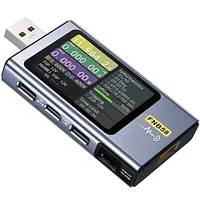
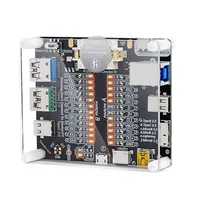
FNIRSI USB Tester
Save 14% ($7.40)
FNIRSI USB Tester: was $52.99 now $45.59 at Amazon
Read moreRead less

Fnirsi is a brand we're familiar with at Tom's Hardware, thanks to its high-quality soldering iron. The Fnirsi USB tester is one of my favorites, with a richly detailed LCD screen that lets you test USB-A, Micro-USB, and USB-C cables with ease. It can measure a cable's voltage, current, power, resistance, capacity, D+/D- voltage, and more, while also supporting fast charge protocol detection.

Treedix USB cable tester
Save 21% ($4)
Treedix USB cable tester: was $18.99 now $14.99 at Amazon
Read moreRead less

Don't need a screen? This USB cable tester from Treedix is a bit more old school. Plug in your cable to quickly check what it's rated for, with support for almost all USB interfaces. It can quickly check a cable for faults in its power, ground, and data lines, and let you know if a cable is safe to use.

Unlike the multimeters we've listed, this tool would be a good option for focusing on a USB cable's capabilities. If it's missing the right power or data lines, for instance, it might not work for data transfers or might just fail to power your devices entirely.

Eversame Eversame 2-in-1 USB tester
Eversame Eversame 2-in-1 USB tester: $16.99 at Amazon
Read moreRead less

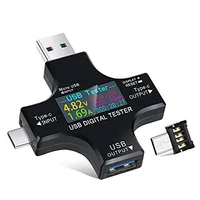
A good in-between compared to the models above, this Eversame 2-in-1 features a much simpler screen with information about the voltage and current supplied through a cable. It has ends for USB-C and USB-A, can detect fast-charging QC modes, and has built-in safety features to automatically switch devices off if a cable or device is faulty.

ChargerLab Power-Z KM003C USB-C Tester
ChargerLab Power-Z KM003C USB-C Tester: $109.99 at Amazon
Read moreRead less

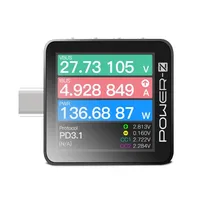
This ChargerLab Power-Z portable USB-C tester is one of the most expensive, but feature-filled, testers on this list. It supports the latest USB Power Delivery 3.2 mode testing, with a 1.5-inch display that lets you run multiple tests, from voltage and current detection to protocol analysis and more.

Porometisto UT01C USB Tester
Save 5% ($1.15)
Porometisto UT01C USB Tester: was $22.99 now $21.84 at Amazon
Read moreRead less

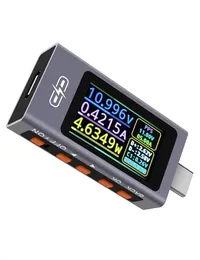
This Porometisto UT01C tester, like the Fnirsi model we've listed, is a comprehensive multimeter for your USB devices. It supports real-time DC voltage checks up to 30V, current up to 12A, and up to 240W power delivery. It even support advanced checks for more advanced USB-C cables like ripple analysis, current direction indication, and real-time range switching.

MakerHawk USB Multimeter
MakerHawk USB Multimeter: $23.99 at Amazon
Read moreRead less

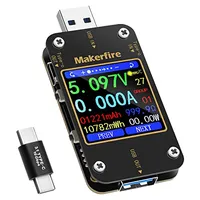
The MakerHawk USB multimeter supports USB-C and USB-A device checks. The 1.54-inch screen gives you a clear indicator of the voltage and current through an attached device, with cable resistance checks, Power Delivery checking, temperature alarms, discharge loads, and more.

These USB testers should give you a good idea of how reliable your cables are. Beginners will probably find it easier to use the models with USB screens, like the Fnirsi USB tester or the MakerHawk USB Multimeter, but you can't really go wrong with any of them.

One thing to point out, however, is that to test a cable, you need a sacrificial lamb of a device to use it with. While testers like these should feature fault detection to prevent any damage, I use an old phone as my test subject, just in case. You should also remember that a cable is only as good as the device you use it with, although the USB multimeters we've listed here can help you check these, too.

And, if you find a cable you can't trust? Don't try to repair it, don't try to salvage it. The best place for it is in the trash — it'll save a whole lot of heartache.

Ben Stockton
Deals Writer

Ben Stockton is a deals writer at Tom’s Hardware. He's been writing about technology since 2018, with bylines at PCGamesN, How-To Geek, and Tom’s Guide, among others. When he’s not hunting down the best bargains, he’s busy tinkering with his homelab or watching old Star Trek episodes.

  • danielbook5
    Seeing as you have one and undoubtedly have a ton of usb cables at Toms Hardware, would you be up for a companion piece where you rate the various brands of cables there? A comparison between name brands like Anker and cheap chinese knock offs would be an interesting comparison.
    Reply
  • bit_user
    danielbook5 said:
    Seeing as you have one and undoubtedly have a ton of usb cables at Toms Hardware, would you be up for a companion piece where you rate the various brands of cables there? A comparison between name brands like Anker and cheap chinese knock offs would be an interesting comparison.
    I would also be interested in seeing that, but I wonder how often cable brand switch to different cable stock or make other design/manufacturing changes. It might end up being pretty pointless, if what you buy doesn't turn out to match what they tested.
    Reply
  • jabliese
    Looks like the Treedix tester is made to test from the Left side to the Right, no sacrificial electronics needed. A definite point in it's favor.
    Reply
  • dosmastrify
    And next we need a tester to test our cheap testers. Good grief
    Reply
  • Skramblr
    Power is one thing, but how many times have you found slow speed UBS cables gumming up the works for transfer speed? As USB speeds increase, how to verify your using the right cables?
    Reply
  • Ogotai
    how about a SATA cable tester ?? does one even exist ?
    Reply
  • bit_user
    Ogotai said:
    how about a SATA cable tester ?? does one even exist ?
    A quick search didn't find one. I think you probably just need to see what speed the drive negotiates and then check its SMART statistics to see if there are any "Interface CRC Errors". Some host chipsets will probably also log any CRC check failures. So, check your system logs for that, as well.
    Reply
  • Ogotai
    i was thinking more along the lines of a tester to see if the cables are still good or not :-)
    Reply
  • bit_user
    Ogotai said:
    i was thinking more along the lines of a tester to see if the cables are still good or not :-)
    I get it. I didn't find one, so I was trying to give other helpful advice.
    Reply
  • Ogotai
    bit_user said:
    I get it. I didn't find one, so I was trying to give other helpful advice.
    i havent found one as well.. and i have been looking
    :)
    Reply