Windows 7's New Autoplay Helps Stop Malware

Next news
7:10 PM - April 28, 2009 by Marcus Yam

All throughout April, the Conficker worm was one of the top things on the mind of those thinking about PC security.

While Conficker so far hasn’t caused any sort of PC outbreak, it does draw attention to the spread of malware across Windows machines. Like all malware, however, it requires actual user consent (or at least some form of action) for it to infect a system.

Windows 7 aims to protect users better by making a small change that should take away one way that malware sneaks onto Windows XP and Windows Vista – taking away AutoPlay options for removable non-optical media.

“While presenting an AutoRun task in AutoPlay has been available since Windows XP, we have seen a marked increase in the amount of malware that is using AutoRun as a potential method of propagation,” explained Arik Cohen, a program manager on the Core User Experience team. “According to the Security Intelligence Report, an enterprise study by Forefront Client Security found that the category of malware that can propagate via AutoRun accounted for 17.7% of infections in the second half of 2008 – the largest single category of malware infections.”

In Windows 7, freshly inserted USB drives, SD cards and other media (but not CD or DVD) will no longer have the “Install or run program” option available in AutoPlay.

It may seem like a small change, but after seeing the image below, we can see how easy it would be to accidentally click the wrong action.
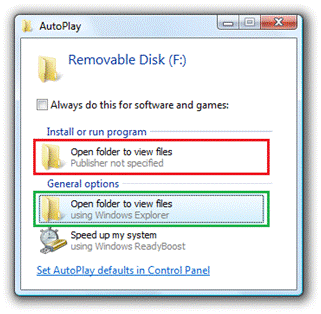
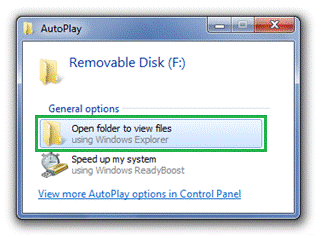
The way Windows Vista does itThe way Windows 7 does it

Source : Tom's Hardware US

Talkback
Add your comment
vettedude 04/29/2009 1:19 AM
Hide
-8+

I always just use the View files with Explorer. I hate that when I have music on my flash drive it says: Do you want windows to open this with iTunes, WMP, Windows Media Center etc. For me, this is more of a annoyance relief.

akoegle 04/29/2009 2:05 AM
Hide
--3+

disable auto run if it's that annoying. Whats annoying is people complaining about things that they don't understand.

SirCrono 04/29/2009 2:06 AM
Hide
-3+

It's a welocme change, I too prefer to open windows explorer to browse my files

vettedude 04/29/2009 2:25 AM
Hide
-1+

akoegle :
disable auto run if it's that annoying. Whats annoying is people complaining about things that they don't understand.


I love autorun. I just don't like that one section that will be gone with Windows 7. You shouldn't just cherry-pick my comment and deduce that I hate autorun. I said I hate the Install and run option.

Shadow703793 04/29/2009 3:07 AM
Hide
-3+

I disable Autorun. I just open Explorer with Windows + E, much faster and less annoying imo esp. if you switch flash drives often.

jsloan 04/29/2009 3:19 AM
Hide
-0+

sounds great!

hemelskonijn 04/29/2009 3:21 AM
Hide
-3+

I for one do hate autorun and although i know i can turn it off i would prefer autorun to be off by default.

Those who are able to turn it back on are probaly 1337 enough to handle the dangers like akoegle.

(this is sarcasm autorun seriously is annoying in my personal opinion and i doubt its wrong to think to turn it of by default gives the user more control and protects the ignorants from the big bad evils)

brendano257 04/29/2009 3:59 AM
Show
seatrotter 04/29/2009 5:46 AM
Hide
-1+

"...taking away AutoPlay options for removable non-optical media."

How about non-removable such as local drives and network drives? It is rare, if at all, for a local/network drivers to use the autorun feature, but it is enabled by default. I have seen how such an oversight have continually caused malware infection.

I sometimes help around my parents' shop and one of the things I ensure is that ONLY optical drives are allowed the autorun feature (a small trade-off as opposed to completely disallow all drive types).

Anonymous 04/29/2009 7:38 AM
Hide
-2+

i usually use Ninja Pendisk to auto-delete the file autorun.inf when removable media is inserted. Much safer.

Unfortunately, i have experienced my vista infected with virus by just opening windows explorer to view the files in my friend's removable usbdrive, even though the autorun has been disabled. Windows is not really safe...

vaskodogama 04/29/2009 9:04 AM
Hide
-0+

deadguysleeps :
... Windows is not really safe...


no, viruses are more inteligent than windows! just a good security suit can solve the problems. and there are too many dumb people using this OS! so, in about 90% market share, that is normal I think!

fuser 04/29/2009 9:06 AM
Hide
--1+

deadguysleeps :
i usually use Ninja Pendisk to auto-delete the file autorun.inf when removable media is inserted. Much safer.Unfortunately, i have experienced my vista infected with virus by just opening windows explorer to view the files in my friend's removable usbdrive, even though the autorun has been disabled. Windows is not really safe...


It sounds like your friend isn't safe.

ShqTth 04/29/2009 10:23 AM
Hide
--1+

There should be an option to have it enabled/disabled on a device.

WHat happens if in the future programs are sold on flash cards?

Flash cards can work as a security device to prevent piracy if a security chip is hooked up to the io. example: SDIO (wifi on sd).....


Also some usb drives rely on auto run, to run the decryption program to unlock the device.

Or some usb devices such as a phone adapter, when hooked in the pc run their custom software to interact with the usb sound card to make pc to internet calls.


So it is a needed feature for some devices.

Maybe check if the device is read only media? (optical is read only)

ShqTth 04/29/2009 10:25 AM
Hide
-0+

You know what a nice feature would be: Disable the low on disk space bubble/info window on a particular drive.

I use an Gigabyte I-RAM 4GB for my pagefile and its always out of space, and that stupid warning comes up all the time.

eklipz330 04/29/2009 2:40 PM
Hide
-1+

i hate this new format on toms, i liked it better with my avatar =[

Marcus Yam 04/29/2009 3:10 PM
Hide
-2+

eklipz330 :
i hate this new format on toms, i liked it better with my avatar =[


I'm with you on this one. If for no other reasons, avatars make it easier to identify the speaker and conversations, especially since our comments aren't threaded.

A Stoner 04/29/2009 3:34 PM
Hide
-1+

akoegle :
disable auto run if it's that annoying. Whats annoying is people complaining about things that they don't understand.


So, let me get this straight. Your position is that only people who know everything about a subject have a good reason to complain about something such that it does not annoy you? What a crappy person you are.

Anonymous 04/29/2009 4:24 PM
Hide
-1+

If Windows knows the diference between "Open" a file and "Execute" a file, and if it knows how to show this diference clearly to the user, it will be much more safe.
At least half the virus use this single (not so) little bug to infect systems all around.

rags_20 04/29/2009 5:00 PM
Hide
-1+

MS is just desperate to sell more copies of their OS.

bounty 04/29/2009 6:19 PM
Hide
-2+

Well then what's the point of the UAC?

Kill@dor 04/29/2009 7:08 PM
Hide
--3+

At least this time MS is paying closer attention to their work ^_^

ossie 04/30/2009 9:25 AM
Hide
--1+

Just feeding the m$ junkies their daily spoon of crapeting, to keep them salivating.
m$ is, as usual, just partially capable to fix it's dumbness, only after the whole world is crying out loud... What makes non-flash/optical media exempt of malware propagation?

@m$ fanboy$: ready? 1, 2, 3: "Windblow$ ($even) is the greatest!!!"

Comments are closed on this page.

Sponsored links

Related articles

  • Welcome to Your Worst Malware Nightmare

    Spyware and adware have have emerged as a more pervasive and insidious threat than worms and viruses, which previously ruled the highways and byways of the Internet as sources of chaos and ruin.. Without some kind of software protection in place, no one active on the Internet is safe and sound.

  • Kanguru's Secure USB Memory Stick

    USB drives can be critical when it comes to data security for companies. The Defender from Kanguru only saves data in encrypted form, and enables the remote deletion of content over the Internet in case of theft.

  • USB 2.0: High-Speed Devices from D-Link

    D-Link has several high-speed USB 2.0 devices that you can pick up for under $30. We take a look at the DUB-A2, a USB 2.0 two-port PCI adapter, the DUB-H4, a USB 2.0 four-port hub, and the DUB-E100, a USB 2.0 fast Ethernet adapter.

Ads

Best offers

Dell Small Business Windows 7 Professional (Full Product) $299.99 Dell Small Business More info
Newegg.com Office 2007 Home and Student (Full... $119.95 Newegg.com More info
Dell Small Business Windows 7 Home Premium (Upgrade) $119.99 Dell Small Business More info
Dell Small Business Windows 7 Ultimate (Full Product) $319.99 Dell Small Business More info
Dell Small Business Norton Internet Security 2010 - 3 Users $69.99 Dell Small Business More info
Ads
All about Software
 Latest Software articles
Troubleshooting Windows 7 With Microsoft's Built-In Tools

Troubleshooting Windows 7 With Microsoft's Built-In Tools
Windows 7 is more stable and responsive than Vista, but no operating system is perfect (the same goes for the drivers and apps running on it). We show you a suite of tools built into Microsoft’s shiny new OS to help you troubleshoot your Windows 7 issues. Read More

  • Windows 7 And Windows Vista: Performance Compared
    Microsoft is hyping Windows 7 as the operating system that everyone should adopt. We'd already done a bit of benchmarking in the new OS, but we revisit a longer list of tests today, including more real-world tasks, like boot-up, hibernate, and shutdown. Read More
All Software articles

Newsletters


  • Ask your question about IT issues
  • Post

Partners

Ads

Sponsored links