









Getting More Bang Out of Your Dual Processing Buck
Generally Unusable: Windows Task Manager
This section describes where Microsoft falls short, and where THG has developed a better alternative. First, let's look at the Task Manager provided by Windows XP, which already allows you to assign certain tasks manually.
If you have an HT/SMP system, selecting the "Processes" tab in the Task Manager and right-clicking a program will bring up the option "Set Affinity." This option gives you the ability to choose which CPUs the program can use.
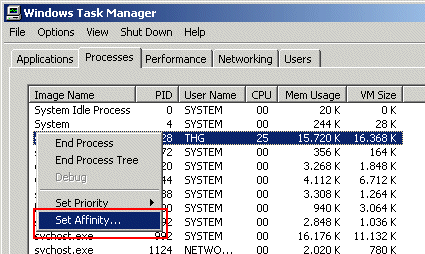
Setting affinity in Windows Task Manager
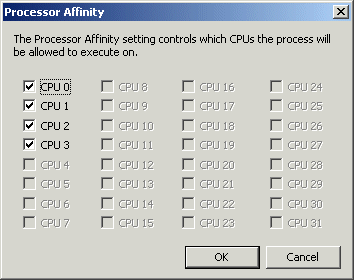
Dialog box for selecting CPUs
HyperThreading can give you a slight performance boost if you have the right applications. Some programs benefit considerably from HT, while others may become markedly slower. The radical cure in this case - to fully deactivate HT in BIOS - may backfire by reducing overall performance significantly. Windows XP is especially optimized for HT; deactivating it will slow down the operating system considerably. The solution is to just deactivate HT for the one program in question. And, since an HT processor is listed as two physical CPUs in the system, that merely entails assigning the software to a certain CPU. In other words, you prevent the program from using the second, logical processor.
At this point, the only problem is figuring out which CPU is physical and which is virtual.
Again, the solution is simple. Windows always follows the same sequence when counting processors: first the physical and then the virtual CPUs. In a system with two Xeon HT processors, CPU0 and CPU1 are the physical CPUs, while CPU2 and CPU3 are the virtual ones.
Get Tom's Hardware's best news and in-depth reviews, straight to your inbox.
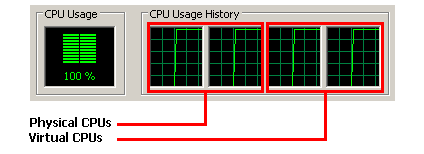
Sequence of physical and virtual processors
So, to deactivate HT on the first CPU of a dual Xeon system for a specific program, you have to lock the third CPU (CPU2) out of the process.
Current page: Generally Unusable: Windows Task Manager
Prev Page Getting The Most Out Of Software By Properly Assigning Threads Next Page An Easier Way: THG Task Assignment Manager-
MorningDarkstar Nice idea! Only one major malfunction - No minimize button! Most of us do not want to be annoyed by having this app open all the time.... Better yet would be a nice little icon sitting in the taskbar available instantly and automatically each time Windoz is started....Reply -
GameR I have heard many good things about this but for me it wont work on ether of my computers.The first cpu is a dual core with xp os.The second is a Qcore with vista 64.The games im trying to assighn still only use the one core :(.But very nifty tool for most users.Reply -
jonnyt822 If you want to minimize the application, just need to create a batch file (.bat) and write this command:Reply
start /m C:\taskassign\TaskAssign.exe
-
I know this is like... way dead, but I was reading here and then found that the download was broken, a quick Google search revealed the answer to me and I figured I would post it here for convenience.Reply
http://www.portablefreeware.com/?id=1393 -
http://img.tomshardware.com/us/2004/05/28/getting_more_bang_out_of_your_dual_processing_buck/taskassign.zipReply