









We tested Advanced Shader Delivery on the RX 9070 XT in six games — up to 95% improvement in load times and 33 percent faster 1% Low FPS
Downloaded shaders are a game changer.

Today, we will take a look at Advanced Shader Delivery (ASD) – a new gaming feature aimed at improving the overall user experience by reducing load times dramatically and improving 1% low FPS. We tested six games, measuring up to a 95% improvement in game loading times and solid improvements in 1% Low FPS in some titles. We will explain the issues that it aims to fix, we will go into detail about its functionality, and then we will test it in several games with on vs off comparisons.
Shader compilation stutter has been the bane of every PC gamer’s existence for a long time. Imagine finally sitting down after school or work to play a highly anticipated new release, only to spend several minutes waiting for shaders to precompile. Worse yet, even after that lengthy process, some shaders may still compile during gameplay, causing noticeable stuttering. First impressions matter, and technical issues like these can quickly sour the experience.
Pipeline State Objects (PSOs) define how input data is interpreted and rendered by the hardware when submitting work to the graphics card. PSO creation is also where shader compilation and related stalls happen. Modern games can contain such a massive number of PSOs that engines are unable to fully enumerate them ahead of time. Developers have introduced various mitigation techniques, but these are ultimately compromises that can still miss certain shaders during pre-compilation. In theory, allowing every player to locally precompile every possible shader permutation could eliminate these issues, but in large modern titles, that process could potentially take hours.
That is why Microsoft has introduced Advanced Shader Delivery.
What is Advanced Shader Delivery?
What is Advanced Shader Delivery?
Advanced Shader delivery is a feature that aims to eliminate long shader pre-compilation and shader compilation-related stuttering in games by distributing precompiled shaders when downloading a game — those shaders are downloaded just like other parts of the game. In other words, faster initial load times and smoother performance when first playing a game after installation, a game update, or a driver update.
The idea is that developers will programmatically capture and generate a new type of asset from pipeline state object inputs, called a State Object Database (SODB.) An SODB is a SQLite3 database that contains the shaders, as well as the structure for how to group them into PSOs.
The next step after collecting the SODBs is to precompile shaders using offline compilers. Compilation happens outside of the game and does not require a GPU. The SODB is converted into a precompiled shader output that can target a wide range of hardware without needing that hardware to be physically present. This output is called a precompiled shader database (PSDB), which can be registered for a game and distributed by the Xbox store alongside the game to supplement the shader cache.
Get Tom's Hardware's best news and in-depth reviews, straight to your inbox.
After installing a game with Advanced Shader Delivery support, the Xbox store downloads an update containing the precompiled shaders. As you can see below, the ‘Shaders’ folder will contain an SODB and PSDB file after this update.

When a game runs for the first time, all the shaders it needs will already be available. The game will see this and will skip the compilation step on the gaming device. If a device requires a driver update, the shaders will be updated automatically.
Theoretically, if developers programmatically capture SODBs with every required shader represented in the PSDB – and the system functions correctly – a game could achieve a 100% cache hit rate on its first run. This would not only dramatically reduce initial load times but could also entirely eliminate shader compilation stutter during gameplay.
Microsoft recently expanded the public preview for Advanced Shader Delivery with support for dedicated and integrated AMD GPUs on desktops. However, not all system configurations currently support Advanced Shader Delivery, even if you own an AMD GPU.
The device requirements are as follows:
- OS: Windows 11 24H2 or higher
- Xbox Gaming Services: 37.113.11003.0 or higher (Microsoft Store > Library > Update Gaming Services)
- Xbox Insider Hub: Open Xbox Insider Hub > Select Previews > PC Gaming Preview
- GPU: AMD RDNA 3, RDNA 3.5, RDNA 4 architectures
- Driver: Adrenalin 26.5.2 or higher
Advanced Shader Delivery is currently only supported on the Xbox store, but it is coming to other storefronts in the future.
NVIDIA and Intel GPUs are expected to receive support in the near future, although Intel has a similar technology on its graphics cards called “Precompiled Shader Distribution.”
If Advanced Shader Delivery is working, ‘Precompiled shaders installed’ will appear in the bottom left corner of the launch window.
With all that said, let’s see how it performs in practice.
Load Time and Performance Tested
Load Time and Performance Tested
Advanced Shader Delivery is supported in a little over 30 games. It is available in every game that initially supported the feature on the ROG Ally, plus the recently released Forza Horizon 6.
We selected six games known for lengthy shader pre-compilation times, shader compilation-related stuttering, or both.
The on vs off comparisons were run with the exact same settings for each individual game, but we did not use maximum settings. We used custom settings to get a playable experience on the 9070 XT.
There is no official way to disable Advanced Shader Delivery, but we managed to disable it by deleting the files in the Shaders folder of each game and then disconnecting the system from the internet so that the Xbox store will not download those files upon launching the game.
Each test was performed after a fresh driver install.
Since ASD is only supported on AMD GPUs, we used a Radeon RX 9070 XT for our testing.
Test system
- PowerColor Red Devil RX 9070 XT
- Ryzen 7 9800X3D
- 64GB (2x32GB) G.SKILL Flare X5 DDR5 @6200 MHz CL30
- Crucial T700 Gen5 SSD
- ASUS ROG STRIX B850-F Gaming WiFi
- Corsair Nautilus 360 RS AIO Cooler
- HAGS enabled
- Windows 11 25H2 (Build 26200.8457)
- Adrenalin 26.5.2
- NVIDIA driver 596.49
Forza Horizon 6

Forza recently launched with Advanced Shader Delivery support. Both the Forza Horizon and Forza Motorsport series are known for having lengthy pre-compilation steps. As such, it is no surprise that ASD dramatically reduces the initial game load time.
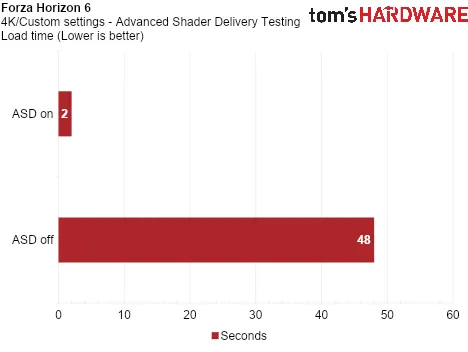
From 48 seconds down to just 2 seconds. That’s a whopping 96% improvement in load time.
Not only did we see a reduction in load time, but gameplay performance was also smoother.
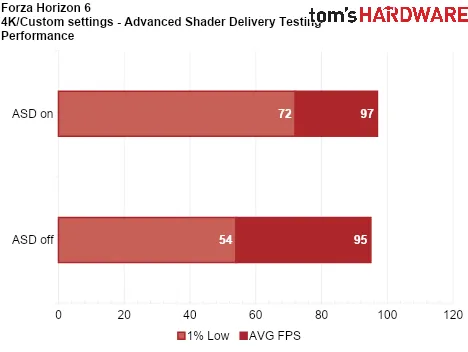
During the first stage of the prologue, there is a nasty shader compilation stutter on the very first run of the game with ASD disabled. With ASD enabled, that stutter is no longer present.
Below you can see a comparison between our test system paired with an RTX 5090 vs an RX 9070 XT with ASD enabled. This is not a comparison between the two GPUs, as the 5090 is far more powerful, which is evident from the average framerate. Indeed, NVIDIA GPUs will also support this feature in the near future. Rather, it serves as an illustration that highlights how shader compilation stutter can bring even the most powerful system to its knees.

Both of the runs shown above were performed with the same settings. With the 5090 (top) plugged into our system, we experienced a massive stutter on the first run, that brings the 1% low to 3 FPS at this particular point of the scene. Meanwhile, the 9070 XT (bottom) cruises past this point with a smooth frametime on the very first run.
The Outer Worlds 2

The Outer Worlds 2 has a very long shader pre-compilation step that takes almost 3 minutes, so it is a very good candidate for our testing.
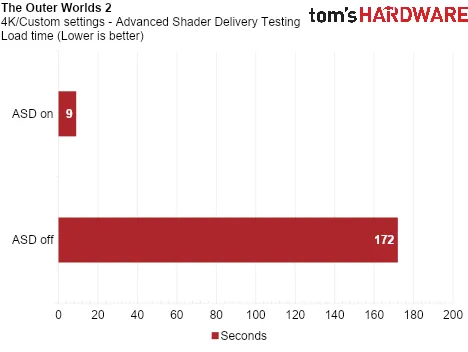
From 2 minutes and 52 seconds down to just 9 seconds. That’s a 95% improvement, but more crucially, it cuts down your waiting time by an incredible 2 minutes and 43 seconds.
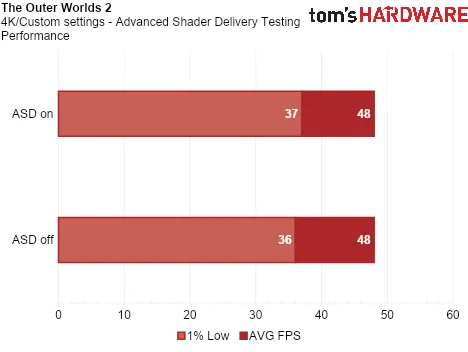
We did not experience any shader compilation stutter in our run with ASD disabled, so there was no improvement in performance here.
Ninja Gaiden 4

Ninja Gaiden 4 does not have a pre-compilation step with ASD disabled, so there is no improvement in load time.
However, we did experience a couple of minor stutters with ASD disabled in our first run that were no longer there in the second run. These are shader compilation-related stutters.
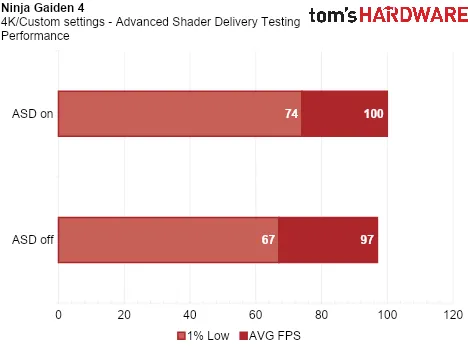
The game was mostly smooth during our runs, but those two minor dips were enough to give ASD about a 10% edge in 1% lows. This is important, because those dips came during combat.
Avowed

Avowed is another game that has a lengthy pre-compilation process of almost 3 minutes.
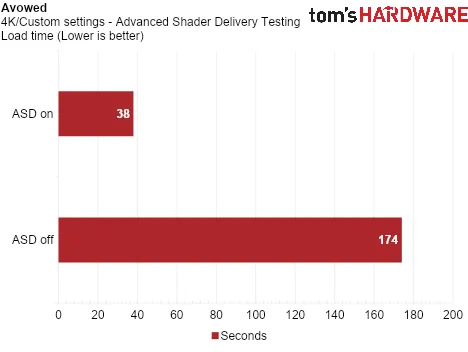
This is a 78% improvement in initial load time. While not as dramatic as what we saw in Forza Horizon 6 and The Outer Worlds, it still cuts your initial waiting time by 2 minutes and 16 seconds.
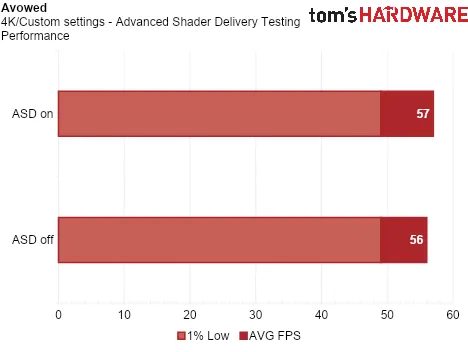
There were no shader compilation stutters here with ASD on or off, so the performance remains the same.
Hogwarts Legacy

Hogwarts Legacy’s pre-compilation is not as long as others we have seen, but it does take over a minute.
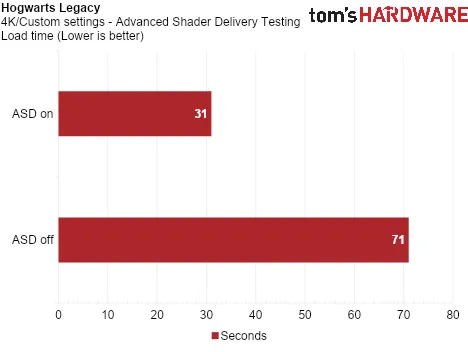
We see a 56% reduction in load time. Quite a bit lower than the previous games we tested, but it is nothing to sneeze at.
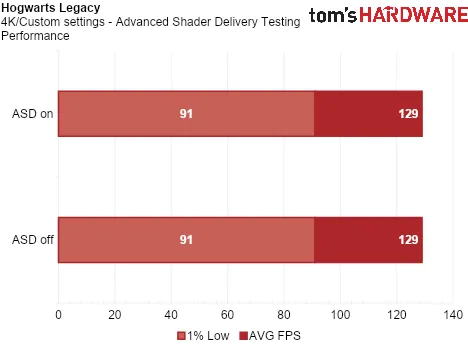
Performance remains the same whether you enable or disable ASD as we encountered no shader compilation related stuttering.
Silent Hill f

Silent Hill f does not have a pre-compilation phase, so there is no improvement in initial load time.
However, the game does have some rather significant shader compilation stutters in the town area at the beginning of the game, as seen below.

We were hoping that ASD would entirely eliminate those stutters, but unfortunately, that is not the case.

Unlike Forza Horizon 6 and Ninja Gaiden 4, Silent Hill f’s shader stutters are not eliminated by ASD, and performance remains the same.
It's unclear whether this stems from an API limitation or the developer failing to supply all shaders to the SODB. Either way, it serves as an example that – while the technology is genuinely impressive – it still needs some work to completely eliminate shader compilation stutter.
The Verdict
Our testing shows that Advanced Shader Delivery can significantly improve the player experience. A gamer’s first impression is critical, and nothing sours it faster than technical issues. Being able to load right into a game without waiting several minutes and having smooth performance unencumbered by intrusive shader compilation stutter should be the standard.
Advanced Shader Delivery delivered this experience in most of the titles we tested. However, there is still work to be done – whether by Microsoft, game developers, or both – to make the feature consistently reliable across all games.

Dan Mateescu is a PC enthusiast with many years of experience benchmarking PC hardware. In 2021, he started his own YouTube channel called 'Compusemble' where he benchmarks hardware in video games and the latest tech demos.
-
Math Geek My question is how much space is used/downloaded for this feature?Reply
Is it a stable % of install size? Dependent on resolution played? Anything consistent where one can plan ahead for space management?
Just wondering since we're already very often well over 100 GB before now downloading even more data. -
jeremyj_83 Reply
If you look at the screenshot you see the shaders total size was about 350MB.Math Geek said:My question is how much space is used/downloaded for this feature?
Is it a stable % of install size? Dependent on resolution played? Anything consistent where one can plan ahead for space management?
Just wondering since we're already very often well over 100 GB already before downloading even more data. -
waltc3 Longest shader compilation I've ever seen in a game is the one in Stalker 2. It's so bad--~10+ minutes every time you run the game--that I put off playing the game because of it. You might see if you could find and test that game. Also, TOW2 actually has two shader comp methods, the first one--the one that takes a minute or two--is the initial compilation when first running the game, or immediately after you have deleted the D3d shader cache; the second one is the one that runs every time you start the game after your initial install--that compilation takes ~10 seconds, or so. It's much faster--unless you delete the shader cache, and then it has to recalculate the long way around again.Reply
Nice article, and I hope they will bring this feature to fruition!--I'm running a 9070 XT I'm very happy with at 4k, 7800x3D + 32GBs 6400mt/s Gskill ram, btw. -
Jabberwocky79 Maybe I missed it, but I'm not seeing any info on how to get this feature - Is it opt-in somewhere? Just something in a future update? Or what?Reply -
deesider Reply
It seems from the article that currently it is only available for games purchased from the Xbox store.Jabberwocky79 said:Maybe I missed it, but I'm not seeing any info on how to get this feature - Is it opt-in somewhere? Just something in a future update? Or what?
- I didn't realise that there even was an Xbox Store on PC! -
Roland Of Gilead This would be nice on NVIDIA GPU's too!Reply
Shader compiling is a nuisance. Some games are much worsen than others. COD for example takes about 5 mins sometimes longer after a game update. BF6 isn't so bad, at maybe a minute of two. With that said, even when 'precompiled', games can stutter for a few mins at least into the game. -
salgado18 I'm just worried about system availability. It will come to other stores like Steam, but will it work with Proton in Linux? Wil GoG be able to offer it? Is it tied to MS servers? Once it becomes widely available, will it be possible to turn it off in future games? I don't want to be locked to one vendor and to online connection except the initial download.Reply -
Joomsy Reply
Steam on Linux has had this feature (or at least one similar to it) for years now. The feature is under the client's download settings, and it works across all GPU types. This feature also helps with video playback in games that use problematic codecs by re-encoding them as MP4 videos.salgado18 said:I'm just worried about system availability. It will come to other stores like Steam, but will it work with Proton in Linux?
Also, as a word of advice, don't enable the option to process shaders in the background if you have a large library. Steam will chew on your CPU for hours during its first run through, and it can deal a pretty big ding to your storage space. The default behavior is to just download and process shaders for games as you play them.