Join Tom’s Hardware today









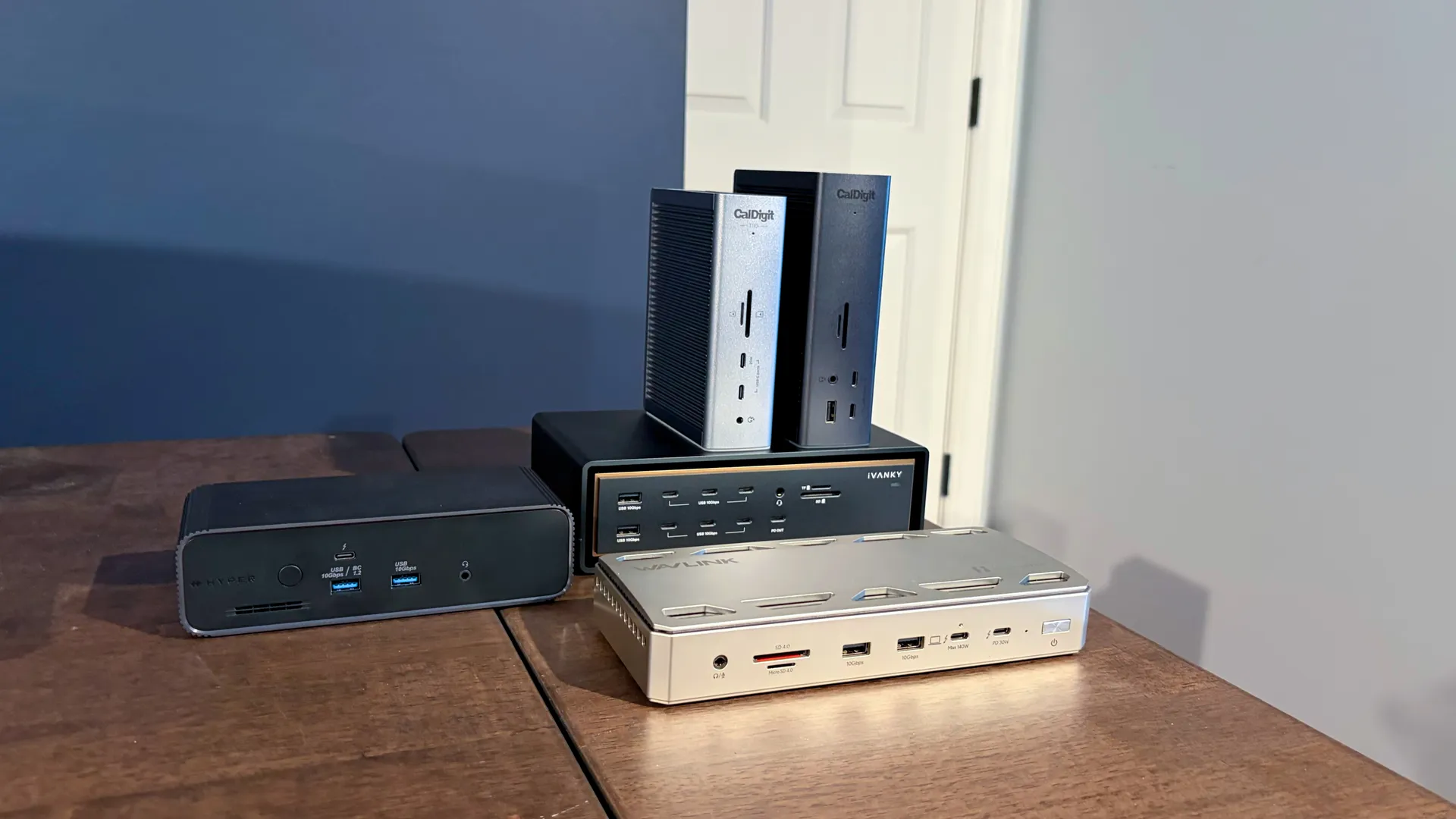
We've taken the top six Thunderbolt 5 docks we could get our hands on and put them into a six-way battle for supremacy. We’ve previously taken a look at a couple of popular Thunderbolt 4 docks on the market, including the Ivanky FusionDock Max 1 and the Amazon Basics Thunderbolt 4 Pro Dock. However, with Thunderbolt 5 now on the market and proliferating on desktop motherboards and laptops, we’ve decided to take a look at what’s available in the Thunderbolt 5 dock market.
This time around, we’ve assembled the CalDigit TS5 and the brawnier TS5 Plus, along with the Razer Thunderbolt 5 Dock, the Ivanky FusionDock Ultra, Hyper HyperDrive Next, and WAVLINK WL-UTD58. As an added data point, we also have an Orico Thunderbolt 5 SSD enclosure for testing external storage speeds over Thunderbolt 5.
Let's take a look at the contenders, then get to the benchmarks, and finally crown the winner.

CalDigit TS5 Plus
CalDigit TS5 Plus
The TS5 is already impressive in its own right, but the $499 TS5 Plus dials up the specs a notch or two. While the TS5 includes 15 ports, the TS5 Plus bumps that to 20.
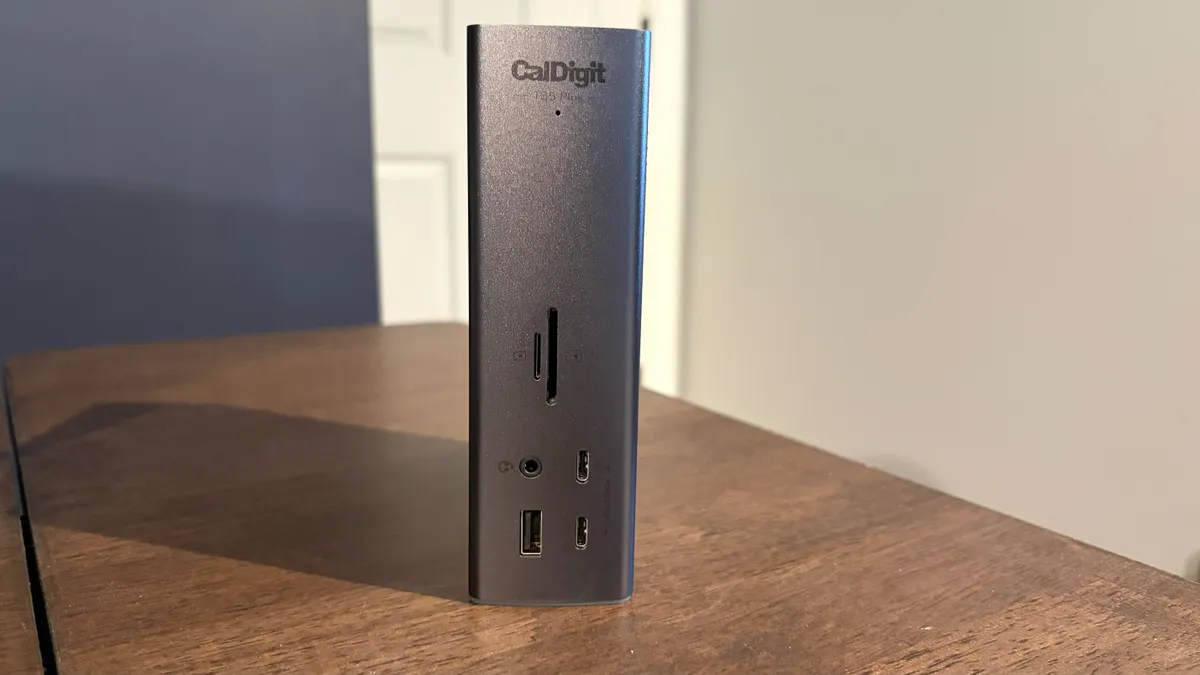
The design of the TS5 Plus closely resembles the TS5, but it is slightly taller and features a space grey finish instead of natural aluminum. As for the port arrangement, this is what you’ll find on the TS5 Plus:
Front
- 2x USB-C 3.2 Gen 2
- 1x USB-A 3.2 Gen 2
- 1x microSD UHS-II slot
- 1x SD UHS-II slot
- 1x audio combo jack
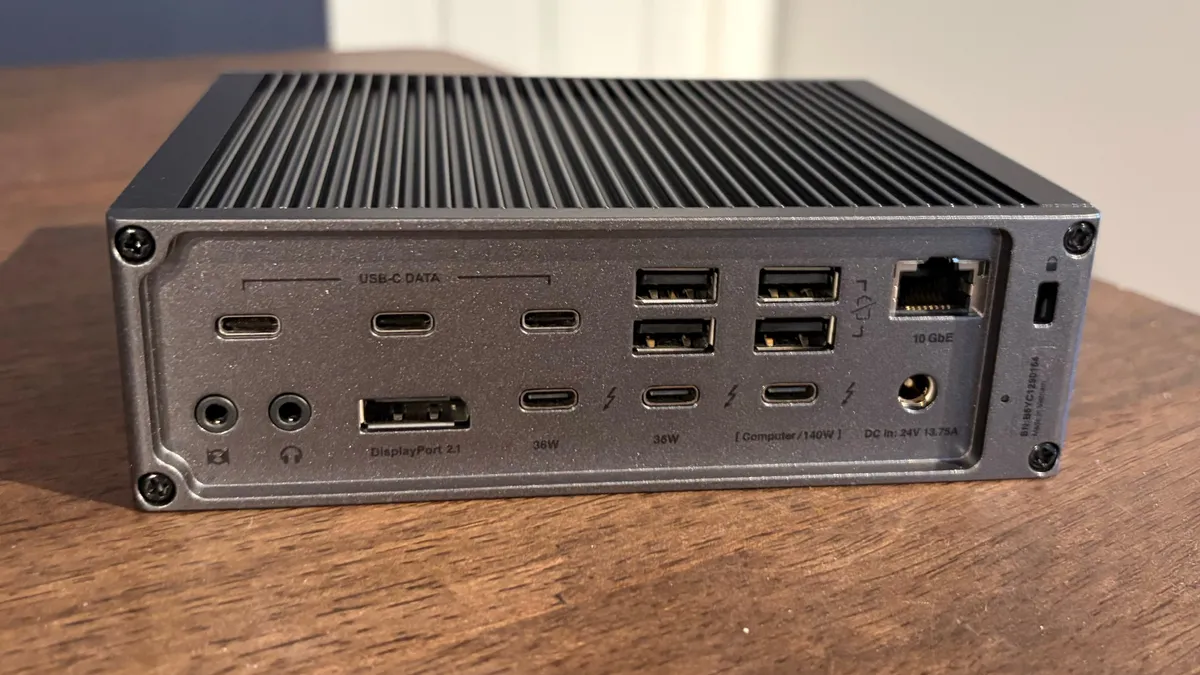
Back
- 1x Thunderbolt 5 upstream (80 Gbps bi-directional)
- 2x Thunderbolt 5 downstream (80 Gbps bi-directional)
- 3x USB-C 3.2 Gen 2
- 4x USB-A 3.2 Gen 2
- 1x DisplayPort 2.1
- 1x 10 GbE (RJ45) port
- 1x audio-in
- 1x audio-out
- 1x 240W power port
As you can see, the TS5 Plus is an absolute powerhouse when it comes to ports. While it loses one downstream Thunderbolt 5 port, it gains a DisplayPort 2.1 port. You’ll also find three additional USB-C ports and a total of four USB-A 3.2 Gen 2 ports on the back. CalDigit also managed to squeeze an extra USB-A 3.2 Gen 2 port on the front of the unit.
You’ll also appreciate that the onboard LAN port has been upgraded to 10 GbE (up from 2.5 GbE). In addition, external monitor support remains unchanged from the TS5, allowing you to connect up to four monitors to a M5 Max-equipped Mac.
Razer Thunderbolt 5 Dock
Razer Thunderbolt 5 Dock
If the CalDigit docks are all-business with a Mac-infused aluminum unibody style, the $399 Razer Thunderbolt 5 Dock Chroma definitely shows its PC gaming roots. The dock features an anodized black aluminum chassis with an etched Razer logo on top. However, Razer plays up the gamer angle with a Chroma RGB light ring at the base of the unit, visible along the front and sides of the chassis. If this motif is a bit much for your aesthetic tastes, Razer also offers a “Mercury” version of the dock that features a more subdued natural aluminum finish (it’s also $10 cheaper).
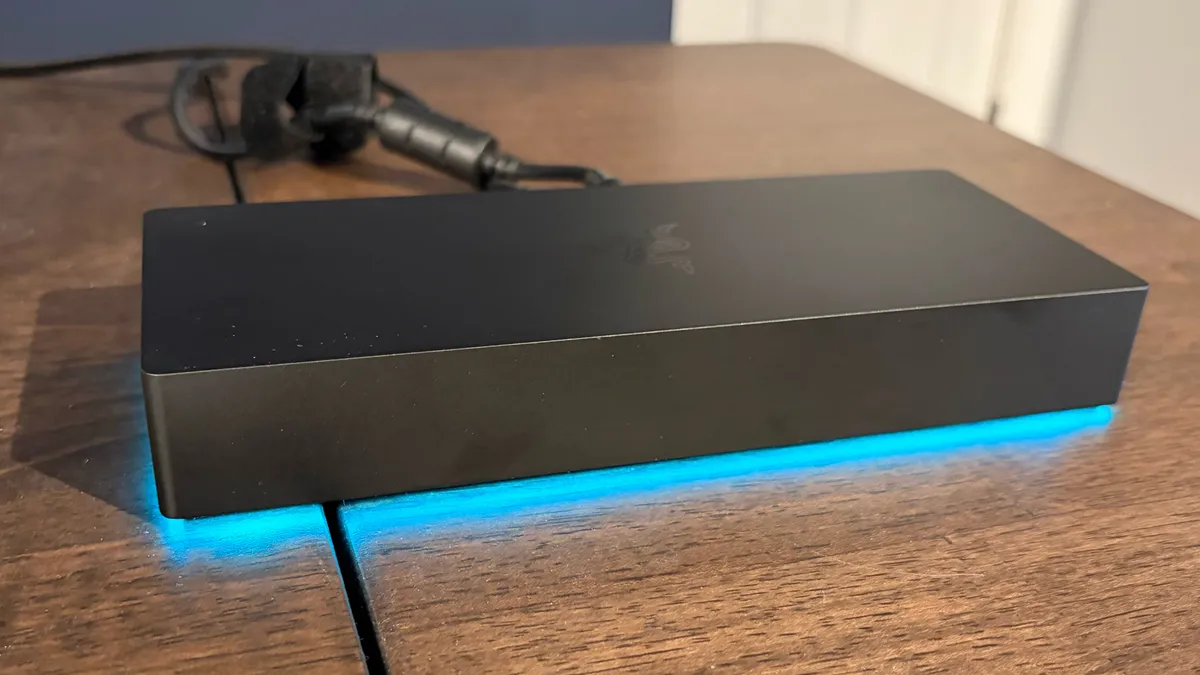
Thunderbolt docks are known for their propensity to generate a lot of heat, and Razer’s offering is no exception. However, Razer tackles this challenge with a built-in cooling fan that helps to dissipate heat.
But active cooling isn’t the only trick up Razer’s sleeve; it also has a built-in PCIe Gen 4x4 M.2 slot on the bottom of the unit. This is a toolless addition: the bottom cover is easily removed using a clip retention system, and the SSD is held in place by a rotating retention clip. Thermal pads are also included that touch the top and bottom of the SSD to help dissipate heat and avoid throttling.
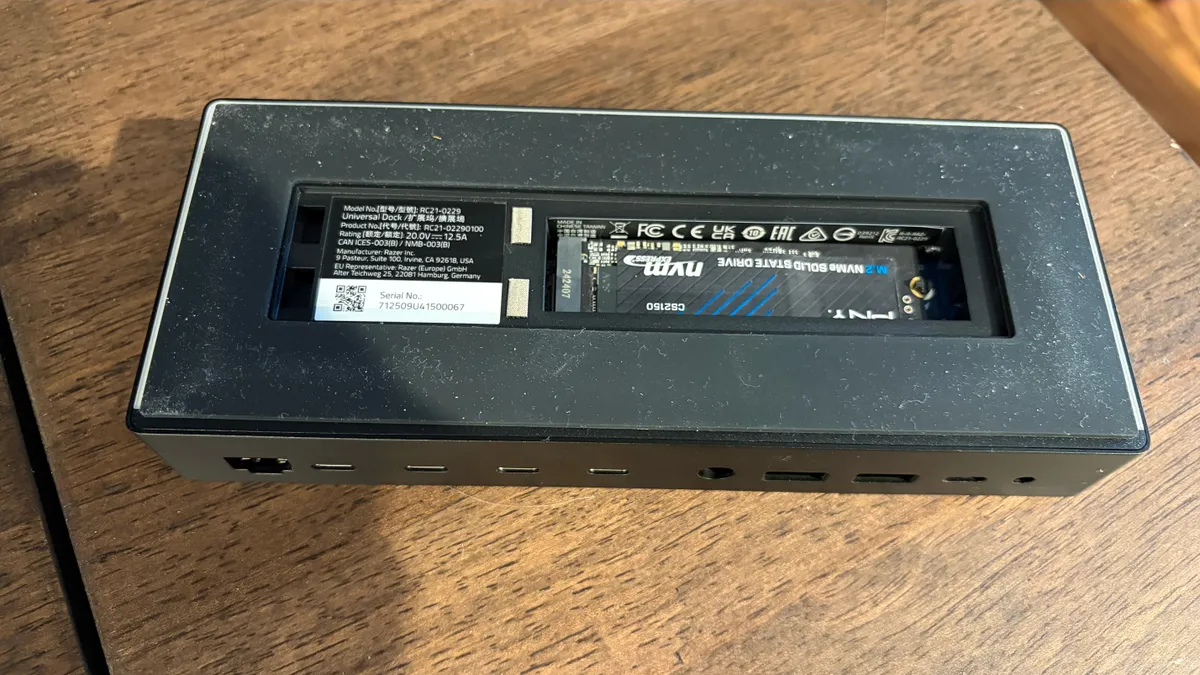
Razer’s solution is ingenious since your SSD is hidden away from view with access to the internal cooling fan, and you don’t have to give up an external port to connect a USB-C/Thunderbolt SSD enclosure.
Speaking of ports, the Razer Thunderbolt 5 Dock isn’t as well-stocked as the two CalDigit docks. You’ll find:
- 1x Thunderbolt 5 upstream (80 Gbps bi-directional)
- 3x Thunderbolt 5 downstream (80 Gbps bi-directional)
- 2x USB-A 3.2 Gen 2
- 1x USB-C 3.2 Gen 2
- 1x SD UHS-II slot
- 1x audio combo port (7.1 Surround)
- 1x 1 GbE (RJ45) port
- 1x 250W power port
- 1x Internal M.2 Slot (PCIe Gen4x4)
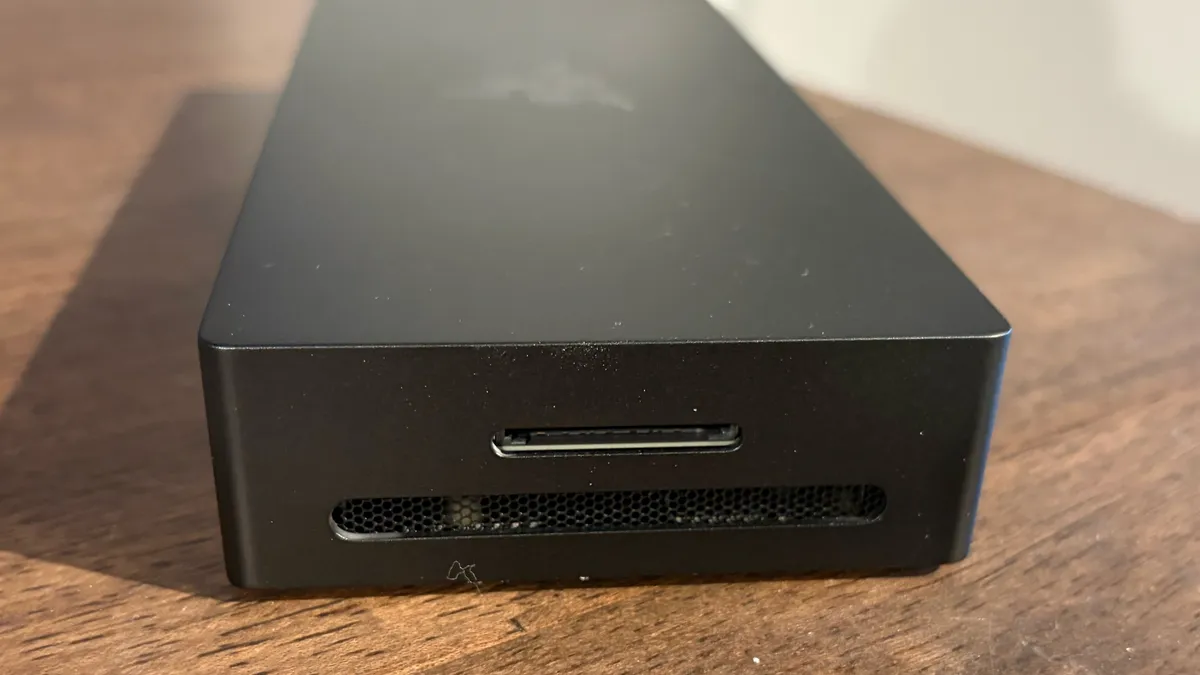
Razer has made a few decisions with its Thunderbolt 5 dock that I question. The UHS-II SD slot is mounted on the right side of the unit, which is easy enough to access, but there are no front-mounted ports. All of the remaining ports are on the back of the unit. It would have been nice to have at least one USB-C port and one USB-A port on the front of the unit to quickly connect a thumb drive or other frequently used accessories.
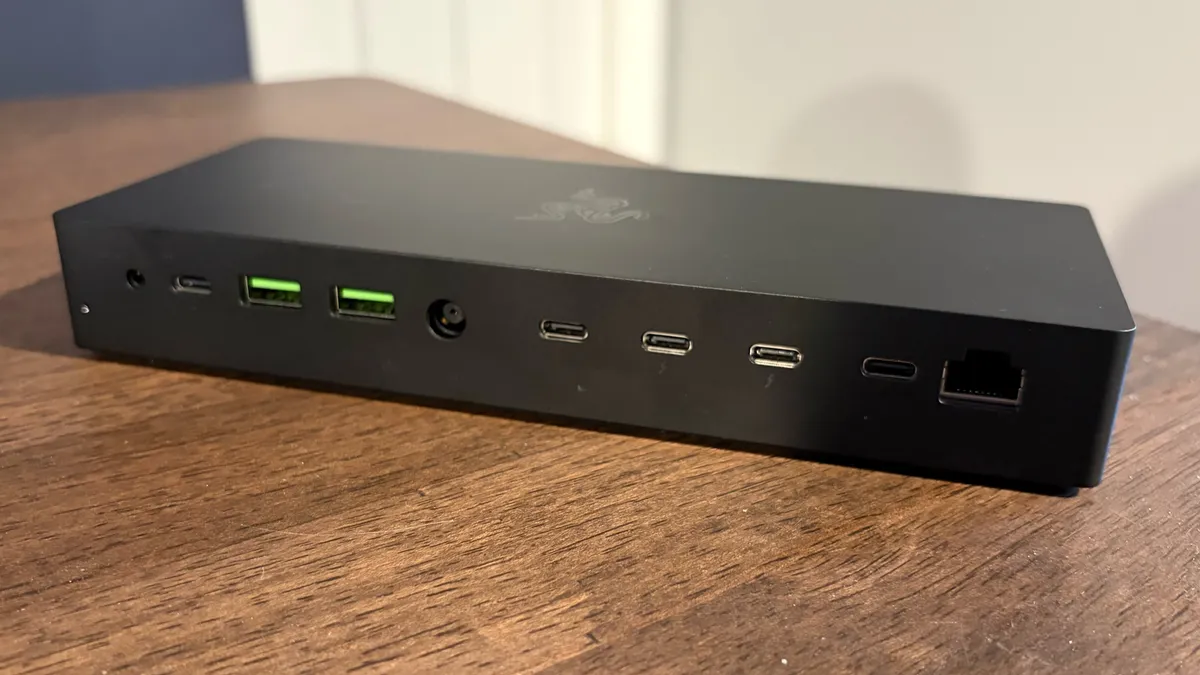
The other curious choice is the 1 GbE port on the back of the dock. This is a Thunderbolt 5 dock – I’d expect at least a 2.5 GbE port, and ideally a 10 GbE port, at this price point ($399). The CalDigit TS5 gives you a 2.5 GbE port, while the TS5 Plus offers a 10 GbE port.
With that said, the dock supports up to 120 Gbps (80 Gbps for data and 40 Gbps for video) and delivers up to 140W to a laptop. It also supports up to three 4K monitors simultaneously operating at up to 144 Hz.
WAVLINK WL-UTD58-M
WAVLINK WL-UTD58-M
The WAVLINK WL-UTD58-M is another solidly built Thunderbolt 5 dock, and its chassis is made entirely of high-quality aluminum. The chassis is relatively long and flat, and can only be used in a landscape orientation (unlike the two CalDigit offerings). There are plenty of ventilation slots along the sides and top of the WL-UTD58-M to help keep the internals cool.
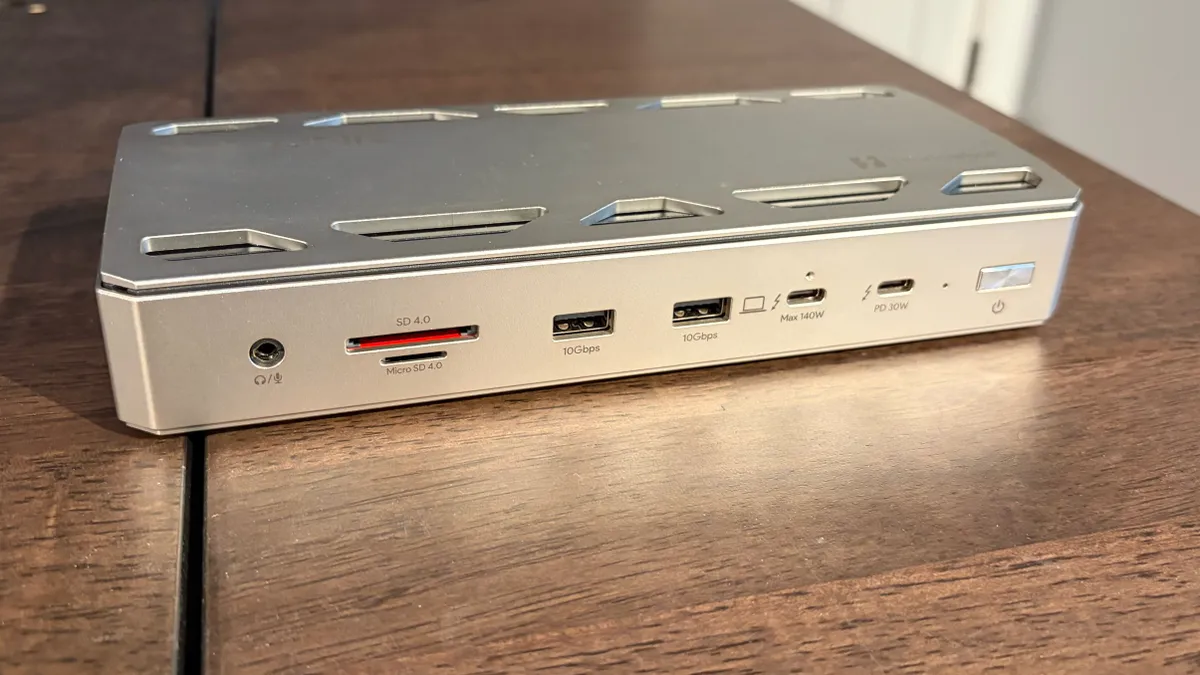
Design-wise, I have one issue with the WL-UTD58-M. Power plugs into the back of the dock, while the Thunderbolt cable coming from the host computer plugs into the front of the dock. It makes for a cluttered appearance, and I would have preferred the upstream Thunderbolt 5 port to be on the back, like it is with other docks we have here in this comparison.
With that said, you get a decent allotment of ports, including:
Front
- 2x USB-A 3.2 Gen 2
- 1x Thunderbolt 5 upstream (80 Gbps bi-directional)
- 1x Thunderbolt 5 downstream (80 Gbps bi-directional)
- 1x audio combo jack
- 1x microSD UHS-II slot
- 1x SD UHS-II slot
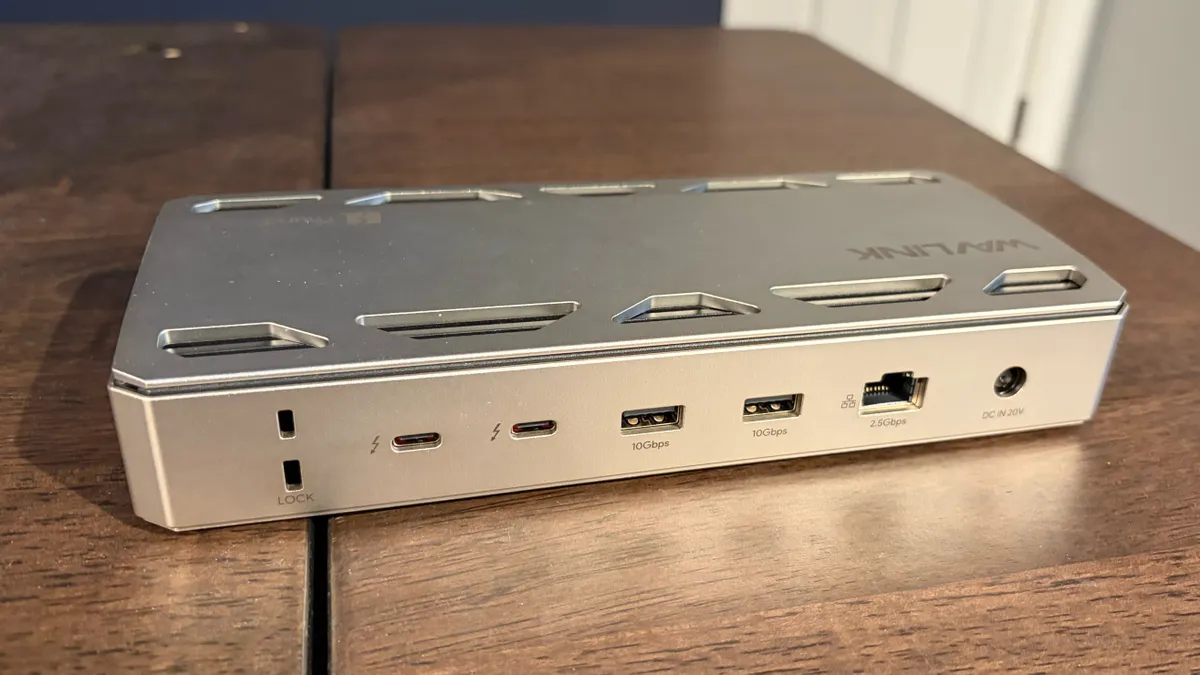
Back
- 2x USB-A 3.2 Gen 2
- 2x Thunderbolt 5 downstream (80 Gbps bi-directional)
- 1x 2.5 GbE (RJ45) port
There are handy SD and microSD slots on the front of the unit, along with two USB-A and one user-accessible Thunderbolt 5 port (the other is for the host computer). On the back, you’ll find two more Thunderbolt 5, two more USB-A, and a 2.5 GbE port.
Like the Razer and Hyper docks, the WL-UTD58-M includes an M.2 PCIe Gen 4x4 on the bottom of the device. The bottom panel is held in place by a single screw and can accommodate a 2280-form-factor SSD. There are no provisions included for securing shorter SSDs.
Ivanky FusionDock Ultra
Ivanky FusionDock Ultra
The Ivanky FusionDock Ultra is an ambitious product targeted at a limited set of users. While the other Thunderbolt 5 docks assembled here are compatible with Macs and Windows PCs, the FusionDock Ultra is only compatible with Macs. And limiting its reach even further, it's only compatible with Apple Silicon Macs. And yet another limitation is that, because the dock uses two Thunderbolt 5 chips, you must give up two Thunderbolt ports on your Mac.
However, if you have an Apple Silicon Mac, the number of ports available to you is unmatched by the FusionDock Ultra. If you thought the TS5 Plus was impressive with 20 ports, the FusionDock Ultra ups the stakes with 26 ports, made possible by the dual Thunderbolt 5 chips. To keep the internal circuits cool, Ivanky uses twin cooling fans to expel hot air from the enclosure. The fans are dynamic, spinning up only when necessary, depending on the load.
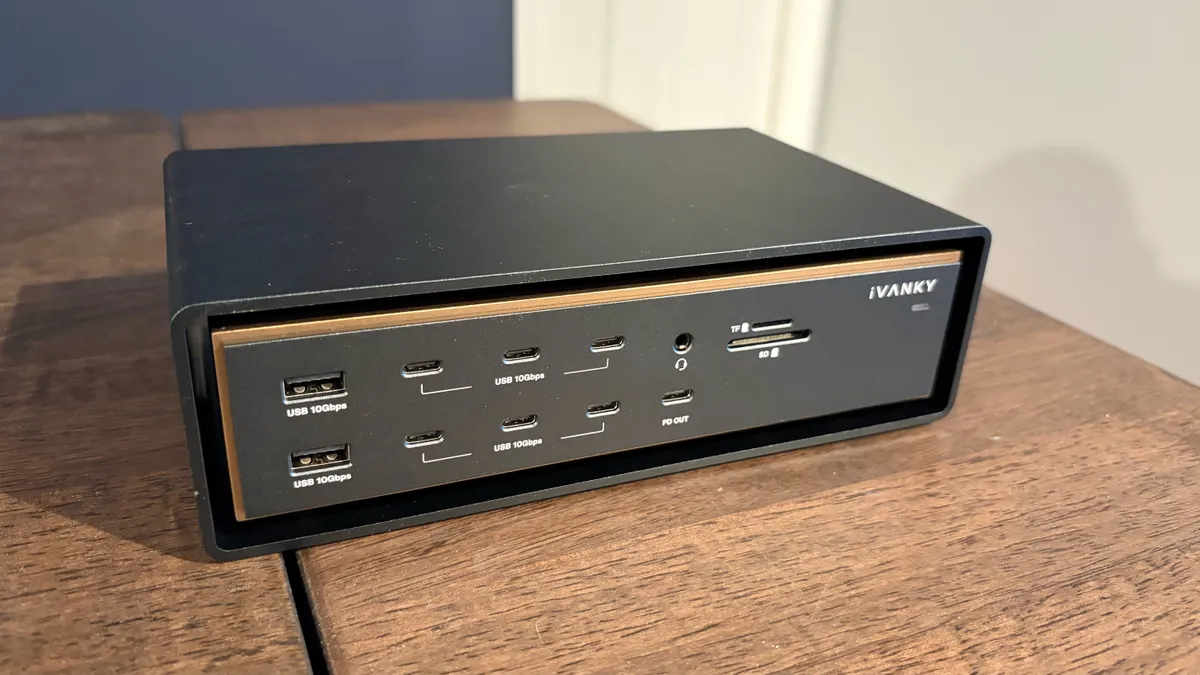
The dock itself is quite attractive, with a Space Grey finish, gold trimming, and a "floating midframe design" in which the main unit is surrounded by an outer heatsink.
Front
- 6x USB-C 3.2 Gen 2
- 1x USB-C 3.2 Gen 2 (45W PD)
- 2x USB-A 3.2 Gen 2
- 1x microSD UHS-II slot
- 1x SD UHS-II slot
- 1x audio combo jack
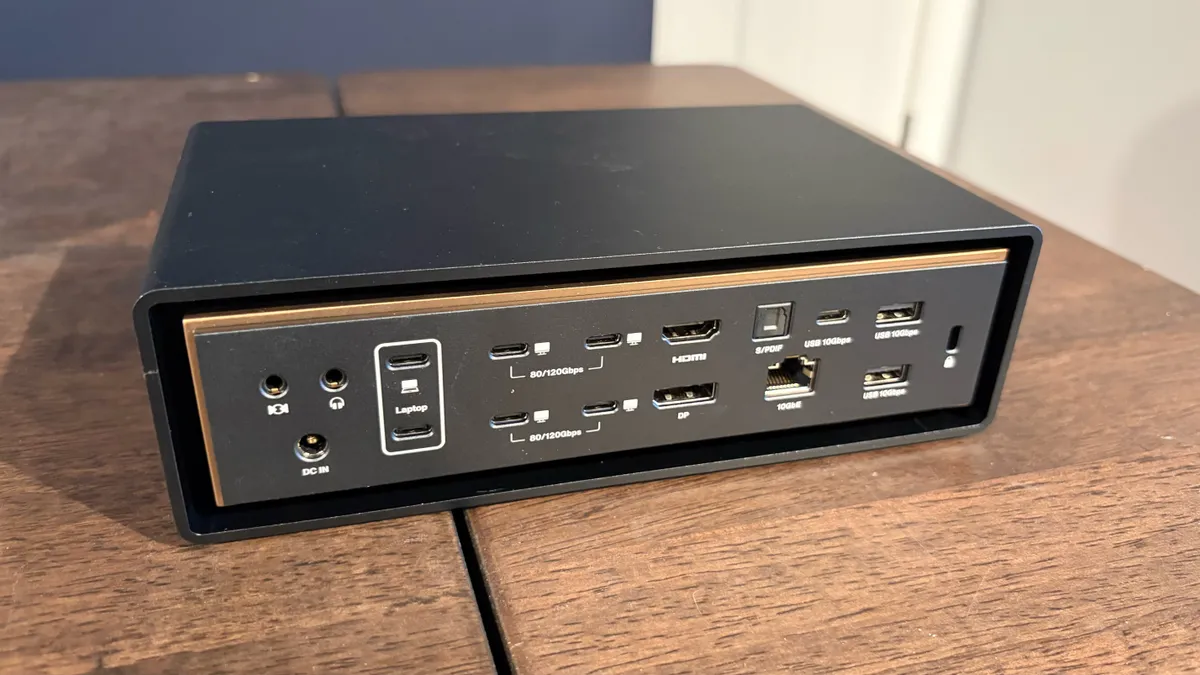
Back
- 2x Thunderbolt 5 upstream (80 Gbps bi-directional)
- 4x Thunderbolt 5 downstream (80 Gbps bi-directional)
- 1x USB-C 3.2 Gen 2
- 2x USB-A 3.2 Gen 2
- 1x DisplayPort 2.1
- 1x HDMI 2.1
- 1x 10 GbE (RJ45) port
- 1x audio-in
- 1x audio-out
- 1x S/PDIF
- 1x 240W power port
It’s hard to be disappointed with the sheer number and variety of ports available on the FusionDock Ultra. It’s absolutely bonkers to see 7 USB-C ports on the front of the unit, although having access to four fully-fledged Thunderbolt 5 ports on the back is great. It’s also nice to see dedicated HDMI 2.1 and DisplayPort 2.1 ports, along with an S/PDIF jack. And as you would expect with such a high-end dock, there’s a 10 GbE port onboard as well.
About the only thing missing from the FusionDock Ultra is an internal M.2 SSD slot, but given the number of ports available, we won’t hold a grudge over the omission.
Hyper HyperDrive Next
Hyper HyperDrive Next
Hyper's $399 HyperDrive Next Thunderbolt 5 dock features a dark grey aluminum chassis, but it's not a full aluminum shell like the other docks assembled here. Instead, both the front and rear fascias are mae of plastic, which doesn't impart the same feeling of quality.
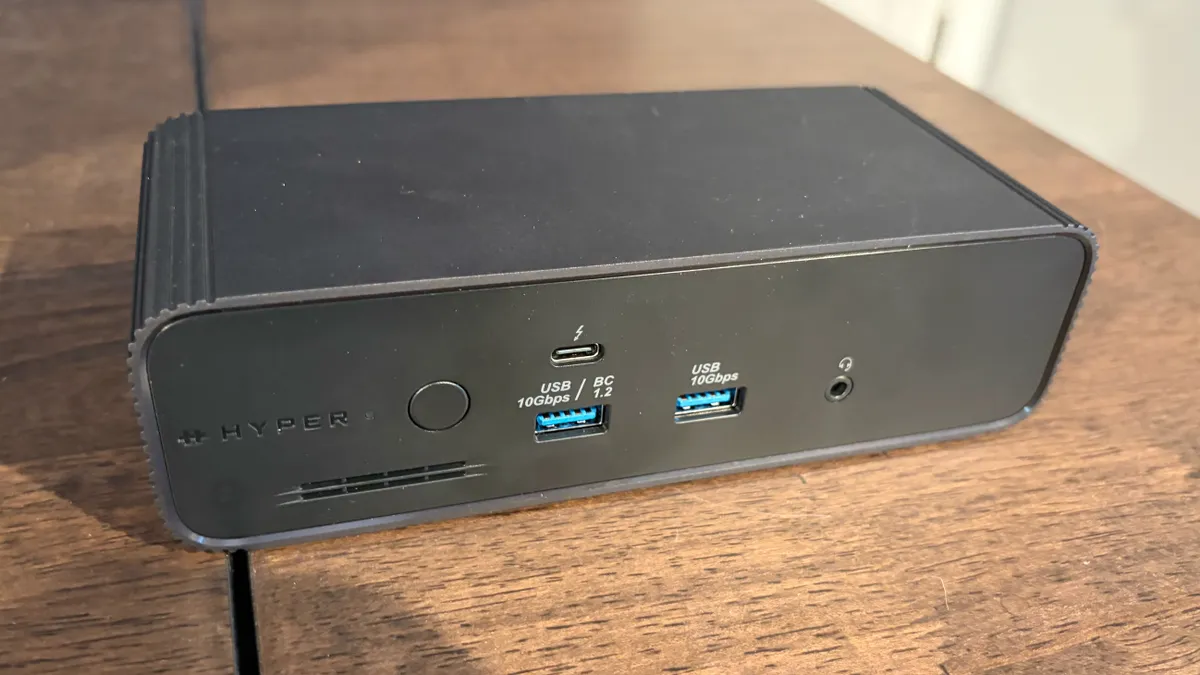
The top of the enclosure is smooth to the touch, while both sides feature a ribbed design to better disperse heat.
Front
- 2x USB-A 3.2 Gen 2
- 1x Thunderbolt 5 downstream (80 Gbps bi-directional)
- 1x audio combo jack
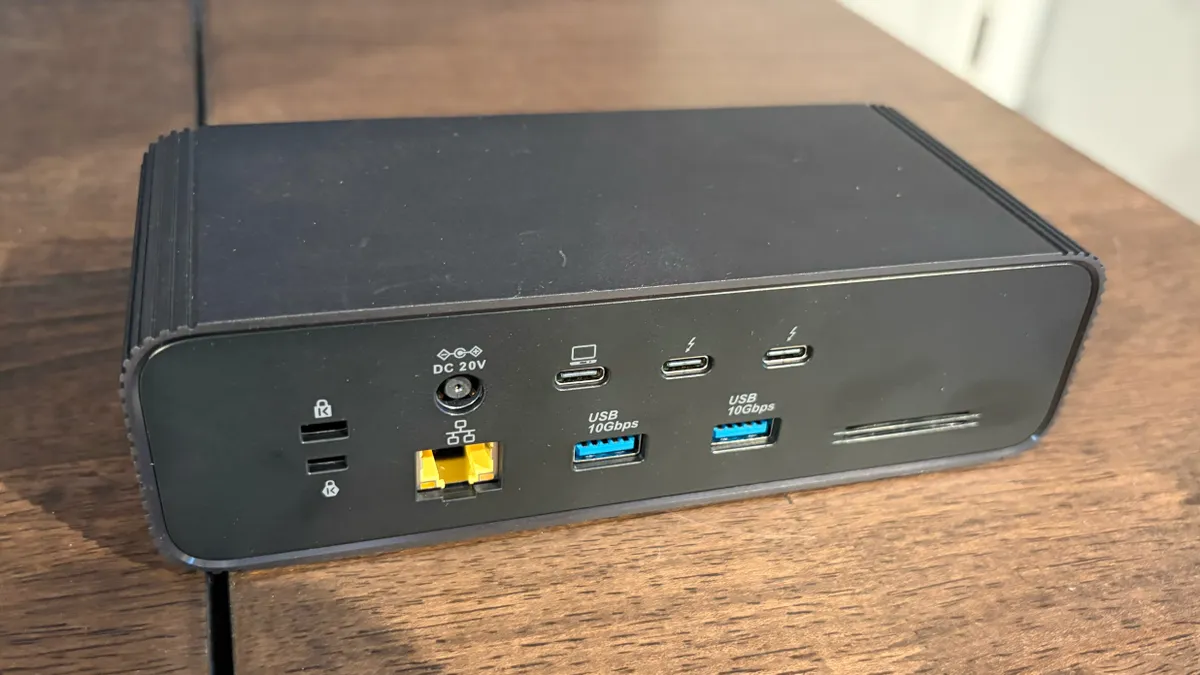
Back
- 2x USB-A 3.2 Gen 2
- 1x Thunderbolt 5 upstream (80 Gbps bi-directional)
- 2x Thunderbolt 5 downstream (80 Gbps bi-directional)
- 1x 2.5 GbE (RJ45) port
The $399 dock features a dedicated power button on the front (something that you won't find on the other docks) and includes a 2.5 GbE network port on the back. Interestingly, Hyper doesn't equip the dock with an SD or microSD slot. You do get a good assortment of ports up front, including one Thunderbolt 5 and two USB-A, along with two additional Thunderbolt 5 downstream ports on the back.
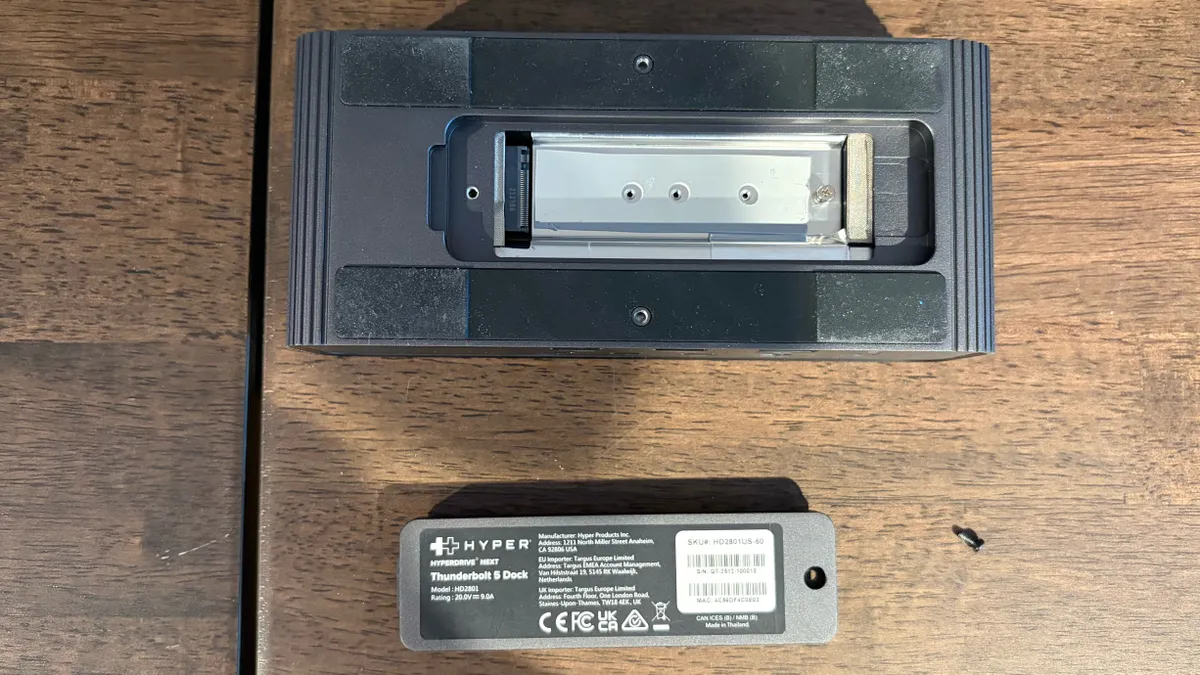
The HyperDrive Next includes an integrated SSD slot (PCIe Gen 4x4) for storage expansion. The dock includes mounting points for 2230, 2242, 2260, or 2280 SSDs, providing plenty of flexibility. There are also thermal pads included for both sides of the SSD to aid in cooling (which is important given that Thunderbolt docks, in general, tend to get rather toasty).
The HyperDrive Next supports up to 80 Gbps for data and 40 Gbps for video, and is compatible with up to 140-watt charging to a connected laptop. When connected to a PC, the dock supports up to one 8K/144 Hz display or up to two 8K displays running at 120 Hz. If you're using a Mac, a single display to 6K resolution and 60 Hz is supported, or dual 6K displays at up to 60 Hz. Windows machines can also support triple 4K monitors at 60 Hz, while Macs can only support this configuration if equipped with an M5 Pro (or higher) SoC.
CalDigit TS5 Dock
CalDigit TS5 Dock
CalDigit's "TS" line comprises its high-end Thunderbolt docks (with the "Element" line being a step below). The $399 TS5 is the entry point for CalDigit's high-end Thunderbolt 5 docks.
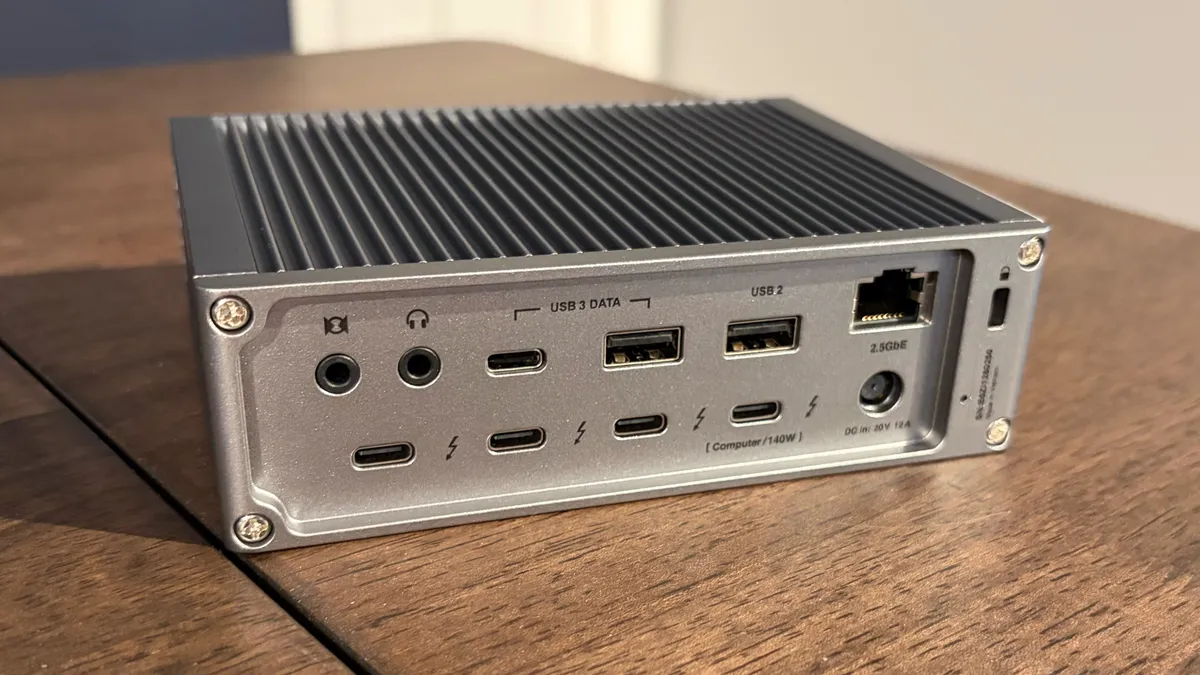
CalDigit hasn't broken any new ground with the TS5's design, as it looks similar to the TS3 and TS4 that came before it. That means you get a passively cooled dock that can sit either horizontally or vertically, depending on your needs. The chassis is machined from aluminum, which matches almost perfectly with the natural aluminum found on Apple's silver MacBooks. There's also a collection of cooling fins on the sides to help dissipate heat.
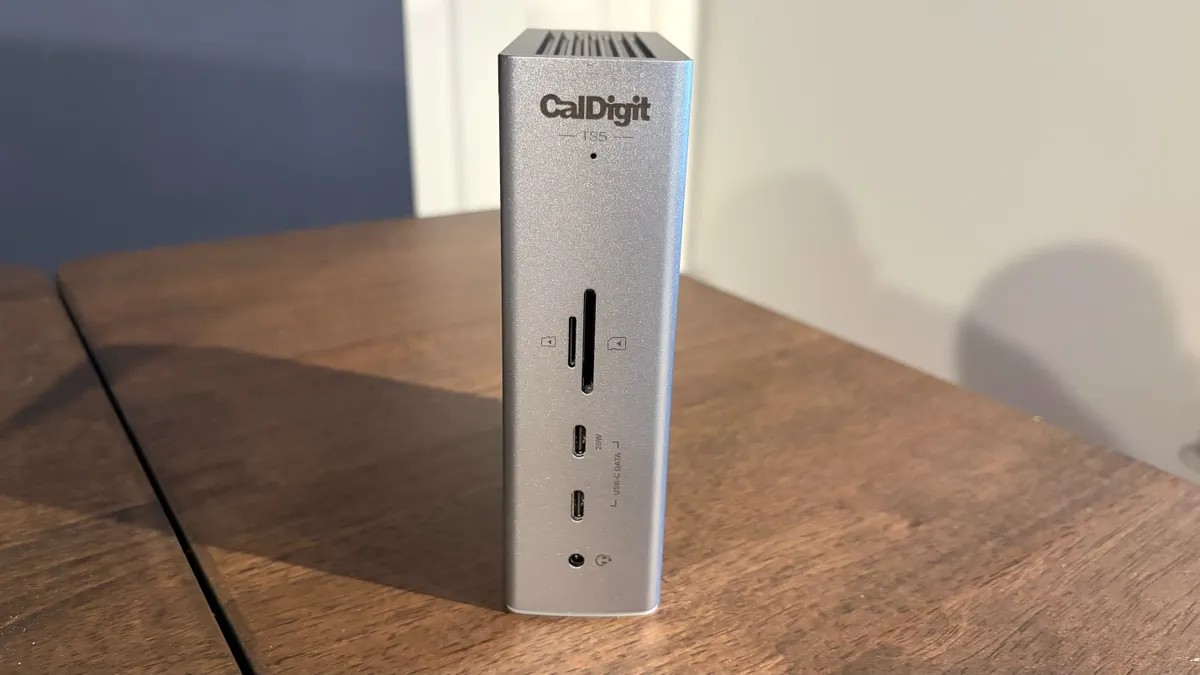
Despite being the entry-level model, the TS5 packs a wealth of ports:
Front
- 2x USB-C 3.2 Gen 2
- 1x microSD UHS-II slot
- 1x SD UHS-II slot
- 1x audio combo jack
Back
- 1x Thunderbolt 5 upstream (80 Gbps bi-directional)
- 3x Thunderbolt 5 downstream (80 Gbps bi-directional)
- 1x USB-C 3.2 Gen 2
- 1x USB-A 3.2 Gen 2
- 1x USB-A 2.0
- 1x 2.5 GbE (RJ45) port
- 1x audio-in
- 1x audio-out
- 1x 240W power port
The TS5 supports up to 120 Gbps (80 Gbps data, 40 Gbps video) and external SSDs at up to 6,200 Mbps (twice as fast as previous-generation Thunderbolt 4 docks). In addition, it supplies up to 140W power delivery to a connected laptop.
When it comes to monitor support, the TS5 can support up to four external monitors simultaneously. Properly spec'd Macs and PCs can support up to three external monitors. Only Macs with an M5 Max processor can support four monitors at once (up to four 6K at 60 Hz or four 4K at 144 Hz).
Orico Thunderbolt80G Enclosure
Orico Thunderbolt80G Enclosure
To test SSD speeds with the assembled Thunderbolt 5 docks, we used an Orico Thunderbolt80G enclosure. This is an aluminum-alloy Thunderbolt 5 enclosure that supports up to M.2 (PCIe Gen4x4) SSDs. The Thunderbolt80G enclosure retails for $165 on Amazon.
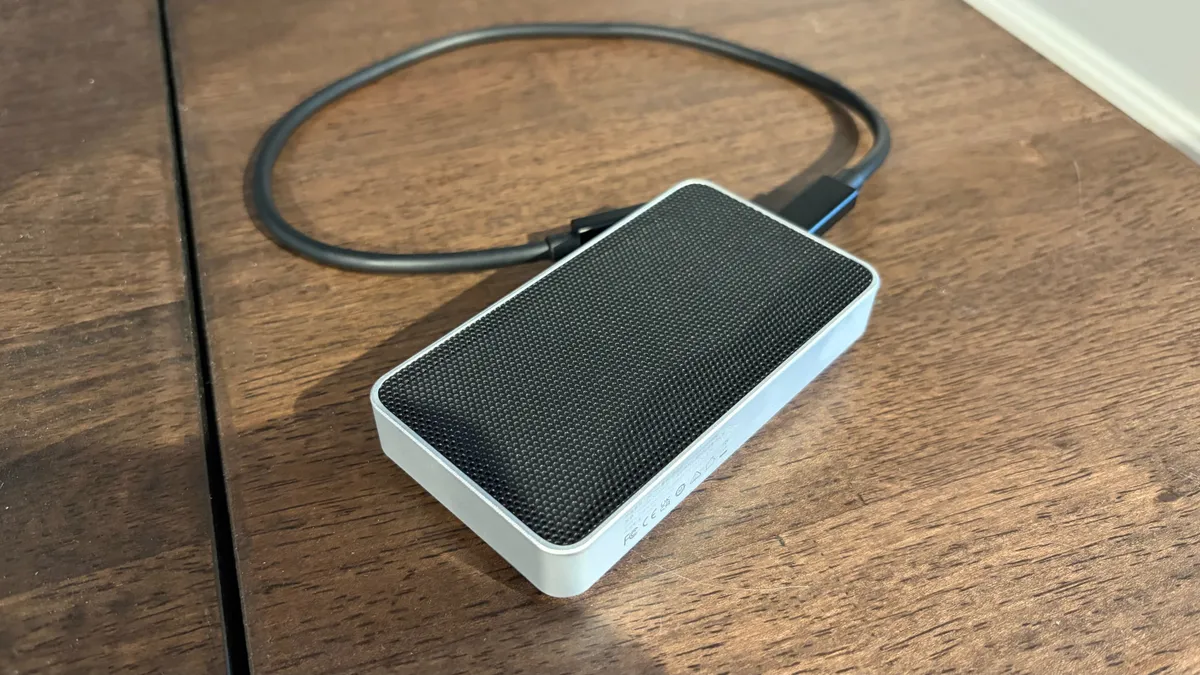
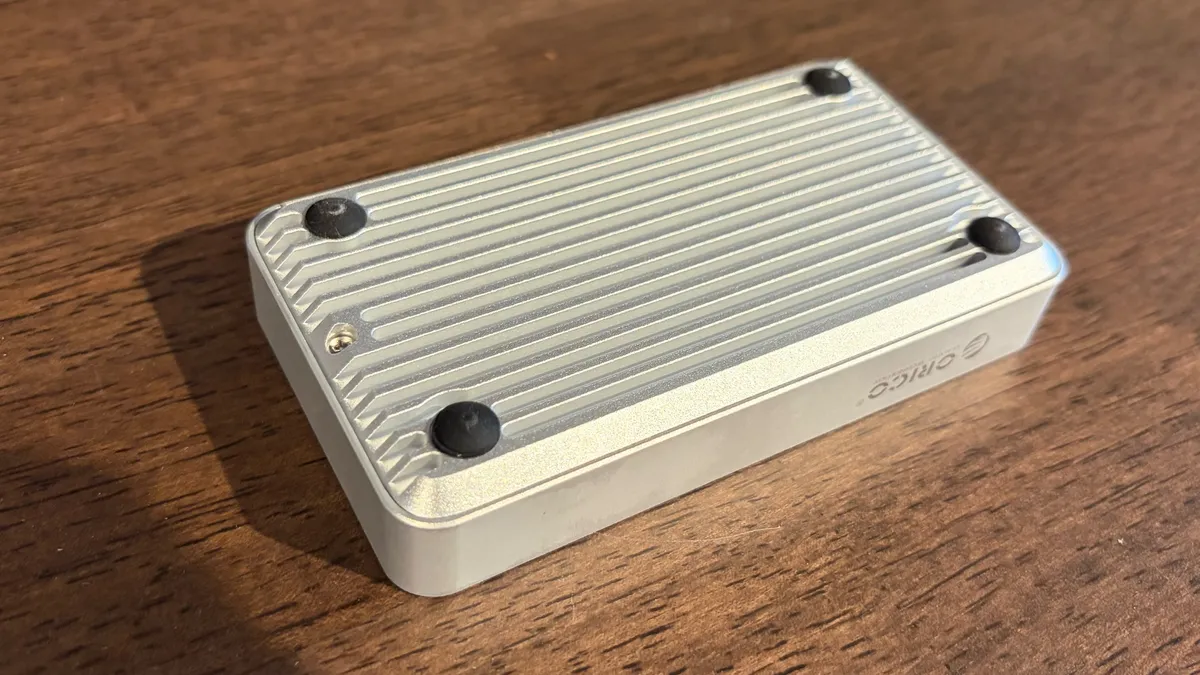
A single screw is removed to lift off the ribbed bottom panel, which reveals the internal M.2 slot. Orico provides a thermal pad for affixing to your SSD, which is then secured with a screw. A single 80 Gbps Thunderbolt 5 cable is also included in the box.
Thunderbolt 5 Dock Specs Comparison
Thunderbolt 5 Dock Specs Comparison
| Row 0 - Cell 0 | Thunderbolt 5 Ports (Downstream) | USB-C Ports (Downstream) | Downstream USB-A Ports (Downstream) | HDMI | DisplayPort | microSD/SD slot | Ethernet | PCie 4.0 M.2 slot |
3 | 3 | 2 | N/A | N/A | Yes | 2.5 GbE | N/A | |
5 | 2 | 5 | N/A | Yes | Yes | 10 GbE | N/A | |
3 | 1 | 2 | N/A | N/A | Yes | 2.5 GbE | Yes | |
2 | N/A | 4 | N/A | N/A | N/A | 2.5 GbE | Yes | |
3 | N/A | 4 | N/A | N/A | Yes | 2.5 GbE | Yes | |
4 | 8 | 4 | Yes | Yes | Yes | 10 GbE | No |
Thunderbolt 5 Dock SSD Performance
Thunderbolt 5 Dock SSD Performance
For storage testing, we used a PNY CS2150 PCIe 5.0 SSD. We first tested the SSD in our test system, which features an Asus Z890 Creator WiFi motherboard with an onboard PCIe 5.0 M.2 slot and two Thunderbolt 4 ports.
Next, we tested the Razer Thunderbolt 5 Dock with the CS2150 installed into the internal M.2 slot. Finally, we tested the CalDigit TS5 and TS5 Plus connected to the CS2150 within the Orico SSD enclosure via a Thunderbolt 5 port.
We ran a quick test with CrystalDiskMark, which is a free benchmarking tool, to see how each dock handled the PNY CS2150 SSD.
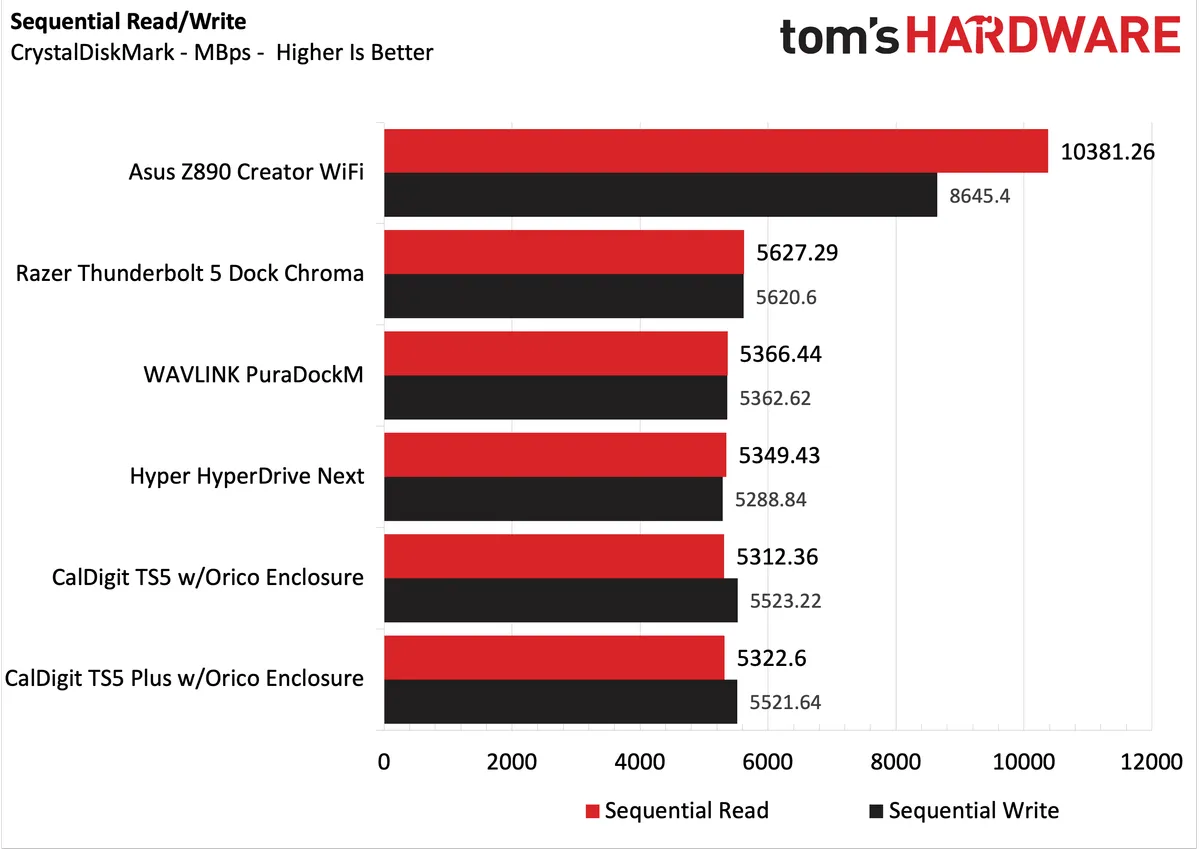
For baseline numbers, we saw 10,381.26 MBps reads and 8,645.4 MBps writes using the CS2150 on an Asus Z890 Creator WiFi motherboard. Switching to the Razer Chroma 5 Dock, the sequential reads and writes dropped to 5,627.29 MBps and 5,620.6 MBps, respectively. Not surprisingly, the CalDigit TS5 and TS5 Plus posted nearly identical performance, at just over 5,300 MBps sequential reads and 5,520 MBps sequential writes. It should be noted that all three docks cite a theoretical maximum of 6,200 Mbps transfers (64Gb/s PCIe 4.0 interface).
Given that the FusionDock Ultra is only supported on Apple Silicon Macs, I couldn’t run our CrystalDiskMark benchmarks on the CS2150. However, when using the CS2150 with an Orico SSD enclosure connected to a free Thunderbolt 5 port on the back, I recorded read speeds of just over 3,000 MBps and write speeds of over 2,500 MBps using BlackMagic Disk Speed Test. Keep in mind, however, that the FusionDock Ultra was limited to Thunderbolt 4 speeds on the MacBook Air (M4) that I used for testing.
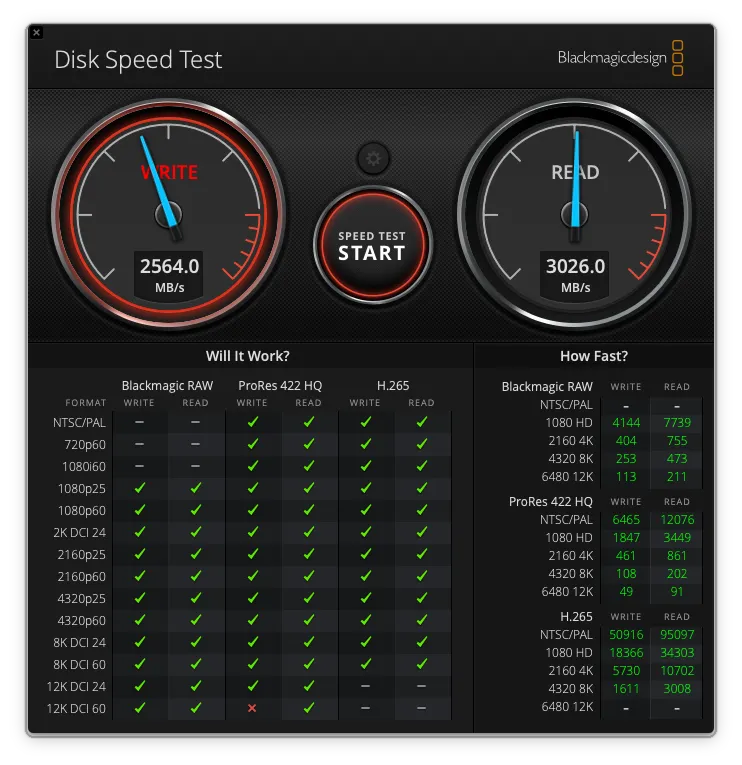
I had no trouble using any of the docks to run two monitors simultaneously, including a 49-inch, 240 Hz DQHD monitor. Each dock worked impeccably with my Windows 11 Home desktop system (except the FusionDock Ultra, which is incompatible), an M5 MacBook Air, and an M4 Mac Mini. The latter two systems only support Thunderbolt 4, but the docks are backward compatible with the older, slower interface.
There were also no issues using the onboard LAN ports, as I was able to reach the theoretical maximum on each port using iPerf3 testing across all three docks (including the 10 GbE port on the TS5 Plus and FusionDock Ultra).
As for thermals, all remained warm to the touch, even when the host computer was idle. At no time did any become too hot to handle. The Razer Thunderbolt 5 and FusionDock Ultra docks were slightly cooler to the touch thanks to their internal fans (which are only audible if you stick your ear to the unit).
Bottom Line
Although Thunderbolt docks don’t really make much sense for most desktop systems, they are an incredible lifeline for laptops, which have a more limited port selection. You can take one Thunderbolt 5 port from your MacBook Pro and, in return, get 20 ports with a CalDigit TS5. Not only do they offer a “one cable” solution for data and power, but you also get a wide range of connectivity options across Thunderbolt, USB-C, USB-A, and SD/microSD. And in the case of the TS5, DisplayPort 2.1 and 10 GbE ports are part of the equation.
The Razer Thunderbolt 5 Dock is a sleek solution that provides an internal M.2 slot for storage expansion and Chroma RGB effects that can sync with your Razer laptop. However, I’m not thrilled with the lack of front-mounted ports or the lackluster GbE network port provided, given its $399 price tag.
The CalDigit TS5 Plus is the overachiever of the bunch, offering a total of 20 ports and support for up to four external monitors (when connected to an M5 Max system). You get five legacy USB-A 3.2 Gen 2 ports, four USB-C 3.2 Gen 2 ports, two downstream Thunderbolt 5 ports, a 10 GbE port, and more. However, that abundance of connectivity options results in a hefty price of $499.
The CalDigit TS5 is not as port-packed as its “Plus” sibling, but it still offers three downstream Thunderbolt 5 ports along with a wealth of USB-A and USB-C 3.2 Gen 2 ports. Like the TS5 Plus, the TS5 also includes multiple front-mounted ports for USB-C, audio, and SD cards. The TS5 also one-ups the Razer Thunderbolt 5 Dock by including an integrated 2.5 GbE port instead of the old hat GbE. At a street price of $399, the CalDigit TS5 is the best option for most people.
The Hyper HyerDrive Next and WAVLINK WL-UTD58-M are both good options if you're looking to spend $400 or less. In addition, they both include an M.2 slot for expanding storage with an SSD.
That leaves us with the Ivanky FusionDrive Ultra. This dock is an exercise in excess, from its elaborate design to its use of two Thunderbolt 5 chips to its requirement of two free Thunderbolt 4 ports. But in return, you get an insane 26 total ports, including seven USB-C ports up front and four Thunderbolt 5 on the back, along with HDMI 2.1, DisplayPort 2.1, and 10 GbE ports. However, compatibility is extremely limited, working only on Apple Silicon Macs. In addition, with a street price of $650, it’s by far the most expensive dock we tested.
However, if it were money being spent on a Thunderbolt 5 docking station, I’d have to give the crown to the WAVLINK WL-UTD58-M. With an integrated M.2 slot and a well-balanced assortment of ports, it’s hard to ignore its value proposition.
Additional Thunderbolt 5 Docks to Consider
Although we plan to keep this guide updated as we test additional Thunderbolt 5 docks, here are some additional units to consider: