RAID 1: Mirroring (High Safety)
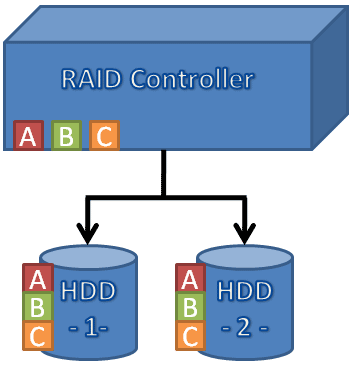
RAID 1 requires two hard drives. The controller will simultaneously write all information onto both drives, which means you have full data redundancy. Should one of the drives fail, the second one will still be there. After replacing the faulty drive, the controller will recreate the RAID 1 array. Some RAID controllers are capable of accelerating RAID 1 read access by alternating access between drives.
RAID 1 is the easiest and most efficient way of creating a secure storage array: all you need is two hard drives and a controller that supports basic RAID modes (which most motherboards over $100 usually do.) When you install Windows, you will have to provide a RAID storage driver disk to the setup program, so it can properly access the RAID array. Once this is done, the array behaves no differently than a single hard drive. If you want to do it right, we recommend spending $20-40 on removable drive frames. This way you can easily exchange a faulty hard drive. If you have a failure, though, be sure you grab the right one!
Some controllers can even mirror data onto more than one drive, so you can mirror data onto three or even four drives. If you’re that paranoid, you should first make sure you’re using a high-quality power supply, an uninterruptible power supply (UPS) with surge protection, and that your computer is in a stable operating environment. Running drives within their ideal operating temperature helps to achieve a long life span too. If that’s still not enough for you, you could go for a RAID 5+1, which mirrors a RAID 5 array with parity. However, we consider these requirements very sophisticated and far above what most of us typically need.

