Best offers
|
Officejet Pro 8500 All-In-One Printer... | $399.99 Office Depot More info |
|
Artisan 810 All-in-One Inkjet Printer... | $299.99 STAPLES More info |
|
Officejet 6500 All-In-One Printer (32... | $149.99 STAPLES More info |
|
TN360 Toner Cartridge (1 Cartridge,... | $47.00 DATABAZAAR.COM More info |
|
Officejet J4580 All-In-One Printer... | $99.98 STAPLES More info |
- hp psc 1210 driver
- hp psc 1210 driver windows xp
- hp psc 1210 vista driver
- what is a weak color
- warming up lamp
- epson scanner color control
- driver windows 7 hp psc 1210
- psc 1210 series
- psc 1210 series driver
- printer driver for hp psc 1210 for windows 7
- small scanner color chart
- hp psc 1210 printer driver windows 98
- windows vista hp psc 1210 driver
- weak colors
- only driver printer psc 1210 xp
Partners
The Games selection
crazy :
Interactive Boogy
Pick one of the 3 songs, hit on the correct keys matching this boy's dance moves.
|
crazy :
Xiao Xiao 7
A great fight scene from the animation movies Xiao Xiao.
|
Sponsored links
The scanner tests were run successively at 75, 300, 600 and 1200 dpi, some with and some without descreening, along with color chart tests. But here we are short of space, so we shall give a one-page summary with the results obtained in the most usual resolution: 300 dpi.
![]() |
![]() |
| Canon F20 | Epson CX 3200 |
![]() |
![]() |
| hp psc 1210 | Lexmark X5150 |
The Lexmark scanner stands out like a sore thumb: it is a lot more yellow than the others, and moreover, every scan shows the same flaw. The reds all turn orange. This is the least satisfactory of the four scanners. It is also has the most disappointing descreening results (digitization and automatic processing of a magazine photo): the image turned out completely blurred.
Next in the "least satisfactory" ranking is HP. You can see raster in the photos, the moiré of magazine photos is not as well processed as on the Canon and Epson, and the driver still has the annoying habit of shutting down after each scan and warming the scanner lamp again every time you rerun it. This is particularly nerve-racking when you are scanning a series of photos.
Canon turns out fairly good images, though they are still a bit too dark.
The Epson scanner comes out the clear winner when you take speed into account. It is three times faster than the others and has the best colors. The only weak point is that its images are a little short on clearness.
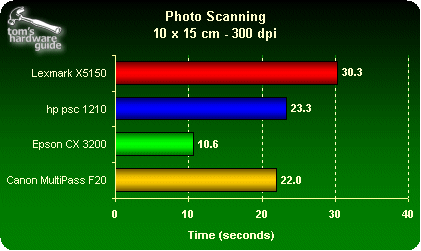
However, none of these scanners is really excellent, as you can see in our marks at the end. Their color quality is not really up to standard and there is often a lack of detail. As the manufacturers have not really worked on this, it also has negative effects on the photocopy results.
- CPU Comparison [CPU & Components]
- [New System Build] Gaming System ~$1500 intel/amd comparison [Homebuilt Systems]
- Comparison between dell studio and inspiron [Laptops & Notebooks]
- AMD Athlon II X2 250 vs E8400 - where can i find comparison? [CPU & Components]
- Laptop Graphics & CPU Comparison Please help me [Laptops & Notebooks]
Questions? Ask Tom's community!
Sponsored links
Related forums topics
- Should I buy a soundcard?
- AMD Deneb Phenom II Reaches 6GHz
- AMD: Core i7 as being out of touch with the marketplace
- HKMG overated?
- Computer Performance over the years
- OCZ Vendetta 2 vs Xigmatek HDT-S1283 BOTH with crossbow & fan
- I HATE APPLE.
- Geforce 8800gtx overclock problems with ati tool?
- SILENCE is the primary consideration, heat secondary
- New Build, want to OC - need advice!
- 4GB in 32-Bit O/S
- Core i7 Games and Memory Testing 6GB vs 3GB
- Asus Rampage or LGA 1366?
- My experiences with the GA-EP45-DQ6 [Updated 9/26/08]
Related news
- Brittanica objects to study claiming equal accuracy with Wikipedia
- Noctua Debuts Brilliant 2-in-1 Concept For Silent Xeon Workstations
- Microsoft To Discontinue Craigslist Competitor That No One Knew About
- Flexible Display Market To Reach $2.8 Billion By 2013, Says ISuppli
- AverMedia Set To Launch TV Tuners For Apple


