Data Transfer Diagram
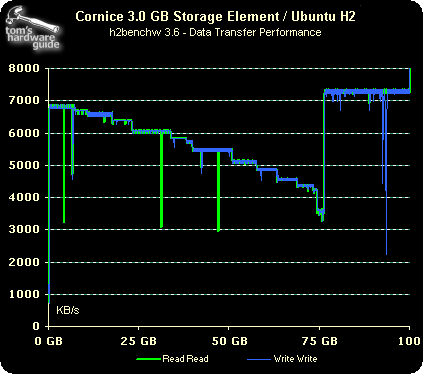
As expected, the H2's performance is far from what most of us are used to in notebook or desktop environments; this explains why booting Ubuntu takes approximately four minutes.
Conclusion
The Ubuntu H2 Micro USB Drive is a pretty interesting product idea. Bundling a tiny storage device with a fully-featured open source operating system enables the user to take a system installation, all its settings and applications, and a limited amount of data with him.
In theory, the Ubuntu H2 package can be run on virtually any computer that has at least one empty USB port. It would be great to take to an Internet café, a computer at a friend's location, or any other system you can think of.

However, there are two things you will have to keep in mind. First, not every computer will allow you to boot from a USB device. Such a feature may either not be supported or won't be accessible for you, for example, due to BIOS password protection. And second, there are obviously some compatibility problems, since the Ubuntu team can't possibly support every piece of hardware that is on the market.
The Ubuntu H2 Micro USB Drive can be ordered online here .
