









Linux kernel's ‘second-in-command’ uses local AI bot to hunt bugs, powered by 'clanker' system with AMD's Ryzen AI Max+ — Framework Desktop has resulted in close to two dozen patches
Greg Kroah-Hartman's "Clanker T1000" runs entirely on AMD Ryzen AI Max+ hardware.
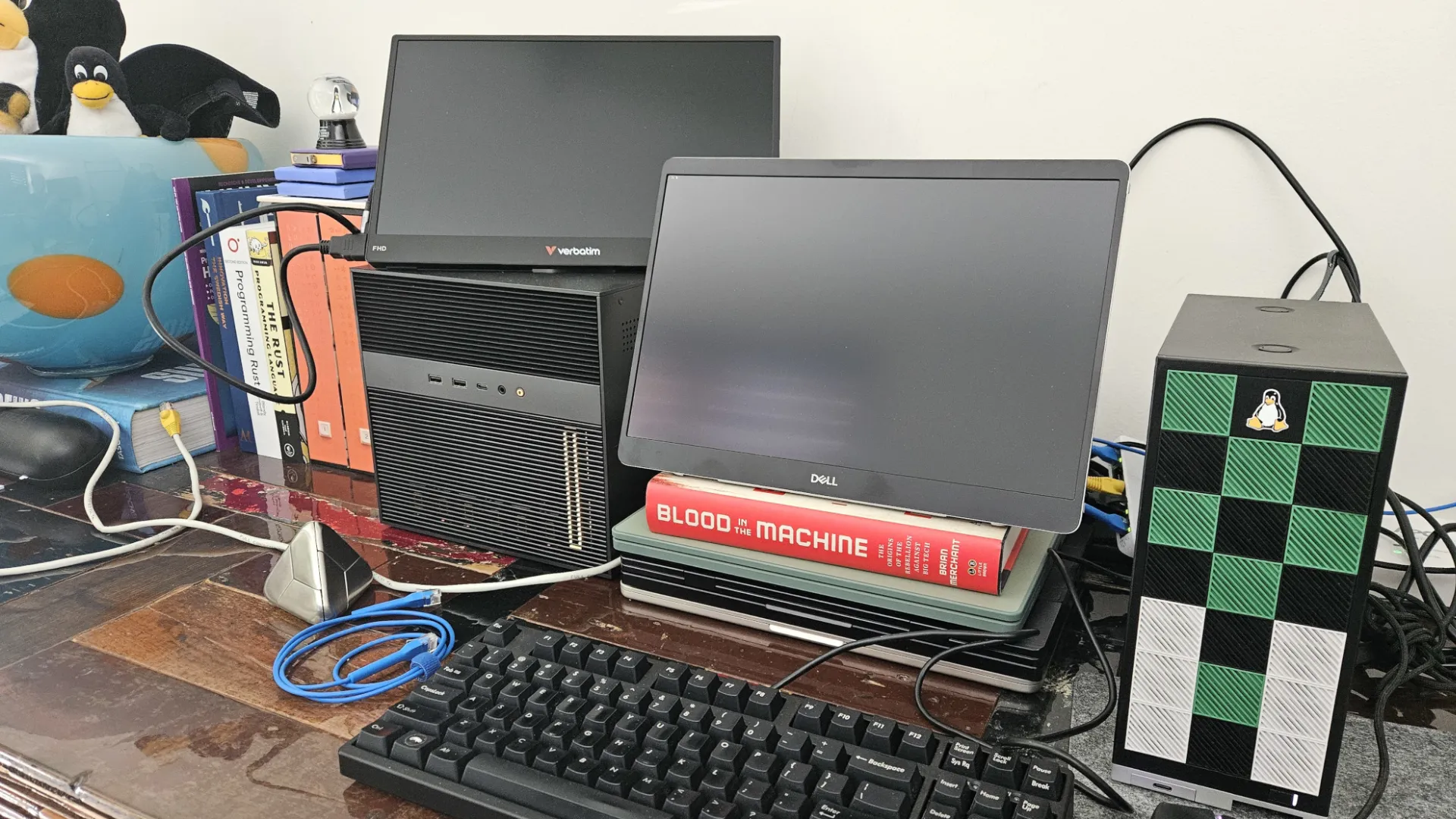
Greg Kroah-Hartman, the Linux kernel's stable branch maintainer, who is widely regarded as second only to Linus Torvalds in the project's hierarchy, posted a photo to Mastodon on Friday showing the hardware behind his AI-assisted bug-finding tool, dubbed a "clanker."
The setup, which Kroah-Hartman has dubbed "gkh_clanker_t1000," is a Framework Desktop powered by AMD's Ryzen AI Max+ "Strix Halo" processor, running a local large language model to hunt down kernel bugs without relying on any cloud infrastructure, as first reported by Phoronix.
Since April 7, close to two dozen patches assisted by the Clanker T1000 have been merged into the mainline Linux kernel, addressing bugs across a range of subsystems, including ALSA, HID, SMB, Nouveau, and IO_uring. Kroah-Hartman first began testing the tool against the kernel's ksmbd and SMB code earlier this month, choosing that subsystem because it was straightforward to set up and test locally using virtual machines.
The patches carry a Git tag reading "Assisted-by: gregkh_clanker_t1000," and Kroah-Hartman has been up-front about the need for human verification, writing in the patch submission that the patches "pass my very limited testing here," adding "please don't trust them at all and verify that I'm not just making this all up before accepting them."
The tool doesn’t write kernel code but instead acts as a fuzzer, bombarding code with unexpected inputs to expose crashes, memory errors, and other latent bugs. Kroah-Hartman then reviews what it finds, writes fixes, and takes full responsibility for the submitted patches.
The Framework Desktop is a 4.5-liter Mini-ITX system built around AMD's Ryzen AI Max+ 395, which pairs 16 Zen 5 CPU cores with 40 RDNA 3.5 compute units and up to 128 GB of unified LPDDR5x memory accessible to both the CPU and GPU. That large shared memory pool makes it capable of running sizable language models locally, a task that would typically require either a high-end discrete GPU with substantial VRAM or a cloud API.
Kroah-Hartman has not disclosed any details about the software stack powering the Clanker T1000, and the emergence of the tool follows the Linux project’s formal adoption of an AI code policy earlier this month, which permits AI-assisted contributions provided developers use an "Assisted-by" disclosure tag and accept full personal liability for any code they submit.
Get Tom's Hardware's best news and in-depth reviews, straight to your inbox.
Kroah-Hartman's workflow with the Clanker T1000 predates that policy but already conforms to it.

Follow Tom's Hardware on Google News, or add us as a preferred source, to get our latest news, analysis, & reviews in your feeds.

Luke James is a freelance writer and journalist. Although his background is in legal, he has a personal interest in all things tech, especially hardware and microelectronics, and anything regulatory.
-
heffeque I have the same mini-PC.Reply
It's much smaller than it looks, it's much quieter than expected (actual zero RPM when no high demand tasks are running; and a large fan gentle hum otherwise, with no small-fan screeching, so very pleasant all-around), and much more powerful than one would expect from such a small device.
It was not cheap (and now it's even more expensive), but if you have the money, the Framework Desktop is a great tool. -
bit_user Reply
Did you opt for the Noctua fan upgrade?heffeque said:It's much smaller than it looks, it's much quieter than expected (actual zero RPM when no high demand tasks are running; and a large fan gentle hum otherwise, with no small-fan screeching, -
heffeque Reply
Yup.bit_user said:Did you opt for the Noctua fan upgrade?
Additionally I changed the side panel to this:
https://www.printables.com/model/1426947-framework-destktop-side-panel-with-noctua-style-fa
More info here:
https://www.noctua.at/en/expertise/blog/how-to-make-the-framework-desktop-run-even-quieter -
bit_user Reply
That's neat, but I'd be looking for some way to attach a dust filter to the outside. I have some magnetic dust filters that you can stick onto steel case panels, but I gather that's plastic.heffeque said:Yup.
Additionally I changed the side panel to this:
https://www.printables.com/model/1426947-framework-destktop-side-panel-with-noctua-style-fa
More info here:
https://www.noctua.at/en/expertise/blog/how-to-make-the-framework-desktop-run-even-quieter
I guess the idea would be to "remix" that design by adding a slot that you can use to insert some low-density foam filter material. Would hurt airflow, unfortunately. The best setup would have a filter area that's much larger than the fan.
Side-note: I recently got a couple of these, which would enable the use of an 140mm fan on its 120mm cooler (although I wish they had a more square exhaust port!):
https://shop.bitspower.com/index.php?route=product/product&product_id=3896
So, I guess you could create a side panel that has a bulge and then you could put a 140 mm fan in there and also have a 140 mm grille with a dust filter insert.
P.S. it would be neat if Framework had a Noctua cooler upgrade option, as well. The Cooler Master heatsink looks like it doesn't have as many heat pipes as it might've. -
usertests I'll post this here. The Gorgon Halo refresh Ryzen AI Max+ PRO 495 was caught running with 192 GB of LPDDR5X:Reply
https://videocardz.com/newz/amd-ryzen-ai-max-pro-495-leaks-out-features-radeon-8065s-igpu-and-192gb-memory -
heffeque Reply
Well, you can design and 3D-print the piece.bit_user said:That's neat, but I'd be looking for some way to attach a dust filter to the outside. I have some magnetic dust filters that you can stick onto steel case panels, but I gather that's plastic.
I guess the idea would be to "remix" that design by adding a slot that you can use to insert some low-density foam filter material. Would hurt airflow, unfortunately. The best setup would have a filter area that's much larger than the fan.
Side-note: I recently got a couple of these, which would enable the use of an 140mm fan on its 120mm cooler (although I wish they had a more square exhaust port!):
https://shop.bitspower.com/index.php?route=product/product&product_id=3896
So, I guess you could create a side panel that has a bulge and then you could put a 140 mm fan in there and also have a 140 mm grille with a dust filter insert.
P.S. it would be neat if Framework had a Noctua cooler upgrade option, as well. The Cooler Master heatsink looks like it doesn't have as many heat pipes as it might've.
With zero 3D software knowledge, I took a 1-hour course for children, made a couple of pieces for a home project I had, and sent them to a 3D-printing store nearby. I was all easier than I expected.