Ads

Best offers

Ads
All about Miscellaneous
 Latest Miscellaneous articles
Exclusive Interview: Nvidia's Ian Buck Talks GPGPU

Exclusive Interview: Nvidia's Ian Buck Talks GPGPU
With Snow Leopard and Windows 7 both offering GPGPU capabilities, we wanted to talk to Nvidia's Ian Buck. Not only is he one of the fathers of Brook, the programming language ultimately adopted by AMD/ATI, but the head of Nvidia's CUDA group as well. Read More

  • Beamforming: The Best WiFi You’ve Never Seen
    Forget 802.11n Draft 2.0. The future of video-capable WiFi depends on a signal-boosting technique called beamforming. We put the pioneers in this frontier through some real-world testing to find out which technology is going to change the wireless world. Read More
All Miscellaneous articles

Newsletters


  • Ask your question about IT issues
  • Post

Partners

The Games selection

adventure : Ray Adventure game, South Park style. Pick the way the story goes by picking an answer among those offered.
violent : Interactive Buddy Unwind on your interactive buddy: Do anything you want to him, it will earn you money, and you can buy other stuff to torture him with.
Ads

Sponsored links

NVIDIA Driver Bug In Doom III On Dual Display Systems

Next news
8:05 PM - August 4, 2004 by Lars Weinand

Users running their PC in Dual Display configuration with a NVIDIA 6800 card will face low FPS and drops down to 3-4FPS in some areas of Doom III. But there's a way to fix it.

We've discovered a driver bug with NVIDIAs current drivers v61.76/61x77 in Doom III (we did not test with older drivers yet). It causes a performance drops down to 3FPS in certain parts of a level and a lower overall FPS, when your GeForce 6800 is running with multiple displays in dual view mode - and only on systems running in dual display mode!! If you have only one display attached, everything should be fine! We did not test yet if other cards are also affected.

If this happens, it can be fixed by setting the Hardware Acceleration mode from "Multi-display performance mode" (the default driver setting when dual display mode is used) to "Single Display Mode". You can find this in the "Performance & Quality" settings, under advanced settings.

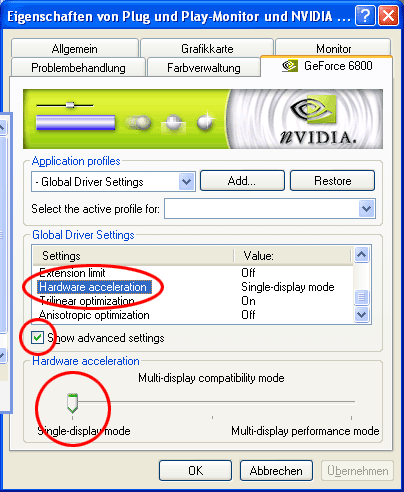
The issue can be fixed by setting Hardware acceleration to Single Display Mode.

NVIDIA is investigating the issue and working on it.

Source : Tom's Hardware US

Talkback
Add your comment
Comments are closed on this page.

Sponsored links