Best offers
|
Core i7 I7-920 Quad Core Processor... | $349.99 Dell Home More info |
|
Phenom II X4 965 Black Edition Quad... | $194.99 Newegg.com More info |
|
Core i5 750 Qaud Core Processor... | $199.99 Newegg.com More info |
|
Core i7 Extreme Edition I7-975 Quad... | $1041.17 CostCentral.com More info |
|
Phenom II X4 955 Black Edition Quad... | $182.99 Directron More info |
- enhanced halt state c1e
- upgrade from pentium d
- p4 570
- upgrade pentium 4 to core 2 duo
- motherboard duo core 2 processor
- dual core processor how different
- enhanced halt state c1e wiki
- upgrade pentium 4 processor
- p5e3 deluxe problems bios
- 775 ddr3 motherboards
- upgrade pentium d processor
- e6850 power consumption
- ddr3 core 2 duo extreme
- what is the name of processors which go on 775 motherboard
- pentium 630
Partners
The Games selection
action :
Yoyo the Star
Yoyo is a young girl who recently graduated and dreams to become a movie star (don't we all). You'll have to guide her on the path to stardom,...
|
crazy :
Xiao Xiao 7
A great fight scene from the animation movies Xiao Xiao.
|
Sponsored links
- Email |
- Print |
- Comments (2) |
- Share
Although Intel has been adjusting the specifications for Socket 775 with every new processor generation, the socket has retained compatibility with older Socket 775 processors. While you will need a new motherboard to run a Core 2 Duo (especially the upcoming 45 nm Penryn generation scheduled for Q1 2008), it is possible to even run an old Pentium 4 in many of today's Socket 775 motherboards. Thanks to this happy circumstance, we were able to run four different processor types on our reference test system.
We picked a common clock speed, which can be set for all processors in this lineup. We would have preferred to select a clock speed in the area between 2.6 and 2.8 GHz, but it was not possible to find a common clock speed setting for all CPUs due to varying Front Side Bus (FSB) speed requirements. Hence we chose to go with 3.0 GHz, which can be reached by both Core 2 processors at FSB1333 speed and by the Pentiums at FSB800. In case of the Core 2 systems, the memory operated at 533 MHz (DDR3-1066 at CL7-7-7-20 timings), while the Pentium processors were backed by DDR3 memory running at 400 MHz (DDR3-800 and CL6-6-6-18 timings). These are the default settings as offered by the Asus P5E3 X38 motherboards. Higher memory speeds and timings would increase the power requirements, but only to a very small degree, which is certainly negligible in the context of 77 to 203 W total system power requirements.
Installing each of the following processors and setting them to run at our target clock speed of 3.0 GHz was amazingly painless. We used the Asus P5E3 Deluxe motherboard, running BIOS version 0402, dated September 19, 2007.

Pentium 4 630

The Pentium 4 600 series was an upgrade to the Pentium a 500 series, offering a 2 MB L2 cache instead of 1 MB on its 90 nm Prescott core, along with a plethora of improvements. While the P4 500 series based on the Prescott core didn't really deliver more performance than the 130 nm Northwood core - despite the doubled cache capacity - the 2 MB version introduced Enhanced SpeedStep, the upgraded Thermal Monitor 2, the Enhanced Halt State C1E and EM64T 64-bit capability.
The Pentium 4 500 series was available at up to 3.8 GHz (model 570) while the 600 series maxed out at 3.6 GHz (Pentium 4 660). Plans to cross the 4 GHz line were discussed, but heat dissipation put an end to that idea, so Intel worked towards getting the first dual core processors ready.
The Pentium 4 600 at 3.0 GHz (which means the P4-630) provided only average performance in SYSmark 2007. This is the main reason why it doesn't do well in the power consumption test, where we look at how much power the systems require to complete a full SYSmark run. Although this system's idle and maximum power requirements are second best, right after those of the Core 2 Duo E6850, the P4-630 system consumed 118 watt-hours and took one hour and 40 minutes. The Core 2 Duo E6850 took 106 watt-hours and finished the same task in one hour and ten minutes!
Related Articles:
- Prescott Reworked: The P4 600 Series and Extreme Edition 3.73 GHz
- 3.8 GHz P4 570 and E0 Stepping to End Intel's Performance Crisis
- The P4 560's Heat Can Crash and Kill
- Pentium, Schmentium: Decoding CPU Names
- 925XE Chipset and P4EE 3.46 GHz
- Intel Stakes its Vision of the Future with 775 Launch
- A Sneak Peak at Intel's 65-nm Pentium 4
- Dothan over Netburst: Is the Pentium 4 a Dead End?

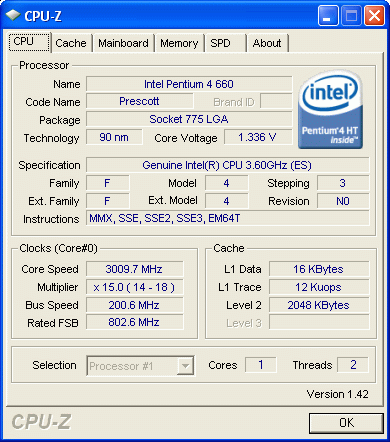
We used a Pentium 4 660 and reduced the clock speed to 3.0 GHz for comparison purpose.
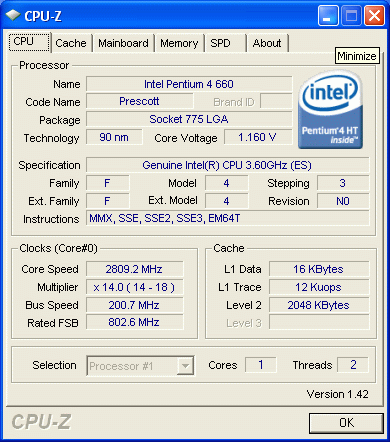
All Pentium-class processors on socket 775 reduce their core clock speed to 2.8 GHz when idle if SpeedStep is available and enabled.
Sponsored links
Related forums topics
- HOWTO: Overclock C2Q (Quads) and C2D (Duals) - Guide v1.6.1
- High-end and Luxury P45-GIGABYTE P45T EXTREME Air-Cooling 659MHz
- Thoughts and questions regarding C2D Temperature Guide
- Best Chipset of 2008 so far?
- Why AMD is better than Intel?
- Low power consumption MB/CPU with WoL, ECC & 4xSATA?
- New PC Built, BIOS Underclocking CPU, help?
- Big step to the future,Gigabyte EX58 Extreme with Intel I7 Extreme 965
- When will DDR3 actually be worth it?
- A 4.1 GHz Dual Core at $130 - Can it be True?
- $300 Power Build!
- Advice on this new system build!
- Low power home server
- Need Advice on Cheap Gaming Build
Related news
- Matsushita makes strides in reducing PDP power consumption
- How Google battles its increasing power consumption
- CMOS voltage regulator to reduce CPU power consumption by up to 35 percent
- Intel to trim power consumption of desktop CPUs in half by H2 2006
- Intel to aims to decrease power consumption of desktop processors to 60 watts


The 'SYSmark Performance per Watt' can be misleading when comparing the dual and quad core processors, particularly when looking at other types of loads that make better use of the additional cores. In particular, look at x264 encoding, where a quad-core processor offers nearly double performance. See the graysky's articles on TechARP for actual charts and tables:
http://www.techarp.com/showarticle.aspx?artno=442
http://www.techarp.com/showarticle.aspx?artno=520
For a load that will use all processors, I believe that testing will show better performance per watt for a quad core compared to a dual (or even single) core because there is little or no additional overhead from the motherboard or powersupply or hard drives when adding an additional core.
It may be easier to understand this by comparing running 2 separate PCs with dual core CPUs in them vs. running a single PC with a quad core CPU. The quad core system won't need another motherboard, power supply, fans, drives, etc. so all those items are areas of power savings.
From the published tests above, the 2 extra cores consume 195-132=63 watts at max load and 94-77=17 watts at idle. That is in contrast to adding a 2nd system identical to the E6850 testbox which used 132 watts at max and 77 at idle.
A simplistic scaling using a spreadsheet, and assuming that performance doubles going from dual to quad cores (reasonable for x264 encodes), shows that:
state cores watts perf/watt perf perf/core perf ratio
Idle 2 77 1.46 112.42 56.21 1
Idle 4 94 2.391914894 224.84 56.21 1.638
Avg 2 90 1.46 131.4 65.7 1
Avg 4 112 2.346428571 262.8 65.7 1.607
Max 2 132 1.46 192.72 96.36 1
Max 4 195 1.976615385 385.44 96.36 1.354
In other words, using the system power numbers given, the quad core can be 35% to 64% more efficient than using a dual core, if given an appropriate load. A look at the Sysmark benchmark scores will show you that it did not scale up very much going from dual to quad.