Overclocking
So how well does the Silent-Pipe II handle overclocking?
The card was able to hit 635 MHz on the core and 838 MHz on the memory. However, it consistently displayed massive tearing in the Firefly Forest benchmark scene of 3dMark05 when set to this speed. This was odd in that Return to Proxycon and Canyon Flight both worked flawlessly at these settings.
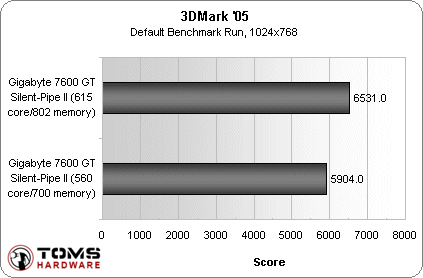
To get the tearing out of Firefly Forest, I had to lower the overclock to 615 MHz on the core and 800 MHz on the memory. It was a little disappointing but still a worthwhile overclock of 55 MHz on the core and 52 MHz on the memory.

As mentioned above, the Silent-Pipe II passive cooler does not touch the video card's memory chips. I can't help but wonder if the card could have sustained the original overclocks artifact-free if the memory was cooled.
The end result was approximately a 600 point increase in 3dmark05, which is very good for a card in this price segment.
Noise
Benchmarking the Silent-Pipe II's noise output presented an interesting challenge. How meaningful is a graph that shows a number of decibels vs. the Silent-Pipe II's zero decibels? After much consideration of the noise issue, I decided to simply write my impressions of Gigabyte's Silent video card.
The first thing you should know about a silent video card is that, if you already have a noise problem, it's not going to solve it by itself. It's simply not the only thing you have to worry about - your PC likely has fans for pushing air already, and the amount of noise your PC already makes will have the largest impact on how much you'll appreciate Gigabyte's Silent-Pipe II card.
As mentioned in the beginning of the article, I have recently begun to notice the sheer amount of noise my PC makes. Replacing the reference 7600 GT with the Silent-Pipe II video card in my already loud PC tower did very little to lower the noise. Sure, it removed one of the loudest components of my system, but the remaining fans were still so loud that it didn't make all that much of a difference.
On the other hand, when I tested with the 3d Aurora case, the difference between the reference 7600 GT and the Silent-Pipe II was simply amazing. With the near-silent case, the regular 7600 GT was loud and obnoxious, especially under load when the fan speed automatically turned up.
When it was substituted with the Silent-Pipe II card, the machine became almost completely silent. The difference was marked, and very pleasant.