Best offers
|
HDT-S1283 CPU Cooler | $29.99 Directron More info |
|
SpinQ CPU Cooler | $54.99 Directron More info |
|
Domino A.L.C. Liquid CPU Cooler | $62.99 Directron More info |
|
CNPS9500 AT 2 Ball CPU Cooling... | $34.99 Directron More info |
|
Notebook Cooler 200 | $79.99 CDW.com More info |
- water cooling system for pc
- water cooling systems
- water coolers
- external water cooling system
- best external water cooling system
- install water cooler on cpu
- external radiator for water cooled pc
- water cooling external radiator
- external water cooling
- cpu fan adjust
- pc external water cooling
- installing water cooling for pc
- water cooling installation
- testing cpu fan voltage
- top water cooling system
Partners
The Games selection
crazy :
Interactive Boogy
Pick one of the 3 songs, hit on the correct keys matching this boy's dance moves.
|
crazy :
Xiao Xiao 7
A great fight scene from the animation movies Xiao Xiao.
|
Sponsored links
Hands Across Four Water Cooling Systems
Table of contents
- 1 – Exiled From The Case
- 2 – Overall Impression, Continued
- 3 – Installation
- 4 – Corsair Hydrocool 200 Ex
- 5 – Installation
- 6 – Cooling Performance
- 7 – Innovatek
- 8 – Installation
- 9 – Zalman Reserator I
- 10 – Installation
- 11 – Results
- 12 – More on this topic
Water coolers are great for cooling, allow extremely high overclocking and are even quieter than conventional CPU fans - at least on paper. Installation, however, represents a bottleneck and is relatively complicated compared to air-cooling due to the number of required components. Then there is the weight factor. Those who frequent LAN parties, for example, don't want to lug around the extra pounds of a pump and the water in the reservoir. For this reason many manufacturers also offer external water cooling systems that allow simple and quick installation. These water coolers can also easily be disconnected from the PC for separate transport.
Koolance Exos-Al
Overall Impression

The Exos-Al from Koolance consists of an external unit that contains the pump, reservoir and radiator. The water blocks necessary for cooling the CPU, chipset and graphics card must be acquired separately. The 20.5 cm pump/radiator/reservoir module case offers a precise fit for a Chieftec PC case. The module can thus be mounted firmly on top of the case or secured using the velcro mounting strips included. The Exos-Al can also be attached to a standard PC case.
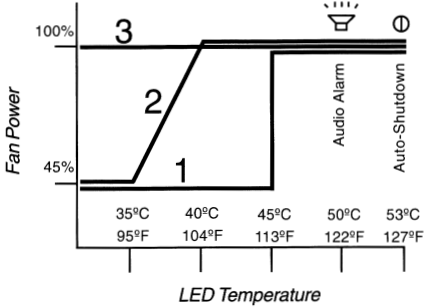
Fan settings and speeds

Three 80 mm fans are located on top of the Exos for heat exchange, which can run at different voltage levels (5V and 12V). A mode switch on the front of the case controls the different settings. Modes 1 and 2 are identical at temperatures up to 35° C (fan voltage 5V); at temperatures above 35° Cthe fans are adjusted up to a maximum 12V (40° C). In mode 1, fans operate at 12V only from 45° C up, in mode 3 they run constantly at that voltage. At 50° C an acoustic alarm sounds and the PC system shuts itself down at temperatures above 53° C.

Fan settings and speeds
- New to water cooling [Overclocking]
- First water cooling system, parts ordered [Overclocking]
- Water Cooling System (Help Needed!!!) [Overclocking]
- My personal Mods. (New D.I.Y. water cooling project) [Homebuilt Systems]
- Liquid cooling kit water spills in PC. [CPU & Components]
Questions? Ask Tom's community!
Sponsored links
Related forums topics
- CPU Cooling Question
- Beginner in Need of Advice
- How to get rid of CPU thermal paste
- Need help on choosing power supply and case
- Pentium D 805 OC to 4.0+ GHz w/ ECS C19-A SLI
- A Beginner's Guide For WaterCooling Your PC
- New System - Reviews Inside - QX9650 - XFX 790i Ultra - 9800GTX SLI
- Which 8800GT to buy?
- Games freeze, sound loops requiring restart


