EVGA nForce 680i SLI

EVGA's nForce 680i SLI is a real enthusiast product; it comes with a powerful six-phase voltage regulator, a heat-pipe cooler for northbridge and southbridge, a built-in Port 80 debug solution for troubleshooting, on-board power-on and reset buttons, and as many as six fan headers.
It utilizes all of the chipset features, such the DualNet Gigabit ports, six SATA/300 ports (two of them bent by 90°), three x16 PCI Express slots for graphics and a possible 3rd graphics card (which can be used for additional display connectivity or a physics acceleration card), two x1 PCIe ports and two classic 32-bit PCI slots.
The King Of Overclocking: FSB1850!
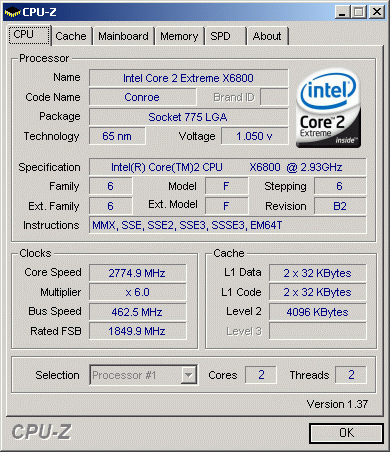
Be sure to reduce the processor multiplier before overclocking your system speed that much! At the default x11 multiplier of the Core 2 Extreme 2.93 GHz, the processor would have to run at over 5 GHz - which it cannot do.

The overclocking options and margins are simply amazing. Whether you use Nvidia's nTune utility - which automatically searches for close-to-ideal overclocking settings - or you prefer to play around with the massive number of settings in the BIOS yourself, you have the powerful tools you need to squeeze a lot of extra performance out of your 680i board.
nForce Versions Compared
| Header Cell - Column 0 | NVIDIA nForce 680i SLI | NVIDIA nForce 650i SLI | NVIDIA nForce 650i Ultra |
|---|---|---|---|
| Segment | Enthusiast SLI | Performance SLI | Performance |
| Socket | Intel Socket 775 | Intel Socket 775 | Intel Socket 775 |
| CPU | Core 2 Extreme (dual and quad core)Core 2 QuadCore 2 DuoCeleron DPentium 4Pentium D 9XXPentium D 8XX | Core 2 Extreme (dual and quad core)Core 2 QuadCore 2 DuoCeleron DPentium 4Pentium D 9XXPentium D 8XX | Core 2 Extreme (dual and quad core)Core 2 QuadCore 2 DuoCeleron DPentium 4Pentium D 9XXPentium D 8XX |
| FSB (MHz) | 1333* MHz | 1066 MHz | 1066 MHz |
| Extreme FSB Overclocking | Best | Good | Good |
| NVIDIA SLI Technology | Yes2 x16 | Yes2 x8 | No |
| Third PCIe Graphics Expansion Slot | Yes | No | No |
| SLI-Ready Memory (MHz) with EPP | 1200 MHz | - | - |
| JEDEC DDR2 Memory (MHz) | 800 MHz | 800 MHz | 800 MHz |
| NVIDIA LinkBoost technology | Yes | No | No |
| PCI Express | |||
| # Lanes | 46 lanes | 18 lanes | 18 lanes |
| # Links | 9 links | 4 links | 3 links |
| Configuration | 16, 16, 8, 1, 1, 1, 1, 1, 1 | 8, 8, 1, 1or16, 1, 1 | 16, 1, 1 |
| SATA/PATA drives | 2-Jun | 4-Apr | 4-Apr |
| SATA speed | 3Gb/s | 3Gb/s | 3Gb/s |
| RAID | 0,1,0+1,5 | 0,1,0+1,5 | 0,1,0+1,5 |
| NVIDIA MediaShield Storage Technology | Yes | Yes | Yes |
| Native Gigabit Ethernet Connections | 2 | 1 | 1 |
| NVIDIA FirstPacket technology | Yes | Yes | Yes |
| NVIDIA DualNet technology | Yes | No | No |
| Teaming | Yes | No | No |
| TCP/IP Acceleration | Yes | No | No |
| NVIDIA nTune Utility | Yes | Yes | Yes |
| USB ports | 10 | 8 | 8 |
| PCI Slots | 5 | 5 | 5 |
| Audio | HDA (Azalia) | HDA (Azalia) | HDA (Azalia) |
