Best offers
|
Edge Z30 Midsize Desktop (2.66GHz... | $1099.00 Velocity Micro More info |
|
iMac All-In-One Desktop (3.06GHz... | $1699.00 AppleStore.com More info |
|
Pavilion p6210f Mini-Tower Desktop... | $526.98 STAPLES More info |
|
Compaq Presario CQ5210F Mini-Tower... | $399.98 STAPLES More info |
|
iMac All-In-One Desktop (3.06GHz... | $1199.00 AppleStore.com More info |
- how to change your ip address on vista
- windows update ip range
- unable to establish a connection with the activation server
- incoming connections depend on
- how to set up a small home or office network
- windows vista desktop not showing up
- internet via vpn windows vista
- windows update ip ranges
- vpn over dynamic ip address
- can t connect internet when vpn connection is establish
- vista shows internet but no connection
- vista router vpn network and sharing
- utility update dns windows
- windows vista dns server error
- windows vista no desktop
Partners
The Games selection
crazy :
Interactive Boogy
Pick one of the 3 songs, hit on the correct keys matching this boy's dance moves.
|
violent :
Interactive Buddy
Unwind on your interactive buddy: Do anything you want to him, it will earn you money, and you can buy other stuff to torture him with.
|
Sponsored links
In addition to the fast Internet connection that is a prerequisite for fast and convenient data transfer, we must also bear a number of other points in mind in order to ensure that a VPN connection can be established successfully. If the home office network connects to the Internet via a router, it must be configured to permit incoming VPN establishment requests to be forwarded to the desktop computer.
The router must also be available on the Internet under a host name. This is necessary because every time it dials in, the DSL provider assigns it a new IP address, and this also usually happens after every 24 hour period. If, while you are out and about, the router at home re-dials and is given a new IP address, you will be unable to establish the connection because you don’t know the new IP address. Tools like DynDNS.org or no-ip.org can be used to assign static host names to dynamic IP addresses.
Many routers already have a range of utilities for updating dynamic DNS entries; which provider you choose to register with will depend on the support provided by your router. If your desktop computer establishes a connection to the Internet directly, without going through a router, you will need to use a small utility that informs the DNS provider of changes to your public IP address, and updates it. Look in the download section of the relevant DNS provider for programs that update the IP address in the DNS server.

Network and Sharing Center
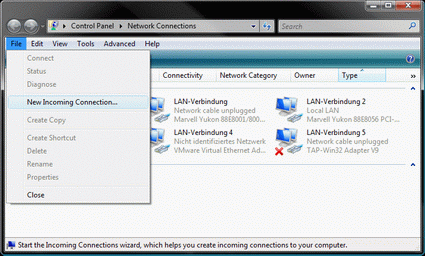
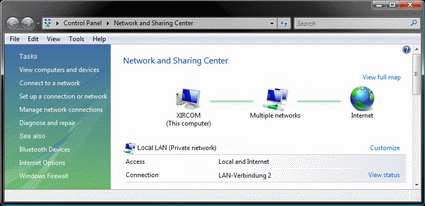
First, we need to set up our Windows Vista desktop computer so that incoming requests for establishing a VPN connection are accepted. This can be done using the following versions: Windows Vista Home Basic, Home Premium, Business, Enterprise and Ultimate. Open the Network and Sharing Center using Start -> Control Panel -> Networks and Internet. Now select the "Manage network connections" menu option on the left hand side, which opens a new window. Depending on the configuration of your Windows Vista installation, you will now need to press the

No menu bar to be seen? Press the ALT key.
- Remote Access VPN [General Networking]
- Like GoToMyPC but free? [Windows XP]
- Sharing,Security,Remote Access - Software/Hardware? Which? [General Networking]
- can't connect though VPN [Windows XP]
Questions? Ask Tom's community!
Sponsored links
Related forums topics
- Why would anyone need a personal server?
- System Process Killer Program Needed! Help!
- Athlon XP 3200 Max Speed
- MS Palladium protects IT vendors, not you (READ!!)
- Considering Data Centre Co-Location and looking for systems:
- Which OS is best for Home server?
- Secure Remote Access for Home Users
- Windows Server 2008 Core Installation
- Building Home Office Server 1st time
- What to do with extra PC?
- Best way for a large array